
1. Entwodiksyon
The DOOGEE Blade10 Pro is a rugged smartphone designed for durability and performance. Featuring an ultra-thin body, a large battery, and advanced camera capabilities, it is built to withstand challenging environments while providing a smooth user experience with Android 15.

2. Enstalasyon
2.1 Kontni pake a
Verifye ke tout atik yo prezan nan pake pwodwi ou a:
- 1 x Blade10 Pro Rugged Smartphone
- 1 x tip-C USB kab
- 1 x Chargeur
- 1 x bwat anbalaj
- 1 x manyèl
- 1 x kat garanti
Video 1: Unboxing the DOOGEE Blade 10 Ultra, showing the phone and accessories.
2.2 Layout Aparèy
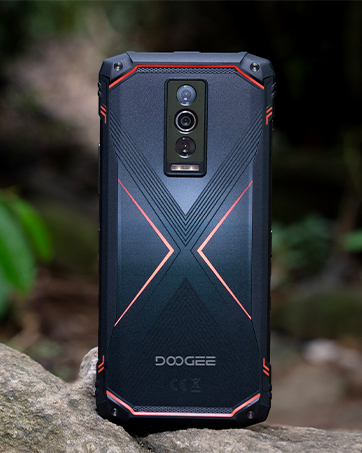
Familiarize yourself with the physical components of your Blade10 Pro smartphone:
- Kamera devan: Sitiye nan mitan anwo ekran an.
- Reseptè: Earpiece for calls.
- Bouton Volim: On the left side for adjusting audio levels.
- Kle pouvwa: On the right side for turning the device on/off and screen lock.
- Custom Key Function: A programmable button on the left side.
- Plas pou kat SIM/TF: On the left side for inserting SIM and memory cards.
- Kamera dèyè: Plizyè lantiy ki sitiye sou do a.
- Rear Flashes: LED lights for illumination.
- Mikwofòn: Sitiye nan pati anba a.
- Kalite-C Port: Anba a pou chaje ak transfè done.
- Oratè: Sitiye nan pati anba a.
2.3 Enstalasyon Kat SIM ak Depo
The Blade10 Pro supports dual Nano SIM cards and a TF (microSD) card for expandable storage up to 2TB. The triple card slot allows for flexible use of network and storage options.
- Jwenn fant kat SIM/TF la sou bò gòch aparèy la.
- Gently open the protective cover of the slot.
- Insert your Nano SIM cards and/or TF card into the tray according to the diagram.
- Carefully reinsert the tray into the slot and ensure the protective cover is securely closed to maintain water and dust resistance.

Video 2: Demonstration of the DOOGEE Blade 10 series, including the SIM card slot and thin design.
2.4 Initial Setup and Power On
To power on your device, press and hold the Power Key until the DOOGEE logo appears. Follow the on-screen instructions to complete the initial setup, including language selection, Wi-Fi connection, and Google account setup.

3. Operating Your DOOGEE Blade10 Pro
3.1 Montre
The Blade10 Pro features a 6.56-inch HD+ IPS waterdrop screen with a 90Hz refresh rate, providing a smooth and immersive visual experience. With 400 nits of brightness, the display offers clear visibility in various lighting conditions.

3.2 Pèfòmans
Powered by a 12nm UNISOC T7200 Octa-Core processor, the Blade10 Pro delivers a balance of performance and power efficiency. It comes with 30GB (6GB + 24GB extended) RAM and 256GB internal storage, expandable up to 2TB with a TF card, ensuring smooth multitasking and ample space for your data.

3.3 Sistèm Kamera
Capture life's moments with the 50MP AI main camera and 8MP front camera. The camera system includes various advanced shooting modes such as HDR, Panorama, Pro Mode, and Beauty Mode to enhance your photography.

3.4 Batri
Equipped with a large 5150mAh battery and 10W charging technology, the Blade10 Pro provides extended usage throughout the day, keeping you connected and entertained.

Video 3: Highlighting the upgraded Si-C battery and reverse charging feature of the Blade 10 Pro Energy.
3.5 Karakteristik Sekirite Sosyal
The device offers multiple security options, including Face ID for quick facial recognition unlock and a side-mounted fingerprint sensor for convenient and secure access.

3.6 Koneksyon
The Blade10 Pro supports NFC for contactless payments and data transfer, dual-band Wi-Fi (2.4G/5G) for fast internet access, and built-in GPS for navigation.
4. Antretyen
4.1 Netwaye aparèy ou an
To clean your DOOGEE Blade10 Pro, use a soft, lint-free cloth. For stubborn dirt, you may dampen the cloth slightly with water. Avoid using harsh chemicals or abrasive materials, as these can damage the device's finish and protective coatings.
4.2 Solidite ak Pwoteksyon
The Blade10 Pro is designed to be highly durable, featuring IP68 and IP69K ratings for water and dust resistance, and MIL-STD-810H compliance for drop protection. This means the device can withstand immersion in water, exposure to dust, and drops from certain heights. Ensure all port covers are securely closed to maintain these protective features.

Video 4: Demonstration of the IP68/IP69K waterproof features, showcasing the phone's resilience to water.
NAN. Depanaj
5.1 Pwoblèm koneksyon rezo
If you experience issues with network connectivity, ensure your SIM card is correctly inserted and activated. Check your device's network settings to confirm that mobile data is enabled and that you are within network coverage. Verify that your local frequency bands are compatible with the device's supported bands: GSM:B2/3/5/8 WCDMA:B1/2/4/5/8 TDD:B34/38/39/40/41 FDD:B1/2/3/4/5/7/8/18/19/20/25/26/28AB/66.
5.2 Aparèy la pa reponn
If your device becomes unresponsive, press and hold the Power Key for approximately 10-15 seconds to force a restart. If the issue persists, ensure the battery is charged. Connect the device to its charger and allow it to charge for at least 30 minutes before attempting to power it on again.
5.3 Pwoblèm Pèfòmans Aplikasyon an
For slow app performance or crashes, try clearing the cache of the problematic app through the device settings (Settings > Apps > [App Name] > Storage > Clear Cache). If the issue continues, consider uninstalling and reinstalling the app. Regularly restarting your device can also help improve overall app performance.
6. Espesifikasyon
| Karakteristik | Detay |
|---|---|
| Non modèl | Blade10 Pro |
| Sistèm operasyon | Android 15 |
| CPU vitès | 1.6 GHz (UNISOC T7200) |
| Gwosè memwa RAM enstale | 30 GB (6GB + 24GB extended) |
| Kapasite Depo memwa | 256 GB (Ou ka elaji li jiska 2TB ak yon kat TF) |
| Gwosè ekran | 6.56 pous |
| Rezolisyon | 720 x 1612 |
| Rafrechisman pousantaj | 90 Hz |
| Kapasite batri | 5150 Miliamp Orè |
| Kamera dèyè | Kamera prensipal 50MP ak entèlijans atifisyèl |
| Kamera devan | 8MP |
| Koneksyon teknoloji | NFC, USB, Wi-Fi, GPS |
| Karakteristik espesyal | Built-In GPS, Expandable Memory, Rugged Body (IP68/IP69K/MIL-STD-810H) |
| Pwa atik | 15.8 ons |
| Dimansyon | 7.56 x 4.09 x 2.05 pous |
7. Garanti ak sipò
7.1 Enfòmasyon sou Garanti
Your DOOGEE Blade10 Pro comes with a Warranty Card. Please refer to the card for detailed information regarding warranty coverage, terms, and conditions. Keep your proof of purchase for warranty claims.
7.2 Sipò pou Kliyan
Pou asistans teknik, depanaj ki depase manyèl sa a, oswa kesyon sou garanti, tanpri kontakte sèvis kliyan DOOGEE atravè sèvis ofisyèl yo. website or the contact information provided in your warranty documentation. You can also visit the Magazen DOOGEE sou Amazon pou resous adisyonèl.