
1. Entwodiksyon
The HUAWEI WATCH FIT 4 is a versatile smartwatch designed for fitness tracking and daily convenience. It features an ultra-thin design, a vibrant 1.82-inch AMOLED display, and comprehensive health monitoring capabilities. This manual provides essential information for setting up, operating, and maintaining your device.
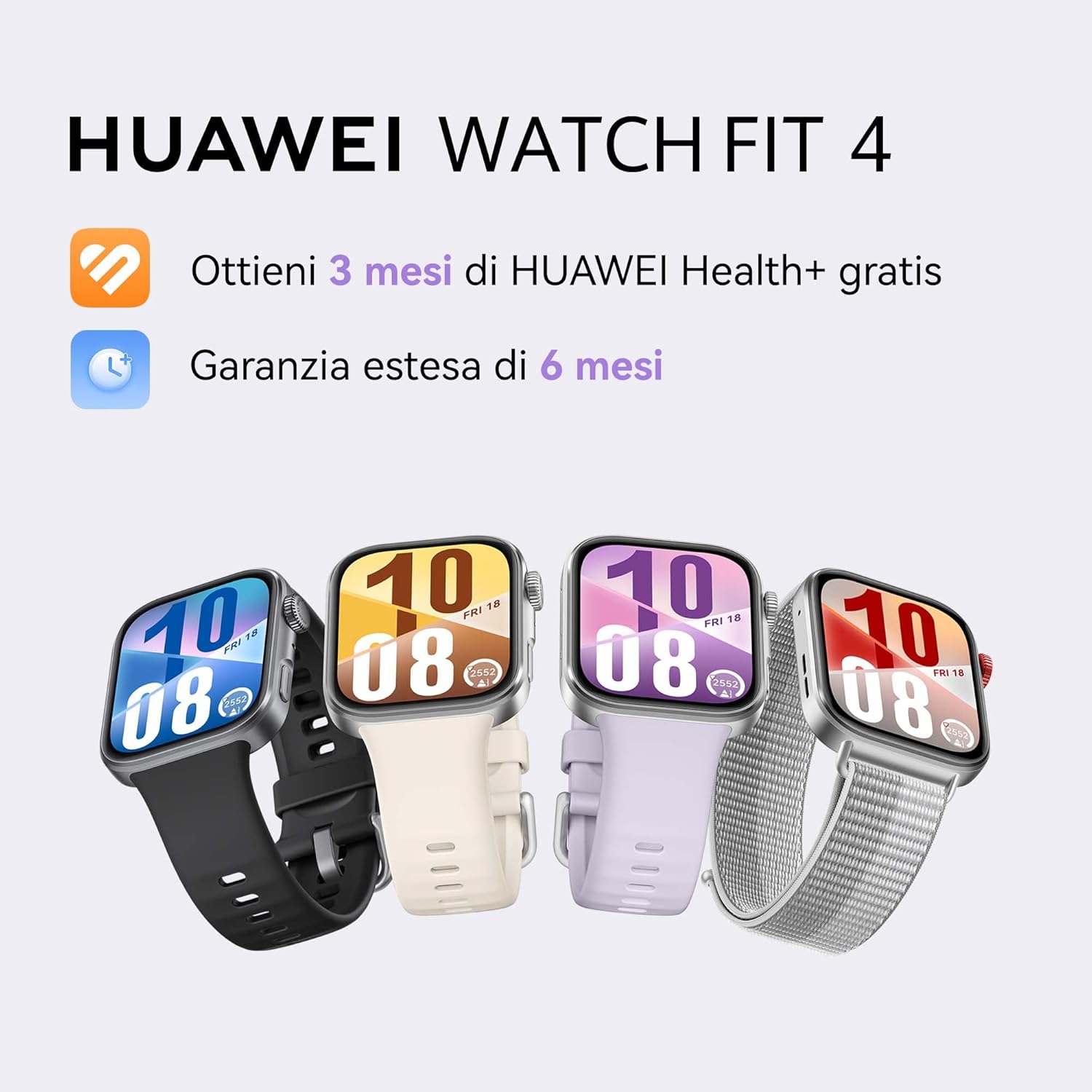
Image: HUAWEI WATCH FIT 4 smartwatches in various colors.
2. Enstalasyon
2.1 Debale ak Premye Enspeksyon
Carefully unbox your HUAWEI WATCH FIT 4. Ensure all components are present:
- HUAWEI WATCH FIT 4 Smartwatch
- Chaje kab
- Gid Quick Start
- Kat Garanti
Video: Unboxing and initial setup of the HUAWEI WATCH FIT 4. This video demonstrates opening the box, removing the watch, and showing the included accessories.
2.2 Chaje Aparèy la
Before first use, fully charge your smartwatch. Connect the charging cable to the watch and a power source. A full charge takes approximately 75 minutes. A 10-minute charge can provide up to one day of typical use.
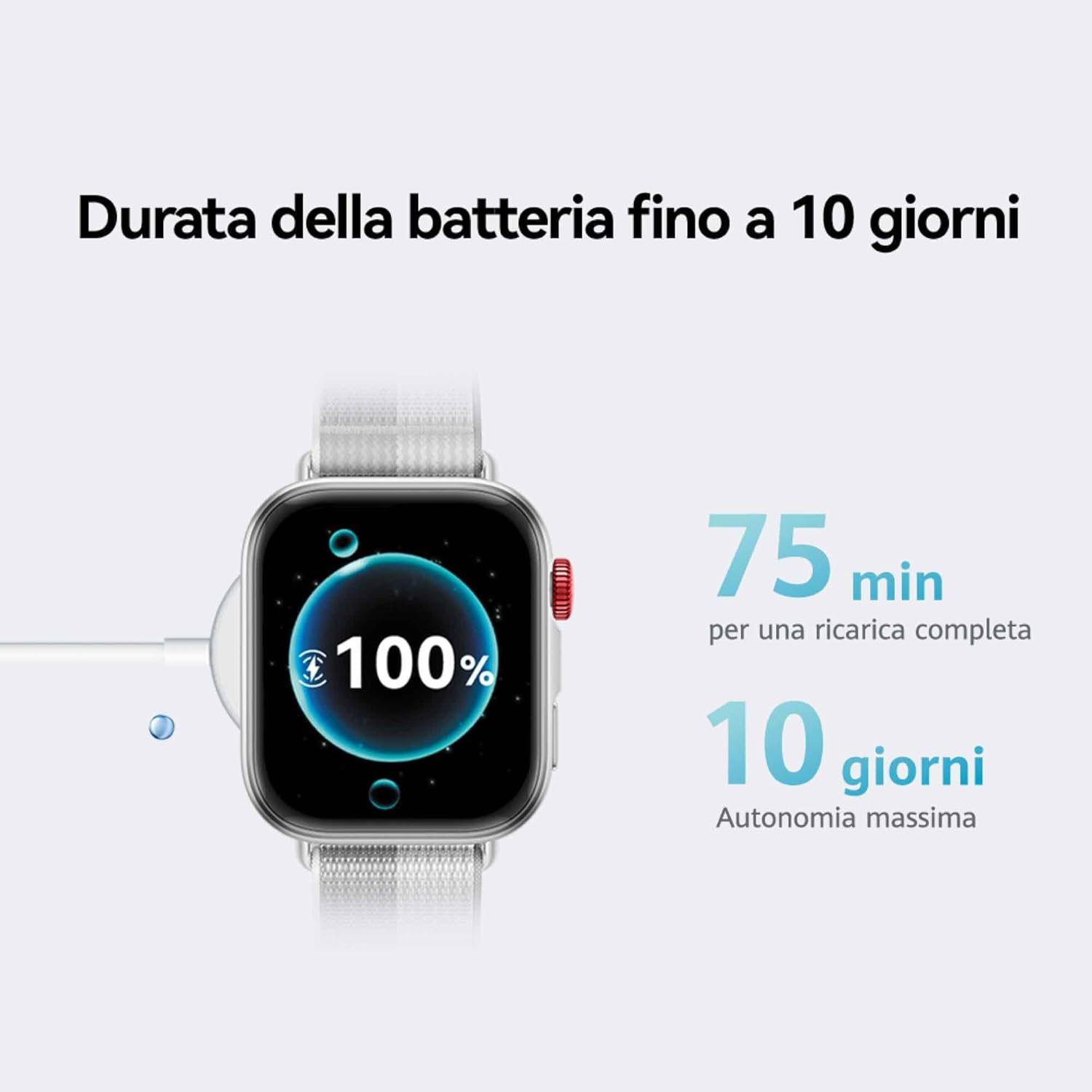
Image: The HUAWEI WATCH FIT 4 connected to its charging cable, displaying a full battery.
2.3 Konekte ak telefòn entelijan ou
The HUAWEI WATCH FIT 4 is compatible with both iOS and Android devices. To pair your watch:
- Etap 1: Telechaje the HUAWEI Health app from your device's app store.
- Etap 2: Pè Louvri aplikasyon HUAWEI Health la, ale nan Devices > Add > Smartwatch, epi chwazi aparèy ou an.
- Etap 3: Mizajou In the HUAWEI Health app, go to Personal > Check for Updates to ensure your watch has the latest software.
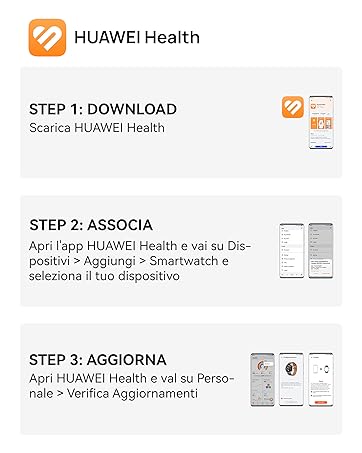
Image: Visual guide for connecting the HUAWEI WATCH FIT 4 to your smartphone using the HUAWEI Health app.

Image: HUAWEI WATCH FIT 4 successfully paired with a smartphone running the HUAWEI Health app.
3. Operasyon
3.1 Ekspozisyon ak Navigasyon
The HUAWEI WATCH FIT 4 features a 1.82-inch AMOLED display with a maximum brightness of 2000 nits, ensuring clear visibility in various lighting conditions. Navigate the watch using its touchscreen and physical buttons.

Image: The bright 1.82-inch AMOLED display of the HUAWEI WATCH FIT 4.
3.2 Pèsonalize Kadran Mont yo
Personalize your watch with a variety of watch faces available through the HUAWEI Health app. You can choose from different styles including personalized, geometric, animal, and emoji themes.
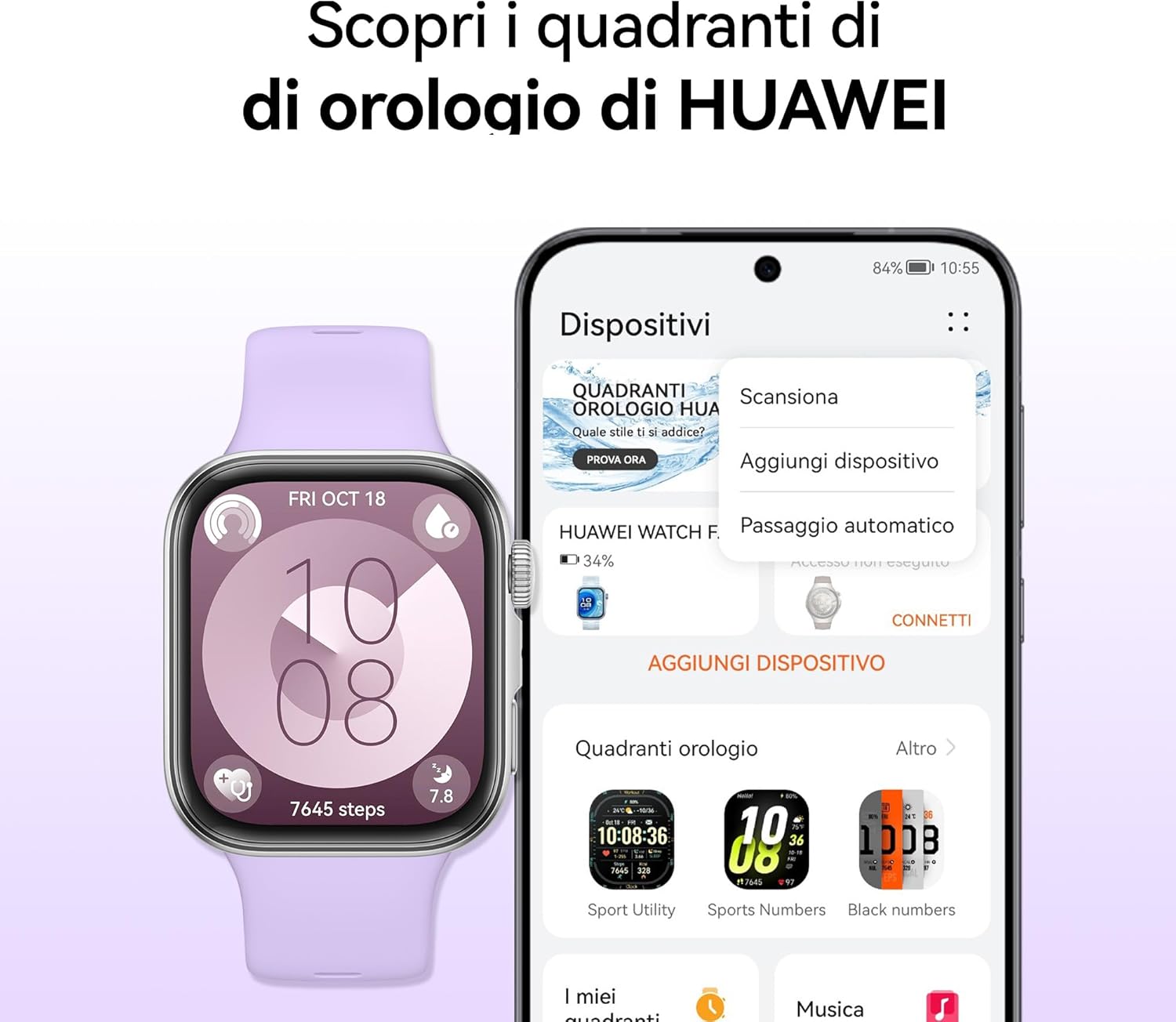
Image: Customizing watch faces on the HUAWEI WATCH FIT 4 via the HUAWEI Health app.
3.3 Mòd Espò ak Suivi GPS
The watch supports over 100 workout modes, including mountaineering, hiking, skiing, climbing, trail running, walking, running, and cycling. It provides high-level data such as altitude, accumulated ascent, and air pressure, supported by a powerful barometer. The HUAWEI Sunflower positioning system offers precise location tracking for outdoor activities.

Image: HUAWEI WATCH FIT 4 tracking outdoor cycling activity with GPS.

Image: Various sports modes available on the HUAWEI WATCH FIT 4.
3.4 Siveyans Sante
The Health Insights app provides guidance for a healthier lifestyle, including stress management, sleep improvement, and workout optimization. The watch tracks sleep levels, fatigue, and stress, utilizing HRV metrics and abnormal breathing alerts. It also includes a cycle calendar feature.
- Suivi dòmi: Monitè dòmitages ak kalite.
- Siveyans batman kè: Suivi kontinyèl batman kè.
- Siveyans SpO2: Blood oxygen saturation levels.
- Jesyon estrès: Provides insights and guidance.
- Cycle Calendar: Helps track menstrual cycles.

Image: Health Insights app on HUAWEI WATCH FIT 4 showing sleep score and other health data.

Image: Cycle calendar feature on the HUAWEI WATCH FIT 4.
3.5 Daily Utility Features
The smartwatch offers several features for daily convenience:
- Nòt Vwa: Record quick voice memos.
- Quick Message Replies: Respond to messages directly from your wrist.
- Apèl Bluetooth: Make and receive calls when connected to your phone.
- Panno Remote: Kontwole kamera telefòn ou a adistans.

Imaj: Plis paseview of daily utility features on the HUAWEI WATCH FIT 4.
4. Antretyen
4.1 Jesyon batri
The HUAWEI WATCH FIT 4 offers up to 10 days of battery life with typical usage. To maximize battery longevity, avoid extreme temperatures and use the provided charging cable.

Image: Battery life and charging details for the HUAWEI WATCH FIT 4.
4.2 Rezistans dlo
The watch is water-resistant up to 50 meters. It is suitable for shallow-water activities like swimming in a pool or ocean. Avoid using it for diving, hot showers, or high-pressure water activities.
4.3 Netwayaj ak swen
Regularly clean your watch and strap to prevent skin irritation and maintain performance. Use a soft, damp cloth to wipe the device. Ensure the watch is dry before charging.
NAN. Depanaj
If you encounter issues with your HUAWEI WATCH FIT 4, try the following common solutions:
- Aparèy pa limen: Asire w ke mont lan chaje nèt.
- Pwoblèm kouple: Check Bluetooth on your phone, restart both devices, and ensure the HUAWEI Health app is updated.
- Done ki pa egzak: Ensure the watch is worn correctly and the sensors are clean. Update the app and watch firmware.
- Kout lavi batri: Diminye klète ekran an, dezaktive notifikasyon ki pa nesesè yo, epi fèmen aplikasyon ki an background sou mont lan.
- Aplikasyon an pa senkronize: Check your phone's internet connection and ensure the HUAWEI Health app has all necessary permissions.
For further assistance, refer to the official HUAWEI support websit oswa kontakte sèvis kliyan.
6. Espesifikasyon
| Karakteristik | Detay |
|---|---|
| Non modèl | Seiya-B19F |
| Sistèm operasyon | HarmonyOS |
| Gwosè ekspozisyon | 1.82 pous |
| Kalite ekspozisyon | OLED (AMOLED) |
| Rezolisyon | 360 x 360 |
| Max Display Brightness | 2000 Nit |
| Kapasite memwa | 4 GB |
| Kapasite batri | 400 mAh |
| Mwayèn lavi batri | 10 Jou |
| Tan pou chaje | 10 Minutes (for a day's use), 75 Minutes (full charge) |
| Koneksyon Teknoloji | Bluetooth |
| GPS | GPS entegre |
| Nivo rezistans dlo | 50 mèt |
| Ka Materyèl | Aliminyòm |
| Bann Materyèl | Silicone |
| Dimansyon (DxWxH) | 43P x 38l x 10H mm |
| Aparèy konpatib | Telefòn entelijan, Tablèt (iOS ak Android) |
7. Garanti & Sipò
7.1 Pwodwi Garanti
The HUAWEI WATCH FIT 4 comes with a Garanti manifakti 2 zan. Additionally, you may be eligible for an extended 30-month warranty through HUAWEI WATCH FIT 4 promotions.
7.2 HUAWEI Health+ Subscription
Achteasing a HUAWEI WATCH FIT 4 may include a 3-month subscription to HUAWEI Health+. This subscription provides access to exclusive benefits such as beginner and expert workouts, guided meditations, Stay Fit Plans, and breathing exercises. Terms and conditions apply.
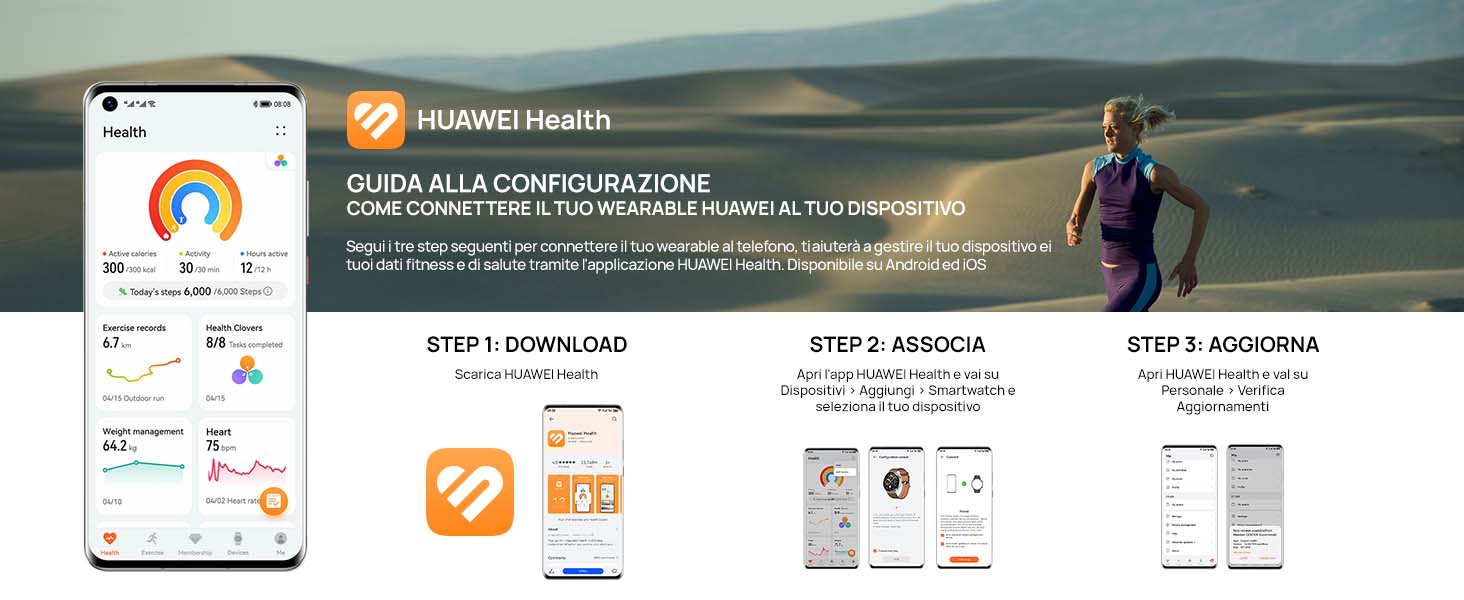
Image: Features of the HUAWEI Health+ app.
7.3 Sipò pou Kliyan
For detailed support, FAQs, and contact information, please visit the official HUAWEI support websit.