
1. Entwodiksyon
This manual provides detailed instructions for the setup, operation, maintenance, and troubleshooting of your Yeabomy Smart Bluetooth Glasses E13C. Please read this manual thoroughly before using the product to ensure proper function and longevity.

A pair of black smart Bluetooth sunglasses, viewsoti nan yon ang, montreasing the integrated technology in the temples.
2. Pwodwi souview
2.1 Kontni pake a
Verifye ke tout atik yo prezan nan pakè a:
- Smart Bluetooth Glasses (E13C)
- Mayetik kab chaje
- Netwaye twal
- Eyeglasses Storage Bag
- Ka linèt
- Manyèl Itilizatè (dokiman sa a)
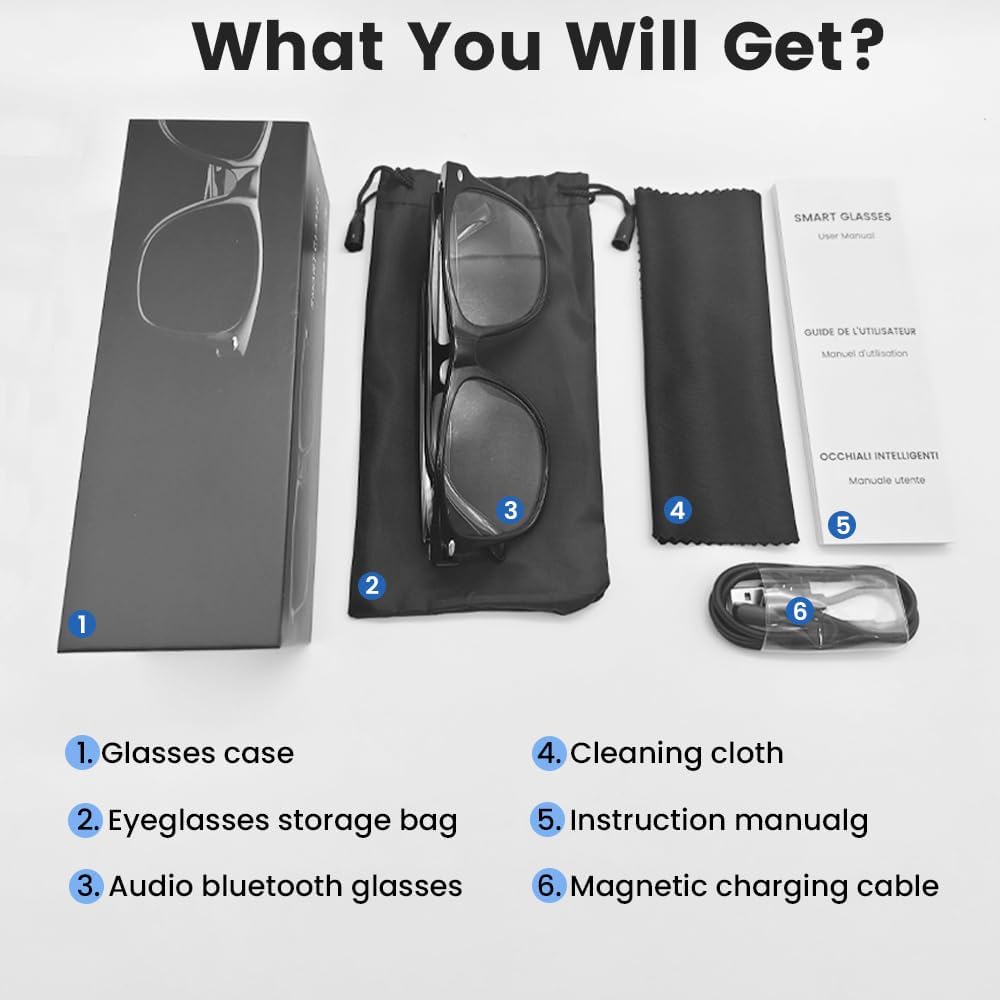
An image displaying the package contents: a glasses case, an eyeglasses storage bag, the audio Bluetooth glasses, a cleaning cloth, an instruction manual, and a magnetic charging cable.
2.2 Karakteristik kle
- Kontwòl Vwa Entelijan: Operate functions using voice commands.
- Lantiy polarize: Effective blue light filtering and 100% UV protection. Lenses are replaceable with prescription lenses.
- Lajè konpatibilite: Connects with various devices including smartphones (Android, iOS) and computers via Bluetooth 5.4.
- Koup yon sèl etap: Automatic reconnection to the last paired device.
- Enpèmeyab (IPX5): Resistant to sweat and rain.
- Konsepsyon ki lejè: Weighs approximately 27g for comfortable extended wear.
- Dual Magnetic Charging: Efficient and secure charging.
- Kontwòl manyen entwisyon: For media playback, calls, and voice assistant activation.
3. Enstalasyon
3.1 Chaje linèt yo
Before first use, fully charge the smart glasses. Use the provided magnetic charging cable.
- Connect the magnetic charging cable to the charging contacts on the temple of the glasses.
- Konekte bout USB kab la nan yon adaptè kouran USB estanda (pa enkli) oubyen nan pò USB yon òdinatè.
- The indicator light will show yellow during charging.
- Charging is complete when the indicator light turns green. A full charge takes approximately 1.5 hours.
The glasses provide approximately 4-6 hours of media playback and over 300 hours of standby time on a full charge.

An illustration showing the magnetic charging cable connecting to the glasses' temple, with indicators for charging (yellow light) and fully charged (green light). Battery capacity, charging time, playback time, and calling time are also displayed.
3.2 Bluetooth Pairing
To connect your smart glasses to a device:
- Asire w linèt yo chaje epi yo limen.
- Pèmèt Bluetooth sou smartphone ou oswa lòt aparèy.
- Chèche pou available Bluetooth devices. The glasses will appear as "E13".
- Select "E13" to pair. Once paired, the glasses will automatically reconnect to this device when powered on and within range (up to 33 feet).

A person wearing the smart glasses while running, with a smartphone screen showing Bluetooth settings and the glasses (E13) connected. The image highlights the 33ft Bluetooth 5.4 transmission range and voice control functionality.
4. Operasyon Enstriksyon
4.1 Power On/Off
- Pouvwa sou: Long touch the control area for 5 seconds.
- Pouvwa Off: Long touch the control area for 5 seconds.
4.2 Kontwòl manyen
The smart glasses feature intuitive touch controls located on the temples:
- Jwe/Poz Mizik: Yon sèl fwa tape
- Pwochen Track: Tape de fwa
- Track Previous: Tape de fwa
- Reponn apèl: Yon sèl fwa tape
- Rele Rele: Yon sèl fwa tape
- Aktive Asistan Vwa: Long Touch for 2 seconds
- Fotografi adistans: Double click to control your smartphone's camera.

A diagram illustrating the touch control gestures on the smart glasses for various functions: pick up calls, turn on music, open navigation, take photos, previous/next track, play/pause, voice assistant, answer/hang up calls, and power on/off.
4.3 Kontwòl vwa
After activating the voice assistant (Long Touch for 2 seconds), you can use voice commands for various functions, such as:
- Making calls (e.g., "Call [Contact Name]")
- Playing music (e.g., "Play [Song Title]")
- Voye mesaj
- Opening navigation
5. Antretyen
- Netwayaj: Use the provided cleaning cloth to gently wipe the lenses and frame. Avoid harsh chemicals or abrasive materials.
- Rezistans dlo: The glasses are IPX5 water-resistant, meaning they can withstand sweat and light rain. Do not submerge them in water or expose them to strong jets of water.
- Depo: When not in use, store the glasses in the provided eyeglasses storage bag or glasses case to protect them from scratches and dust.
- Tanperati: Avoid exposing the glasses to extreme temperatures (hot or cold) as this can affect battery life and electronic components.

A pair of smart glasses resting on a surface, emphasizing their lightweight design (27g) and comfort for extended wear. A magnified inset shows the dual magnetic charging contacts.
NAN. Depanaj
- Pa ka limen: Ensure the glasses are fully charged. Connect to the magnetic charging cable and check the indicator light.
- Pa ka konekte ak aparèy la:
- Asire w ke Bluetooth aktive sou aparèy ou an.
- Make sure the glasses are within the 33-foot Bluetooth range.
- Turn the glasses off and on again, then try pairing.
- Bliye aparèy la nan paramèt Bluetooth telefòn ou an epi eseye konekte li ankò.
- Pa gen son/Volim fèb:
- Check the volume settings on both the glasses (if applicable via touch control) and your connected device.
- Asire w linèt yo byen konekte atravè Bluetooth.
- Confirm that the audio output on your device is set to the smart glasses.
- Kontwòl manyen pa reponn: Ensure the glasses are powered on and connected. Try restarting the glasses.
7. Espesifikasyon
| Modèl | E13C |
| Mak | Yeabomy |
| Koneksyon Teknoloji | Bluetooth 5.4 |
| Sistèm operasyon konpatibilite | Android, iOS Devices |
| Karakteristik espesyal | Music Player, Phone Call, Voice Control, UV Protection, Polarized Lenses, Remote Photography |
| Kapasite batri | 1 Amp Hours (80mAh per temple) |
| Tan pou chaje | Apeprè. 1.5 èdtan |
| Continuous Playback Time (Music) | Apeprè. 5 èdtan |
| Continuous Calling Time | Apeprè. 4 èdtan |
| Tan sibstiti | Plis pase 300 èdtan |
| Pwa atik | 0.07 liv (apeprè 27g) |
| Rezistans dlo | IPX5 |
| Dimansyon pake | 6.65 x 2.4 x 2.24 pous |
| Gwosè ekran | 1.96 pous (dyagonal ekran vizib) |
| Kapasite Depo memwa | 128 MB |
| GPS | Pa gen GPS |

An image detailing the physical dimensions of the smart glasses, including lens width, frame width, and temple length. It also shows various face shapes (oval, triangle, round, square, diamond) indicating suitability.
8. Garanti ak sipò
For warranty information or technical support, please refer to the contact details provided with your purchase documentation or visit the official Yeabomy websit la. Kenbe prèv acha ou a pou nenpòt reklamasyon garanti.