
1. Entwodiksyon
Thank you for choosing the NENEN HSH-DV3A Air Duct Temperature and Humidity Sensor. This device is designed for precise environmental monitoring and management in various settings. This manual provides essential information for the safe and efficient installation, operation, and maintenance of your sensor.
Karakteristik kle:
- Precise Monitoring: Utilizes advanced detection technology to ensure accurate data collection for both temperature and humidity.
- Aplikasyon versatile: Suitable for a wide range of environments including homes, offices, warehouses, and greenhouses.
- Konsepsyon pou ekonomize enèji: Engineered for low power consumption, contributing to economical long-term operation.
- Enstalasyon fasil: Designed for straightforward setup, allowing for quick deployment without complex procedures.
- Solid ak fyab: Constructed with high-quality materials to ensure long-lasting stability and dependable performance under various environmental conditions.
2. Enfòmasyon sou Sekirite
Please read and understand all safety instructions before installing or operating the sensor. Failure to follow these instructions may result in electric shock, fire, or damage to the device.
- Ensure the power supply matches the specified working voltage (24V).
- Do not expose the sensor to extreme physical shock or vibration.
- Avoid installing the sensor in locations with corrosive gases or liquids.
- Se sèlman pèsonèl kalifye ki ta dwe fè enstalasyon ak fil elektrik.
- Disconnect power before performing any maintenance or wiring.
3. Pake kontni
Verifye ke tout atik yo prezan epi yo pa domaje lè w ap ouvri pake a:
- NENEN HSH-DV3A Air Duct Temperature and Humidity Sensor (1 unit)
- Manyèl Itilizatè (dokiman sa a)
- (Additional mounting hardware or accessories may be included depending on the specific kit)
4. Pwodwi souview
The NENEN HSH-DV3A sensor consists of a main housing containing the electronics and a probe designed for insertion into air ducts. The probe accurately measures temperature and humidity within the airflow.

Figi 4.1: Angle view of the NENEN HSH-DV3A sensor, showing the main housing and the elongated probe for duct insertion.
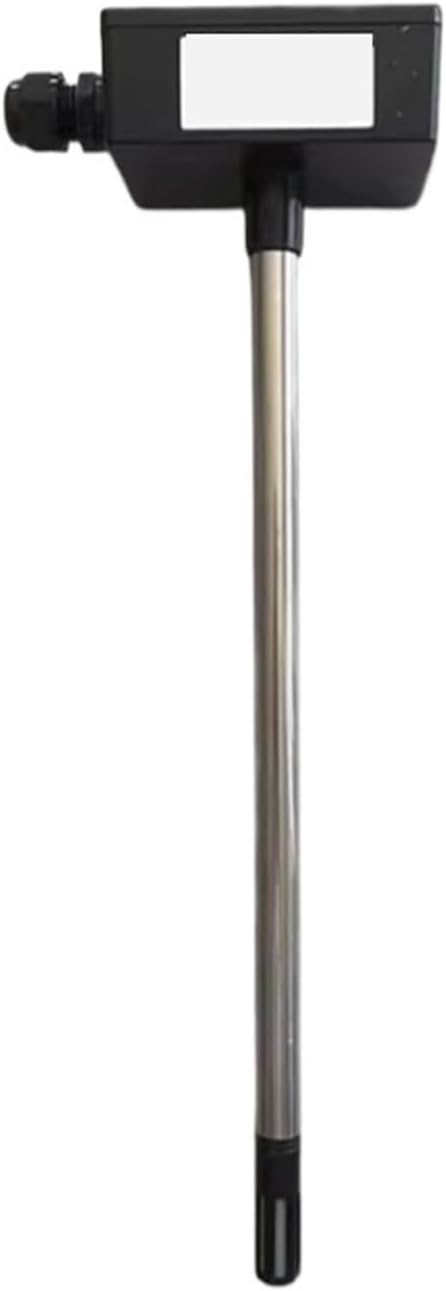
Figi 4.2: Devan view of the NENEN HSH-DV3A sensor, illustrating the probe extending downwards from the main housing.

Figi 4.3: Dèyè view of the NENEN HSH-DV3A sensor, highlighting the mounting plate and cable gland connection point.
5. Espesifikasyon
| Paramèt | Valè |
|---|---|
| Modèl | HSH-DV3A |
| Ranje Mezi | -40 a 60 ℃ (-40 a 140 ℉) |
| Travay Voltage | 24V |
| Dimansyon pake | 1.18 x 0.79 x 0.39 pous |
| Pwa atik | 2.2 liv |
| Manifakti | NENEN |
| Asanble obligatwa | Non |
| Kantite moso | 1 |
6. Enstalasyon ak Enstalasyon
The NENEN HSH-DV3A sensor is designed for easy installation. Follow these steps for proper setup:
- Chwazi Kote: Choose a suitable location within the air duct where temperature and humidity measurements are representative of the overall airflow. Avoid areas with stagnant air or direct exposure to heat sources/coolants.
- Prepare twou montaj la: Drill an appropriately sized hole in the air duct for the sensor's probe. Ensure the hole is clean and free of debris.
- Mount Sensor: Insert the sensor probe into the prepared hole. Secure the main housing to the exterior of the duct using appropriate fasteners (not included, typically self-tapping screws or bolts) through the mounting plate. Ensure a tight seal to prevent air leakage.
- Fil elektrik: Connect the sensor to your control system or data logger. Refer to the wiring diagram provided with your specific control system for correct terminal connections. The sensor requires a 24V power supply. Ensure all connections are secure and insulated.
- Pouvwa sou: Once installation and wiring are complete, apply power to the sensor. The device will begin monitoring automatically.
Nòt: For optimal performance, ensure the sensor probe is fully immersed in the airflow.
7. Operasyon Enstriksyon
The NENEN HSH-DV3A sensor operates continuously once powered. It provides real-time temperature and humidity data to your connected monitoring system. There are no user-adjustable settings directly on the sensor itself.
- Sòti Done: The sensor outputs data via its wired connection to your building management system (BMS), HVAC controller, or data acquisition system. Consult the documentation for your specific control system to interpret the sensor's output signals.
- Siveyans kontinyèl: The sensor is designed for continuous, unattended operation, providing consistent environmental data.
8. Antretyen
Regular maintenance ensures the longevity and accuracy of your NENEN HSH-DV3A sensor.
- Netwayaj: Periodically inspect the sensor probe for dust, lint, or other obstructions. Gently clean the probe surface with a soft, dry cloth. Do not use abrasive cleaners or solvents.
- Kalibrasyon: While the sensor is factory-calibrated, long-term drift can occur. If precise accuracy is critical, periodic recalibration by a qualified technician is recommended.
- Tcheke Koneksyon: Annually inspect wiring connections for tightness and signs of corrosion.
NAN. Depanaj
If you encounter issues with your sensor, refer to the following common problems and solutions:
| Pwoblèm | Kòz posib | Solisyon |
|---|---|---|
| Pa gen pwodiksyon done | No power; incorrect wiring; faulty sensor | Check 24V power supply; verify wiring connections; test sensor with known good power/system. |
| Lekti kòrèk | Sensor probe obstructed; improper placement; calibration drift | Clean probe; reposition sensor for better airflow; consider recalibration. |
| Lekti tanzantan | Loose wiring connections; power fluctuations | Secure all wiring connections; ensure stable 24V power supply. |
Si pwoblèm nan pèsiste apre ou fin eseye solisyon sa yo, tanpri kontakte sèvis kliyan.
10. Garanti & Sipò
NENEN products are manufactured to high-quality standards. For warranty information, technical support, or service inquiries, please refer to the warranty card included with your purchase or contact your authorized NENEN dealer or customer service directly. Please have your model number (HSH-DV3A) and purchase details ready when contacting support.
For further assistance, visit our official website or contact the seller from whom you purchased this product.