
Johgee YZD03-T
Johgee 3 Zones Water Timer Brass Inlet - Instruction Manual (Model YZD03-T)
Programmable Garden Hose Timer with Rain Delay, Manual, and Automatic Watering System
1. Entwodiksyon
Thank you for choosing the Johgee 3 Zones Water Timer. This device is designed to automate your garden watering, providing flexible and efficient irrigation for lawns, plants, and other areas. It features three independently programmable outlets, rain delay functionality, and manual watering options. Please read this manual thoroughly before installation and operation to ensure proper use and longevity of the product.
2. Enfòmasyon sou Sekirite
- This product is intended for outdoor use with cold water only. Do not use with hot water or in freezing conditions.
- Do not immerse the timer in water. The unit is IPX5 waterproof, meaning it is protected against low-pressure water jets, but not submersion.
- Use only 2x 1.5V AA alkaline batteries. Do not mix old and new batteries, or different types of batteries.
- Retire pil yo si ou pa pral itilize revèy la pou yon peryòd tan pwolonje pou anpeche li koule.
- Keep the device out of reach of children and pets to prevent accidental activation or damage.
- Ensure all connections are tight to prevent leaks. Use the provided sealing washer and thread seal tape.
3. Pake kontni
Tanpri verifye ke tout atik yo prezan nan pakè ou a:
- Johgee 3 Zones Water Timer Unit
- Manyèl itilizatè
- Sealing Washers (pre-installed or separate)
- Fil sele tep
4. Pwodwi souview
Familiarize yourself with the components of your Johgee Water Timer:

Imaj: Devan view of the Johgee 3 Zones Water Timer, showing the LCD display, control buttons, and rotary dial.
- Ekspozisyon LCD: Shows current time, program settings, and battery status.
- Rotary Dial: Used to select different programming modes (OFF, AUTO, Set Clock, Start Time, How Long, How Often).
- Bouton Zòn: Selects which of the three output zones to program or operate manually.
- OK bouton: Konfime seleksyon ak paramèt.
- +/- Delay Buttons: Adjusts values (time, duration, frequency) and activates rain delay.
- Manyèl bouton: Initiates temporary manual watering.
- Antre an kwiv: Connects to your garden faucet (3/4" external thread). Features a reinforced design and integrated filter.
- Water Outlets (x3): Connect to garden hoses for individual watering zones.
5. Enstalasyon
5.1 Enstalasyon batri
- Jwenn konpatiman pil la sou dèyè revèy la.
- Louvri kouvèti lòj la.
- Mete de (2) nouvo pil alkalin AA 1.5V, asire polarite ki kòrèk la (+/-).
- Close the battery compartment cover securely to maintain the waterproof seal.
The timer features a low battery warning and an automatic shut-off valve to prevent water waste when battery levels are critically low.
5.2 Connecting the Water Timer
- Ensure your garden faucet is turned off.
- Inspect the brass inlet for the pre-installed sealing washer. If missing, insert one.
- Apply thread seal tape (provided) to the threads of your garden faucet for an extra secure, leak-proof connection.
- Screw the Johgee Water Timer onto your standard 3/4" garden faucet. Hand-tighten firmly. Do not overtighten.
- Connect your garden hoses to the three independent water outlets at the bottom of the timer. Ensure these connections are also tight.

Image: The Johgee Water Timer connected to a garden faucet, with three hoses attached to its outlets, ready for use.

Imaj: Yon imaj detaye view of the reinforced brass inlet, highlighting its robust construction and integrated metal filter for preventing debris from entering the timer.
6. Operasyon Enstriksyon
6.1 Setting the Current Time (Clock)
- Vire kadran rotary a Mete revèy.
- Chif lè a ap flache. Sèvi ak la + or - bouton yo pou ajiste lè a. Peze OK pou konfime.
- The minute digit will flash. Use the + or - bouton yo pou ajiste minit la. Peze OK pou konfime.
- Se revèy la kounye a mete.
6.2 Programming Automatic Watering
The timer allows for independent programming of each of its three zones.

Image: The Johgee Water Timer connected to a faucet, with three hoses extending to different garden areas labeled Zone 1, Zone 2, and Zone 3, illustrating its multi-zone capability.
- Vire kadran rotary a OTO.
- Peze a ZÒN button to select the desired watering zone (1, 2, or 3) you wish to program.
- Vire kadran rotary a KÒMANSE TAN. Sèvi ak + or - to set the desired start time for watering. Press OK pou konfime.
- Vire kadran rotary a KONBYEN TAN. Sèvi ak + or - to set the watering duration (1 to 360 minutes). Press OK pou konfime.
- Vire kadran rotary a Konbyen fwa. Sèvi ak + or - to set the watering frequency (e.g., every 1, 3, 6, 12 hours, or every 1 to 30 days). Press OK pou konfime.
- Repeat steps 2-5 for each zone you wish to program.
- Once programming is complete, turn the rotary dial back to OTO pou operasyon otomatik.

Image: The LCD screen displaying options for setting start time, watering duration, and frequency, indicating the timer's programmable capabilities.

Image: An infographic detailing the customizable settings for automatic watering schedules, including setting the clock, start time, watering duration (1-360 minutes), and frequency (1 hour to 30 days).
6.3 Awozaj manyèl
Manual watering allows you to water immediately without interrupting your preset automatic schedule.
- Ensure the rotary dial is set to OTO or OFF.
- Peze a MANYÈL bouton.
- Sèvi ak la + or - bouton yo pou fikse dire awozaj manyèl ou vle a (1 a 360 minit).
- Peze OK pou kòmanse awozaj manyèl.
- Pou sispann awozaj manyèl la, peze MANYÈL again or turn the dial to OFF.

Image: A person using a hose to manually water a garden, demonstrating the manual watering feature of the Johgee Water Timer. The timer's display shows a manual watering countdown.
6.4 Fonksyon reta lapli
The rain delay function allows you to temporarily suspend your watering schedule for a specified period, conserving water during rainy weather.
- Ensure the rotary dial is set to OTO.
- Peze epi kenbe la RETA button (part of the + bouton).
- Sèvi ak la + or - buttons to select the desired delay duration (1 to 15 days).
- Peze OK to activate the rain delay. The display will show the remaining delay time.
- To cancel the rain delay, press and hold the RETA button again until the delay is cleared.

Image: The Johgee Water Timer shown during rainfall, with its display indicating an active rain delay. This feature helps conserve water by pausing scheduled watering during wet conditions.
6.5 Child Lock Mode
The child lock feature prevents accidental changes to your watering schedule by children or pets.
- Pou aktive: Peze epi kenbe bouton an OK button for 3 seconds until a lock icon appears on the display.
- Pou dezaktive: Peze epi kenbe bouton an OK bouton an pou 3 segonn jiskaske ikòn kadna a disparèt.

Image: A child's hand interacting with the Johgee Water Timer, illustrating the child lock function designed to prevent unintended changes to settings.
7. Antretyen
7.1 Ranplasman batri
When the low battery indicator flashes on the display, replace the batteries promptly to ensure continuous operation and prevent the timer from shutting off unexpectedly. Follow the battery installation steps in Section 5.1.
7.2 Netwaye filtè a
The brass inlet contains an integrated metal filter to prevent debris from entering the timer. Periodically check and clean this filter to maintain optimal water flow. To clean:
- Fèmen rezèv dlo a epi dekonekte revèy la nan wobinèt la.
- Carefully remove the filter screen from the brass inlet.
- Rense filtè a anba dlo k ap koule pou retire tout debri ki akimile.
- Reinsert the clean filter and reconnect the timer to the faucet.
7.3 Depo ivè
Before the first frost, disconnect the water timer from the faucet and hoses. Remove the batteries. Store the timer indoors in a dry, frost-free location to prevent damage from freezing water.
NAN. Depanaj
| Pwoblèm | Kòz posib | Solisyon |
|---|---|---|
| Timer does not turn on / LCD is blank. | Pil ki mouri oswa ki mal enstale. | Replace batteries with new 1.5V AA alkaline batteries, ensuring correct polarity. |
| Water is leaking from the faucet connection. | Loose connection, missing/damaged washer, or insufficient thread seal tape. | Ensure the timer is tightly screwed onto the faucet. Check that the sealing washer is properly seated. Apply more thread seal tape if necessary. |
| Water is leaking from hose connections. | Loose hose connection or damaged hose washer. | Tighten hose connections. Replace hose washers if they are worn or damaged. |
| Watering does not start at the programmed time. | Timer is in OFF mode, rain delay is active, or program is incorrect. | Ensure the dial is set to AUTO. Check if rain delay is active and cancel if needed. Verify program settings for start time, duration, and frequency. |
| One or more valves run continuously / will not shut off. | Internal valve issue, possibly due to debris or a temporary malfunction. | Remove batteries for 30 seconds to reset the unit, then reinsert. If the problem persists, contact customer support. |
| No water flow from an outlet. | Water supply off, clogged filter, or hose kinked. | Ensure the faucet is fully open. Check and clean the inlet filter (Section 7.2). Inspect hoses for kinks or blockages. |
9. Espesifikasyon
- Nimewo Modèl: YZD03-T
- Tanperati travay: 4.5°C - 45°C (40.1°F - 113°F)
- Presyon travay: 0.05Mpa - 0.8Mpa (7.25 psi - 116 psi)
- Evalyasyon ki enpèmeyab: IPX5
- Pwovizyon pou pouvwa: 2 pil alkalin AA 1.5V (pa enkli)
- Koneksyon tiyo kawotchou: 3/4" External Thread
- Dimansyon pwodwi: 7 x 15 x 12 cm
- Pwa atik: 600 g
- Materyèl: Metal, Plastik
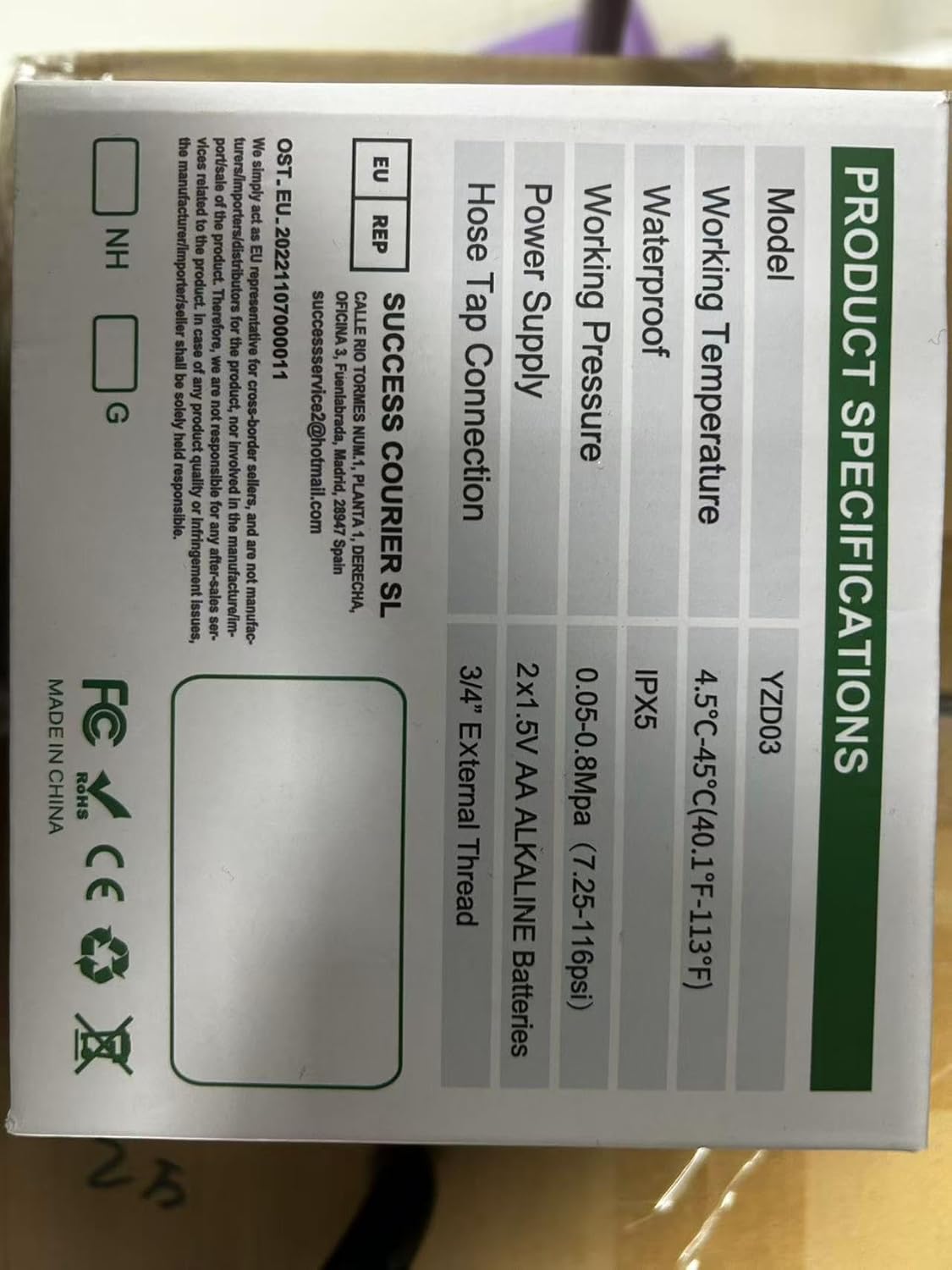
Image: A technical diagram illustrating the dimensions of the Johgee Water Timer, including its height (133mm) and width (155mm).
10. Garanti ak sipò
The Johgee 3 Zones Water Timer is backed by a manufacturer's warranty. For specific warranty details, including duration and coverage, please refer to the product packaging or contact the seller directly. If you encounter any issues or require technical assistance, please reach out to Johgee customer support through the retailer's platform or the contact information provided on the product packaging.
For online support and additional resources, you may visit the Johgee Store on Amazon.
Ask a question about this manual
Ask about setup, troubleshooting, compatibility, parts, safety, or missing instructions. Manuals+ will review the question and use this page’s manual context to help answer it.