
1. Enstalasyon
1.1 Debake
Carefully remove the TV and all accessories from the packaging. Ensure all components listed below are present:
- Televizyon
- Pouvwa kab
- Kontwòl Remote
- Manyèl itilizatè
1.2 Enstalasyon kanpe
Attach the TV stand to the television using the provided screws. Refer to the diagram for correct orientation and screw placement. The VESA mounting standard for wall mounting is 300 x 400 mm.

Figi 1.1: TV Dimensions and VESA Mount Specifications. This diagram illustrates the physical measurements of the 65-inch Hisense TV and the required VESA pattern for mounting.
1.3 Konekte Aparèy Ekstèn yo
Connect your external devices to the TV's ports. The TV features 3 HDMI ports (including HDMI 2.1 with eARC), 2 USB 2.0 ports, Ethernet, and antenna inputs (DVB-T2/S2). Use HDMI for high-definition video and audio, and USB for media playback or connecting compatible devices.

Figi 1.2: TV Rear Panel Connections. This image shows the available ports on the back of the Hisense TV, including USB, HDMI, Ethernet, and antenna inputs.
1.4 Premye Limen
Plug the power cable into the TV and a wall outlet. Press the power button on the remote control or the TV itself to turn it on. Follow the on-screen instructions for initial setup, including language selection, network connection, and channel scanning.
2. Operasyon Enstriksyon
2.1 Kontwòl Remote
The included remote control allows full operation of your Hisense TV. It features dedicated buttons for popular streaming services and supports voice control via Alexa Built-in and VIDAA Voice. To use voice commands, press the voice button on the remote and speak clearly.

Figi 2.1: Hisense TV Remote Control. This image displays the remote control with quick access buttons for various streaming platforms and voice control features.
2.2 Karakteristik Smart TV (VIDAA U8)
Your TV runs on the VIDAA U8 operating system, providing access to over 1000 applications including DAZN, NOW, Netflix, Paramount+, and Prime Video. Navigate through the smart interface using the remote control to browse and launch applications.

Figi 2.2: VIDAA Smart TV Interface. This screenshot shows the home screen of the VIDAA operating system with various streaming applications and content recommendations.
2.3 Anviwònman ak Amelyorasyon Imaj
The QLED display technology delivers vibrant colors and deep contrasts. The AI 4K Upscaler enhances lower-resolution content to near 4K quality. Dolby Vision, HDR10+, and HLG support provide an expanded range of colors and contrast for compatible content. The AI Light Sensor automatically adjusts screen brightness based on ambient light for optimal viewing and energy efficiency. AI Smooth Motion technology reduces blur in fast-moving scenes. Activate Filmmaker Mode to view movies and TV shows as intended by their creators, preserving original aspect ratios, colors, and frame rates.

Figi 2.3: QLED Colour Technology. This image highlights the vibrant and rich color reproduction capabilities of the QLED display.

Figi 2.4: AI 4K Upscaler in Action. This illustration demonstrates how the TV's AI technology enhances lower-resolution content to near 4K clarity.

Figi 2.5: AI Smooth Motion. This image visually represents the TV's ability to render fast-moving scenes with reduced blur and increased fluidity.
2.4 Anviwònman odyo
Experience immersive sound with Dolby Atmos. The TV features stereo speakers with a maximum output of 20 Watts. You can also connect external audio devices via Bluetooth or the digital audio output.

Figi 2.6: Dolby Vision Atmos Experience. This image illustrates the immersive audio and visual experience provided by Dolby Vision and Dolby Atmos technologies.
2.5 Karakteristik jwèt yo
Game Mode Plus offers an ultra-smooth, lag-free gaming experience. Features like 60Hz VRR (Variable Refresh Rate) and ALLM (Auto Low Latency Mode) minimize input lag and screen tearing. The Game Bar provides a centralized dashboard to manage game settings and monitor performance in real-time.

Figi 2.7: Game Mode Plus. This image highlights the TV's gaming capabilities, including 60Hz VRR and ALLM for a smooth gaming experience.
2.6 Connectivity and Screen Mirroring
The TV supports Bluetooth and Wi-Fi for wireless connectivity. Screen mirroring technologies like AirPlay 2, Google Cast, Miracast, and Smart View allow you to share content from your mobile devices to the TV.
3. Antretyen
3.1 Netwaye televizyon an
Pou netwaye ekran an, siye l dousman avèk yon twal mou, sèk, ki pa gen pousyè. Pou mak ki difisil pou retire, siye l yon ti kras.ampen the cloth with water or a specialized screen cleaner. Avoid using harsh chemicals or abrasive materials. Clean the TV's exterior with a soft, dry cloth. Ensure the TV is unplugged before cleaning.
NAN. Depanaj
4.1 Pwoblèm komen ak solisyon
- Pa gen pouvwa: Check if the power cable is securely connected to both the TV and the wall outlet. Ensure the wall outlet is functioning. Try pressing the power button on the TV itself, not just the remote.
- Pa gen imaj/son: Verify that the correct input source is selected. Check all cable connections (HDMI, antenna) for looseness. If using an external device, ensure it is powered on and functioning correctly. Adjust volume settings.
- Remote pa reponn: Replace the batteries in the remote control. Ensure there are no obstructions between the remote and the TV's IR sensor. If using voice control, ensure the microphone is not blocked and you are speaking clearly.
- Fonksyonalite entelijan yo pa fonksyone: Check your internet connection (Wi-Fi or Ethernet). Restart the TV by unplugging it for a few minutes and then plugging it back in. Ensure the VIDAA U8 operating system is updated to the latest version.
5. Espesifikasyon
Below are the key technical specifications for the Hisense 65E78Q QLED 4K Smart TV:
| Karakteristik | Spesifikasyon |
|---|---|
| Gwosè ekran | 65 pous |
| Teknoloji ekspozisyon | QLED |
| Rezolisyon | 4K (3840x2160) |
| Rafrechisman pousantaj | 60 Hz |
| Sipò HDR | Vizyon Dolby, HDR10+, HLG |
| Sistèm operasyon | LAVI U8 |
| Sòti odyo | 20 Watt Stereo speakers with Dolby Atmos |
| Pò HDMI | 3 (HDMI 2.1, eARC support) |
| Pò USB | 2 (USB 2.0) |
| Koneksyon | Bluetooth, Ethernet, Wi-Fi |
| Asistan vwa | Alexa entegre, Vwa VIDAA |
| Dimansyon (LxHxP) | 145.3 x 87.5 x 29.8 cm (ak sipò a) |
| Estanda Mòn VESA | 300 x 400 mm |
| Klas Enèji (SDR) | E |

Figi 5.1: Energy Label. This label provides information on the TV's energy efficiency class and consumption.
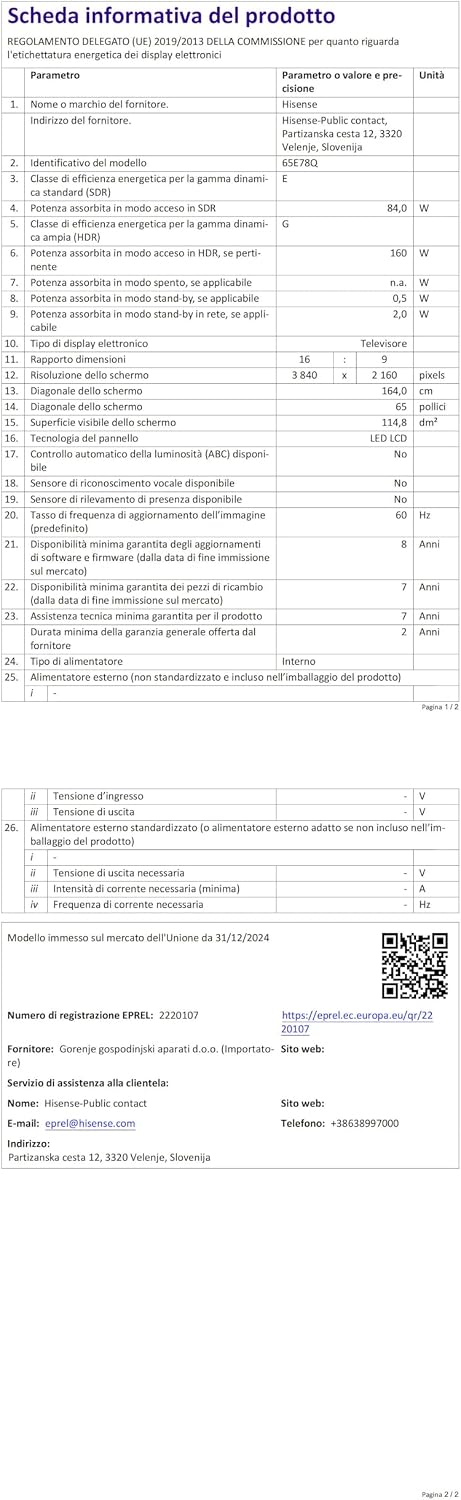
Figi 5.2: Product Information Sheet. This document contains detailed technical parameters and regulatory information. For more details, scan the QR code or visit https://eprel.ec.europa.eu/qr/2220107.
6. Enfòmasyon sou Garanti
This Hisense TV comes with a 2-year manufacturer warranty. Please retain your proof of purchase for warranty claims. For detailed terms and conditions, refer to the warranty card included with your product or visit the official Hisense websit.
7. Sipò
For technical assistance, product inquiries, or warranty support, please contact Hisense customer support. Refer to the contact information provided in your product documentation or visit the official Hisense support websit.


