
1. Pwodwi souview
The Hisense 65E7Q QLED Smart TV offers a premium viewing experience with its 65-inch QLED display. This television integrates advanced technologies such as Dolby Vision and Dolby Atmos for immersive audio-visuals, AI Smooth Motion for fluid images, and dedicated modes for gaming and sports. Powered by the VIDAA operating system, it provides easy access to a wide range of streaming content and smart features, including voice control.

Devan view of the Hisense 65E7Q QLED Smart TV.
Karakteristik kle:
- Koulè QLED: Experience rich, vibrant, and realistic colors.
- AI Smooth Motion: Advanced MEMC and 3D Noise Reduction for fluid, blur-free images.
- Dolby Vision & Dolby Atmos: Cinematic picture and immersive sound for an enhanced entertainment experience.
- Mòd jwèt Plus: Reduces input lag to 16ms, with 60Hz VRR and ALLM for ultra-fluid gaming.
- Mòd Espò IA: Optimizes picture and sound for sports content, reducing motion blur and enhancing stadium-like audio.
- Amelyoratè IA 4K: Enhances blurry images to near-4K quality.
- VIDAA Smart TV OS: Fast, secure, and intuitive operating system with access to popular streaming applications.
- Kontwòl vwa: Integrated Alexa and VIDAA Voice for convenient operation.
2. Enfòmasyon sou Sekirite
Please read all safety instructions carefully before using your TV. Keep this manual for future reference. Always ensure the TV is placed on a stable surface to prevent tipping. Do not expose the TV to rain or moisture. Refer to the full safety guidelines in the included safety manual.
3. Pake kontni
Verifye ke tout atik yo prezan nan bwat la:
- Hisense 65E7Q QLED Smart TV
- Pouvwa kab
- Remote Control (with 1 AAAA battery included)
- Sipò pou televizyon (2 moso)
- Vis pou Asanblaj Sipò a
- Manyèl Itilizatè (dokiman sa a)
- Kat Garanti
4. Enstalasyon
4.1 Asanble kanpe la
- Mete ekran televizyon an ak anpil atansyon sou yon sifas ki plat e mou pou evite li domaje.
- Aliyen moso sipò yo ak fant ki koresponn yo anba televizyon an.
- Secure the stand pieces using the provided screws. Ensure they are tightened firmly.

Diagram illustrating TV dimensions and stand installation points.
4.2 Montaj mi
If you plan to wall mount your TV, ensure you use a VESA-compatible wall mount kit (not included). The Hisense 65E7Q supports a VESA mounting standard of 600 x 400 mm. Follow the instructions provided with your wall mount kit for safe installation.
4.3 Konekte periferik
Connect your external devices to the TV's ports as needed. Refer to the port diagram below:

Dèyè view showing available ports and connections.
- Pò HDMI (x3): Connect Blu-ray players, game consoles, and other HDMI devices. One port supports eARC for enhanced audio return.
- Pò USB (x2): Connect USB flash drives for media playback. (1x USB 3.0, 1x USB 2.0)
- Antenna Inputs (x2): Konekte antèn tèrès ou oswa kab ou.
- Ethernet (LAN): Pou koneksyon rezo filaire.
- Soti odyo optik: Konekte ak yon ba son oswa yon reseptè odyo pou odyo dijital.
- Kas ekoutè Jack: Pou koute prive.
- Antre AV: Pou konekte ansyen aparèy lè l sèvi avèk kab videyo konpoze ak odyo stereo.
4.4 Premye pouvwa sou
- Konekte kab kouran an nan televizyon an epi answit nan yon priz kouran.
- Peze bouton pouvwa a sou kontwòl remote la oswa televizyon an.
- Swiv enstriksyon ki sou ekran an pou w konplete konfigirasyon inisyal la, ki gen ladan seleksyon lang, koneksyon rezo a, ak eskanè chanèl yo.
5. Opere televizyon ou
5.1 Kontwòl Remote
The included remote control allows you to navigate the TV's features. Insert the provided AAAA battery into the remote. The remote supports voice control for convenient operation.
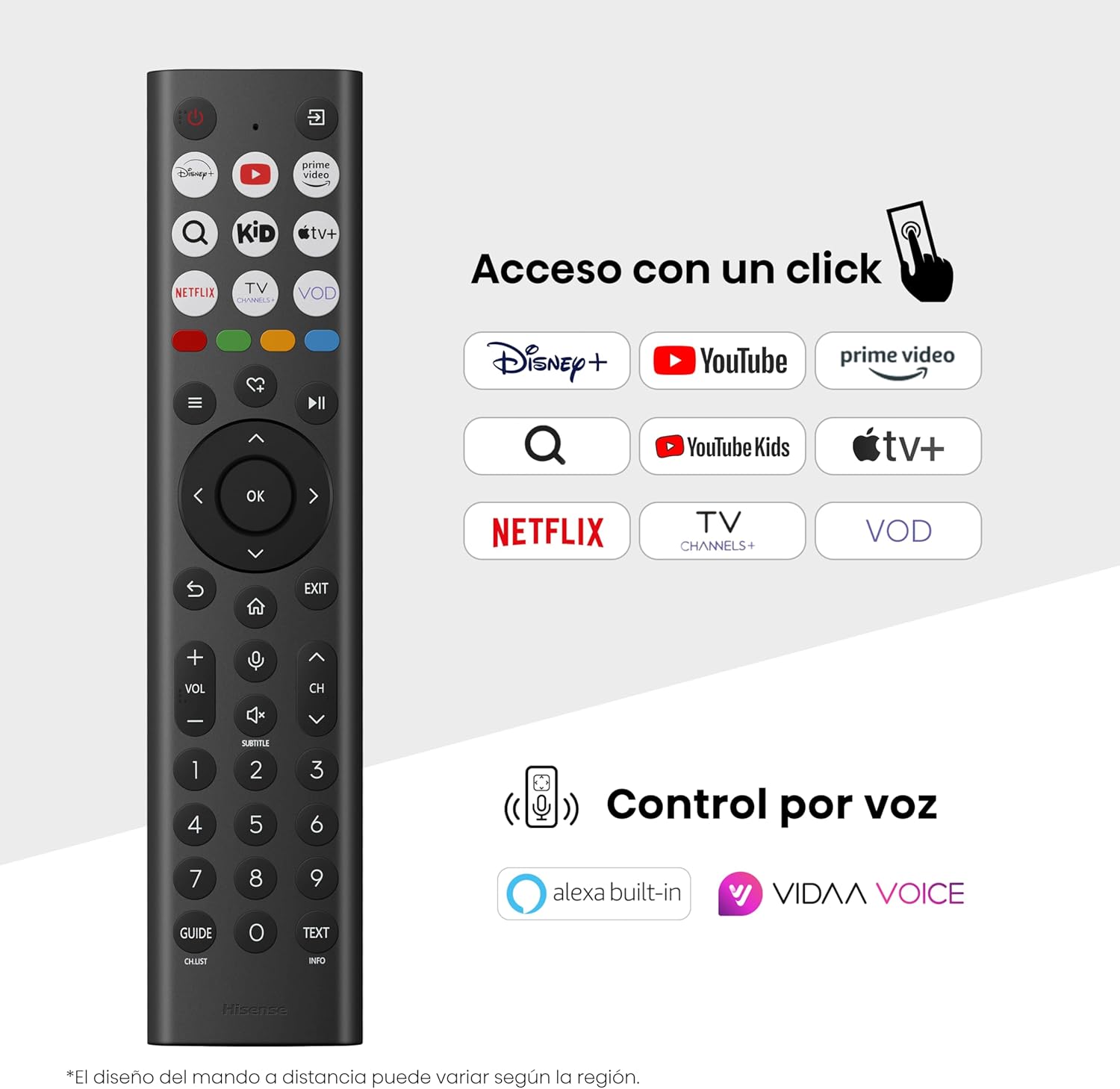
Hisense Smart TV remote control with dedicated app buttons and voice control.
5.2 Karakteristik Smart TV (VIDAA OS)
Your Hisense TV runs on the VIDAA operating system, offering a user-friendly interface for accessing various applications and services.

The VIDAA Smart TV interface with popular streaming applications.
- Aplikasyon: Access pre-installed apps like Netflix, YouTube, Prime Video, and more.
- Kontwòl vwa: Use the remote's voice function to search for content, adjust settings, or interact with Alexa built-in and VIDAA Voice.
- Screen Mirroring (AirPlay): Share content from your Apple devices directly to the TV.
- Pataje sou televizyon: Easily send content from your mobile devices to the TV.
5.3 Anviwònman Foto
Optimize ou viewing experience with various picture enhancement technologies:
- Koulè QLED: Delivers over a billion shades of vibrant, lifelike colors.
- Amelyoratè IA 4K: Amelyore otomatikman kontni ki gen rezolisyon ki pi ba pou rive nan yon kalite ki prèske 4K.
- AI Smooth Motion: Reduces motion blur in fast-paced scenes, ensuring clear and fluid visuals.
- Dolby Vision: Provides stunning brightness, contrast, and color for a dramatic visual experience.
- Mòd Filmmaker: Preserves the original aspect ratio, colors, and frame rates to display movies as intended by the director.
- Capteur Limyè IA: Intelligently adjusts screen brightness based on ambient light for optimal viewing ak efikasite enèji.
- Mòd Swen Je: Diminye emisyon limyè ble pou minimize fatig nan je.
- Enèji ekonomize mòd: Optimizes power consumption without significantly compromising picture quality.

QLED technology delivers over a billion vibrant color tones.

AI 4K Upscaler enhances lower resolution content to near 4K clarity.

AI Smooth Motion ensures fluid images without blur, especially in fast-moving scenes.

Filmmaker Mode presents content exactly as the director intended.
5.4 Anviwònman son
Enhance your audio experience with:
- Dolby Atmos: Immersive, multi-dimensional sound that fills your room.
- Oratè entegre: Built-in speakers with a maximum output of 1 Watt per channel.
- EzPlay: Seamlessly control compatible Hisense soundbars directly from your TV screen.

Dolby Vision and Dolby Atmos combine for a spectacular audio-visual experience.
5.5 Karakteristik jwèt yo
Pou jwè yo, televizyon an ofri:
- Mòd jwèt Plus: Reduces input lag to 16ms, ensuring responsive gameplay.
- 60Hz VRR (Vès Rafrechisman Varyab): Synchronizes the TV's refresh rate with the game console's output to prevent screen tearing.
- ALLM (Mod Auto Low Latansi): Automatically switches the TV to low-latency mode when a game is detected.
- Ba jwèt: An integrated control center for quick access to game settings and real-time performance monitoring.

Game Mode Plus provides ultra-fluid, lag-free gaming.

The Game Bar offers centralized control for game settings.
5.6 Sports Features
- Mòd Espò IA: Automatically detects sports content and optimizes picture and sound settings for a stadium-like experience, enhancing clarity and audio effects.
6. Antretyen
6.1 Netwaye televizyon an
- Toujou debranche televizyon an anvan ou netwaye li.
- Sèvi ak yon twal mou, sèk, ki pa gen pousyè pou siye ekran an ak kò televizyon an dousman.
- Pou mak ki difisil pou retire, pase yon ti krasampRense twal la avèk dlo oswa yon pwodui netwayaj ekran espesyalize (pa flite dirèkteman sou ekran an).
- Evite itilize pwodui netwayaj abrazif, alkòl, benzèn, oswa diluant, paske sa yo ka domaje sifas televizyon an.
6.2 Mizajou lojisyèl
Televizyon ou ka resevwa mizajou lojisyèl detanzantan pou amelyore pèfòmans epi ajoute nouvo fonksyonalite. Asire w ke televizyon ou konekte ak entènèt la pou resevwa mizajou sa yo. Anjeneral, ou ka tcheke pou mizajou manyèlman nan meni paramèt televizyon an.
NAN. Depanaj
Si w rankontre pwoblèm ak televizyon w lan, gade solisyon komen sa yo:
- Pa gen pouvwa: Check if the power cable is securely connected and the power outlet is working. Try a different outlet.
- Pa gen imaj/son: Asire w ou chwazi bon sous antre a. Tcheke tout koneksyon kab yo (HDMI, antèn).
- Kontwòl Remote pa travay: Check the battery (1 AAAA battery). Ensure there are no obstructions between the remote and the TV.
- Pwoblèm Koneksyon Rezo: Verify your Wi-Fi password or Ethernet cable connection. Restart your router.
- Kalite imaj ki pa bon: Ajiste paramèt imaj yo (klète, kontras, netteté). Asire w sous opinyon an ap bay yon siyal kalite siperyè.
- Distòsyon son: Check audio settings. If using external speakers, ensure they are connected correctly.
For more detailed troubleshooting, consult the full electronic user manual or contact Hisense customer support.
8. Espesifikasyon
Detailed technical specifications for the Hisense 65E7Q QLED Smart TV:
| Karakteristik | Spesifikasyon |
|---|---|
| Nimewo Modèl | 65E7Q |
| Gwosè ekran | 65 pous |
| Teknoloji ekspozisyon | QLED |
| Rezolisyon | 4K (3840 x 2160) |
| Rafrechisman pousantaj | 60 Hz |
| Sipò pou fòma HDR | Dolby Vizyon |
| Motion Enhancement Technology | Mouvman Lis IA |
| Amelyorasyon Kalite Imaj | AI 4K Upscaler, AI Smooth Motion, QLED Colour |
| Tan repons | 100 Milisegond |
| Konfigirasyon ekleraj | Direct Illumination, Dimming |
| Oratè Deskripsyon | Integrated speaker with Dolby Atmos |
| Maksimòm puisans sòti oratè | 1 Watt |
| Chanèl Audio | Multichanèl |
| Surround Sound Format | Dolby Atmos |
| Sistèm operasyon | VIDAA |
| Kapasite Depo memwa | 1 GB |
| Metòd kontwòl | Vwa |
| Koneksyon Teknoloji | Bluetooth, HDMI, Wi-Fi |
| Internet Applications | Netflix, YouTube, Prime Video, AirPlay 2 |
| Pò HDMI | 3 (including HDMI 2.1 with eARC) |
| Pò USB | 2 (1x USB 3.0, 1x USB 2.0) |
| Teknoloji san fil | Wi-Fi |
| Screen Mirroring Technology | AirPlay |
| VESA Mounting Standard | 600 x 400 mm |
| Dimansyon pwodwi (DxWxH) | 7.6 x 145.3 x 83.8 cm |
| Pwa pwodwi | 15.2 kg (ak kanpe) |
| Klas efikasite enèji | E |
| Konsomasyon enèji chak ane | 84 kWh/1000h (SDR), 160 kWh/1000h (HDR) |
| Pouvwa | 1 Watt (standby) |
| Voltage | 100-240 VCA 50-60 Hz |
| Konpozan ki enkli | Kab pouvwa, kontwòl remote, kanpe |
| Ane ki gen konpòtman egzanplè | 2025 |
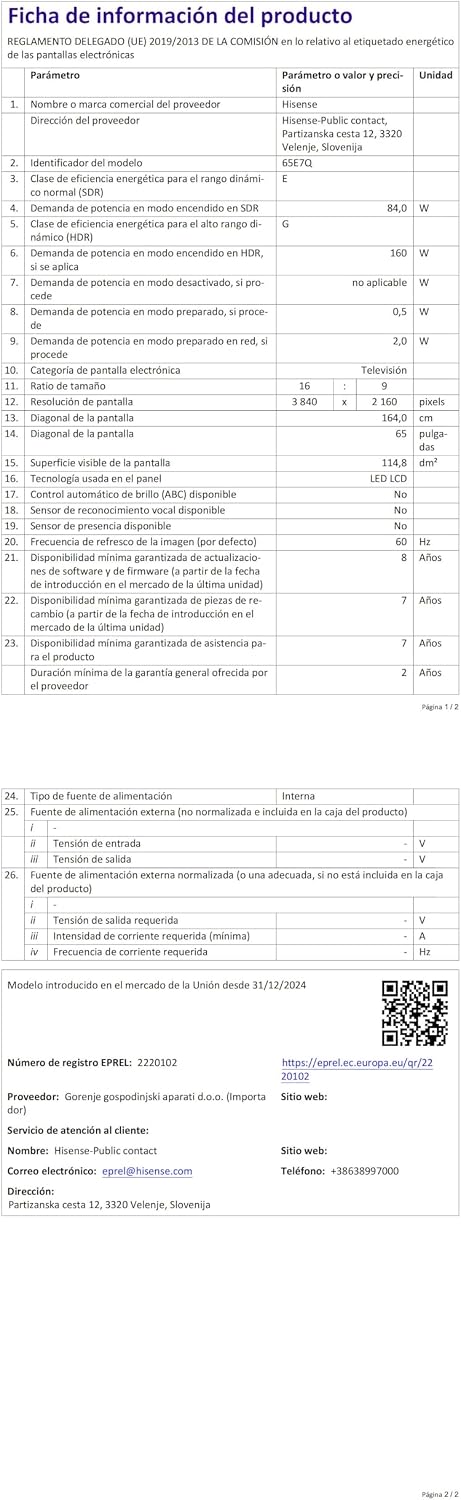
Energy label for the Hisense 65E7Q TV.
Pou plis enfòmasyon detaye sou pwodwi a, tanpri al gade baz done EPREL la: https://eprel.ec.europa.eu/qr/2220102
9. Garanti ak sipò
9.1 Pwodwi Garanti
This Hisense TV comes with a 3 ane garanti pwodwiTanpri konsève prèv acha ou a pou reklamasyon garanti a.
9.2 Disponibilite pyès rezèv
Spare parts for this model are guaranteed to be available in the EU for a duration of 10 ane from the product's market introduction.
9.3 Sipò pou Kliyan
For technical assistance, troubleshooting, or warranty service, please contact Hisense customer support. Refer to the contact information provided in your warranty card or visit the official Hisense websit pou rejyon ou an.