
Entwodiksyon
This manual provides detailed instructions for the safe and efficient operation of your HAYEAR 8MP Digital Microscope Camera, Model HY-6700. This high-performance camera is equipped with an 8MP sensor, capable of capturing images and videos in 4K Ultra HD and 1080P resolutions. It supports simultaneous USB and HDMI output, making it suitable for various applications including industrial inspection, laboratory research, quality control, and detailed observation with image and video recording capabilities. Please read this manual thoroughly before use and retain it for future reference.
Pwodwi souview
Karakteristik kle
- Segondè rezolisyon: 8MP sensor for 4K Ultra HD and 1080P image and video capture.
- Doub Sòti: Simultaneous USB and HDMI output for connection to PCs, monitors, or TVs.
- Aplikasyon versatile: Ideal for industrial inspection, laboratory observation, quality control, and educational purposes.
- Image & Video Recording: Features still image capture and video recording functions for detailed documentation.
- Sistèm konpatibilite: USB connection compatible with Windows, Mac OS, and Linux systems.
Kontni pake
Verifye ke tout atik ki nan lis anba a yo enkli nan pakè ou a:
- 1 x HAYEAR Digital Microscope Camera (Model HY-6700)
- 1 x HDMI kab
- 1 x USB kab
- 1 x manyèl enstriksyon

Figi 1: Package contents including the camera, HDMI cable, USB cable, and instruction manual.
Enstalasyon
Camera Interface and Buttons
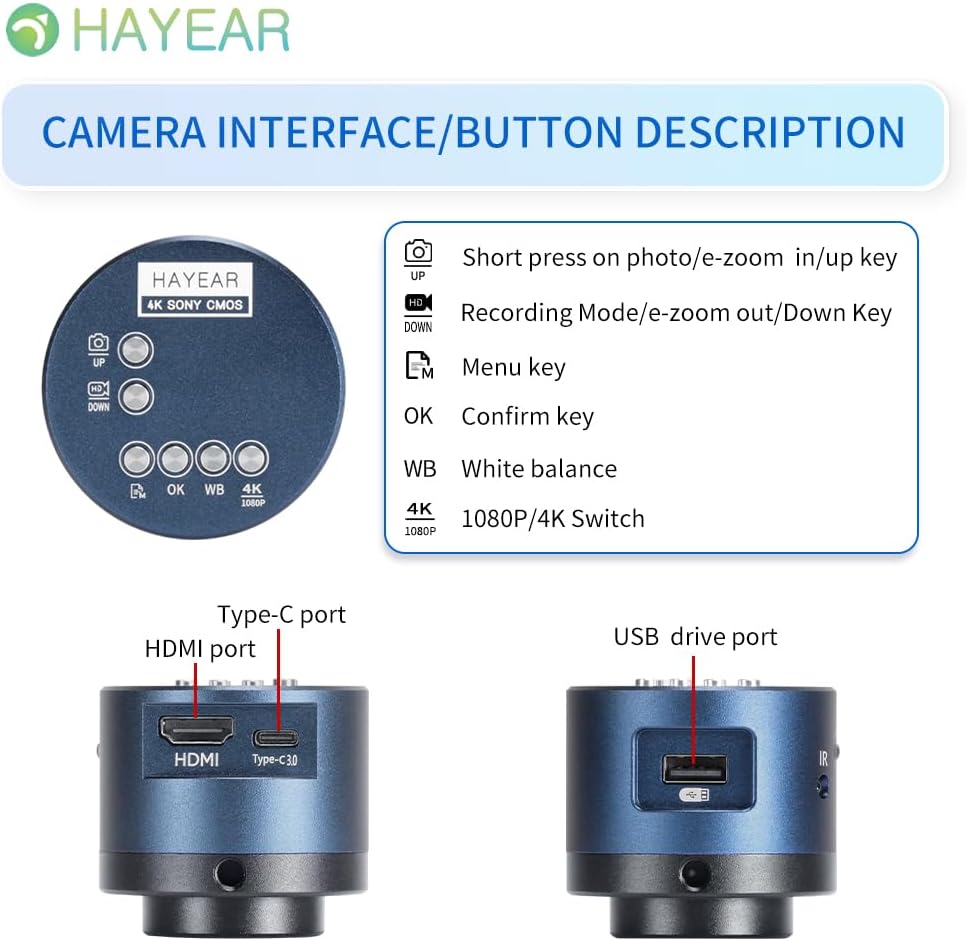
Figi 2: Plis paseview of the camera's control buttons and ports.
- Photo/E-Zoom In/Up Key: Short press to take a photo or zoom in. Use for navigation (Up).
- Recording Mode/E-Zoom Out/Down Key: Short press to switch to recording mode or zoom out. Use for navigation (Down).
- Meni kle: Aksè nan meni paramèt kamera a.
- OK kle: Konfime seleksyon oswa aksyon.
- WB (White Balance) Key: Adjust white balance settings.
- 4K/1080P Switch: Toggle between 4K and 1080P resolution output.
- HDMI Port: Connect to an HDMI display (monitor, TV).
- Kalite-C Port: Power input and data transfer.
- Pò kle USB: Connect to a computer for data transfer or use as a webCam.
Konekte ak yon ekspozisyon
The camera supports simultaneous HDMI and USB output. Choose the connection method suitable for your application.
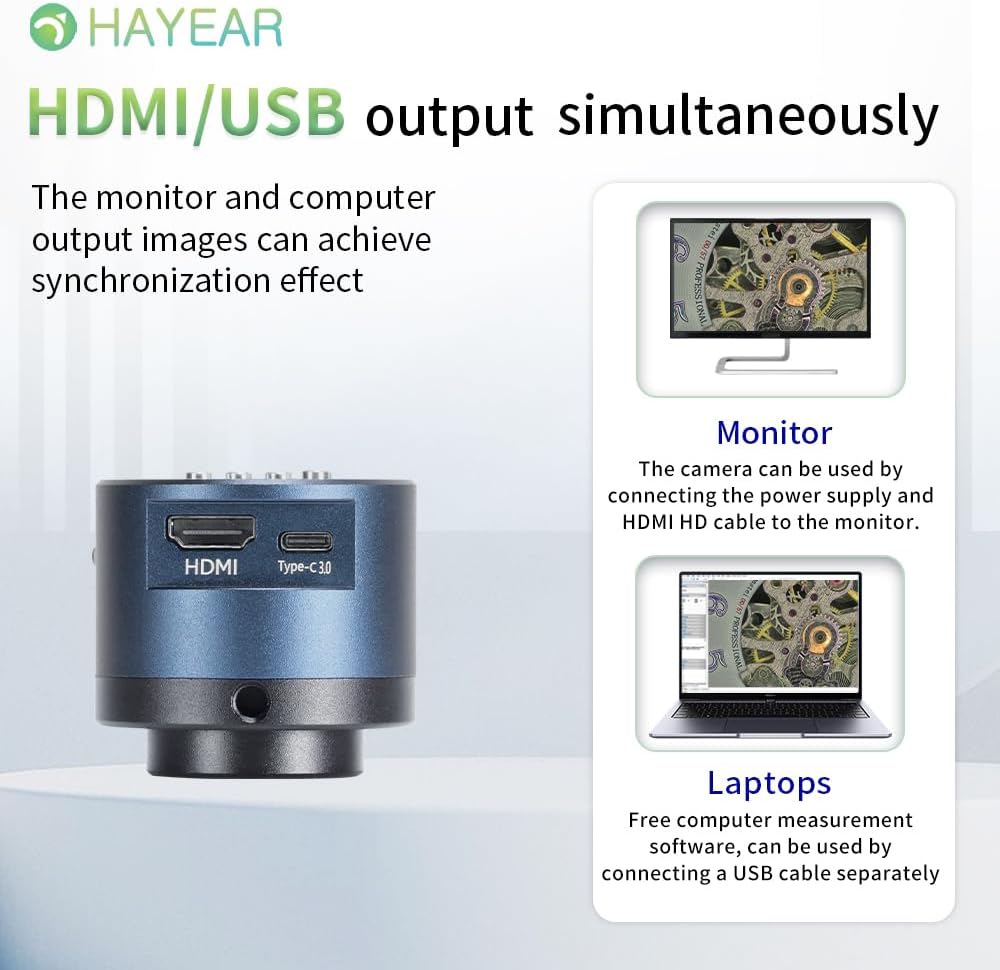
Figi 3: Illustrates simultaneous HDMI and USB output capabilities.
- Koneksyon HDMI: Connect the camera to an HDMI monitor or TV using the provided HDMI cable. Ensure the camera is powered via the Type-C port. This allows for direct display of the microscope's output.
- Koneksyon USB: Connect the camera to a computer (Windows, Mac, or Linux) using the provided USB cable. The camera can function as a webcam or be used with dedicated measurement software.
Limen / Off
The product powers on automatically when connected to a power source via the Type-C port. To turn off the device, disconnect the power plug from the camera or the power outlet.
Enstriksyon Operasyon
Operasyon debaz
- Lè w ap pran foto: Short press the "Photo/E-Zoom In/Up" key to capture a still image.
- Anrejistreman Videyo: Short press the "Recording Mode/E-Zoom Out/Down" key to switch to video recording mode, then press again to start/stop recording.
- Fonksyon Zoom: Use the "Photo/E-Zoom In/Up" key to zoom in and the "Recording Mode/E-Zoom Out/Down" key to zoom out.
- Resolution Switch: Press the "4K/1080P" key to toggle between 4K and 1080P output resolutions.
Ajisteman balans blan
To achieve accurate color representation, adjust the white balance using the WB key. For one-touch white balance adjustment:
- If the image appears with a blue tint, open the camera's one-touch white balance function.
- Place a white paper under the light source.
- Adjust the light source from its darkest setting gradually to its brightest.
- The camera will automatically adjust the blue tint to a normal white balance state.
Navigasyon Menu
Press the "Menu" key to access the camera's settings. Use the "Up" and "Down" keys to navigate through options and the "OK" key to select or confirm.
Antretyen
- Netwayaj: Sèvi ak yon twal mou epi sèk pou netwaye kò kamera a. Pou lantiy la, sèvi ak yon twal espesyal ak yon solisyon pou netwaye lantiy. Evite materyèl abrazif oswa pwodui chimik ki agresif.
- Depo: Store the camera in a dry, dust-free environment when not in use. Protect it from extreme temperatures and humidity.
- Manyen: Handle the camera with care to prevent physical damage. Avoid dropping or subjecting it to strong impacts.
Depanaj
Si ou rankontre pwoblèm, gade pwoblèm ak solisyon komen sa yo:
- Pa gen imaj sou ekran an:
- Asire w kamera a byen limen epi kab kouran an byen konekte.
- Check the HDMI or USB cable connection to both the camera and the display/computer.
- Verify that the display input source is correctly selected (e.g., HDMI 1, USB).
- Image Appears Blue/Incorrect Colors:
- Perform a one-touch white balance adjustment as described in the "Operating Instructions" section.
- Ensure the lighting conditions are stable and appropriate for observation.
- Cannot Record Images/Videos:
- Ensure a compatible TF memory card (up to 128GB) is inserted correctly into the camera.
- Tcheke si kat memwa a gen ase espas lib.
- Verify that you are in the correct recording mode.
- Camera Not Recognized by PC (USB):
- Asire w ke kab USB a byen konekte.
- Eseye konekte nan yon pò USB diferan sou òdinatè w lan.
- Restart your computer and the camera.
- Ensure your operating system (Windows/Mac/Linux) has the necessary drivers installed (usually plug-and-play).
Pou plis asistans, tanpri kontakte sipò teknik.
Espesifikasyon
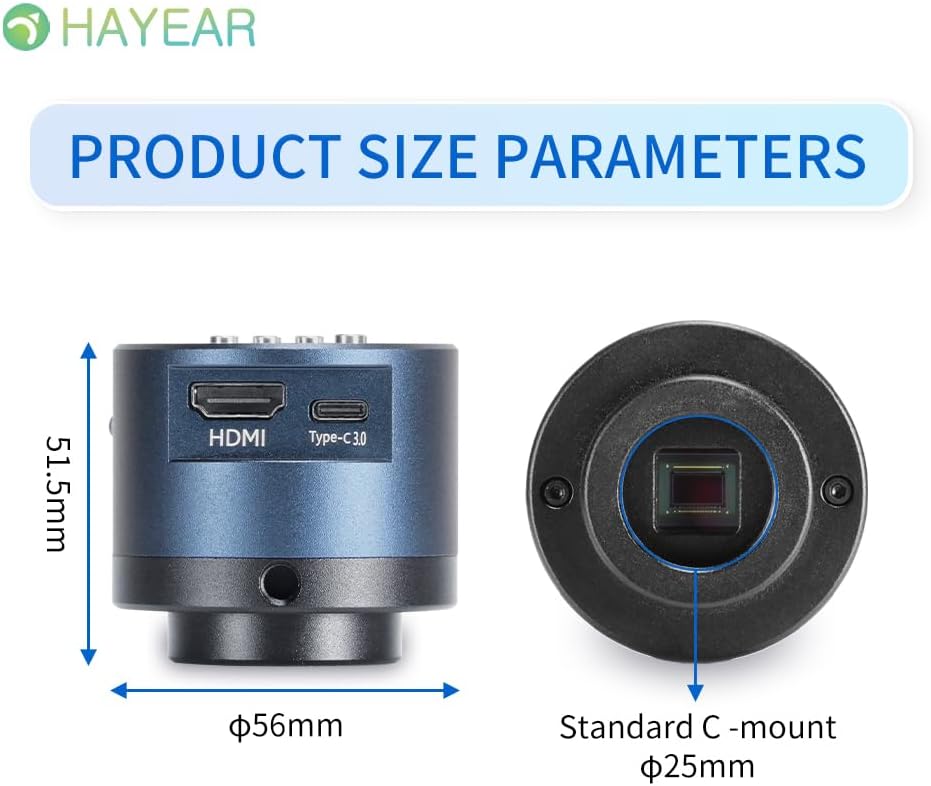
Figi 4: Dimensions of the HAYEAR Digital Microscope Camera.
| Karakteristik | Spesifikasyon |
|---|---|
| Modèl | HY-6700 |
| Capteur | 8 megapiksèl |
| Sòti videyo | 4K/2K/1080P (HDMI Output) |
| Gwosè Capteur | 1/2.8 pous |
| Gwosè piksèl | 2.0 x 2.0 µm |
| Rezolisyon | 3840x2160@30FPS (4K); 1920x1080P@30FPS |
| Anrejistreman videyo | Supports 4K video recording |
| USB Sòti | 1920x1080P@30FPS; 1280x720P@30FPS |
| Longèdonn | 400nm ~ 1000nm |
| Entèfas Sòti | HDMI / USB (Simultaneous Support) |
| Balans blan | One-touch / Auto / Manual |
| Kalite lantiy | Standard C/CS Interface |
| Depo | TF Memory Card, up to 128GB |
| Sipò pou PC | Windows / Mac / Linux Systems |
| Imaj Zoom | 7x Optical Zoom / Digital Zoom |
| Dimansyon | 15 x 15 x 8 cm (Product Size) |
| Pwa | 500 g |
| Antre pouvwa | 5 Volts |
Garanti ak sipò
Enfòmasyon sou Garanti
- All products undergo a thorough inspection before shipment to ensure quality.
- Customers are advised to inspect the package upon receipt.
- A one-year free warranty is provided for all machines. This warranty does not cover damage caused by human error or misuse.
Sipò teknik
Free technical support is always available. If you encounter any issues not covered in this manual or require further assistance, please contact HAYEAR customer service. Refer to the product packaging or official websit pou detay kontak.