
1. Entwodiksyon
Thank you for choosing the JUNJIEUNVO Q16 PRO Wireless Translation Earbuds. These earbuds are designed to provide a versatile audio experience, featuring real-time language translation, high-definition sound, and an open-ear design for comfort. This manual provides essential information for setting up, operating, and maintaining your device.
2. Pake kontni
- JUNJIEUNVO Q16 PRO Wireless Translation Earbuds (Left and Right)
- Charging Case with Smart Touch Screen
- Manyèl itilizatè
- Kab chaje (USB-C)
3. Pwodwi souview

Figi 3.1: JUNJIEUNVO Q16 PRO Wireless Translation Earbuds and Charging Case. This image displays the white and silver earbuds with their unique ear-hook design, alongside the charging case which features a digital display showing time and battery levels.
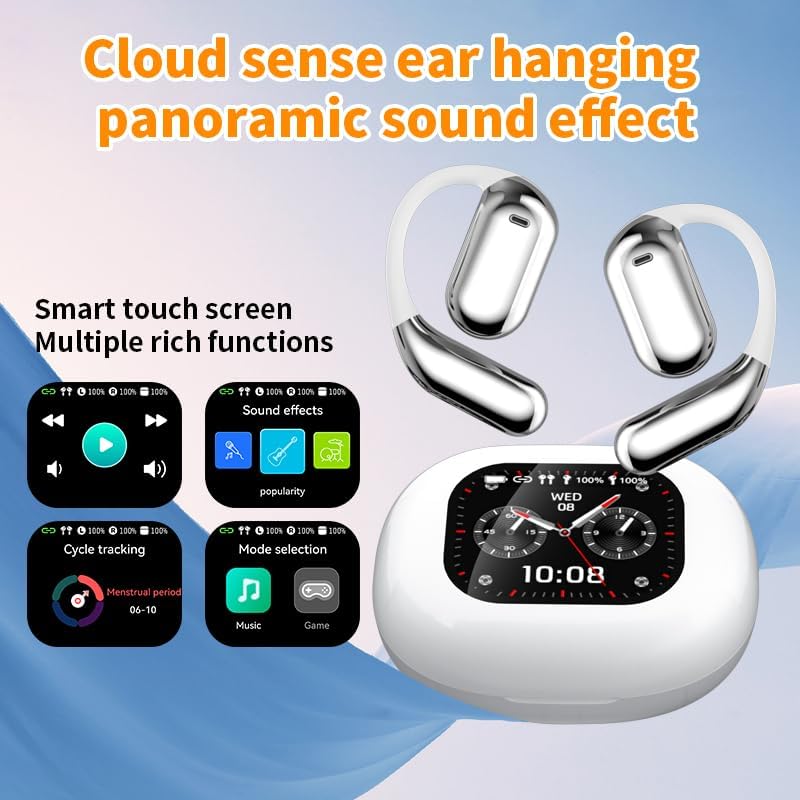
Figi 3.2: Smart Touch Screen Functions. This image highlights the charging case's smart touch screen, illustrating various functions such as media playback controls, sound effects, cycle tracking, and mode selection (music/game).

Figi 3.3: Environmental Noise Cancellation (ENC). This image depicts a person wearing the earbuds, with an overlay illustrating how the ENC technology reduces ambient noise by up to 99.44%, providing a clearer audio experience.

Figi 3.4: Open-Ear Design for Comfort. This image shows a person wearing the earbuds, emphasizing the open-ear design that offers comfort and allows for awareness of external sounds, protecting ear canal health.

Figi 3.5: Multiple Sound Adjustment Modes. This image displays the charging case's screen showing "Sound effects" with options for various music genres, indicating the ability to customize audio preferences.

Figi 3.6: Extended Battery Life and Rich Functions. This image showcases the earbuds and charging case, highlighting a 40-hour endurance with a 500mAh charging case capacity, along with a mention of multiple functions.

Figi 3.7: Earbuds and Charging Case (Open View). A detailed view of both earbuds and the open charging case, showing the internal design and charging contacts.

Figi 3.8: Earbuds in Charging Case. This image shows the earbuds securely placed within their charging case, ready for charging or storage.

Figi 3.9: Earbuds and Charging Case (Angled View). Another perspective of the earbuds and charging case, emphasizing their sleek design and compact form factor.
4. Enstalasyon
4.1 Chaje ekoutè yo ak bwat la
Anvan premye itilizasyon an, chaje ekoutè yo ak bwat chaje a nèt.
- Mete ekoutè yo nan bwat chaje a. Asire w ke yo byen chita nan plas respektif yo (L pou goch, R pou dwat).
- Connect the charging cable to the USB-C port on the charging case and to a power source.
- Ekran dijital ki sou bwat chaje a ap endike eta chaj la.
A full charge for the earbuds takes approximately 1.5 hours. The charging case has a 500mAh battery, providing extended use.
4.2 Pairing ak yon Aparèy
The earbuds use Bluetooth 5.4 for a stable connection up to 10 meters.
- Louvri bwat chaje a. Ekoutè yo ap antre otomatikman nan mòd koneksyon.
- Sou aparèy ou an (telefòn entelijan, tablèt, elatriye), aktive Bluetooth.
- Chèche pou available Bluetooth devices and select "Q16 PRO" from the list.
- Once connected, the earbuds will indicate successful pairing, and the device will show them as connected.
Ekoutè yo ap konekte otomatikman ak dènye aparèy ki te konekte a lè yo retire yo nan bwat la, si Bluetooth aktive sou aparèy la.
5. Operasyon Enstriksyon
5.1 Smart Touch Screen Functions
The charging case features a smart touch screen for easy control of various functions. Navigate through options by swiping or tapping on the screen.
- Media lèktur: Control music (play, pause, skip tracks) directly from the screen.
- Efè son: Select from various sound modes.
- Seleksyon mòd: Switch between music and game modes.
- Suivi sik: Access additional features if supported by the connected application.
5.2 Touch Controls (Earbuds)
The earbuds themselves also feature touch-sensitive areas for basic controls:
- Tap sèl: Jwe/Mete mizik sou poz, Reponn/Fen apèl.
- Tape de fwa (agoch): Track Previous.
- Tape de fwa (Adwat): Pwochen tras.
- Long Press: Aktive asistan vwa a, Rejte apèl la.
5.3 Translation Function
The Q16 PRO earbuds support real-time translation for up to 144 languages. This feature typically requires a dedicated application on your connected smartphone.
- Download and install the companion translation application (refer to the app store or product packaging for details).
- Open the application and follow the on-screen instructions to connect your earbuds.
- Select the desired source and target languages within the application.
- Use the earbuds as instructed by the application for real-time translation during conversations or audio playback.
5.4 Sound Adjustment Modes
Customize your audio experience through the charging case's smart touch screen. Available sound modes include:
- Nòmal
- Pop
- Wòch
- Jazz
- Klasik
- Folk
- Custom (user-defined equalizer settings)
5.5 IPX5 Enpèmeyab Evalyasyon
The earbuds are rated IPX5 waterproof, meaning they are resistant to splashes and sweat. They are suitable for sports and outdoor activities but should not be submerged in water.
6. Antretyen
- Netwayaj: Use a soft, dry cloth to clean the earbuds and charging case. Avoid using abrasive materials or harsh chemicals.
- Depo: Sere ekoutè yo nan ka chaje yo lè yo pa itilize pou pwoteje yo epi kenbe yo chaje.
- Evite tanperati ekstrèm: Do not expose the device to extreme heat or cold, as this can damage the battery and internal components.
- Ekspozisyon dlo: While IPX5 rated, avoid prolonged exposure to water or high humidity. Ensure the charging port is dry before charging.
NAN. Depanaj
| Pwoblèm | Solisyon posib |
|---|---|
| Ekoutè pa asosye | Ensure earbuds are charged. Turn off and on Bluetooth on your device. Forget "Q16 PRO" from your device's Bluetooth list and re-pair. |
| Pa gen son nan yon sèl ekoutè | Check battery level of both earbuds. Place both earbuds back in the case, close it, then reopen to reset. Re-pair with your device. |
| Ka chaje pa chaje | Ensure the charging cable is securely connected. Try a different USB-C cable and power adapter. |
| Fonksyon tradiksyon an pa fonksyone | Ensure the companion app is installed and updated. Check app permissions (microphone, internet). Verify a stable internet connection. |
| Move son kalite | Ensure earbuds are clean. Check the distance to your device (within 10m). Avoid obstacles between earbuds and device. |
8. Espesifikasyon
| Karakteristik | Detay |
|---|---|
| Non modèl | YYK-Q16 PRO |
| Bluetooth vèsyon | V5.4 + EDR |
| Chip | Blue Flood |
| Pwotokòl sipòte | AVRCP V1.6, A2DP V1.3, HFP V1.7, Simultaneous LE and BR / EDR |
| Usage/Playback Time | Apeprè 8 èdtan (nan 80% volim) |
| Tan sibstiti | 80 èdtan |
| Tan pou chaje | Apeprè 1.5 èdtan |
| Distans san fil | 10 mèt |
| Kapasite batri ekouteur | 40mAh (chak ekoutè) |
| Chaje Ka Batri Kapasite | 500mAh |
| Evalyasyon ki enpèmeyab | IPX5 |
| Pwa atik | 6.4 ons (total) |
| UPC | 884613749637 |
| Manifakti | UNVO |
| Koulè | Blan + Ajan |
| Plasman Zòrèy | On Ear (Open-wear design) |
| Faktè fòm | Vrè Wireless |
9. Garanti ak sipò
Pou enfòmasyon sou garanti a ak sipò kliyan, tanpri al gade dokiman ki vini ak acha ou a oswa kontakte détayan/fabrikan an dirèkteman. Kenbe prèv acha ou a pou nenpòt reklamasyon garanti.