
Entwodiksyon
Thank you for choosing the Pro Breeze 25L Smart Dehumidifier. This appliance is designed to efficiently remove excess moisture from your indoor environment, helping to prevent mold, mildew, and dampness. Featuring smart Wi-Fi connectivity, a digital display, and multiple operating modes, this dehumidifier offers advanced control and convenience. Please read this manual thoroughly before operation to ensure safe and optimal performance.
Enstriksyon Sekirite Enpòtan
Toujou swiv prekosyon sekirite debaz yo lè w ap itilize aparèy elektrik pou diminye risk dife, chòk elektrik, ak blesi.
- Asire ke ekipman pou pouvwa a matche ak voltage espesifye sou etikèt evalyasyon an.
- Pa sèvi ak dezimidifikatè a si kòd la oswa ploge a domaje.
- Keep the appliance at least 20 cm (8 inches) away from walls and other objects to ensure proper airflow.
- Pa plonje aparèy la, kòd kouran an, oswa ploge a nan dlo oswa lòt likid.
- Debranche dezimidifikatè a anvan ou netwaye li, fè antretyen, oswa lè w pa ap itilize li.
- Aparèy sa a se pou itilize andedan kay la sèlman.
- Pa bloke inlet oswa priz lè a.
- Sipèvize timoun yo epi asire yo pa jwe ak aparèy la.
- Pa eseye repare oswa modifye aparèy la tèt ou. Kontakte pèsonèl sèvis kalifye.
Karakteristik pwodwi

Image: The Pro Breeze 25L Smart Dehumidifier, showcasing its compact design and highlighting features such as Wi-Fi compatibility, 25L extraction rate, energy efficiency, and laundry mode. Dimensions are also indicated.
- Dezumidifikasyon pwisan: Extracts up to 25 liters of moisture per day, effectively combating persistent humidity, mold, and condensation in large rooms.
- Gwo tank dlo: Features a 5.5-liter water tank with automatic shut-off when full. A drainage hose is included for continuous operation.
- Enèji efikas: Utilizes a high-performance compressor, 24-hour timer, and automatic stop system to reduce energy consumption.
- Operasyon trankil: Designed with silent technology, making it suitable for use in bedrooms, living rooms, offices, and other quiet environments.
- Smart Control via App: Manage all functions remotely using the free Pro Breeze app or voice commands with Alexa and Google Home (compatible with iPhone and Android).
- Digital Display & Humidity Sensor: An intuitive LED screen allows selection of fan speed and humidity levels between 30% and 80%. The smart sensor displays real-time humidity and automatically stops the dehumidifier once the target is reached.
- Mòd operasyon miltip: Includes a 24-hour timer and 4 operating modes, including a dedicated Mòd siye lesiv. Also features a Timoun Lock, Automatic Defrost Mode, ak Ekspozisyon lannwit.

Image: The Pro Breeze dehumidifier positioned next to a large 25-liter water bottle, visually representing its daily moisture extraction capacity and the benefit of fewer tank emptying cycles.
Kontni pake
Tanpri tcheke kare a pou atik sa yo:
- Pro Breeze 25L Smart Dehumidifier Unit
- Kawoutchou drenaj kontinyèl
- Manyèl itilizatè
Enstalasyon
- Debake: Retire dezumidifikatè a nan anbalaj li avèk prekosyon. Kenbe anbalaj la pou depo oswa transpò pita.
- Plasman: Place the dehumidifier on a firm, level surface. Ensure there is at least 20 cm (8 inches) of clear space around the air inlet and outlet to allow for efficient airflow. Avoid placing it near heat sources or in direct sunlight.
- Koneksyon pouvwa: Branche kòd kouran an nan yon priz elektrik ki gen tè. Asire w vòltaj latage koresponn ak egzijans inite a.
- Enstalasyon tank dlo: Asire w ke tank dlo a byen mete nan aparèy la. Dezimidifikatè a p ap fonksyone si tank la pa byen chita oswa si li plen.
- Drenaj kontinyèl (opsyonèl): For continuous operation without emptying the tank, connect the provided drainage hose to the continuous drainage port on the back of the unit. Route the hose to a suitable drain, ensuring it is sloped downwards to allow water to flow freely.
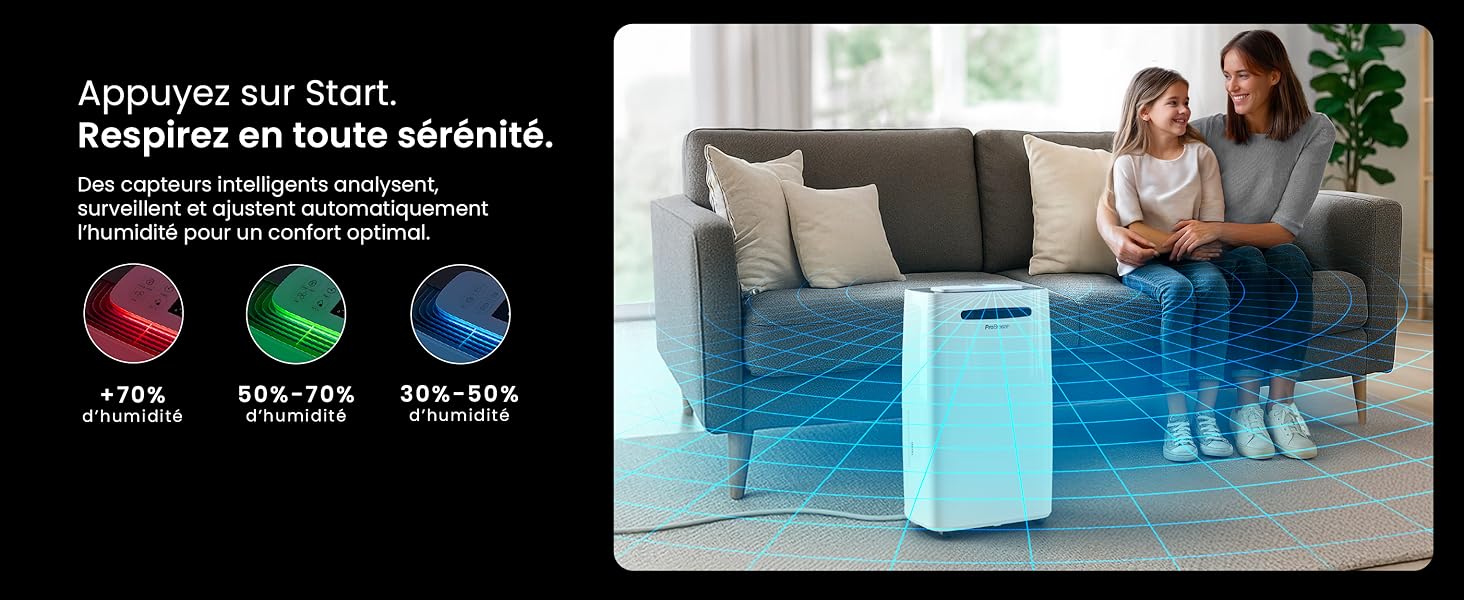
Image: The dehumidifier shown in different environments such as a garage, home office, and laundry room, illustrating its versatility and suitability for various spaces. Icons for continuous drainage and automatic defrost are also present.
Enstriksyon Operasyon
Kontwòl Panel Plis paseview

Imaj: Yon imaj detaye view of the dehumidifier's illuminated digital control panel, showing buttons for power, mode, fan speed, timer, child lock, and humidity settings, along with the LED display.
The intuitive LED display and touch controls allow for easy operation.
- Bouton pouvwa: Peze pou limen oswa etenn inite a.
- bouton mòd: Cycle through available operating modes: Nòmal, Siye lesiv, ak Mòd lannwit.
- Bouton vitès fanatik: Adjust the fan speed between Ba epi Segondè.
- Humidity Setting (SET %): Use the up/down arrows to set your desired humidity level (30% - 80%). The unit will operate until this level is reached.
- Bouton revèy: Set a 24-hour timer for automatic power ON or OFF.
- Bouton pou fèmen timoun: Press and hold to activate/deactivate the child lock, preventing accidental changes to settings.
- Bouton ekspozisyon: Turn the LED display lights ON or OFF, useful for night mode.
Wi-Fi ak kontwòl aplikasyon

Image: A user interacting with the Pro Breeze mobile application on a smartphone, demonstrating remote control capabilities for the dehumidifier. The app shows current humidity and temperature settings.
The Pro Breeze 25L Smart Dehumidifier can be controlled remotely via the Pro Breeze app. Download the app from your smartphone's app store and follow the in-app instructions to connect your device to your home Wi-Fi network. Once connected, you can control all functions, set schedules, and monitor humidity levels from anywhere.
The unit is also compatible with Amazon Alexa and Google Home for voice control. Refer to the app's help section for detailed instructions on integrating with these smart home platforms.
Antretyen
Vide tank dlo a
When the water tank is full, the dehumidifier will automatically shut off and an indicator light will illuminate. Carefully remove the water tank from the unit, empty the collected water, and reinsert the tank securely. The unit will resume operation.
Netwaye filtè lè a
A clogged filter can reduce efficiency. It is recommended to clean the air filter every two weeks or more frequently depending on usage and air quality.
- Etenn dezumidifikatè a epi debranche li nan priz kouran an.
- Jwenn epi retire filtè lè a (anjeneral li sou do oswa sou kote aparèy la).
- Netwaye filtè a avèk yon aspiratè oubyen lave l dousman avèk dlo tyèd savon.
- Rense filtè a byen epi kite l seche nèt nan lè a anvan ou mete l tounen nan aparèy la.
Netwaye Eksteryè a
Siye eksteryè dezimidifikatè a ak yon mou, damp twal. Pa sèvi ak pwodui chimik ki agresif, pwodui netwayaj abrazif, oswa solvan, paske sa yo ka domaje sifas la.
Depo
If storing the unit for an extended period, ensure the water tank is empty and clean, and the filter is clean and dry. Store the dehumidifier in a cool, dry place, preferably in its original packaging.
Depanaj
| Pwoblèm | Kòz posib | Solisyon |
|---|---|---|
| Dezumidifikatè a pa limen. | No power; water tank full or incorrectly inserted; ambient temperature too low. | Check power connection; empty and reinsert water tank; ensure room temperature is above 5°C (41°F). |
| Aparèy la ap mache men li pa kolekte dlo. | Humidity level too low; air filter clogged; room temperature too low; unit size too small for space. | Adjust desired humidity setting lower; clean air filter; ensure room temperature is adequate; consider if unit is appropriate for room size. |
| Inite a fè bwi. | Unit not on a level surface; air filter clogged; internal components vibrating. | Place on a flat, stable surface; clean air filter; if noise persists, contact support. |
| Pwoblèm koneksyon Wi-Fi. | Incorrect Wi-Fi password; unit too far from router; router issues; app issues. | Verify Wi-Fi password; move unit closer to router; restart router; reinstall Pro Breeze app. |
| Jèl parèt sou bobin yo. | Tanperati anbyen ki ba. | The unit has an automatic defrost function. If frost persists, increase room temperature. |
Espesifikasyon
| Spesifikasyon | Detay |
|---|---|
| Nimewo Modèl | PB-D-37W-W-EU |
| Mak | Pro Breeze |
| Moisture Extraction Capacity | 25 Lit/jou |
| Kapasite tank dlo | 5.5 lit |
| Dimansyon (L x W x H) | 38.6 cm x 26 cm x 50 cm |
| Pwa | 15.1 Kilogram |
| Vitès fanatik | 2 |
| Karakteristik espesyal | Adjustable Humidity Control, Night Mode, Continuous Drainage, Wi-Fi Connectivity, Digital Display, 24h Timer, Laundry Drying Mode, Child Lock, Automatic Defrost |
| Sifas Planche Rekòmande | Jiska 322 pye kare (30 m²) |

Image: The Pro Breeze dehumidifier highlighting its elegant and discreet design, along with its dimensions (50cm H, 38.6cm L, 26cm P) and four easy-to-move caster wheels.
Garanti ak sipò
Pro Breeze products are manufactured to the highest standards. This product comes with a standard manufacturer's warranty. For specific warranty details, please refer to the warranty card included in your package or visit the official Pro Breeze websit.
If you encounter any issues or have questions regarding your dehumidifier, please contact Pro Breeze customer support. Contact information can typically be found on the Pro Breeze websit la oubyen sou anbalaj pwodwi a.