
1. Entwodiksyon
This manual provides detailed instructions for the safe and effective use of your TOTAL TMT57026 Laser Distance Meter. Please read this manual thoroughly before operating the device and keep it for future reference. This device is designed for accurate distance measurements up to 70 meters, suitable for various professional and DIY applications.
2. Enstriksyon Sekirite
- Radyasyon lazè: This device emits Class 2 laser radiation. Do not stare into the laser beam or direct it at other people or animals.
- Pwoteksyon je: Evite ekspoze je dirèk nan reyon lazè a.
- Anviwònman Fonksyònman: Pa sèvi ak aparèy la nan atmosfè eksplozif oswa toupre materyèl ki ka pran dife.
- Rezistans dlo: Aparèy sa a se pa reziste dloEvite ekspoze a dlo oswa imidite ki wo.
- Antretyen: Only qualified personnel should repair the device.
- Batri: Use only specified AAA batteries. Do not mix old and new batteries or different types of batteries.
3. Pwodwi souview
Familiarize yourself with the components of your TOTAL TMT57026 Laser Distance Meter.
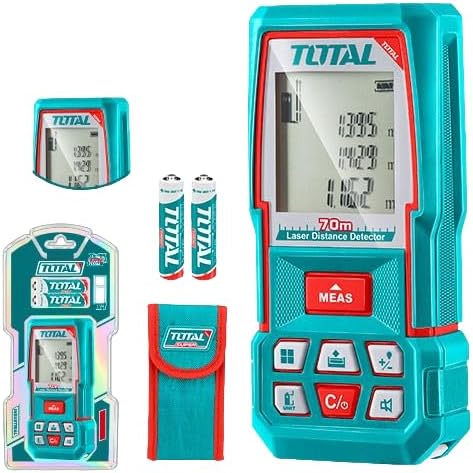
Figure 1: The TOTAL TMT57026 Laser Distance Meter, showing the device itself, two AAA batteries, a carrying pouch, and retail packaging. The device features a digital display and multiple function buttons.
Konpozan kle:
- Emetè/Reseptè Lazè: Sitiye anlè aparèy la.
- Ekspozisyon ekran: Shows measurements, units, and mode indicators.
- Bouton MEAS: Initiates single or continuous measurement.
- Bouton UNIT: Changes measurement units (e.g., meters, feet, inches).
- C/O Button: Clears the last measurement or turns the device off.
- Bouton Fonksyon: For area, volume, addition, subtraction, and other calculations.
- Lòj batri: Sitiye nan dèyè aparèy la.
4. Enstalasyon
4.1 Enstalasyon batri
- Jwenn kouvèti konpatiman batri a sou dèyè aparèy la.
- Glise oswa deklipe kouvèti a pou louvri li.
- Insert two (2) AAA 1.5V disposable batteries, ensuring correct polarity (+/-). The device includes two AAA batteries.
- Fèmen kouvèti lòj batri a byen.
4.2 Limen/Etenyen
- Pou limen: Peze a MEAS Peze bouton an yon ti moman. Ekran an ap limen.
- Pou etenn: Peze epi kenbe la C/O bouton an pou apeprè 3 segonn. Aparèy la ap etenn otomatikman apre yon peryòd inaktivite pou konsève lavi batri a.
5. Operasyon Enstriksyon
5.1 Mezi Distans Debaz
- Asire w ke aparèy la limen.
- Dirije reyon lazè a sou sifas sib la.
- Peze a MEAS button once. The laser will activate, and the measurement will appear on the display.
- The measurement will be held on the screen until a new measurement is taken or the device is turned off.
5.2 Mezi Kontinyèl (Swiv)
- Peze epi kenbe la MEAS bouton pou apeprè 2 segonn.
- The device will enter continuous measurement mode, displaying real-time distance as you move the device.
- Peze a MEAS button again to stop continuous measurement and hold the last value.
5.3 Chanje Inite Mezi yo
- Peze a INITE button repeatedly to cycle through available units: meters (m), feet (ft), and inches (in).
- Inite ki chwazi a ap parèt sou ekran an.
5.4 Mezi Sifas ak Volim
The device supports calculation of area and volume. Refer to the icons on the function buttons for specific modes.
- Press the appropriate function button (e.g., the button with the square icon for area, or cube icon for volume).
- Follow the on-screen prompts to take the required measurements (e.g., length, width for area; length, width, height for volume).
- The calculated result will be displayed.
5.5 Adisyon ak Soustraksyon
Sèvi ak la +/- button to add or subtract measurements.
- Pran premye mezi a.
- Peze a +/- button to select addition or subtraction mode.
- Take the second measurement. The device will automatically perform the calculation and display the result.
6. Antretyen
6.1 Netwayaj
- Siye aparèy la ak yon mou, damp twal. Pa sèvi ak pwodui netwayaj abrazif oswa solvang.
- Netwaye lantiy lazè a ak anpil atansyon avèk yon twal mou ki pa gen pousyè, menm jan ak netwaye lantiy kamera yo.
6.2 Depo
- Sere aparèy la nan yon kote ki sèk epi fre, lwen limyè solèy dirèk ak tanperati ekstrèm.
- Si w ap sere l pou yon bon bout tan, retire pil yo pou anpeche yo koule.
6.3 Ranplasman batri
- When the battery indicator on the display shows low power, replace both AAA batteries following the instructions in Section 4.1.
NAN. Depanaj
| Pwoblèm | Kòz posib | Solisyon |
|---|---|---|
| Aparèy pa limen. | Pil yo mouri oswa yo mal enstale. | Tcheke polarite pil yo oubyen ranplase yo ak nouvo pil AAA. |
| Mezi ki pa kòrèk. | Laser lens is dirty; target surface is too reflective/non-reflective; device is unstable. | Clean the laser lens. Measure against a suitable, stable surface. Ensure device is held steady. |
| Reyon lazè a pa vizib. | Limyè anbyen klere; lazè a etenn. | Operate in lower light conditions. Ensure device is powered on and MEAS button is pressed. |
| Ekran an montre yon kòd erè. | Mezi a pa nan limit la; erè entèn. | Ensure target is within 0.05m to 70m range. Try restarting the device. If error persists, contact support. |
8. Espesifikasyon
- Modèl: TMT57026
- Mak: TOTAL
- Ranje mezi: 0.05 a 70 mèt
- Inite Mezi: Mèt (m), Pye (ft), Pous (in)
- Klas lazè: Klas 2
- Batri: 2 x AAA, 1.5V (included)
- Kalite batri: Jetab
- Automatic Laser Shut-off: Wi (apre inaktivite)
- Automatic Device Shut-off: Wi (apre inaktivite)
- Dimansyon pwodwi: Apeprè 17 x 5 x 0.1 cm
- Pwa atik: Approximately 160 g (0.16 Kilograms)
- Materyèl: Plastik
- Koulè: Turkwaz
- Nivo rezistans dlo: Pa reziste dlo
- Manifakti: Total
- Peyi orijin: Lachin
9. Garanti ak sipò
For warranty information and technical support, please contact TOTAL customer service. Keep your purchase receipt as proof of purchase.
For further assistance, please refer to the official TOTAL websit la oubyen kontakte distribitè lokal ou a.