
1. Entwodiksyon
Thank you for choosing the VGR V-992 Professional Hair Trimmer. This device is engineered for precision grooming, offering both corded and cordless operation. It features advanced ceramic and DLC-coated blades, a powerful 9000 RPM motor, and an intuitive LED display. This manual provides essential information for safe and effective use, maintenance, and troubleshooting.
2. Pwodwi souview ak Konpozan
The VGR V-992 trimmer comes with a comprehensive set of accessories to enhance your grooming experience.

Image 1: VGR V-992 Trimmer with charging base, guide combs, oil, and cleaning brush.
Atik ki enkli:
- Tondeuz cheve VGR V-992
- Chaje baz
- 3 Guide Combs (1mm, 2mm, 3mm)
- Netwayaj Bwòs
- Lubrifyan lwil oliv
- USB Kalite-C Chaje Kab
- Pwoteksyon Cap

Image 2: All components of the VGR V-992 grooming kit.
3. Enstalasyon
Premye chaj:
Before first use, fully charge the trimmer. Connect the USB Type-C cable to the charging base and then to a 5V-1A USB power adapter (not included) or a power bank/laptop. Place the trimmer on the charging base. The LED display will indicate the charging status. A full charge takes approximately 2.5 hours and provides up to 240 minutes of cordless operation.
Image 3: The VGR V-992 Trimmer placed on its charging base.
Atache peny gid yo:
Select the desired guide comb (1mm, 2mm, or 3mm) for your preferred hair length. Align the comb with the trimmer blade and push it firmly until it clicks into place. To remove, gently pull the comb away from the blade.
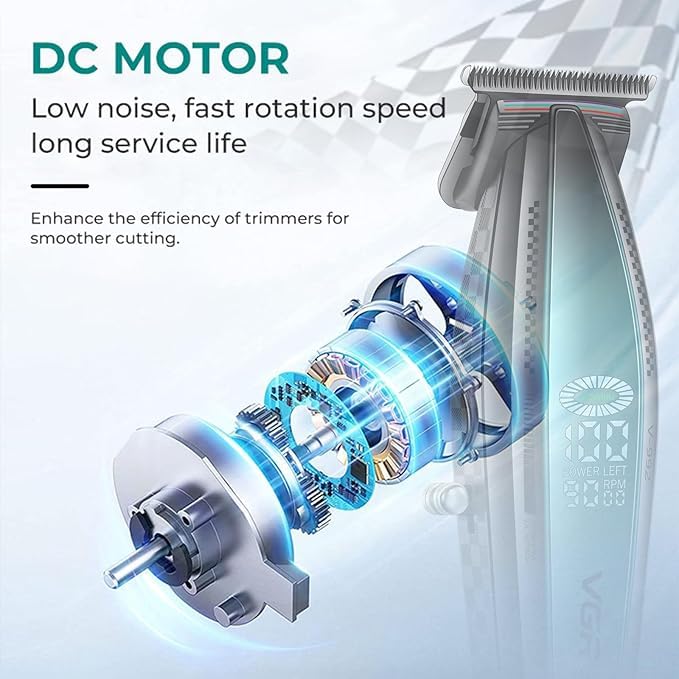
Image 4: The three guide combs for varying hair lengths.
4. Operasyon Enstriksyon
Limen/Etenyen:
Press the power button to turn the trimmer on. Press it again to turn it off.
Sèvi ak taye a:
- Ensure the trimmer is charged or connected to power for corded use.
- Attach the appropriate guide comb for your desired hair length.
- Hold the trimmer with the blades facing the area to be trimmed.
- Move the trimmer against the direction of hair growth for an even and effective trim.
- For detailing or edging, remove the guide comb and use the bare blade carefully.
Dirije ekspozisyon:
Ekspozisyon entelijan LED la bay enfòmasyon an tan reyèl:
- Batri Percentage: Montre lavi ki rete batri a.
- Vitès motè (rpm): Indicates the current operating speed of the motor.
- Avètisman antretyen: May display indicators for cleaning or oiling the blades.

Image 5: The LED display showing battery level and motor speed.

Image 6: Illustration emphasizing the high-speed 9000 RPM motor.
5. Antretyen
Regular maintenance ensures optimal performance and extends the lifespan of your trimmer.
Netwaye lam yo:
- After each use, turn off and unplug the trimmer.
- Use the provided cleaning brush to remove any loose hairs from the blades.
- For a more thorough cleaning, the blades can be carefully detached and rinsed under running water. Ensure they are completely dry before reattaching.
Lubrifyan lam yo:
Apply a few drops of the provided lubricating oil to the blades after every few uses or after cleaning. Turn the trimmer on for a few seconds to allow the oil to distribute evenly. This helps maintain smooth operation and prevents rust.
Depo:
Store the trimmer in a cool, dry place. Always use the protection cap to cover the blades when not in use to prevent damage and ensure safety.
6. Enfòmasyon sou Sekirite
- Keep the trimmer away from water, heat, and fire to prevent damage or hazards.
- Deploge régler la anvan w netwaye.
- Use only a 5V-1A charger for safe charging.
- This product is not intended for use by children. Store safely to avoid accidents.
- Always clean and lubricate the blades for optimal performance and longevity.
- Discontinue use if irritation or discomfort occurs.
NAN. Depanaj
If you encounter any issues with your VGR V-992 trimmer, please refer to the following common solutions:
- Trimmer pa limen: Asire w batri a chaje. Si w ap itilize aparèy la ak fil, tcheke koneksyon kouran an.
- Pèfòmans koupe ki pòv: Clean the blades thoroughly to remove any trapped hair. Apply lubricating oil to the blades. Ensure the guide comb is correctly attached.
- Twòp bri oswa Vibration: This may indicate a need for blade cleaning and lubrication. If the issue persists, contact customer support.
- Batri pa chaje: Verify the USB Type-C cable and charging base are properly connected. Ensure the power adapter is 5V-1A.
8. Espesifikasyon
| Karakteristik | Detay |
|---|---|
| Nimewo Modèl | V-992 Professional |
| Materyèl lam | Ceramic & DLC-Coated Blades |
| Vitès motè | 9000 RPM |
| Sous pouvwa | Battery Powered (Cordless & Corded) |
| Kalite batri | 2000mAh ityòm batri |
| Tan pou chaje | 2.5 èdtan |
| Tan operasyon | Jiska 240 minit |
| Entèfas chaje | USB Kalite-C |
| Gid peny | 1mm, 2mm, 3mm |
| Pwa atik | 241 gram |
| Dimansyon pwodwi | 15.4 x 3.8 x 3.3 santimèt |
| Peyi orijin | Lachin |
9. Garanti ak sipò
This product comes with a standard brand warranty. For any warranty claims, technical support, or inquiries, please contact VGR customer service.
Enfòmasyon pou kontakte:
- Imèl: customercare@vgrofficial.in
- Telefòn: 18002578939
- Websit: www.vgrofficial.in
- Orè operasyon: 10:00 AM to 6:00 PM, Monday to Saturday
Extended warranty plans may be available for purchase. Please refer to the product detail page or contact customer support for more information.