
1. Entwodiksyon
This manual provides detailed instructions for the installation, operation, and maintenance of your ANNKE AU-DT81DX200-V1 4K 8-Channel Digital Video Recorder (DVR). This DVR is designed for security surveillance systems, offering 4K (8MP) high-definition live viewing and recording capabilities. It features advanced H.265+ video compression, AI human/vehicle detection, and supports various camera types for flexible integration.

Image 1.1: The ANNKE 4K 8CH DVR connected to a display, illustrating its 4K Ultra HD video capability.
2. Pake kontni
Verify that all items listed below are included in your package. If any items are missing or damaged, contact ANNKE customer support.
- 1x ANNKE 4K 8CH DVR with 2TB Hard Drive
- 1x 5.9 ft/1.8 m HDMI Cable
- 1x 3.2 ft/1 m Ethernet Cable
- 1x pouvwa adaptè
- 1x USB sourit
- 1x Manyèl Itilizatè (dokiman sa a)
- 1x Sticker Miray

Image 2.1: Visual representation of all components included in the ANNKE 4K 8CH DVR package.
3. Sistèm finiview
The ANNKE AU-DT81DX200-V1 DVR is a hybrid 5-in-1 system, supporting various camera technologies. It can operate in two primary modes:
- DVR mòd: Supports up to 8 BNC (TVI/AHD/CVI/CVBS) cameras and an additional 4 IP cameras.
- Mòd NVR: Can be configured to support up to 12 IP cameras exclusively.
This flexibility allows for integration with existing analog systems while providing options for future IP camera expansion.
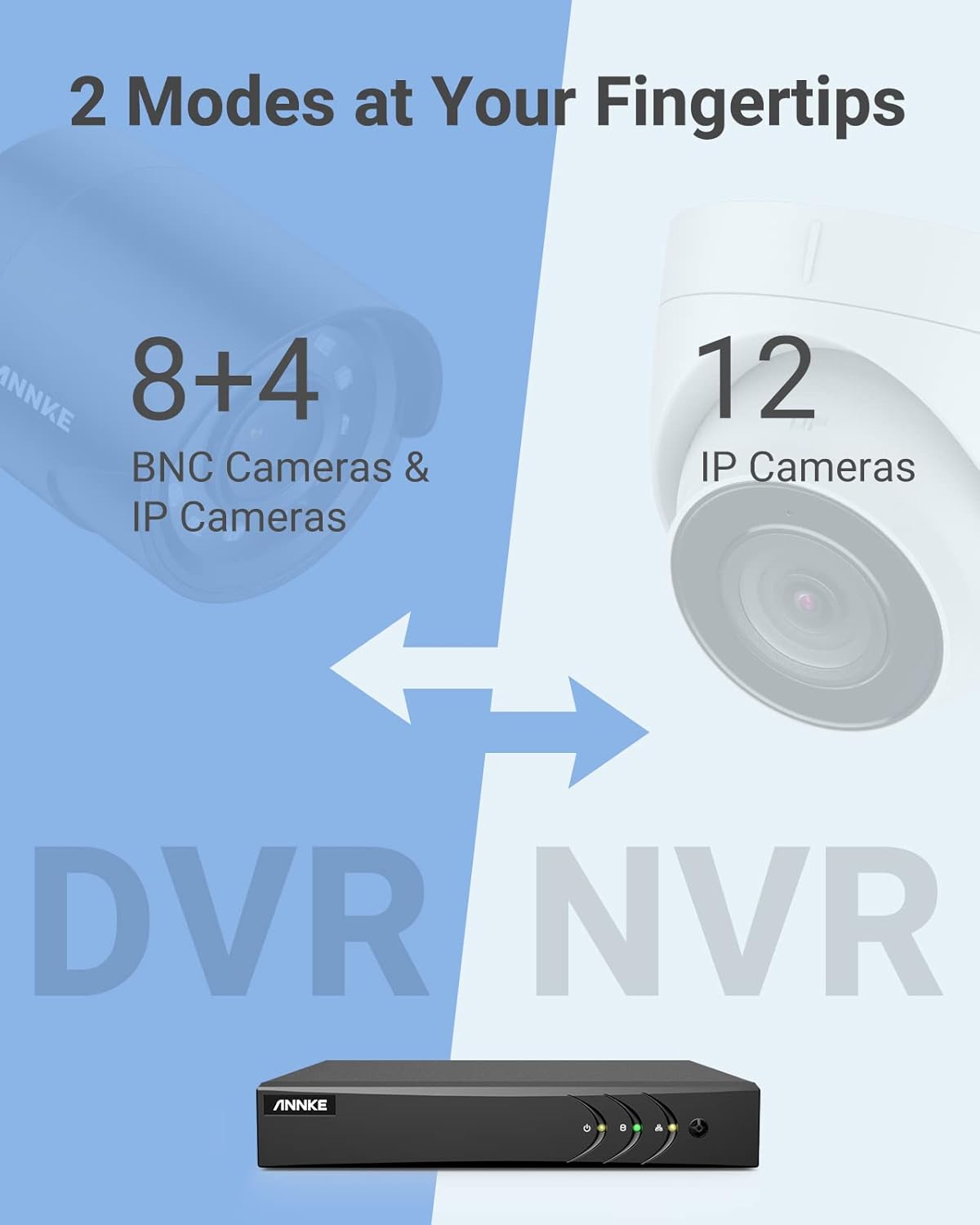
Image 3.1: Illustration of the DVR's dual operational modes, supporting both BNC and IP cameras or IP cameras exclusively.
4. Gid Enstalasyon
4.1 Enstalasyon fizik
- Konekte Kamera yo: Connect your security cameras to the BNC video input ports on the back of the DVR. For IP cameras, connect them to your network switch/router, and ensure the DVR is also connected to the same network via the Ethernet cable.
- Konekte Monitè a: Connect a monitor to the DVR's HDMI or VGA output port using the provided HDMI cable or a VGA cable (not included).
- Konekte Sourit USB a: Plug the USB mouse into one of the USB ports on the DVR.
- Konekte pouvwa: Connect the power adapter to the DVR's power input and then plug it into a power outlet. The DVR will power on automatically.
4.2 Inisyal Konfigirasyon
Upon first boot, the DVR will guide you through an initial setup wizard. Follow the on-screen prompts to:
- Mete yon modpas solid pou kont administratè a.
- Konfigire paramèt rezo yo (DHCP rekòmande pou pifò itilizatè).
- Mete dat ak lè.
- Scan and add IP cameras if applicable.
5. Opere DVR la
5.1 Viv View
Apre premye konfigirasyon an, DVR a ap montre imaj an dirèk la. view from connected cameras. Use the USB mouse to navigate the interface. Right-click to access the main menu.
5.2 Anrejistreman
The DVR is pre-configured for continuous recording. You can customize recording schedules, motion-triggered recording, or alarm-triggered recording via the main menu under Record > Schedule.
5.3 Lektur
Pou review anrejistre footage:
- Soti nan ap viv la view, klike sou bouton dwat la epi chwazi Lektur.
- Select the desired camera(s) and date.
- Use the timeline to navigate through recordings. Events (like motion detection) are often marked on the timeline for quick access.

Image 5.1: The DVR's playback interface, demonstrating how to locate and review evènman anrejistre sou yon liy tan.
6. Karakteristik avanse
6.1 AI Human/Vehicle Detection
The DVR incorporates deep learning-based motion detection 2.0, which can differentiate between human and vehicle movements. This significantly reduces false alarms caused by environmental factors such as leaves or light changes.
- Konfigirasyon: Enable and configure AI detection for each analog channel via the main menu under AI > Motion Detection 2.0.
- Smart Events: Supports line crossing and intrusion detection for specific areas.
- Avètisman: Configure the DVR to send app push notifications, email alerts, or trigger a buzzer when human or vehicle motion is detected.
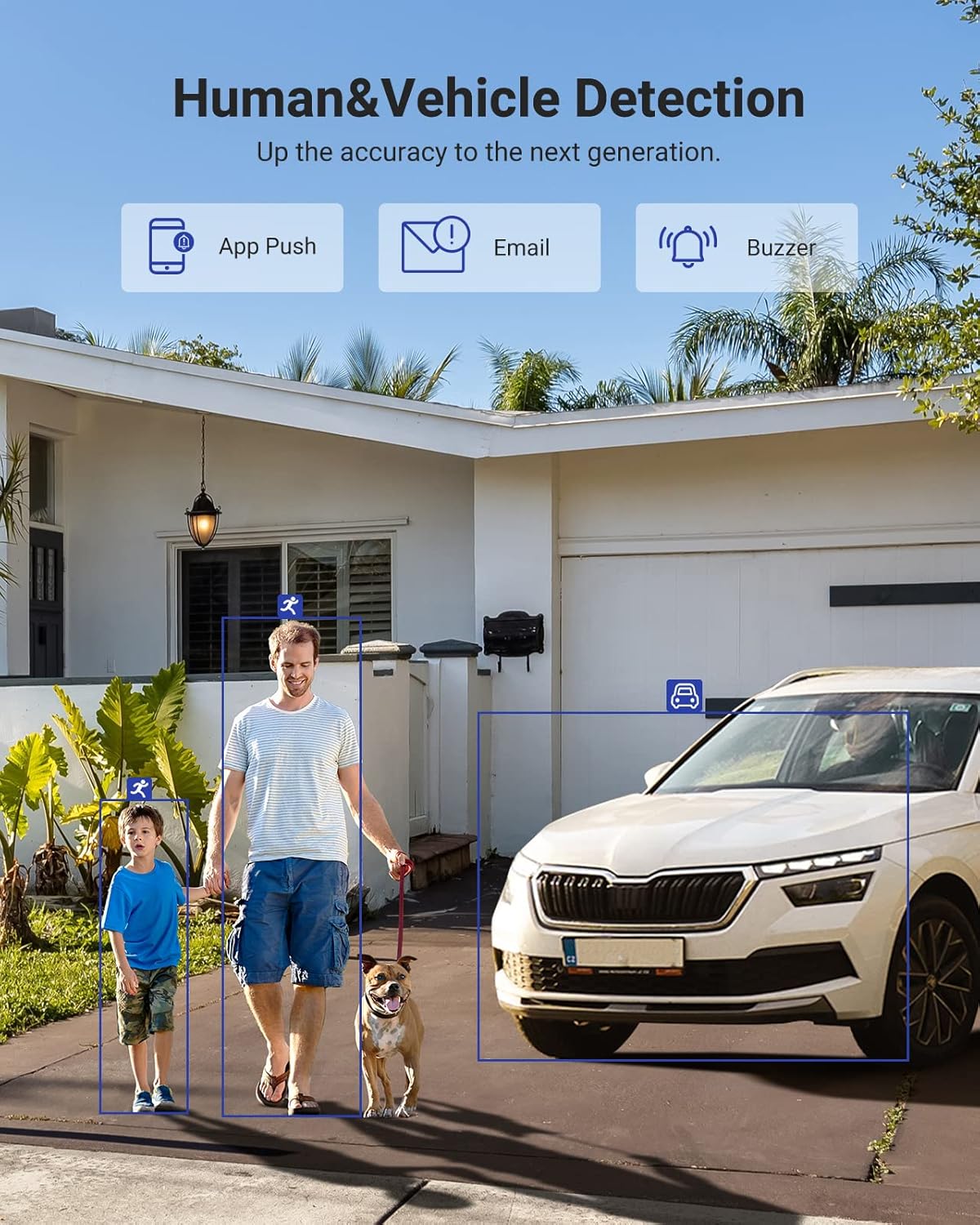
Image 6.1: Visual demonstration of the AI human and vehicle detection capability, showing how the system identifies and distinguishes between people and vehicles.
6.2 Aksè Remote
Access your DVR remotely from anywhere using the ANNKE Vision App or a web navigatè.
- Aplikasyon Vizyon ANNKE: Download the app from the App Store (iOS) or Google Play Store (Android). Register an account and add your DVR by scanning the QR code or entering its serial number.
- Web Navigatè: Access the DVR's web koòdone pa antre adrès IP li nan yon web navigatè sou òdinatè w lan.
- Konpatibilite: The system is compatible with various devices including smartphones, tablets, laptops, and personal computers. It also supports integration with Alexa for voice control.

Image 6.2: Remote access via the ANNKE Vision App, showing compatibility with mobile devices and Alexa.
7. Video Management
7.1 H.265+ Konpresyon Videyo
The DVR utilizes advanced H.265+ video compression technology. This technology significantly reduces file sizes, saving up to 80% of storage space compared to H.264 compression, while maintaining video quality. This allows for longer recording durations on the same 2TB hard drive.

Image 7.1: Comparison illustrating the storage efficiency of H.265+ compression versus H.264.
8. Konpatibilite
The ANNKE AU-DT81DX200-V1 is a versatile 5-in-1 hybrid DVR, designed to be compatible with a wide range of security cameras:
- HD TVI Input: Supports 8 MP@15 fps, 5 MP@20 fps, 3K@20 fps, 4 MP@30 fps.
- AHD Input: Supports 5 MP@20 fps, 4 MP@30 fps, 1080p@25 fps, 1080p@30 fps.
- HD CVI Input: Supports 4 MP@30 fps, 4 MP@25 fps, 1080p@25 fps, 1080p@30 fps.
- Antre CVBS: Supports PAL/NTSC standards.
- IPC Input: Supports up to 8MP IP cameras.
This broad compatibility ensures that the DVR can integrate with both older analog cameras and modern IP cameras, providing a flexible upgrade path for existing surveillance systems.

Image 8.1: The DVR's compatibility with various camera technologies, including TVI, CVI, AHD, and IP cameras.
9. Espesifikasyon
| Karakteristik | Spesifikasyon |
|---|---|
| Mak | ANNKE |
| Nimewo Modèl | AU-DT81DX200-V1 |
| Koneksyon Teknoloji | Branche |
| Rezolisyon Capture Videyo | 4K (8MP) |
| Kantite Chanèl | 8 (Analog) + 4 (IP) or 12 (IP) |
| Konpresyon videyo | H.265 Pro+/H.265 Pro/H.265/H.264+/H.264 |
| Kalite Kamera Sipòte yo | TVI, AHD, CVI, CVBS, IPC |
| AI Karakteristik | Human Detection, Vehicle Detection, Line Crossing, Intrusion Detection |
| Kapasite Depo memwa | 2 TB HDD (Up to 10 TB supported) |
| Aksè Remote | ANNKE Vision App, Web Navigatè |
| Aparèy konpatib | Cameras, Laptops, Personal Computers, Smartphones, Tablets |
| Sous pouvwa | Fil elektrik |
| Koulè | Nwa |
| Dimansyon atik | 17.13 x 12.4 x 3.86 pous |
10. Antretyen
Antretyen regilye asire pèfòmans optimal ak lonjevite sistèm DVR ou a.
- Netwayaj: Keep the DVR free from dust. Use a soft, dry cloth to clean the exterior. Do not use liquid cleaners.
- Vantilasyon: Asire w ou mete DVR a nan yon zòn ki byen ayere pou anpeche l chofe twòp. Pa bloke ouvèti vantilasyon yo.
- Mizajou mikrolojisyèl: Tcheke ofisyèl ANNKE a detanzantan. website for firmware updates. Keeping your DVR's firmware updated can improve performance, add new features, and enhance security.
- Sovgad done: Regularly back up important video footage nan yon aparèy depo ekstèn.
- Sante Disk Di: The DVR's menu may offer options to check the health status of the installed hard drive. Monitor this periodically.
NAN. Depanaj
This section addresses common issues you might encounter with your DVR.
- Pa gen Sorti Videyo:
- Check HDMI/VGA cable connections to both the DVR and the monitor.
- Asire w ke monitè a configuré sou sous antre ki kòrèk la.
- Verify the DVR is powered on (power indicator light should be active).
- No Camera Display:
- Check camera power supply and video cable connections.
- For IP cameras, ensure they are on the same network as the DVR and properly added in the DVR's camera management settings.
- Verify camera compatibility with the DVR (refer to Section 8).
- Aksè Remote pa travay:
- Asire w ke DVR a konekte ak entènèt la.
- Check network settings on the DVR (e.g., DHCP enabled, correct IP address).
- Verify the ANNKE Vision App is updated to the latest version.
- Ensure the DVR is properly added to your ANNKE Vision account.
- Fo Alam Mouvman:
- Adjust the sensitivity of motion detection in the DVR settings.
- Utilize the AI Human/Vehicle Detection feature (Section 6.1) to filter out irrelevant movements.
- Define specific detection zones to exclude areas with frequent non-threatening movement.
If you continue to experience issues, please contact ANNKE customer support.
12. Garanti ak sipò
Pwodwi ANNKE yo anjeneral vini ak yon garanti limite. Tanpri gade kat garanti ki enkli nan pake w la oswa vizite sit entènèt ofisyèl ANNKE a. websit la pou wè kondisyon garanti detaye ki espesifik pou rejyon ou an.
Pou sipò teknik, kesyon sou pwodwi, oswa reklamasyon garanti, tanpri kontakte sèvis kliyan ANNKE atravè sèvis ofisyèl yo. website or the contact information provided in your product documentation. Have your model number (AU-DT81DX200-V1) and purchase details ready when contacting support.
ANNKE Official Websit: www.annke.com