
Tornado TCM-1025A-GS
Tornado TCM-1025A-GS Conical Burr Grinder Coffee Maker
Model: TCM-1025A-GS | Brand: Tornado
1. Entwodiksyon
This instruction manual provides essential information for the safe and efficient operation of your Tornado TCM-1025A-GS Conical Burr Grinder Coffee Maker. Please read this manual thoroughly before first use and retain it for future reference. Proper use and maintenance will ensure optimal performance and longevity of your appliance.
2. Enfòmasyon enpòtan sou sekirite
Lè w ap itilize aparèy elektrik, yo ta dwe toujou swiv prekosyon sekirite debaz yo pou redwi risk pou dife, chòk elektrik ak/oswa blesi moun, tankou sa ki annapre yo:
- Li tout enstriksyon yo.
- Pa manyen sifas cho. Sèvi ak manch oswa bouton.
- Pou pwoteje tèt ou kont chòk elektrik, pa plonje kòd la, ploge yo, oswa machin kafe a nan dlo oswa lòt likid.
- Sipèvizyon sere se nesesè lè nenpòt aparèy itilize pa oswa toupre timoun yo.
- Debranche soti nan priz lè yo pa itilize ak anvan netwaye. Kite refwadi anvan ou mete oswa retire pati yo, epi anvan ou netwaye aparèy la.
- Pa sèvi ak okenn aparèy ki gen yon fil oswa yon ploge ki domaje, oubyen apre aparèy la pa fonksyone byen, oubyen li fin domaje nan nenpòt fason. Kontakte sèvis kliyan pou egzamine li, repare li, oswa ajiste li.
- Itilizasyon akseswar manifakti aparèy la pa rekòmande pou yo ka lakòz dife, chòk elektrik oswa blesi sou moun.
- Pa sèvi ak deyò.
- Pa kite kòd pandye sou kwen tab oswa kontwa, oswa manyen sifas cho.
- Pa mete sou oswa toupre yon gaz cho oswa recho elektrik, oswa nan yon fou chofe.
- Toujou tache ploge nan aparèy la an premye, apresa ploge kòd nan priz miray la. Pou dekonekte, vire nenpòt kontwòl sou "off", epi retire ploge nan priz miray la.
- Pa sèvi ak aparèy pou lòt itilizasyon ki gen entansyon an.
3. Pake kontni
Tanpri tcheke kare a pou atik sa yo:
- Tornado TCM-1025A-GS Coffee Maker with Integrated Conical Burr Grinder
- Glass Carafe (1.5 L / 12-cup capacity)
- Panyen Filtè Reutilizab
- Mezire Scoop
- Manyèl Enstriksyon
4. Pwodwi souview
Familyarize w ak konpozan machin kafe w la.

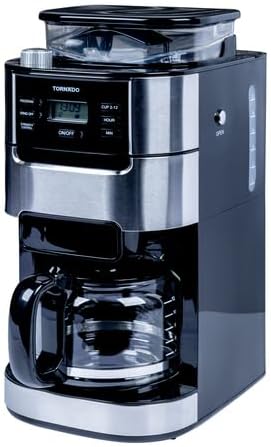
Devan view of the Tornado TCM-1025A-GS coffee maker, showcasing its sleek black and stainless steel design with the control panel and glass carafe visible.

Detaye view of the coffee maker's control panel, featuring a digital display, 'PROGRAM', 'GRIND OFF', 'STRENGTH CONTROL', 'ON/OFF', 'CUP 2-12', 'HOUR', and 'MIN' buttons.

The removable filter basket and its holder, designed for easy access and cleaning, with a reusable mesh filter visible inside.
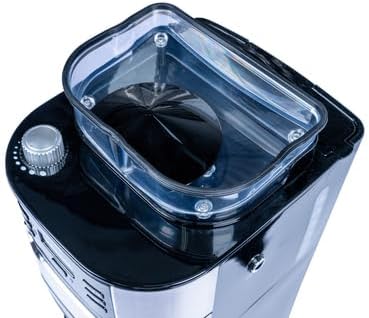
Top view of the integrated conical burr grinder, with its transparent lid removed, showing the bean hopper and grinding mechanism.
Dèyè view of the coffee maker, showing the water reservoir with clear level markings and the power cord.
5. Enstalasyon ak Premye Itilizasyon
5.1 Debalaj ak Netwayaj Premyè
- Retire tout materyèl anbalaj yo nan machin kafe a avèk prekosyon.
- Wash the glass carafe, lid, and reusable filter basket in warm, soapy water. Rinse thoroughly and dry.
- Siye eksteryè a nan machin nan kafe ak anonsamp twal.
5.2 Premye Sik Enfuzyon (Sik Netwayaj)
Anvan ou fè kafe pou premye fwa, fè yon sik netwayaj pou retire tout rès fabrikasyon yo.
- Ranpli rezèvwa dlo a ak dlo fre, frèt jiska mak 12 tas la.
- Ensure the empty filter basket is in place. Do not add coffee beans or grounds.
- Mete karafe an vè vid la ak kouvèti li sou plak chof la.
- Branche machin kafe a nan yon priz elektrik ki gen tè.
- Press the 'ON/OFF' button to start a brew cycle. Allow the full cycle to complete.
- Jete dlo ki nan karafe a. Machin kafe ou a pare pou itilize kounye a.
6. Operasyon Enstriksyon
6.1 Brewing Coffee with Whole Beans
- Ranpli rezèvwa dlo: Open the water reservoir lid and fill with fresh, cold water to your desired cup level (2-12 cups).
- Ajoute grenn kafe: Open the lid of the conical burr grinder and add whole coffee beans. Do not overfill.
- Mete karafe a: Asire w ke karaf an vè a ak kouvèti li byen plase sou plak chofe a.
- Chwazi paramèt moulen: Use the grind adjustment knob (usually on top near the grinder) to select your preferred grind fineness. Finer for stronger coffee, coarser for lighter.
- Set Cup Quantity: Press the 'CUP 2-12' button repeatedly to select the number of cups you wish to brew.
- Adjust Strength Control: Press the 'STRENGTH CONTROL' button to choose your desired coffee strength (e.g., Regular, Bold).
- Kòmanse melanje: Press the 'ON/OFF' button to begin the grinding and brewing process. The machine will grind the beans, then brew the coffee.
6.2 Brewing Coffee with Pre-Ground Coffee
- Ranpli rezèvwa dlo: Follow step 1 from section 6.1.
- Ajoute kafe moulu: Open the filter basket and add your desired amount of pre-ground coffee. Use approximately one scoop per cup, adjusting to taste.
- Dezaktive moulen an: Press the 'GRIND OFF' button to ensure the grinder does not activate.
- Mete karafe a: Follow step 3 from section 6.1.
- Set Cup Quantity: Follow step 5 from section 6.1.
- Adjust Strength Control: Follow step 6 from section 6.1.
- Kòmanse melanje: Press the 'ON/OFF' button to begin the brewing process.
6.3 Programming Auto-Brew (Timer Function)
- Mete tan aktyèl la: Press the 'HOUR' button to set the current hour, then the 'MIN' button to set the current minutes.
- Prepare Coffee Maker: Follow steps for brewing with whole beans or pre-ground coffee (sections 6.1 or 6.2).
- Fikse Lè Pwogram nan: Press the 'PROGRAM' button. The display will flash. Use the 'HOUR' and 'MIN' buttons to set your desired brew time.
- Aktive Pwogram nan: Press the 'PROGRAM' button again to confirm the setting. The program indicator light will illuminate, indicating the timer is set.
- Machin kafe a ap kòmanse fè kafe otomatikman nan lè ki fikse a.
7. Netwayaj ak antretyen
Regular cleaning ensures the best coffee taste and extends the life of your appliance.
7.1 Netwayaj chak jou
- Toujou debranche machin kafe a anvan ou netwaye li epi kite l refwadi nèt.
- Remove the glass carafe, lid, and reusable filter basket. Wash them in warm, soapy water or place them on the top rack of your dishwasher.
- Wipe the exterior of the coffee maker, warming plate, and water reservoir with a damp twal. Pa sèvi ak pwodui netwayaj abrazif oswa kousinen.
- Clean the grinder chute regularly with a small brush to prevent clogs from coffee grounds.
7.2 Descaling (Every 2-3 Months)
Mineral deposits from water can build up over time, affecting performance. Descale your coffee maker regularly.
- Mix 4 cups of white vinegar with 8 cups of cold water.
- Vide melanj lan nan rezèvwa dlo a.
- Mete karaf vid la sou plak chofe a.
- Run a full brew cycle. After about 30 seconds, turn off the coffee maker and let it soak for 30 minutes.
- Remete machin kafe a epi kite sik la fini.
- Jete solisyon vinèg la.
- Run 2-3 cycles with fresh, cold water to rinse out any remaining vinegar smell or taste.
NAN. Depanaj
Si ou rankontre pwoblèm ak machin kafe ou a, gade pwoblèm ak solisyon komen sa yo:
| Pwoblèm | Kòz posib | Solisyon |
|---|---|---|
| Kafe pa koule. | No water in reservoir; Coffee maker not plugged in; Power outage; Brew cycle not started. | Fill water reservoir; Plug in coffee maker; Check power supply; Press 'ON/OFF' button. |
| Moulen an pa mache. | 'GRIND OFF' button pressed; No beans in hopper; Grinder clogged. | Ensure 'GRIND OFF' is not active; Add beans; Clean grinder chute. |
| Kafe a gen yon gou fèb oswa twò fò. | Incorrect coffee-to-water ratio; Grind setting incorrect; Strength control setting. | Adjust coffee amount; Adjust grind fineness; Change strength control setting. |
| Dlo ap koule nan machin nan. | Water reservoir overfilled; Carafe not properly seated; Filter basket overflowing. | Do not overfill water reservoir; Ensure carafe is correctly placed; Do not overfill filter basket with grounds. |
9. Espesifikasyon
| Nimewo Modèl | TCM-1025A-GS |
| Kapasite | 1.5 Liters / 12 Cups |
| Pouvwa | 900-1050 W |
| Pwa | 4.5 kg |
| Koulè | Nwa |
| Materyèl | Nerjaveèi asye, plastik |
10. Garanti ak sipò
Your Tornado TCM-1025A-GS Coffee Maker is covered by a manufacturer's warranty against defects in material and workmanship. Please refer to the warranty card included with your purchase for specific terms and conditions, including the warranty period and coverage details.
For technical support, service, or warranty claims, please contact Tornado customer service through the contact information provided in your product packaging or on the official Tornado website. Please have your model number and proof of purchase ready when contacting support.
Ask a question about this manual
Ask about setup, troubleshooting, compatibility, parts, safety, or missing instructions. Manuals+ will review the question and use this page’s manual context to help answer it.