
1. Entwodiksyon
Thank you for choosing the JUNJIEUNVO Q16 Wireless Translation Earbuds. These open-ear design earbuds offer a comfortable listening experience, advanced Bluetooth 5.4 connectivity, IPX5 waterproof rating, and support for real-time language translation across over 100 countries. This manual provides detailed instructions on how to set up, operate, and maintain your earbuds to ensure optimal performance.
2. Pake kontni
Tanpri tcheke pake a pou atik sa yo:
- JUNJIEUNVO Q16 Wireless Translation Earbuds (Left and Right)
- Ka chaje
- Manyèl itilizatè
- Charging Cable (USB-C, not always included, please check packaging)
3. Pwodwi souview
The Q16 earbuds feature an open-ear design for comfort and situational awareness, housed in a compact charging case. The case includes a digital display for battery status.

Figi 3.1: Q16 Earbuds in their charging case, showing the left (L) and right (R) indicators along with the digital battery display.

Figi 3.2: The open-ear design of the Q16 earbuds, emphasizing comfort and awareness of surroundings.

Figi 3.3: Diagram illustrating the directional sound transmission technology, designed to protect privacy and reduce sound leakage.
4. Enstalasyon
4.1 Chaje ekoutè yo ak bwat la
Before first use, fully charge the earbuds and the charging case. The charging case has a 500mAh battery, and each earbud has a 40mAh battery. A full charge takes approximately 1.5 hours.
- Connect the charging cable (typically USB-C) to the charging port on the case and to a USB power source.
- The digital display on the charging case will show the charging progress.
- Place the earbuds into the charging case. Ensure they are correctly seated; the case will indicate if they are charging.
4.2 Bluetooth Pairing
The Q16 earbuds use Bluetooth 5.4 for a stable and efficient connection. The pairing process is automatic upon opening the case.
- Ensure your smartphone or device's Bluetooth is turned on.
- Louvri kouvèti bwat chaje a. Ekoutè yo ap antre otomatikman nan mòd koneksyon.
- On your device, search for Bluetooth devices and select "Q16" from the list.
- Yon fwa konekte, w ap tande yon son konfimasyon, epi ekoutè yo ap pare pou itilize.
- Pou koneksyon apre sa, tou senpleman ouvri bwat chaje a, epi ekoutè yo pral otomatikman rekonekte ak dènye aparèy ki te konekte a.
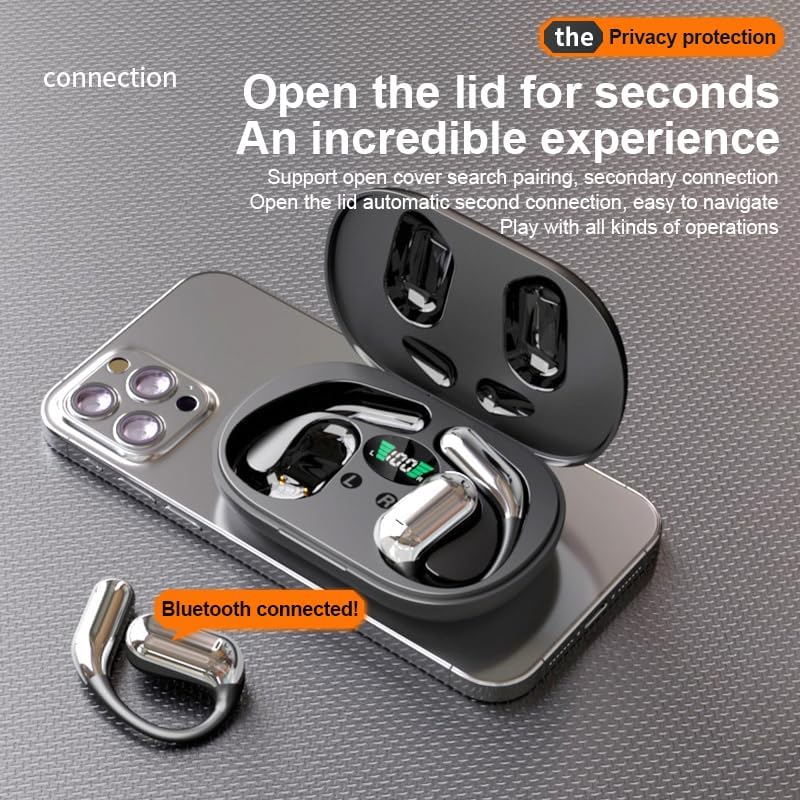
Figi 4.1: The Q16 earbuds connected to a smartphone, indicating successful Bluetooth pairing.
5. Operasyon Enstriksyon
5.1 Power On/Off
- Pouvwa sou: Louvri kouvèti bwat chaje a, epi ekoutè yo ap limen otomatikman.
- Pouvwa Off: Mete ekoutè yo tounen nan bwat chaje a epi fèmen kouvèti a. Y ap etenn otomatikman epi y ap kòmanse chaje.
5.2 Mizik lèktur
(Specific touch controls are not detailed in the provided product data. The following are common gestures; refer to the manufacturer's official app or website for precise controls.)
- Jwe/Poz: Tape swa ekoutè yon fwa.
- Pwochen Track: Tape doub ekoutè dwat la.
- Track Previous: Tape doub ekoutè gòch la.
- Kontwòl Volim: (Typically a long press or triple tap, specific action not provided. Adjust via your connected device if not available on earbuds.)

Figi 5.1: Illustration of the panoramic stereo surround sound feature, enhancing the audio experience.
5.3 Jesyon Apèl
- Reponn/Fen Apèl: Tape swa ekoutè yon fwa.
- Rejte apèl: Long peze swa ekoutè pou 2 segonn.
5.4 Language Translation Function
The Q16 earbuds support real-time translation for over 100 languages. This feature typically requires a dedicated translation application on your paired smartphone.
- Download and install the recommended translation app (refer to product packaging or manufacturer's website for app details) on your smartphone.
- Ensure the earbuds are connected to your smartphone via Bluetooth.
- Open the translation app and follow its instructions to initiate real-time translation. The earbuds will act as your audio input/output device for the translation.
5.5 IPX5 Enpèmeyab Evalyasyon
The earbuds are rated IPX5 waterproof, meaning they are resistant to splashing water from any direction. This makes them suitable for sports and outdoor activities. Note: The charging case is not waterproof. Avoid exposing the charging case to water.
6. Antretyen ak Swen
- Netwayaj: Siye ekoutè yo ak bwat chaje a dousman avèk yon twal mou, sèk, ki pa gen pousyè. Pa sèvi ak pwodui chimik ki agresif oswa materyèl abrazif.
- Depo: Lè w pa ap itilize yo, sere ekoutè yo nan bwat chaj yo pou pwoteje yo epi kenbe yo chaje. Sere yo nan yon kote ki fre epi sèk, lwen tanperati ekstrèm.
- Evite dlo: While the earbuds are IPX5 waterproof, avoid submerging them in water. The charging case is not waterproof.
- Swen batri: Pou pwolonje lavi batri a, evite dechaje ekoutè yo ak bwat chaj la nèt souvan. Chaje yo regilyèman, menm si w pa itilize yo tout tan.
NAN. Depanaj
| Pwoblèm | Solisyon |
|---|---|
| Ekoutè yo pa konekte ak aparèy la. |
|
| Pa gen son ki soti nan ekoutè yo. |
|
| Ekoutè yo pa ap chaje. |
|
| Fonksyon tradiksyon an pa mache. |
|
8. Espesifikasyon
| Karakteristik | Detay |
|---|---|
| Non modèl | YYK-Q16 |
| Bluetooth vèsyon | V5.4 + EDR |
| Chip | Blue Flood |
| Pwotokòl sipòte | AVRCP V1.6, A2DP V1.3, HFP V1.7 (Simultaneous LE and BR / EDR) |
| Usage/Playback Time | Apeprè 8 èdtan (nan 80% volim) |
| Tan sibstiti | 80 èdtan |
| Tan pou chaje | Apeprè 1.5 èdtan |
| Distans san fil | 10 mèt |
| Kapasite batri ekouteur | 40mAh (chak) |
| Chaje Ka Batri Kapasite | 500mAh |
| Evalyasyon ki enpèmeyab | IPX5 (koutè sèlman) |
| Sipò Tradiksyon | Over 100 languages |
| Plasman Zòrèy | On Ear (Open-ear design) |
| Enpedans | 32 Ohms |
| Pwa nèt | 84g (an total) |
9. Garanti ak sipò
For warranty information and customer support, please refer to the documentation included with your purchase or visit the official JUNJIEUNVO website. If you encounter any issues not covered in this manual, please contact our customer service team for assistance.
Manifakti: UNVO
Mak: JUNJIEUNVO