
AVMATRIX PKC4000-NDI
Manyèl Itilizatè Kontwolè Kamera AVMATRIX PKC4000-NDI PTZ
Model: PKC4000-NDI
1. Entwodiksyon
Thank you for choosing the AVMATRIX PKC4000-NDI PTZ Camera Controller. This device is designed for professional live streaming, church, and conference applications, offering intuitive control over PTZ cameras. Featuring a 5-inch touch screen and a 4D joystick, it provides precise control over camera functions such as pan, tilt, zoom, focus, and iris. This manual will guide you through the setup, operation, maintenance, and troubleshooting of your controller.
2. Enfòmasyon sou Sekirite
Please read and understand all safety instructions before operating the device. Keep this manual for future reference.
- Pa ekspoze aparèy la anba lapli, imidite, oswa tanperati ekstrèm.
- Asire bon vantilasyon pou anpeche surchof.
- Sèvi sèlman ak adaptè kouran ki vini ak li a oswa yon sous PoE konpatib.
- Evite mete objè lou sou kontwolè a.
- Pa eseye demonte oswa modifye aparèy la. Konfye tout antretyen bay pèsonèl kalifye.
- Netwaye aparèy la avèk yon twal mou epi sèk. Evite pwodui netwayaj likid.
3. Pake kontni
Verifye ke tout atik ki nan lis anba a yo enkli nan pakè ou a:
- AVMATRIX PKC4000-NDI PTZ Camera Controller x1
- 12V DC pouvwa adaptè x1
- Tally Connector x1
- Manyèl Itilizatè (dokiman sa a)
4. Pwodwi souview
The PKC4000-NDI controller features a robust design with a clear 5-inch touch screen and a precise 4D joystick for comprehensive camera control.
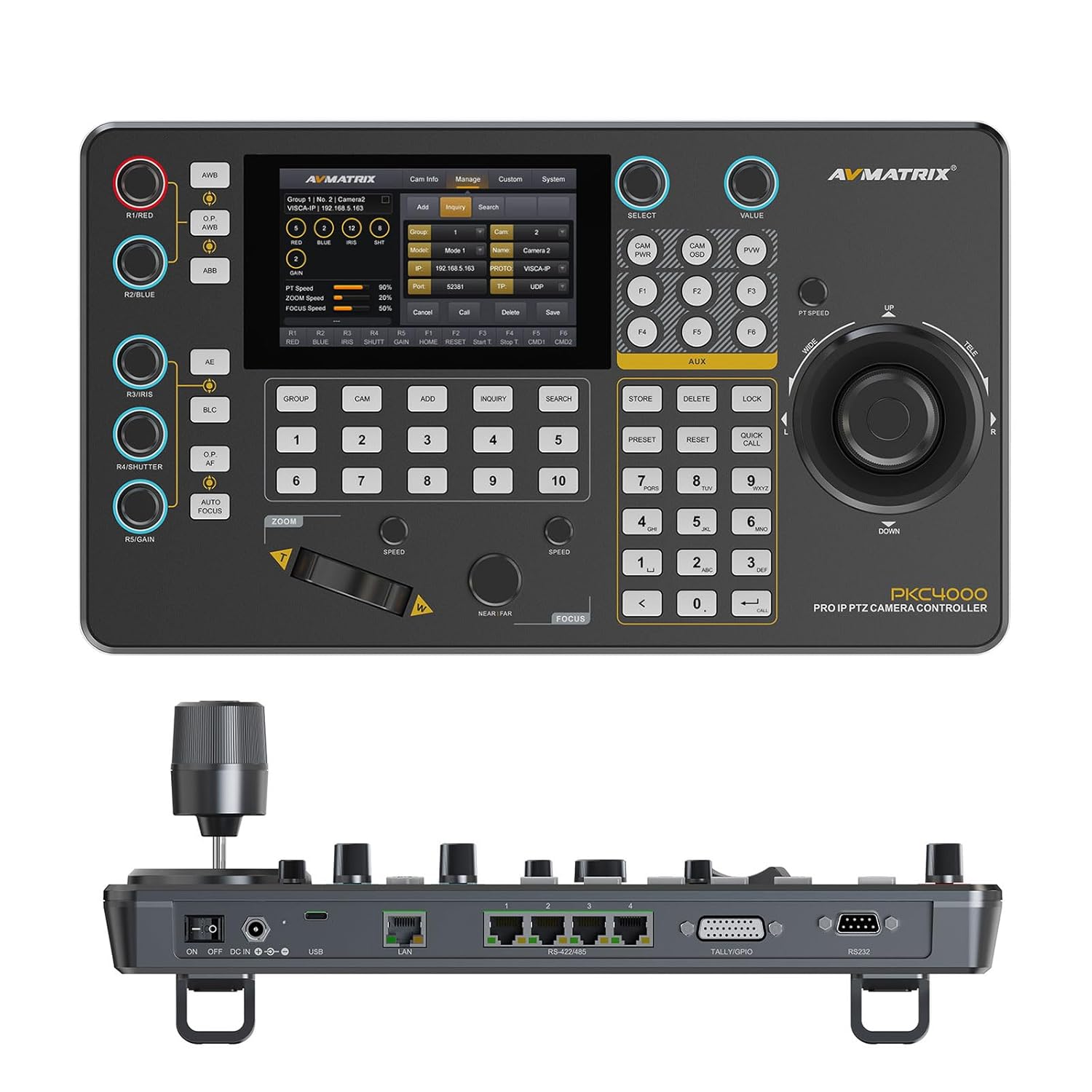
Figi 4.1: Devan view of the PKC4000-NDI Controller
Karakteristik kle:
- Universal Compatibility & Protocol Support: Supports IP and serial control protocols including VISCA, VISCA-IP, ONVIF, PELCO P&D, and NDI (NDI for Optional). Works with AVMATRIX PTZ cameras and most major PTZ brands.
- Fast Setup with Intuitive Touchscreen: Equipped with a 5-inch full-color touchscreen and menu knob for quick setup and operation.
- Smooth, Professional PTZ Control: Precise control over pan, tilt, zoom, focus, iris, shutter, and more. Supports up to 100 camera shortcuts (10 groups x 10 cameras).
- PoE & Flexible Power Options: Supports both Power over Ethernet (PoE) and traditional DC power for simplified cabling.

Figure 4.2: PKC4000-NDI Key Features Overview
5. Enstalasyon
5.1 Koneksyon Inisyal
Follow these steps to set up your PKC4000-NDI controller:
- Koneksyon pouvwa: Connect the 12V DC power adapter to the 'DC IN' port on the rear of the controller, or connect an Ethernet cable from a PoE-enabled switch to the 'LAN (PoE)' port.
- Rezo Koneksyon: For IP control, connect an Ethernet cable from your network switch to the 'LAN (PoE)' port.
- Serial Connection (Optional): For RS-232, RS-422, or RS-485 control, connect the appropriate serial cables from your PTZ cameras to the corresponding ports on the controller.
- Tally/GPIO (Optional): Connect Tally lights or GPIO devices to the Tally/GPIO port as needed.
- Pouvwa sou: Flip the 'ON/OFF' switch to the 'ON' position. The controller will boot up and display the main interface on the 5-inch touch screen.

Figure 5.1: Rear Panel Control Interfaces
5.2 Konfigirasyon Kamera
After initial power-up, you will need to configure your PTZ cameras. The controller supports automatic IP address assignment for quick setup.
- Navigate to the 'CAM' or 'System' menu on the touch screen.
- Select 'Add Camera' and follow the on-screen prompts to discover and add your cameras via IP or serial connection.
- Assign each camera to a group and address for easy recall. The controller can manage up to 100 IP cameras (10 groups x 10 cameras).
6. Operasyon Enstriksyon
6.1 Operasyon debaz
The PKC4000-NDI provides intuitive control through its touch screen and physical controls.
- Seleksyon kamera: Use the numeric keypad or the 'CAM' menu on the touch screen to select the camera you wish to control.
- Kontwòl Joystick: The 4D joystick allows for smooth and precise control of Pan, Tilt, and Zoom. Rotate the joystick for zoom control.
- Exposure Controls: Dedicated knobs and buttons allow quick adjustment of Exposure, Iris, Focus, and Gain.
- Rapèl prereglaj: Store and recall up to 255 camera presets using the 'PRESET' and numeric buttons.
6.2 Entèfas ekran taktil
The 5-inch touch screen provides access to advanced settings and real-time monitoring.
- Navigasyon nan meni: Tap on menu icons to access camera settings, network configurations, system preferences, and more.
- Siveyans an tan reyèl: The NDI version supports video decoding for real-time monitoring of camera feeds directly on the 5-inch screen. This allows for visual confirmation of camera movements and adjustments.

Figure 6.1: Real-time Video Preview on Touch Screen
6.3 Track Recording and Playback
The controller supports track loop function, allowing you to record camera pan, tilt, and zoom movements and replay them whenever needed without manual control.
- Access the 'Track' function from the touch screen menu.
- Initiate recording of your desired camera movements.
- Save the recorded track for future playback.

Figure 6.2: Track Recording and Playback Feature
7. Antretyen
7.1 Netwayaj ak swen
To ensure the longevity and optimal performance of your PKC4000-NDI controller, follow these maintenance guidelines:
- Netwayaj: Use a soft, dry, lint-free cloth to clean the exterior of the controller, including the touch screen. Do not use liquid cleaners, aerosols, or solvents.
- Depo: Lè w pa itilize kontwolè a pou yon bon bout tan, sere l nan yon kote ki fre epi sèk, lwen limyè solèy dirèk ak tanperati ekstrèm.
- Manyen: Handle the joystick and buttons with care to prevent mechanical damage.
NAN. Depanaj
8.1 Pwoblèm komen ak solisyon
If you encounter problems with your controller, refer to the table below for possible solutions.
| Pwoblèm | Kòz posib | Solisyon |
|---|---|---|
| Kontwolè pa limen. | No power supply; Power adapter faulty; PoE not active. | Check power adapter connection; Ensure PoE switch is active; Try a different power outlet. |
| M pa ka kontwole kamera a. | Incorrect camera IP/serial settings; Network issue; Camera not powered on. | Verify camera IP address and protocol settings; Check network cables; Ensure camera is powered on and accessible. |
| No video preview sou ekran. | NDI stream not active; Network congestion; Camera not sending video. | Ensure camera is configured for NDI output; Check network bandwidth; Verify camera video output settings. |
| Joystick/bouton yo pa reponn. | Firmware issue; Hardware malfunction. | Restart the controller; Check for firmware updates; Contact technical support if problem persists. |
9. Espesifikasyon
9.1 Espesifikasyon teknik
Detailed technical specifications for the AVMATRIX PKC4000-NDI PTZ Camera Controller:
| Kategori | Paramèt | PKC4000-NDI |
|---|---|---|
| Koneksyon | Entèfas | IP(RJ45)x1, RS-232x1, RS-485/RS-422x4, TALLYx1, USB2.0 (For upgrade) |
| IP Pwotokòl | ONVIF, VISCA-IP, NDI | |
| Pwotokòl seri | PELCO-D, PELCO-P, VISCA | |
| Seri Baud To | 2400, 4800, 9600, 19200, 38400, 115200 bps | |
| LAN Port | 100M×1 (PoE/PoE+: IEEE802.3 af/at) | |
| Itilizatè Interfaces | Ekspozisyon | 5 pous Touch Screen |
| Bouton | Quickly control iris, shutter speed, gain, auto exposure, white balance, etc. | |
| Joystick | Pan / Panche / Zoom | |
| Gwoup Kamera | 10 (Each group connect up to 10 cameras) | |
| Adrès Kamera | Jiska 100 | |
| Kamera Prereglaj | Jiska 255 | |
| Pouvwa | Pouvwa | PoE/DC 7~24V |
| Konsomasyon pouvwa | PoE: <8W, DC: <8W | |
| Anviwònman | Tanperati travay | -20 ℃ ~ 60 ℃ |
| Tanperati Depo | -20 ℃ ~ 70 ℃ | |
| Dimansyon | Dimansyon (LWD) | 340mm×195mm×49.5mm/ 340mm×195mm×110mm(With joystick) |
| Pwa | Net:1730g, Gross:2360g | |
| Jeneral | Nimewo Modèl | NW-PKC4000-NDI |
| Manifakti | NW-AVMATRIX | |
| Dat lage | 1 mas 2025 |

Figi 9.1: Espesifikasyon detaye ak dimansyon
10. Garanti ak sipò
10.1 Enfòmasyon sou Garanti
The AVMATRIX PKC4000-NDI PTZ Camera Controller is backed by a 1-ane garanti limite from the date of purchase. This warranty covers defects in materials and workmanship under normal use. It does not cover damage caused by misuse, accident, unauthorized modification, or external causes.
10.2 Sipò teknik
For technical assistance, troubleshooting, or warranty claims, please contact AVMATRIX customer support. We offer sipò teknik pou tout lavi pou pwodwi nou yo.
Please have your product model number (PKC4000-NDI) and purchase information ready when contacting support.
Ask a question about this manual
Ask about setup, troubleshooting, compatibility, parts, safety, or missing instructions. Manuals+ will review the question and use this page’s manual context to help answer it.