
VANTRUE E1 Pro
Manyèl Itilizatè VANTRUE E1 Pro Dash Cam
Model: E1 Pro | Brand: VANTRUE
Pwodwi souview
The VANTRUE E1 Pro Dash Cam is a compact, high-resolution vehicle recording device designed to capture your journeys in detail. This bundle includes the E1 Pro Dash Cam, a Hardwire Kit, and a 256GB SD Card, providing a comprehensive solution for continuous recording and parking surveillance.

Image: The Vantrue E1 Pro Dash Cam shown with its included hardwire kit and 256GB SD card, alongside a smartphone displaying the Vantrue app interface.
Ki sa ki nan bwat la
- VANTRUE E1 Pro Dash Cam
- Twous Hardwire
- Kat SD 256GB
- CPL Filter (included with dash cam)
- Magnetic Adhesive Mount
Karakteristik kle
Mini & 4K Mighty
The Vantrue E1 Pro dash cam features a Sony IMX678 sensor (8MP) for 4K 3840 x 2160/30FPS resolution. Its wide 158° lens captures extensive road details, including license plates, road signs, and pedestrians. The compact design, roughly the size of a one-dollar coin, allows for discreet placement on the windshield. A CPL Filter is included to reduce sunlight reflection.
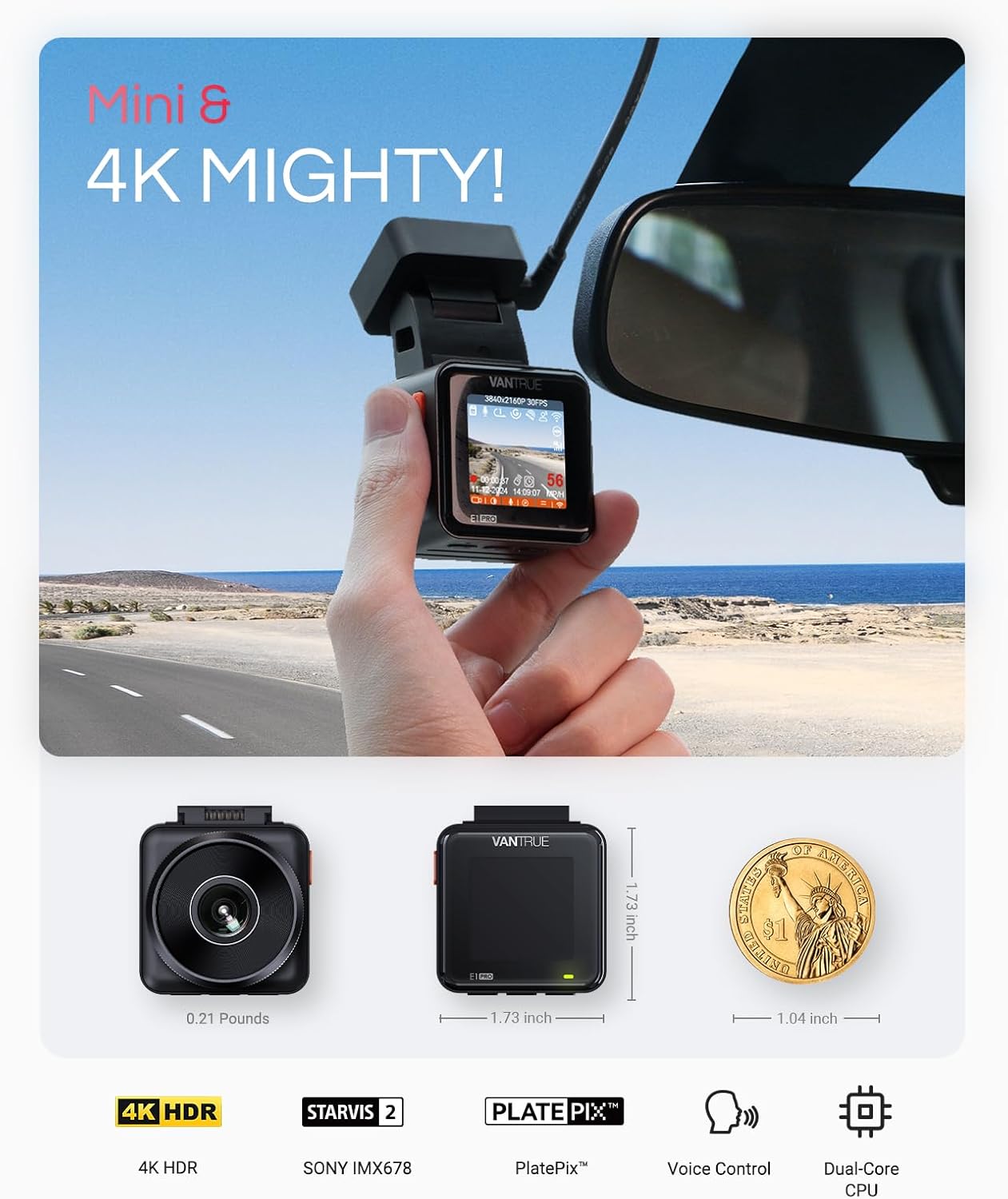
Image: The compact size of the Vantrue E1 Pro dash cam is illustrated by comparing it to a US one-dollar coin.
PlatePix & STARVIS 2 Night Vision
Equipped with advanced PlatePix software, the E1 Pro delivers scalable 4K HDR, offering 50% clearer images than standard 4K HDR. The combination of PlatePix, STARVIS 2, and an F1.8 7-glass lens reduces motion blur and enhances license plate recognition, even at night. This feature is beneficial for all drivers, including family vehicles, new drivers, and ride-share operators.

Image: A comparison demonstrating the enhanced clarity of license plate capture at night using the E1 Pro's 4K HDR, STARVIS 2, and PlatePix technologies versus standard dash cam footage.

Image: Illustrates the 158-degree wide-angle view of the E1 Pro dash cam capturing four lanes of traffic, and a comparison of footage with and without the CPL filter to show reduced sunlight reflection.
5G WiFi with Voice-Controlled Travel & Built-in GPS
Connect to the Vantrue APP via 5G WiFi for fast video downloads, editing, and sharing (up to 8MB/second). The built-in GPS provides precise tracking of location, driving speed, and route, viewable on your smartphone or computer. Voice control features allow hands-free operation for commands like "Turn on/off WiFi" or "Take photo."

Image: Demonstrates the 5GHz WiFi connectivity for faster app interaction and the dual-system GPS for accurate location and speed tracking, viewable on mobile and desktop devices.
24/7 Buffered Parking Mode
When hardwired (Hardwire Kit included in this bundle), the E1 Pro offers buffered motion detection, recording 15 seconds before and 30 seconds after motion is detected. Starlight Night Vision enhances video brightness and clarity in parking mode by 30%. Multiple parking modes are available: Motion Detection, Collision Detection, Low Bitrate, or Low Frame Rate Mode for comprehensive event protection.

Image: Visual representation of the 15-second pre-recording and 30-second post-recording buffer in parking mode, along with icons for Motion Detection, Collision Detection, Low Bitrates, and Low Framerate Recording. Also shows a comparison of low light night vision with 30% brighter results.
Metòd kontwòl miltip
The E1 Pro supports Smart Voice Control for hands-free commands, an Optional Remote Control (sold separately), and traditional Button Control for direct interaction with the device.

Image: Depicts the various control methods for the E1 Pro, including smart voice control, an optional remote control, and direct button control on the device.
Gid Enstalasyon
- Mete kat SD: Ensure the 256GB SD card is inserted correctly into the dash cam's SD card slot.
- Montaj: Attach the magnetic adhesive mount to your car's windshield in a location that does not obstruct your view. Ensure the surface is clean and dry before applying.
- Koneksyon pouvwa:
- For continuous power and parking mode, connect the included Hardwire Kit to your vehicle's fuse box according to the hardwire kit's instructions.
- Alternatively, use a standard car charger (not included in this bundle) for power during driving.
- Ajiste Ang kamera: Once mounted, adjust the camera lens to ensure it captures the desired field of view, typically centered on the road ahead.
- Premye pouvwa sou: Turn on your vehicle's ignition. The dash cam should power on automatically.
- Koneksyon Aplikasyon (Si ou vle): Download the Vantrue APP from your smartphone's app store. Follow the in-app instructions to connect to the dash cam via 5G WiFi for advanced settings, video playback, and firmware updates.
Enstriksyon Operasyon
Anrejistreman otomatik
The dash cam will automatically begin recording when powered on. Loop recording ensures older files are overwritten when the SD card is full, unless they are locked.
Manual Recording & Emergency Lock
Press the designated button on the dash cam to manually start/stop recording or to lock the current video segment, preventing it from being overwritten. Locked videos are stored in a separate folder.
Mòd pakin
If the Hardwire Kit is installed, the dash cam will automatically switch to parking mode when the vehicle is turned off. Select your preferred parking mode (Motion Detection, Collision Detection, Low Bitrate, or Low Frame Rate) via the dash cam settings or the Vantrue APP.
Kontwòl vwa
Utilize voice commands for hands-free operation. Common commands include "Turn on WiFi," "Turn off WiFi," and "Take photo." Refer to the full user manual for a complete list of voice commands.
GPS Tracking
The built-in GPS records your vehicle's location and speed. This data can be viewed during video playback using the Vantrue APP or compatible desktop software.
Antretyen
Jesyon kat SD
Regularly format the SD card (at least once a month) to ensure optimal performance and prevent data corruption. Back up any important videos before formatting.
Mizajou mikrolojisyèl
Check the Vantrue website or the Vantrue APP for the latest firmware updates. Keeping your dash cam's firmware updated can improve performance, add new features, and resolve known issues.
Netwayaj
Use a soft, dry cloth to clean the dash cam lens and body. Avoid using abrasive cleaners or solvents that could damage the device.
Depanaj
Video Appears Stuttery or Skips Frames
This can be a software-related issue. Ensure your dash cam's firmware is updated to the latest version. Firmware updates often address such performance issues.
Dash Cam Runs Hot
Due to its compact size and high-resolution recording capabilities, the E1 Pro may run warm during operation. This is generally normal. Ensure the dash cam is not exposed to direct sunlight for prolonged periods when the vehicle is parked, especially in hot climates. If the device becomes excessively hot and shuts down, allow it to cool before resuming use. Consider parking in shaded areas or using a sunshade.
Cannot Connect to Vantrue App via WiFi
Ensure your smartphone's WiFi is enabled and connected to the dash cam's WiFi network. Some users have reported issues with simultaneous use of wireless CarPlay/Android Auto and the dash cam's WiFi. If you experience this, disconnect from CarPlay/Android Auto temporarily to access the dash cam app.
"PlatePix" Option Missing After Firmware Update
Some users have reported this feature temporarily disappearing after certain firmware updates. Vantrue typically addresses such glitches in subsequent updates. Keep an eye on official firmware releases for a resolution.
Kamera Dash la pa limen
Check all power connections, including the hardwire kit or car charger. Ensure the vehicle's ignition is on if not using a constant power source. Verify the SD card is properly inserted.
Espesifikasyon
| Mak | VANTRUE |
| Non modèl | E1 Pro |
| Koneksyon Teknoloji | Wi-Fi |
| Rezolisyon Capture Videyo | 4K (3840 x 2160 piksèl) |
| Konpozan ki enkli | 256GB SD Card, Hardwire Kit |
| Kalite aliye | Vit devan mòn |
| Pozisyon Pati Auto | Devan |
| Koulè | Nwa |
| Èske pil yo enkli | Non |
Garanti ak sipò
The VANTRUE E1 Pro Dash Cam comes with an extended 18-month warranty. For any inquiries or support needs, please contact VANTRUE customer service via email. Email inquiries are typically answered within 24 hours.
Stay updated with the latest VANTRUE software releases for an enhanced user experience through regular firmware updates, available via the Vantrue APP or the official Vantrue websit.
Ask a question about this manual
Ask about setup, troubleshooting, compatibility, parts, safety, or missing instructions. Manuals+ will review the question and use this page’s manual context to help answer it.