1. Entwodiksyon
This manual provides comprehensive instructions for the LIGE EF2-I PRO Military Smartwatch. Please read this manual carefully before using the device to ensure proper operation and maintenance. This smartwatch is designed for rugged outdoor use, featuring advanced health monitoring, extensive sport modes, and robust connectivity.
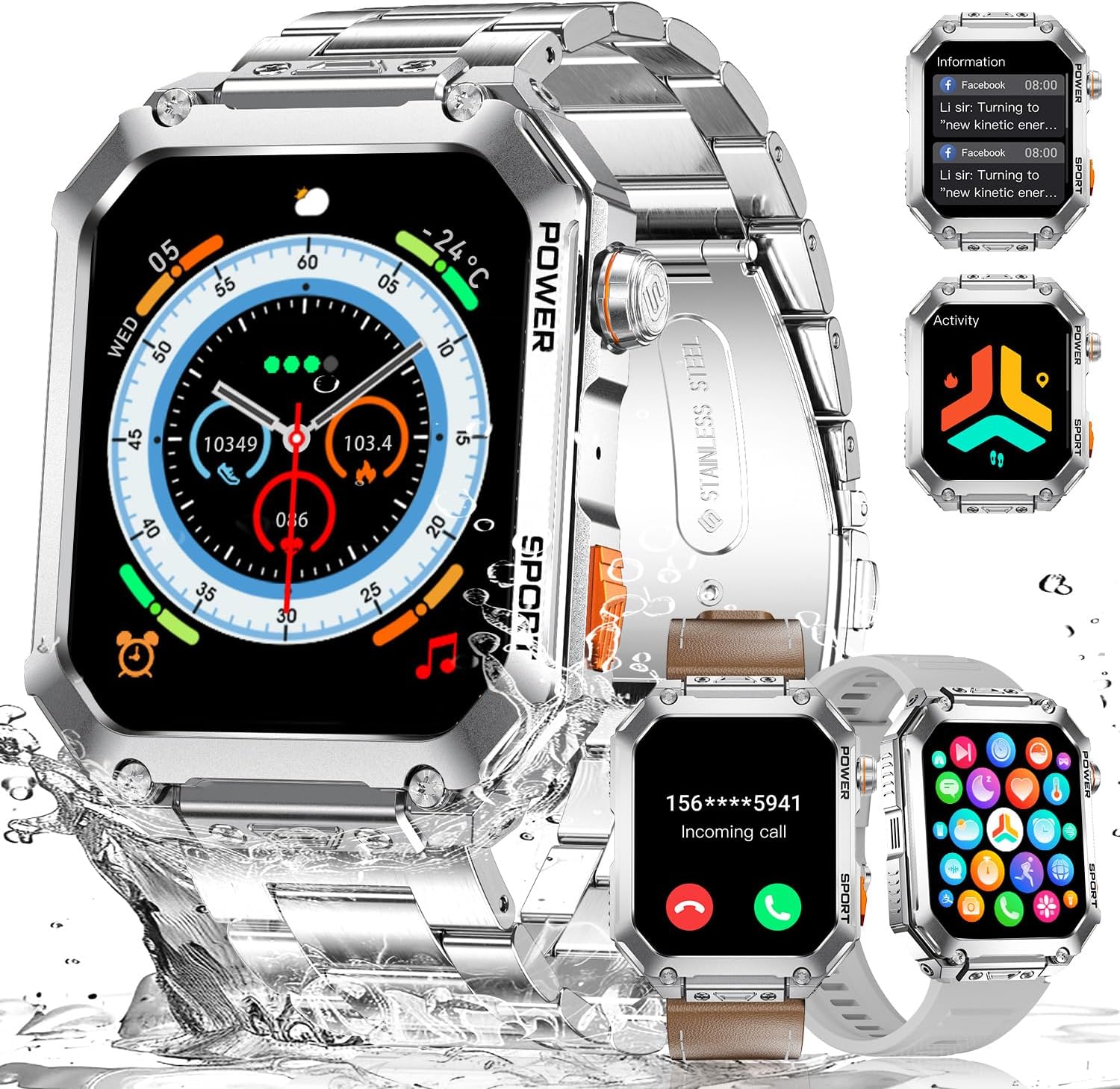
Image: LIGE Military Smartwatch EF2-I PRO, showcasing its versatile design with metal, leather, and silicone bands, and various display functionalities.
Karakteristik kle:
- 1.96" AMOLED Touch Screen: Large, ultra HD square display for clear visuals and smooth interaction.
- Dirab klas militè: Constructed with a unibody stainless steel metal case and 3rd generation 9H Gorilla Glass. Passed 15 military standard tests for temperature, pressure, dust, salt spray, and liquid contamination.
- Rezistans dlo 5 ATM: Designed to withstand daily wear and collisions, with static water resistance up to 50 meters.
- Extensive Sport Modes: Supports over 100 workout modes including walking, running, cycling, and basketball.
- Siveyans Sante 24 èdtan: Tracks heart rate, blood oxygen, blood pressure, respiratory rate, and automatic sleep monitoring. Includes stress detection and hydration reminders.
- Bluetooth Calling & Notifications: Equipped with Bluetooth 5.2 chip and Hi-Fi speakers for seamless call management and message notifications from apps like Facebook, WhatsApp, and Twitter.
- Asistan vwa AI: Integrated AI assistant for sending messages, checking weather, and setting reminders.
- Long lavi batri: Powered by a 400 mAh lithium polymer battery.
2. Enstalasyon
2.1 Chaje mont entelijan an
Before first use, fully charge the smartwatch. Connect the magnetic charging cable to the charging contacts on the back of the watch and plug the USB end into a standard USB power adapter (5V/1A recommended).
- Yon chaj konplè pran apeprè 2 èdtan anjeneral.
- Ikòn batri a sou ekran an ap endike estati chaj.

Image: The smartwatch displaying a full charge, highlighting its 400mAh battery capacity.
2.2 Enstalasyon ak koneksyon aplikasyon an
The LIGE EF2-I PRO Smartwatch uses the FitCloudPro application for full functionality. Ensure your smartphone meets the compatibility requirements (Android 8.0+ or iOS 12.0+).
- Telechaje App a: Scan the QR code in the watch manual or search for "FitCloudPro" in your smartphone's app store (Google Play Store for Android, Apple App Store for iOS).
- Pèmèt Bluetooth: Asire w ke Bluetooth aktive sou smartphone ou.
- Louvri FitCloudPro: Lanse aplikasyon FitCloudPro a epi swiv enstriksyon ki sou ekran an pou kreye yon kont oubyen konekte.
- Ajoute Aparèy: In the app, navigate to the "Device" or "Add Device" section. The app will search for nearby smartwatches.
- Chwazi mont ou a: Select "EF2-I PRO" or the corresponding device name from the list. Confirm the pairing request on both your phone and the smartwatch.
- Bay otorizasyon: Allow all necessary permissions requested by the app (e.g., location, notifications, contacts) for full functionality.
Note: Some users have reported confusion regarding the correct app. The product description explicitly states "FitCloudPro". If you encounter issues, ensure you are using this specific app.
3. Kijan pou itilize mont entelijan an
3.1 Navigasyon debaz
- Ekran manyen: Glise agoch/adwat, monte/anba pou navige nan meni ak fonksyon yo. Tape pou chwazi.
- Bouton bò: The watch features "POWER" and "SPORT" buttons.
- POUVWA bouton: Short press to wake/sleep screen, long press to power on/off.
- SPORT Button: Short press to quickly access sport modes.
3.2 Pèsonalize Kadran Mont yo
The smartwatch supports over 200 customizable watch faces via the FitCloudPro app. You can also use your own images.
- Louvri aplikasyon FitCloudPro a sou telefòn entelijan ou.
- Navigate to the "Dial Market" or "Watch Face" section.
- Browse and select a watch face, or choose to customize with your own photo.
- Synchronize the selected watch face to your smartwatch.

Image: Customization options for watch faces, showing over 200 built-in designs and the ability to use personal images.
3.3 Siveyans Sante
The smartwatch provides continuous health monitoring features. Access these functions from the watch menu or view detailed data in the FitCloudPro app.
- Siveyans batman kè: Li swiv batman kè ou pandan tout jounen an.
- Siveyans oksijèn nan san (SpO2): Mezire nivo saturation oksijèn nan san an.
- Siveyans tansyon: Bay lekti tansyon estime.
- Siveyans dòmi: Li otomatikman swiv modèl dòmi ou yo, tankou dòmi pwofon, dòmi lejè, ak lè ou reveye.
- Ritm respiratwa: Monitors your breathing rate.
- Stress Detection: Helps monitor stress levels.
- Hydration Reminders: Set reminders to drink water.
- Sante Fanm: Specific tracking features for women's health management.

Image: The smartwatch showing 24-hour health monitoring, including heart rate and advanced sleep tracking.
Disclaimer: The health monitoring features are for reference only and should not be used for medical diagnosis or treatment.
3.4 mòd espò
The smartwatch supports over 100 sport modes to track your workouts accurately. Select a mode before starting your activity.
- Tracking Metrics: Accurately tracks heart rate, calories burned, distance, and steps for each activity.
- Automatic Exercise Detection: Some activities may be automatically detected.

Image: The smartwatch showing sport mode tracking, with icons representing activities like walking, running, cycling, and more.
3.5 Bluetooth Calls & Message Notifications
Stay connected with Bluetooth calling and message notifications directly on your wrist.
- Fè/Resevwa Apèl: Use the built-in microphone and Hi-Fi speakers to answer or reject incoming calls. You can also dial numbers directly from the watch.
- Notifikasyon mesaj: Receive push notifications from various apps such as Facebook, WhatsApp, Twitter, and more.
- Asistan vwa AI: Activate the AI voice assistant to perform tasks like sending messages, checking weather, or setting reminders.

Image: The smartwatch's Bluetooth call functionality, showing an incoming call screen and a dial pad.

Image: The smartwatch receiving message notifications from popular applications.

Image: Additional smartwatch functions including music control, remote camera shutter, and alarm settings.
3.6 Lòt Fonksyon
The smartwatch includes a variety of useful daily functions:
- Revèy
- Kronomètr
- Kalkilatè
- Kontwòl Mizik
- Previzyon tan
- Jwenn Telefòn
- Kalandriye
- Kontwòl Kamera (deklanchè a distans)
- Ekspozisyon milti-lang
- Multiple Time Zone Settings
4. Antretyen
4.1 Netwayaj ak swen
- Regularly clean the watch case and bands with a soft, damp twal.
- Asire w ke kontak chaj yo pwòp epi sèk anvan ou chaje yo pou anpeche yo koroze.
- Evite itilize pwodwi chimik piman bouk oswa materyèl abrazif pou netwaye.
4.2 Rezistans dlo
The LIGE EF2-I PRO Smartwatch is rated 5 ATM water resistant, meaning it can withstand pressures equivalent to a depth of 50 meters. This makes it suitable for:
- Daily use, such as hand washing and rain.
- Showering (cold water recommended, avoid hot water and steam).
- Shallow-water activities like swimming in a pool.
Konsiderasyon enpòtan:
- Do NOT press any buttons while the watch is submerged.
- Avoid exposure to hot water, steam, or strong detergents, as these can compromise the water seal.
- The water resistance is for static pressure; sudden changes in water pressure (e.g., diving, high-pressure water jets) may exceed its limits.
- Apre ou fin ekspoze mont lan nan dlo sale, rense l avèk dlo fre epi seche l byen.
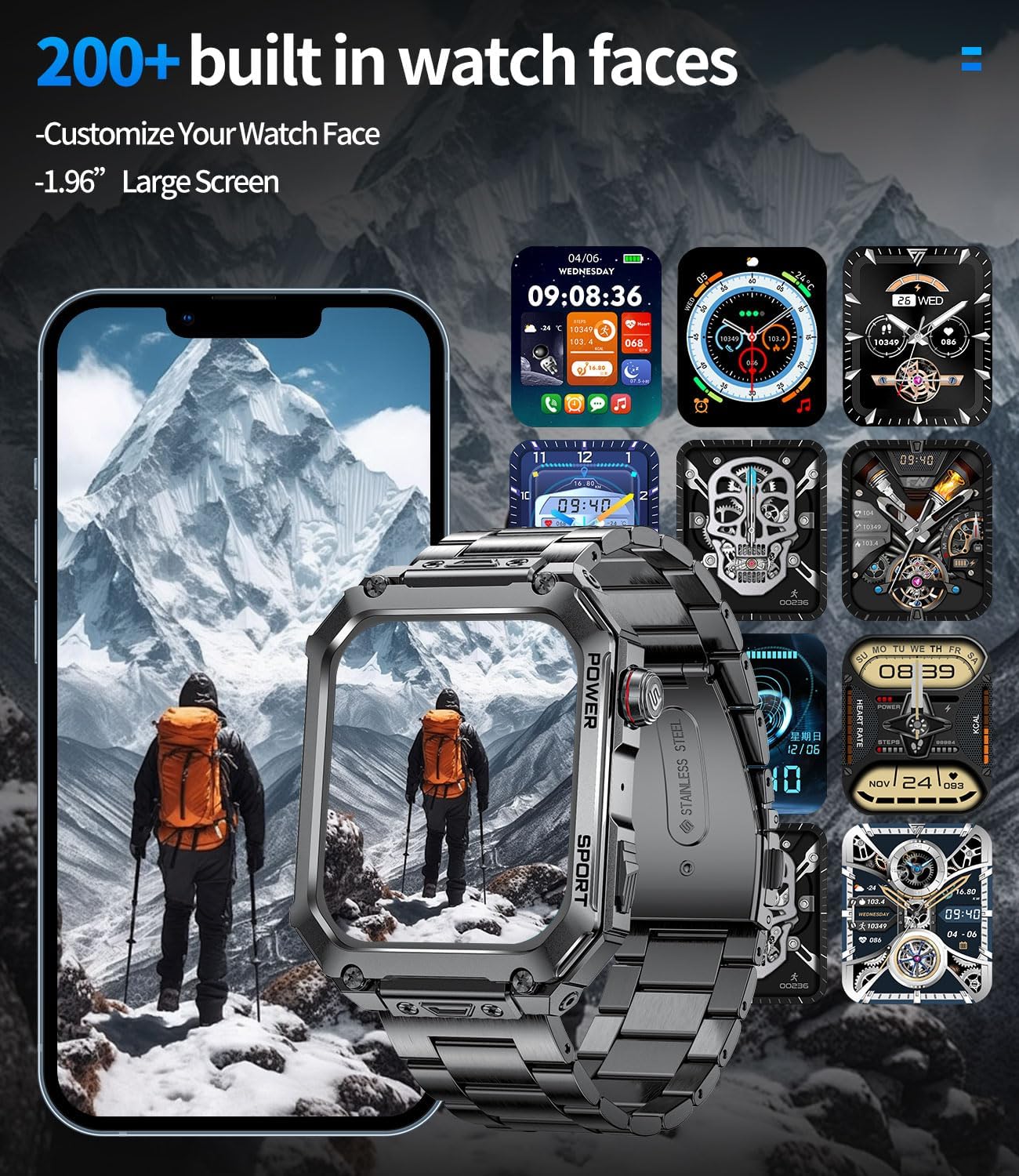
Image: The smartwatch demonstrating its military-grade durability, including 5 ATM water resistance.
NAN. Depanaj
Pwoblèm komen ak solisyon:
| Pwoblèm | Kòz posib / Solisyon |
|---|---|
| Mont lan pa limen. | Battery might be depleted. Charge the watch for at least 30 minutes. If still unresponsive, try a different charging cable or adapter. |
| Pa ka konekte ak telefòn entelijan an. |
|
| Done sou sante ki pa egzak. |
|
| Notifikasyon yo pa parèt. |
|
| Kout lavi batri. |
|
6. Espesifikasyon
| Karakteristik | Detay |
|---|---|
| Mak | LIGE |
| Nimewo Modèl | EF2-I PRO |
| Gwosè ekran | 1.96 pous |
| Kalite ekspozisyon | AMOLED (implied from description) |
| Fòm | Rektangilè |
| Koneksyon Teknoloji | Bluetooth 5.2 |
| Aparèy konpatib | Telefòn entelijan (Android 8.0+, iOS 12.0+) |
| Kapasite batri | 400 mAh (Lityòm Polymè) |
| Depo memwa | 128 MB |
| Rezistans dlo | 5 ATM (50 meters static) |
| Karakteristik espesyal | Activity Tracker, Heart Rate Monitor, Sleep Monitor, Multi-Sport Tracker, Music Player, Stress Tracking, Bluetooth Calls, Touch Screen, Voice Control, Alarm Clock, Weather Forecast, Find Phone, Camera Control |
| GPS | Pa gen GPS |
| Peyi orijin | Lachin |
| ASIN | B0DX1Q71KT |
7. Garanti ak sipò
LIGE is committed to providing quality products and customer service.
- Sèvis sou entènèt: 24-hour online support is available. Please refer to the FitCloudPro app or LIGE's official websit pou detay kontak.
- Sèvis Retounen: Enjoy 6 months of returns service from the date of purchase.
- Garanti pwodwi: Pwodwi a vini ak yon garanti 2 ane.

Image: LIGE's commitment to customer service, including online support, returns, and guarantee information.
For further assistance, please contact LIGE customer support through the channels provided in the FitCloudPro app or on the official LIGE websit.


