
Ourlife RXE123
OurlManyèl Itilizatè Kamera Aksyon Espò ife a
Mak: Ourlife | Modèl: RXE123
1. Pwodwi souview
Ourlife Sports Action Camera is designed to capture clear and detailed images with 1080P HD video recording and 5MP photography. It is suitable for various activities, from outdoor sports to everyday moments, delivering vibrant and dynamic visuals. Its robust design, including a waterproof casing and wide-angle lens, makes it an ideal companion for adventurers.
Karakteristik kle:
- HD 1080P Video & 5MP Photography: Capture high-resolution videos and crisp still images.
- Konsepsyon ki enpèmeyab: Designed for extreme sports, allowing use while surfing, swimming, or diving.
- 140° Ultra-Wide-Angle Lens: Kaptire yon domèn ki pi laj view for immersive footage.
- Batri 400mAh ki dire lontan: Supports extended shooting time.
- 2-Inch HD LCD Screen: Bay yon klè view for framing shots and playback.
- Entèfas itilizatè-zanmitay: Easy to operate for all users.

Figure 1.1: The Ourlife Sports Action Camera enclosed in its waterproof housing, ready for underwater use. The camera features an HD 1080P display and is designed for capturing dynamic visuals in various environments.
2. Ki sa ki nan bwat la
Tanpri verifye sa ki nan pake a pou asire w ke tout atik yo la:
- Ourlife Sports Action Camera
- Lojman ki enpèmeyab
- Manch Bar/Pol Mount
- Clip 1
- Mòn 1
- Mòn 2
- Mòn 3
- Mòn 4
- Pansman
- Batri rechargeable (400mAh)
- Batri Charger
- Manyèl Itilizatè (dokiman sa a)
- Pry Bar

Figure 2.1: All included accessories and components for the Ourlife Sports Action Camera. This includes various mounts, the waterproof housing, battery, charger, and other essential items.
3. Gid Enstalasyon
3.1 Chaje batri a
- Insert the provided 400mAh rechargeable battery into the battery charger.
- Connect the battery charger to a power source using a compatible USB cable (not included) and adapter.
- The indicator light on the charger will show the charging status. Once fully charged, disconnect the charger.
3.2 Mete pil la ak kat memwa a
- Louvri kouvèti konpatiman batri a sou kamera a.
- Insert the charged battery, ensuring the correct polarity.
- Locate the TF (microSD) card slot. Insert a compatible memory card (Class 10 or higher, up to 32GB recommended) until it clicks into place.
- Fèmen kouvèti lòj batri a byen.
3.3 Attaching the Waterproof Housing and Mounts
- To use the camera underwater or in harsh environments, place it inside the waterproof housing. Ensure the housing is clean and free of debris, and the seal is properly seated.
- Close the housing latch firmly to create a watertight seal.
- Attach the desired mount (e.g., Handle Bar/Pole Mount, Clip, or other mounts) to the waterproof housing or directly to the camera if not using the housing, depending on your activity.
- Secure the mount using the provided screws or clips.

Figure 3.1: The camera in its waterproof housing, demonstrating its capability to be submerged up to 98 feet (approximately 30 meters). This housing protects the camera during water-based activities.
4. Operasyon Enstriksyon
4.1 Limen/Etenyen
- Pou limen: Press and hold the Power/Mode button (usually located on the front or top of the camera) for a few seconds until the screen lights up.
- Pou etenn: Peze epi kenbe bouton Pouvwa/Mòd la ankò jiskaske ekran an etenn.
4.2 Navigating the 2-Inch LCD Screen
The 2-inch HD LCD screen allows you to preview your shots, review footage, and navigate settings. Use the Power/Mode button to cycle through modes (Video, Photo, Playback, Settings) and the Up/Down buttons (if available) or Shutter button to select options within menus.
4.3 Recording Videos and Taking Photos
- Mòd videyo: Once powered on, the camera typically defaults to video recording mode. Press the Shutter/OK button (usually on top) to start recording. Press it again to stop.
- Foto mòd: Press the Power/Mode button repeatedly until the camera enters photo mode. Press the Shutter/OK button to take a picture.
- Lektur mòd: Chanje nan mòd lekti pou re-repwoduiview videyo ki anrejistre ak foto ou yo sou ekran LCD a.
4.4 Using the 140° Wide-Angle Lens
The 140° wide-angle lens is automatically engaged, providing a broad field of view. This is ideal for capturing expansive landscapes, group shots, or immersive action footage where you want to include more of the surroundings.

Figure 4.1: Visual representation of the Ourlife Sports Action Camera highlighting its key features: 12MP image resolution, 140° wide-angle lens, waterproof capability, 2-inch LCD display, and 1080P Ultra HD video capture.
5. Antretyen
5.1 Cleaning the Camera and Housing
- Use a soft, lint-free cloth to clean the camera body and LCD screen. For stubborn smudges, slightly dampen twal la ak dlo.
- Pou lantiy la, sèvi ak yon twal espesyal pou netwaye lantiy ak yon solisyon pou evite reyur.
- After using the waterproof housing in saltwater, rinse it thoroughly with fresh water and let it air dry. Ensure no salt residue remains on the seals.
5.2 Swen Batri
- Chaje batri a konplètman anvan premye itilize.
- Evite vide batri a nèt regilyèman pou pwolonje dire lavi li.
- If storing the camera for an extended period, charge the battery to about 50% and remove it from the camera.
5.3 Depo
Store the camera and its accessories in a cool, dry place, away from direct sunlight and extreme temperatures. Keep it in its original packaging or a protective case to prevent damage.
NAN. Depanaj
| Pwoblèm | Kòz posib | Solisyon |
|---|---|---|
| Kamera a pa limen. | Batri a mouri oswa li pa byen mete. | Chaje batri a nèt. Asire w ke batri a byen mete nan plas li epi li byen polarite. |
| Pa ka anrejistre videyo oswa pran foto. | Memory card is full, corrupted, or not inserted. | Insert a compatible memory card. Format the memory card (this will erase all data). Delete unnecessary files. |
| Move kalite videyo/foto. | Lens is dirty. Insufficient lighting. Incorrect settings. | Clean the lens. Ensure adequate lighting. Check camera settings for resolution and exposure. |
| Water leakage into housing. | Housing not properly sealed. Debris on seal. Damaged seal. | Ensure housing latch is firmly closed. Check for and remove any debris on the rubber seal. Inspect the seal for cracks or damage; replace if necessary. |
7. Espesifikasyon
| Mak | Ourlsi |
| Nimewo Modèl | RXE123 |
| Rezolisyon Capture Videyo | 1080p HD |
| Rezolisyon foto | 5 megapiksèl (MP) |
| Gwosè ekran | 2-pous LCD |
| Wide-Angle Field of View | 140° |
| Kapasite batri | 400mAh |
| Kalite memwa flash | TF (mikroSD) |
| Fòma Capture Videyo | AVI |
| Teknoloji Capteur Foto | CCD |
| Maksimòm Longè Fokal | 30 |
| Longè Fokal Minimòm | 28 |
| Ouverture maksimòm | 2.8 f |
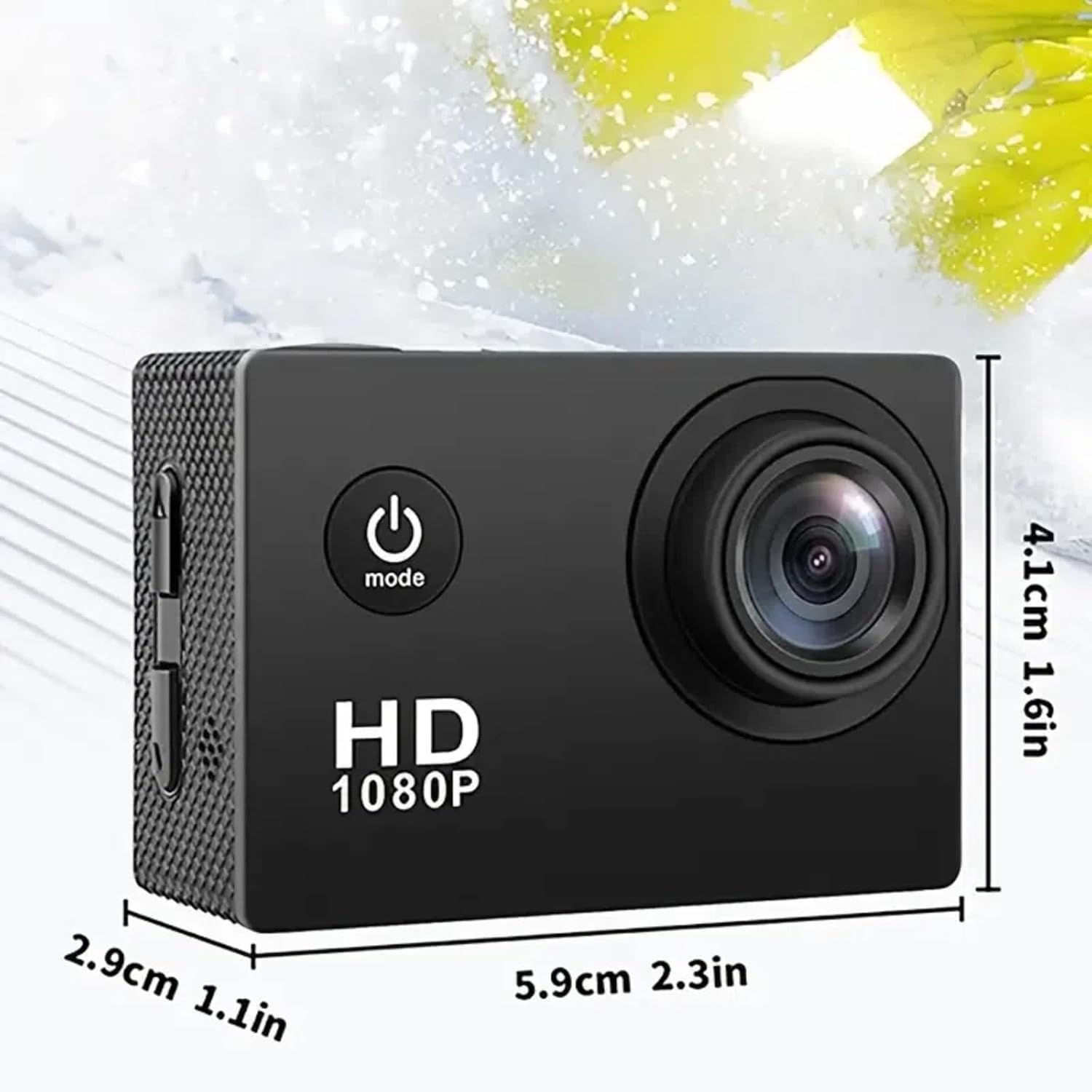
Figure 7.1: Physical dimensions of the Ourlife Sports Action Camera, showing its compact size for portability and ease of use.
8. Garanti ak sipò
For warranty information, technical support, or service inquiries, please contact Ourlife customer support. Details can typically be found on the product packaging or the official Ourlsi websit.
Tanpri konsève prèv acha ou a pou nenpòt reklamasyon garanti.
Dokiman ki gen rapò - RXE123
 |
OURLIFE MTR41 Action Camera User Manual - 5K Video, EIS, WiFi Manyèl itilizatè konplè pou O aURLIFE MTR41 action camera. Learn about its 5K video capabilities, 5X zoom, EIS, WiFi connectivity, waterproof features, and accessories. |
 |
OurlManyèl Itilizatè Kamera pou Timoun ife - Gid Operasyon ak Karakteristik Manyèl itilizatè konplè pou O aurlKamera pou Timoun ife, ki kouvri aparans, operasyon, paramèt, koneksyon, konsèy pou itilizatè, ak prekosyon sekirite. Aprann kijan pou itilize kamera videyo dijital ou pou timoun piti. |
 |
OURLIFE D610 Digital Camera Quick Guide Quick start guide and user manual for the OURLIFE D610 digital camera. Includes setup instructions, button functions, menu settings, and troubleshooting. |
 |
OURLIFE M105 Digital Camera User Manual Manyèl itilizatè konplè pou O aURLIFE M105 4K Action Camera and Gimbal Stabilizer, covering setup, operation, charging, and safety instructions. |
 |
OurlKamera pou Timoun ife: Manyèl Itilizatè, Karakteristik, ak Gid Operasyon Dekouvri karakteristik ak fonksyònman O aurlKamera Timoun ife. Gid sa a kouvri konfigirasyon, mòd foto ak videyo, espesifikasyon teknik, ak konsèy depanaj pou kamera dijital timoun amizan sa a. |
 |
OurlKamera dijital ife AC600: Gid fasil Manyèl itilizatè konplè pou O aurlKamera dijital ife AC600 la, ki kouvri konfigirasyon, operasyon, karakteristik, antretyen ak depanaj. Aprann kijan pou pran foto ak videyo ak O ou a.urlkamera ife. |
Ask a question about this manual
Ask about setup, troubleshooting, compatibility, parts, safety, or missing instructions. Manuals+ will review the question and use this page’s manual context to help answer it.