
Electronic Spices W88-B
Electroni Spices W88-B 20A Solar Charger Controller User Manual
Model: W88-B
1. Entwodiksyon
The Electronic Spices W88-B 20A Solar Charger Controller is designed to efficiently manage the charging and discharging of 12V/24V solar power systems. This controller optimizes battery performance and extends battery life by preventing overcharging, over-discharging, and short circuits. It features dual USB ports for charging mobile devices and other USB-powered gadgets directly from the solar system. Utilizing intelligent PWM charging technology, it enhances energy conversion efficiency, making it suitable for off-grid solar setups, RVs, boats, and small solar installations. The user-friendly LCD display provides real-time data for effective monitoring and management. Constructed with durable and heat-resistant materials, the W88-B controller offers reliable long-term performance in various environmental conditions.
2. Karakteristik kle
- Modèl: W88-B
- Rated Voltage: 12V/24V automatic identification
- Aktyèl nominal: 20A
- Max. PV Voltage: 50V
- Maksimòm puisans PV Antre: 130W (for 12V system) / 260W (for 24V system)
- Kalite ekspozisyon: LCD/LED display for real-time monitoring
- Chaje Teknoloji: PWM battery charging
- Pò USB: Pò USB doub pou chaje aparèy
- Karakteristik pwoteksyon: Overcharging, over-discharging, short circuit, over-current, over-voltage, overheating, and lightning protection.
- Batri konpatibilite: Suitable for lead-acid battery, lithium iron battery, lithium battery.
- Materyèl: Konstriksyon plastik ak metal dirab.
3. Pwodwi souview ak dimansyon
The W88-B solar charge controller features a compact design with clearly labeled terminals and an intuitive LCD display. Below are images illustrating the product's appearance and its key dimensions.

Figi 3.1: Devan view of the Electroni Spices W88-B Solar Charger Controller, showing the LCD display, control buttons, USB ports, and terminal connections.

Figure 3.2: Dimensions of the W88-B Solar Charger Controller, indicating a length of 131 mm and a width of 69 mm.
4. Enfòmasyon sou Sekirite ak Karakteristik Pwoteksyon
Always observe safety precautions when working with electrical systems. Ensure all connections are secure and correct before applying power. The W88-B controller incorporates multiple protection features to ensure safe operation of your solar system:
- Plis pase Pwoteksyon Kouran: Anpeche domaj ki soti nan twòp kouran.
- Pwoteksyon sou chaj: Stops charging when the battery is full to prevent overcharging.
- Pwoteksyon Kout Awondisman: Automatically disconnects in case of a short circuit.
- Plis pase Voltage Pwoteksyon: Protects against damage from excessively high voltage.
- Over Heating Protection: Li fèmen si tanperati entèn lan depase limit ki an sekirite yo.
- Pwoteksyon Zeklè: Offers defense against lightning strikes.

Figure 4.1: Visual representation of the various protection features integrated into the W88-B Solar Charger Controller.
5. Enstalasyon ak Enstalasyon
Proper installation is crucial for the optimal performance and longevity of your solar charge controller. Follow these steps carefully:
- Connect Battery First: Konekte batri a ak kontwolè chaj la. Asire w polarite ki kòrèk la (+ pou rive nan + ak - pou rive nan -). Kontwolè a ap detekte vòl batri a.tage (12V oswa 24V) otomatikman.
- Connect Solar Panels: Connect the solar panels to the charge controller. Again, observe correct polarity.
- Connect DC Load (Optional): Connect your DC load (e.g., DC lights) to the load terminals of the controller.
- Konekte Envèstisè a (Si ou vle): If using an inverter for AC loads, connect it to the battery terminals (not directly to the controller's load terminals).
Enpòtan: Always connect the battery to the controller first, then the solar panels, and finally the load. Disconnect in the reverse order: load, then solar panels, then battery.
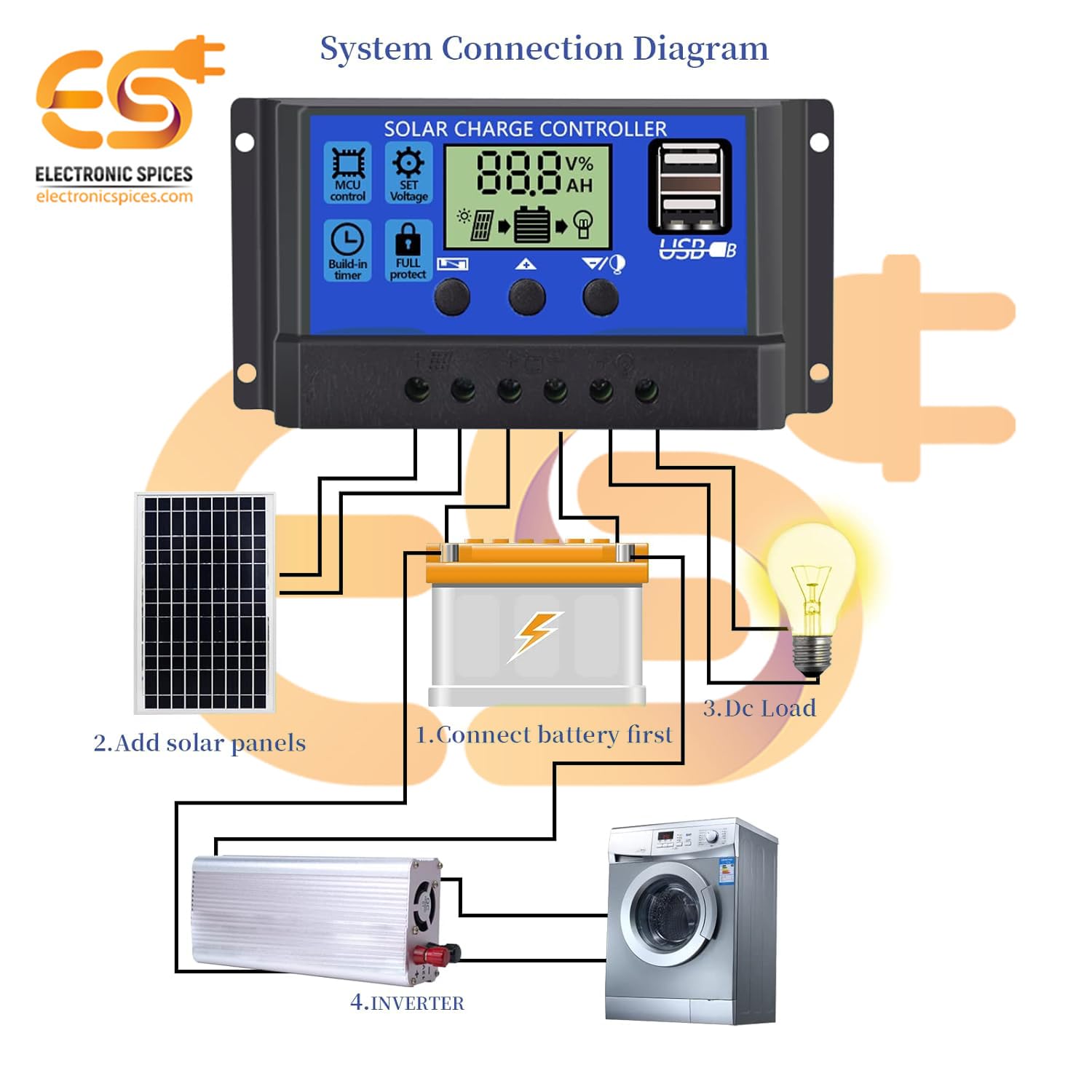
Figure 5.1: System connection diagram illustrating the proper sequence for connecting the battery, solar panels, DC load, and inverter to the solar charge controller.

Figure 5.2: A quick visual guide for connecting the solar panels, battery, and DC load to the W88-B controller.
6. Operasyon Enstriksyon
The W88-B controller features an LCD display that provides real-time information about your solar system's status.

Figure 6.1: Explanation of the digital display on the W88-B controller, showing indicators for solar panel charge, battery status, and load output.
6.1. Display Modes
The LCD cycles through various display modes automatically. You can also manually cycle through them using the control buttons. Common displays include:
- Batri Voltage: Montre volim aktyèl latage nan batri a konekte.
- Solar Panel Charge Status: Indicates if the solar panels are actively charging the battery.
- Load Output Status: Shows if the load output is active or inactive.
6.2. Bouton kontwòl
The controller has three buttons for navigation and setting adjustments:
- Bouton meni: Itilize pou antre ak sòti nan mòd paramèt yo.
- Up bouton: Itilize pou ogmante valè oswa navige anlè nan meni yo.
- Desann bouton: Itilize pou diminye valè oswa navige anba nan meni yo.
Refer to the specific icons on the controller for functions like MCU control, set voltage, build-in timer, and full protect indicators.
7. Antretyen
To ensure the long-term reliability and performance of your W88-B solar charge controller, follow these maintenance guidelines:
- Netwayaj regilye: Kenbe kontwolè a pwòp epi san pousyè ak debri. Sèvi ak yon twal mou epi sèk pou netwaye.
- Tcheke Koneksyon: Periodically inspect all wiring connections to ensure they are tight and free from corrosion. Loose connections can lead to power loss or overheating.
- Vantilasyon: Ensure the controller is installed in a well-ventilated area to prevent overheating. Do not block the ventilation holes.
- Kondisyon anviwònman: While designed for durability, avoid exposing the controller to extreme moisture or direct sunlight for prolonged periods if not rated for such exposure.
- Sante batri: Monitor your battery's health regularly. A failing battery can impact the controller's performance.
NAN. Depanaj
If you encounter issues with your W88-B solar charge controller, refer to the following common problems and their solutions:
| Pwoblèm | Kòz posib | Solisyon |
|---|---|---|
| Pa gen ekspozisyon oswa kouran | Batri a pa konekte oswa li gen ti vòltajtage; reversed polarity; loose connection. | Tcheke koneksyon batri ak voltage. Ensure correct polarity. Tighten all terminals. |
| Batri pa chaje | Solar panels not connected; insufficient sunlight; faulty solar panel; controller fault. | Check solar panel connections. Ensure panels are receiving adequate sunlight. Test solar panel output. |
| Chaj la pa fonksyone | Load disconnected; battery voltage too low (low voltage disconnect); overload protection activated. | Check load connections. Charge battery. Reduce load or check for short circuit in load. |
| Surchof kontwolè | Poor ventilation; excessive load; short circuit. | Ensure adequate airflow around the controller. Reduce load. Check for short circuits in the system. |
Si pwoblèm nan pèsiste apre ou fin eseye solisyon sa yo, tanpri kontakte sèvis kliyan.
9. Espesifikasyon
| Paramèt | Valè |
|---|---|
| Modèl | W88-B |
| Rated Voltage | 12V/24V (Otomatik) |
| Rated aktyèl | 20A |
| Max. PV Voltage | 50V |
| Max. PV Input Power (12V) | 130W |
| Max. PV Input Power (24V) | 260W |
| Kalite ekspozisyon | LCD / dirije |
| Chaje Port Kalite | USB (Dual) |
| Pwa atik | 150 gram |
| Dimansyon (LxW) | 13.1 cm x 6.9 cm |
| Materyèl | Plastik, Metal |
| Koulè | Ble |
| Peyi orijin | peyi Zend |
10. Garanti ak sipò
This product is manufactured by Electronic Spices. For any technical assistance, troubleshooting beyond this manual, or warranty inquiries, please contact Electronic Spices customer support. Please have your product model number (W88-B) and purchase details ready when contacting support.
Manifakti: Epis elektwonik
Enfòmasyon pou kontakte: Refer to the contact details provided with your purchase or visit the official Electronic Spices websit la pou jwenn enfòmasyon sipò ki pi ajou yo.
Ask a question about this manual
Ask about setup, troubleshooting, compatibility, parts, safety, or missing instructions. Manuals+ will review the question and use this page’s manual context to help answer it.