
DOOGEE V40PRO
DOOGEE V40 Pro 5G Rugged Smartphone User Manual
Modèl: V40PRO
1. Entwodiksyon
This manual provides essential information for the safe and efficient operation of your DOOGEE V40 Pro 5G Rugged Smartphone. Please read it thoroughly before using your device to ensure proper setup, usage, and maintenance. The DOOGEE V40 Pro is designed for durability and high performance, featuring a Dimensity 7300 4nm 5G processor, a 200MP AI camera, an 8680mAh battery, and a 1.47-inch multi-functional rear screen.
2. Ki sa ki nan bwat la
Verifye ke tout atik yo prezan nan anbalaj pwodwi a:
- 1 x DOOGEE V40 Pro Rugged Phone
- 1 x tip-C USB kab
- 1 x Chargeur
- 1 x Packing Box/ 1 x Manual
Deskripsyon Videyo a: An unboxing video of the DOOGEE V40 Pro, showing the phone and its included accessories such as the charger and USB cable.
3. Pwodwi souview
The DOOGEE V40 Pro features a robust design with advanced functionalities. It includes a large main display and an innovative rear screen for quick access to information and controls.
3.1 Devan ak dèyè Views
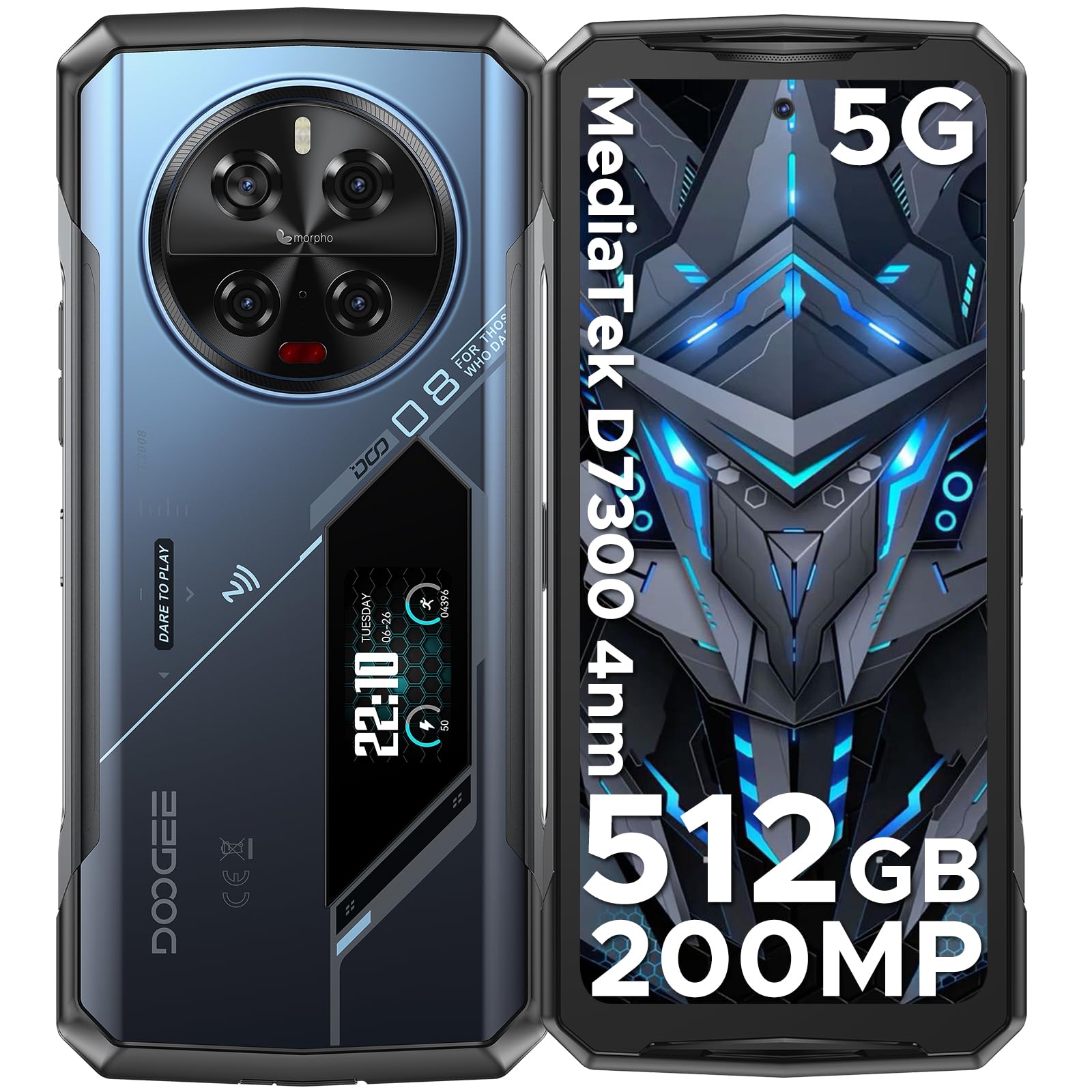
Deskripsyon imaj: Yon konplè view of the DOOGEE V40 Pro, showcasing its front display and the unique rear panel with the camera module and secondary screen.
3.2 Ekspozisyon prensipal
The device is equipped with a 6.78-inch FHD+ display offering a 120Hz dynamic refresh rate for smooth visuals and efficient power consumption.

Deskripsyon imaj: The DOOGEE V40 Pro's main 6.78-inch FHD+ display, illustrating its vibrant screen quality.
3.3 Multi-functional Rear Display
A 1.47-inch secondary display on the rear provides quick access to essential information and controls without needing to activate the main screen. Functions include time, date, notifications, music control, and battery level.

Deskripsyon imaj: A close-up of the DOOGEE V40 Pro's 1.47-inch rear display, showing various customizable widgets and information displays.
3.4 Sistèm Kamera
The device features a versatile camera setup, including a 200MP AI main camera with OIS, a 20MP night vision camera, an 8MP telephoto camera, an 8MP macro camera, and a 32MP front-facing camera.

Deskripsyon imaj: Yon detaye view of the DOOGEE V40 Pro's circular rear camera module, highlighting its multiple lenses and flash.
4. Enstalasyon
4.1 Enstalasyon Kat SIM ak Kat TF
To install your SIM card(s) and/or TF card (microSD card for expandable storage), locate the SIM tray on the side of the device. Use the provided SIM ejector tool to open the tray. Carefully place your nano-SIM cards and/or TF card into the designated slots, ensuring correct orientation. Close the tray securely.
4.2 Premye pouvwa sou
Press and hold the Power button located on the side of the device until the DOOGEE logo appears. Follow the on-screen instructions to complete the initial setup, including language selection, network connection, and account configuration.
5. Operasyon Enstriksyon
5.1 Fonksyon Telefòn Debaz yo
Navigate the Android 14 operating system using touch gestures. Swipe down from the top for notifications and quick settings. Use the volume buttons on the side to adjust audio levels. The power button can be configured for various actions, including screen lock/unlock and power options.
5.2 Using the Rear Display
The 1.47-inch rear display offers quick access to information and controls. Swipe left or right to cycle through different widgets such as time, date, battery status, music playback controls, and notification alerts. This display can also be used for enhanced selfie previews.

Deskripsyon imaj: A person holding the DOOGEE V40 Pro, demonstrating the visibility and utility of the rear display.
5.3 Operasyon Kamera
Open the Camera application to access the 200MP AI main camera, 20MP night vision camera, 8MP telephoto, 8MP macro, and 32MP front camera. Select different modes for photos, videos (including 4K recording), and special features like anti-shake and night vision. The rear display can assist with framing selfies using the main camera.
Deskripsyon Videyo a: Yon emisyon videyo pwomosyonèlasing the DOOGEE V40 Pro's features, including its camera capabilities and rugged design.
5.4 Pèfòmans ak Jwèt
The Dimensity 7300 4nm 5G processor and 36GB RAM (16GB physical + 20GB virtual) provide smooth performance for demanding applications and games. The DOOGEE OS 4.0 includes features like Game Mode Without Disturb for an uninterrupted gaming experience.
Deskripsyon Videyo a: A video highlighting the DOOGEE V40 Pro's e-sports design and performance, suitable for gaming enthusiasts.
5.5 DOOGEE OS 4.0 Features
Experience enhanced user interface and features with DOOGEE OS 4.0, including App Cloning, Drama Mode (Video), and Dynamic Capsule for improved multitasking and user interaction.
6. Koneksyon
The DOOGEE V40 Pro supports a range of connectivity options:
- Rezo: 5G connectivity. Supports AT&T, Verizon, T-Mobile. Not compatible with CDMA carriers such as Cricket, Sprint, Boost Mobile, Straight Talk, or U.S. Cellular.
- Wi-Fi: Wi-Fi 6 for fast and stable wireless internet.
- Bluetooth: Bluetooth 5.2 pou konekte akseswa san fil.
- NFC: Near Field Communication for contactless payments and data exchange.
- GPS: Integrated GPS with Beidou, Galileo, and Glonass support for accurate navigation.
7. Jesyon batri
The DOOGEE V40 Pro is equipped with an 8680mAh battery, providing extended usage times. It supports 33W fast charging to quickly replenish power.

Deskripsyon imaj: An illustration highlighting the large 8680mAh battery capacity of the DOOGEE V40 Pro.
7.1 OTG Chaje Ranvèse
Utilize the OTG (On-The-Go) function to use your V40 Pro as a power bank to charge other compatible devices.
7.2 Jesyon Batri Entelijan
The device features an intelligent battery management system with Ultra Power Saving mode to extend battery life when needed and an option to display battery percentage nan ba estati a.
8. Karakteristik solid
The DOOGEE V40 Pro is built to withstand harsh environments, certified with IP68, IP69K, and MIL-STD-810H ratings.
- Ip68: Dust and water resistant up to 1.5 meters for 30 minutes.
- IP69K: Rezistan a jè dlo ki gen gwo presyon ak gwo tanperati.
- MIL-STD-810H: Military-grade durability against drops, shocks, and extreme temperatures.
- Rezistans Tanperati: Operates reliably in temperatures ranging from -40°C (-40°F) to +70°C (158°F).

Deskripsyon imaj: The DOOGEE V40 Pro submerged in water and being dropped, illustrating its IP68/IP69K and MIL-STD-810H ruggedness ratings.
9. Espesifikasyon
| Karakteristik | Detay |
|---|---|
| Dimansyon pwodwi | 7.2 x 3.3 x 0.6 pous |
| Pwa atik | 12.8 ons (0.8 Liv) |
| Sistèm operasyon | Android 14 |
| Modèl CPU | Dimensity 7300 4nm 5G Octa-core Processor |
| CPU vitès | 2.5 GHz |
| Gwosè memwa RAM enstale | 36 GB (16GB + 20GB vityèl) |
| Kapasite Depo memwa | 512 GB (Ou ka elaji li jiska 2TB ak yon kat TF) |
| Kanpe Screen Display Size | 6.78 pous |
| Rezolisyon | 1080 x 2400 (FHD+) |
| Rafrechisman pousantaj | 120 Hz |
| Ekspozisyon dèyè | 1.47" All-Purpose Secondary Display |
| Kamera prensipal | 200MP AI Main Camera with OIS |
| Kamera Vizyon lannwit | Kamera Vizyon Lannwit 20MP |
| Other Rear Cameras | 8MP Telephoto Camera, 8MP Macro Camera |
| Kamera devan | Kamera devan 32MP |
| Kapasite batri | 8680 Miliamp Orè |
| Chaje | Chaje rapid 33W, chaje ranvèse OTG |
| Koneksyon teknoloji | Bluetooth 5.2, NFC, WiFi 6 |
| GPS | Beidou, Galileo, Glonass, GPS |
| Se solid | IP68, IP69K, MIL-STD-810H |
| Audio Jack | Kalite-C |
| Oratè | 1216 Super-linear Waterproof 121dB 1.5W BOX Speaker with SMART PA chip |
| Antre Entèfas Imèn | Touchscreen |
| Koulè | Ble |
NAN. Depanaj
If you encounter issues with your DOOGEE V40 Pro, try the following steps:
- Aparèy pa limen: Asire w batri a chaje. Konekte telefòn nan nan plato a epi tann kèk minit anvan ou eseye limen l ankò.
- Ekran ki pa reponn: Peze epi kenbe bouton Pouvwa a pandan apeprè 10-15 segonn pou fòse yon rekòmanse.
- Pwoblèm koneksyon rezo: Check if your SIM card is correctly inserted. Verify that mobile data or Wi-Fi is enabled. Restart the device.
- Defo nan aplikasyon an: Close and reopen the problematic application. If the issue persists, clear the app's cache and data in Settings > Apps.
- Pèfòmans Ralanti: Close unnecessary background applications. Clear cache regularly. Consider a factory reset as a last resort (back up your data first).
11. Garanti ak sipò
DOOGEE provides comprehensive support for your V40 Pro smartphone:
- Garanti 30 jou pou ranbousman: If you are not satisfied with your purchase, you may be eligible for a full refund within 30 days.
- 2-ane garanti limite: Your device is covered by a 2-year limited warranty against manufacturing defects. Please refer to the warranty card included in the box for detailed terms and conditions.
- 24/7 Sipò sou entènèt: For any technical assistance or inquiries, contact DOOGEE customer service available 24 hours a day, 7 days a week.
Ask a question about this manual
Ask about setup, troubleshooting, compatibility, parts, safety, or missing instructions. Manuals+ will review the question and use this page’s manual context to help answer it.