
1. Entwodiksyon
The Fanvil V60W is an advanced desktop IP phone designed for modern communication needs. It combines elegant design with robust functionality, featuring a 2.4-inch color display for an intuitive user interface. This device supports up to 4 SIP lines and includes 6 programmable keys for optimal customization. High-definition audio quality and 6-way audio conferencing capabilities make this phone ideal for professional communications. Versatile connectivity is provided through integrated dual-band 2.4G/5G WiFi (WiFi 6) and Bluetooth 5, eliminating the need for additional cables. Two 10/100 ports with PoE support ensure easy integration into your existing network. Its modern black design seamlessly fits into any office environment, while the ergonomic handset with a coiled cord ensures comfort during extended conversations.
2. Pake kontni
Please verify that all items are present and in good condition upon opening the package. If any items are missing or damaged, please contact your vendor.
- Fanvil V60W IP Phone Unit
- Aparèy
- Aparèy kòd
- Ethernet kab
- Adaptè kouran (si w pa itilize PoE)
- Gid Enstalasyon Rapid
3. Pwodwi souview
Familiarize yourself with the components of your Fanvil V60W IP Phone.
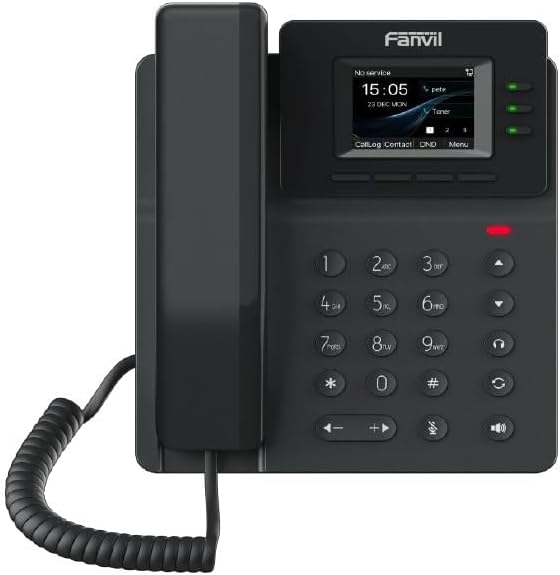
Figure 3.1: Fanvil V60W IP Phone Front View
This image displays the front of the Fanvil V60W IP Phone. It features a black handset on the left, connected by a coiled cord. The main unit on the right includes a color display showing "No service", "15:05", "23 DEC MON", and menu options like "CallLog", "Contact", "DND", and "Menu". Above the display, the "Fanvil" logo is visible. To the right of the display are three green indicator lights. Below the display is a standard numeric keypad (0-9, *, #) along with navigation keys (up, down, left, right), volume controls, and dedicated function keys for headset, speakerphone, mute, and redial/transfer. A red indicator light is visible above the keypad.
Konpozan kle:
- Ekspozisyon ekran: 2.4-inch color display (320 x 240 resolution) for user interface and information.
- Kle pwogramasyon: 6 keys for custom functions.
- Klavye nimerik: Standard 0-9, *, # for dialing.
- Kle Navigasyon: Pou navigasyon meni.
- Kle Fonksyon: Dedicated keys for common features like speakerphone, mute, headset.
- Aparèy: Ergonomic design for comfortable calls.
- Endikatè ki ap dirije: For call status, message waiting, etc.
4. Enstalasyon ak Enstalasyon
Follow these steps to set up your Fanvil V60W IP Phone.
4.1 Konekte Telefòn nan
- Konekte telefòn nan: Branche yon bout kòd telefòn ki vlope a nan telefòn nan epi lòt bout la nan pò telefòn nan ki sou baz telefòn nan.
- Konekte sou rezo a:
- Ethernet (PoE or Adapter): Connect an Ethernet cable from the LAN port on the phone to your network switch or router. If using Power over Ethernet (PoE), the phone will power on automatically.
- Power Adapter (if no PoE): If PoE is not available, connect the power adapter to the power port on the phone and then to a power outlet.
- Konekte ak PC (Si ou vle): If you wish to connect a computer through the phone, connect an Ethernet cable from the PC port on the phone to your computer.
4.2 Inisyal Konfigirasyon
Upon first boot, the phone will attempt to obtain network settings via DHCP. You may need to configure SIP accounts manually or via auto-provisioning.
- Aksè Anviwònman: Peze a Menu key on the phone to access system settings.
- Anviwònman rezo: Navige nan Settings > Advanced Settings > Network to configure IP address, subnet mask, gateway, and DNS if not using DHCP.
- Enskripsyon Kont SIP: Navige nan Settings > Advanced Settings > Accounts to add or modify SIP accounts. You will need your SIP server address, SIP user ID, and password provided by your VoIP service provider.
- Konfigirasyon Wi-Fi: Navige nan Anviwònman> Wi-Fi to enable Wi-Fi and connect to an available wireless network.
5. Operasyon debaz
5.1 Fè yon apèl
- Lift the Handset oswa peze la Speakerphone kle.
- Fè nimewo a lè l sèvi avèk klavye a.
- Peze a Rele key or wait a few seconds for the call to connect automatically.
5.2 Reponn yon apèl
Lè telefòn nan sone:
- Lift the Handset, oswa
- Peze a Speakerphone kle, oswa
- Peze korespondan an Liy kle.
5.3 Fini yon apèl
Pou mete fen nan yon apèl aktif:
- Replace the Handset, oswa
- Peze a Fini apèl key (if available on screen or as a function key).
5.4 Ajiste Volim
Pandan yon apèl, sèvi ak la Volim monte (+) epi Volim Dawonn (-) keys to adjust the handset, headset, or speakerphone volume.
6. Karakteristik avanse
The Fanvil V60W offers several advanced features to enhance your communication experience.
- Rele kenbe: Peze a Kenbe key during an active call to place it on hold. Press again to resume.
- Rele Transfè:
- Avèg Transfè: Pandan yon apèl, peze Transfè, dial the new number, and press Transfè ankò.
- Te ale nan transfè: Pandan yon apèl, peze Transfè, dial the new number, wait for the other party to answer, then press Transfè ankò pou konplete.
- 6-Way Audio Conferencing:
- Make a call to the first party.
- Peze a Konf key. The first party is put on hold.
- Dial the second party's number and wait for them to answer.
- Peze a Konf key again to establish the conference.
- Repeat steps 2-4 for additional parties (up to 6 participants total).
- Koneksyon Bluetooth: Pair your Bluetooth headset or mobile device via Anviwònman> Bluetooth for hands-free communication or contact synchronization.
- Kle pwogramasyon: Customize the 6 programmable keys via the phone's web koòdone oswa Settings > DSS Key to assign speed dials, BLF (Busy Lamp Field), or other functions.
7. Antretyen
Proper maintenance ensures the longevity and optimal performance of your Fanvil V60W IP Phone.
- Netwayaj: Sèvi ak yon twal mou epi sèk pou netwaye sifas telefòn nan. Pou mak ki difisil pou retire, yon ti kras siye.amp cloth with mild, non-abrasive cleaner can be used. Avoid excessive moisture and harsh chemicals.
- Retire pousyè: Regularly wipe down the display and keypad to prevent dust buildup.
- Kondisyon anviwònman: Keep the phone in a dry environment, away from direct sunlight, extreme temperatures, and sources of moisture.
- Mizajou mikrolojisyèl: Periodically check for firmware updates from Fanvil's official website or through your service provider. Firmware updates can improve performance, add features, and fix bugs.
NAN. Depanaj
This section addresses common issues you might encounter with your Fanvil V60W IP Phone.
| Pwoblèm | Kòz posib | Solisyon |
|---|---|---|
| Telefòn nan pa limen. | No power from adapter or PoE. | Check power adapter connection or ensure PoE is active on the Ethernet port. Try a different power outlet or Ethernet port. |
| Pa gen ton pou rele / Pa ka fè apèl. | Network connectivity issue; SIP account not registered. | Verify Ethernet cable connection. Check network settings (IP address, gateway). Ensure SIP account status is "Registered" in the phone's settings. Contact your VoIP service provider. |
| Move kalite odyo (eko, estatik). | Network congestion; faulty cable; environmental interference. | Check network bandwidth. Replace Ethernet cable. Move phone away from other electronic devices. Adjust volume settings. |
| Koneksyon Wi-Fi a pa estab. | Weak signal; interference; incorrect password. | Move phone closer to Wi-Fi router. Check Wi-Fi password. Ensure router firmware is up to date. |
If the problem persists after attempting these solutions, please contact your technical support or VoIP service provider for further assistance.
9. Espesifikasyon
Detailed technical specifications for the Fanvil V60W IP Phone.
- Ekspozisyon: 2.4-inch (320x240) color screen
- Liy SIP: 4
- Kle pwogramasyon: 6
- Odyo: HD Audio, 6-way audio conferencing
- Koneksyon: Dual-band 2.4G/5G Wi-Fi (Wi-Fi 6), Bluetooth 5
- Pò Ethernet: 2 x 10/100 Mbps (with PoE support)
- Dimansyon (L x W x H): 22 x 25 x 15 cm (apeprè)
- Pwa: 600 gram (apeprè)
- Materyèl: Plastik
- Koulè: Nwa
- Sous pouvwa: Power adapter or PoE
- Aparèy konpatib: Ehs
10. Garanti ak sipò
Pou enfòmasyon sou garanti a ak sipò teknik, tanpri gade dokimantasyon ki vini ak acha ou a oswa vizite sit ofisyèl Fanvil la. websit la. Kenbe resi acha ou kòm prèv acha pou reklamasyon garanti.
- Manifakti: Fanvil
- Kontakte sipò: Refer to Fanvil's official website for support channels (e.g., support portal, email, phone).
- Mizajou lojisyèl: Information regarding software updates is not available in the product data. Please check the manufacturer's websit pou dènye dènye yo.
- Pyès rezèv: Information regarding spare parts availability is not available.