
1. Entwodiksyon
The Wingtech Celero 5G smartphone is designed to provide reliable performance and connectivity. This manual offers comprehensive guidance on its features, setup, operation, and maintenance to ensure optimal use of your device.
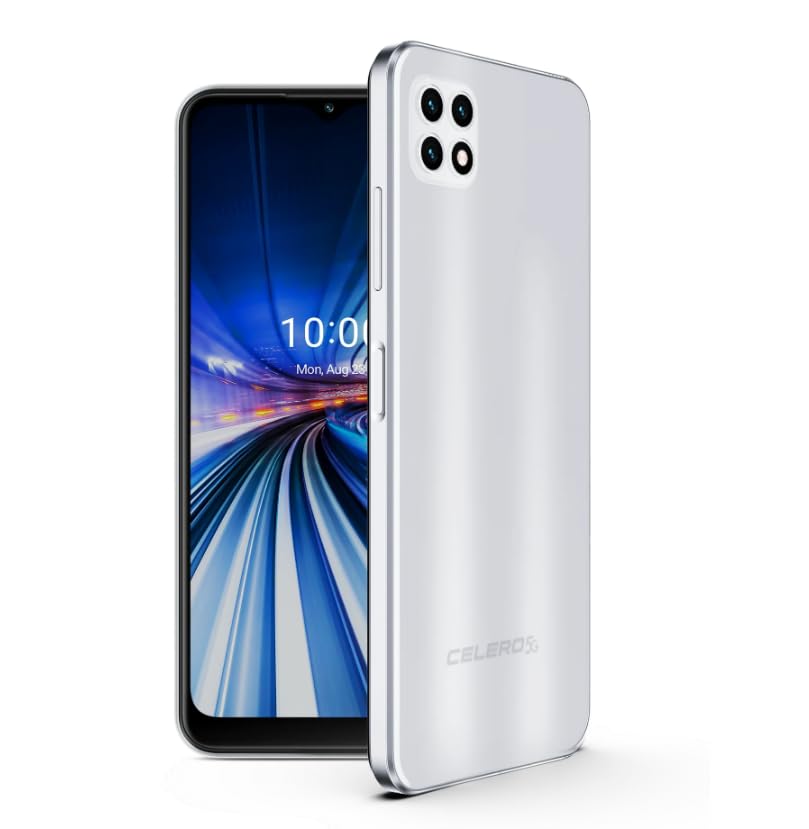
Figure 1: Wingtech Celero 5G Smartphone (Silver)
2. Ki sa ki nan bwat la
Verifye ke tout atik yo prezan nan anbalaj pwodwi a:
- Wingtech Celero 5G Smartphone
- USB kab
- SIM Plato Ejector
- Gid pou kòmanse rapidman (ou ka mete l apa)
3. Enstalasyon
3.1. Mete kat SIM la
- Jwenn plato kat SIM lan sou bò aparèy ou an.
- Mete zouti pou retire plato SIM lan nan ti twou ki akote plato a epi pouse dousman jiskaske plato a soti.
- Mete kat Nano-SIM ou yo ak/oswa kat microSD ou yo nan plato a ak kontak lò yo anba.
- Ak anpil atansyon reinserte plato a nan aparèy la.
3.2. Premye Limen ak Konfigirasyon
- Peze epi kenbe bouton Pouvwa a jiskaske aparèy la vibre epi ekran an limen.
- Swiv enstriksyon yo sou ekran an pou chwazi lang ou, konekte ak yon rezo Wi-Fi, epi konfigire kont Google ou.
- Ranpli asistan konfigirasyon an pou pèsonalize paramèt aparèy ou an.
4. Opere
4.1. Navigasyon debaz
- Ekran Kay: Glise agoch oswa adwat pou jwenn aksè nan diferan panèl ekran prensipal la.
- Tiwa aplikasyon: Glise moute soti nan ekran kay la view tout aplikasyon enstale.
- Panèl Notifikasyon yo: Glise anba soti anwo ekran an pou jwenn aksè a notifikasyon yo ak paramèt rapid yo.
4.2. Fè apèl epi voye mesaj
- Tape la Telefòn icon to open the dialer and make calls.
- Tape la Mesaj icon to send and receive text messages.
4.3. Itilizasyon kamera
- Tape la Kamera icon to launch the camera application.
- Select different modes (Photo, Video, Portrait, etc.) by swiping across the screen.
- Tape bouton deklanchè a pou pran foto oswa pou kòmanse/sispann anrejistreman videyo.
5. Espesifikasyon
| Karakteristik | Detay |
|---|---|
| Non modèl | Celero 5G |
| Nimewo Modèl Atik | DSH98123 |
| Sistèm operasyon | Android 11.0 |
| Gwosè ekran | 6.52 pous |
| Rezolisyon | 1920 x 1080 |
| Kapasite Depo memwa | 4 GB (RAM) |
| Depo Entèn | 64GB (as per product title, though description mentions 64GB built-in memory) |
| Kapasite batri | 4000 Miliamp Orè |
| Koneksyon Teknoloji | 5G |
| Koulè | Ajan |
| Manifakti | Wingtech |
6. Antretyen
- Keep your device clean using a soft, dry cloth.
- Evite ekspoze aparèy la nan tanperati ekstrèm, limyè solèy dirèk, oswa likid.
- Fè kopi done ou yo regilyèman pou evite pèt.
- Install software updates as they become available to ensure optimal performance and security.
NAN. Depanaj
7.1. Aparèy pa Limen
- Asire w batri a chaje. Konekte aparèy la nan yon plato epi tann kèk minit anvan ou eseye limen l.
- Peze epi kenbe bouton Pouvwa a pou omwen 10-15 segonn pou fòse rekòmanse.
7.2. Koneksyon rezo pòv
- Tcheke si kat SIM ou a byen mete.
- Verify that mobile data is enabled in your device settings.
- Restart your device or toggle Airplane Mode on and off.
- Contact your wireless carrier to confirm service availability in your area.
7.3. Aplikasyon ki bloke oswa ki bloke
- Clear the cache and data for the problematic app via Settings > Apps.
- Désinstaller ak réinstaller app a.
- Asire w ke lojisyèl aparèy ou an ajou.
8. Garanti ak sipò
This product is offered as an Amazon Renewed device. Amazon Renewed products are inspected, tested, and refurbished as necessary to be fully functional. Your purchase is eligible for Amazon Renewed coverage in conjunction with Amazon's Return Policy and the A-to-z Guarantee.
For specific warranty details, return policies, or technical support, please refer to the documentation provided with your purchase or visit the Amazon Renewed support page.