
Entwodiksyon
The Holmes DuoBreeze Dual Purple Blade 13-inch Desk Fan is designed to provide efficient cooling for small spaces. This manual provides essential information for the safe and effective operation, maintenance, and troubleshooting of your fan. Please read these instructions thoroughly before use and retain them for future reference.
Karakteristik pwodwi
- Dual Blade Design: Features an innovative dual blade system for enhanced air circulation and powerful, consistent cooling.
- Clean Breeze Technology: Equipped with a removable front grill for easy cleaning of the grill, blades, and interior, promoting improved air quality.
- Tèt enklinezon reglabl: Customize airflow direction with a 45-degree adjustable tilt head.
- Osilasyon Gran Ang: Provides a broader distribution of air with 60-degree automatic oscillation.
- Twa Anviwònman Vitès: Select from low, medium, or high fan speeds using intuitive control buttons.
- Revèy 8 èdtan: Set the fan to automatically turn off after 2, 4, or 8 hours for convenience and energy savings.
- Konsepsyon pou ekonomize espas: Compact size ideal for desks, tabletops, and areas with limited space.
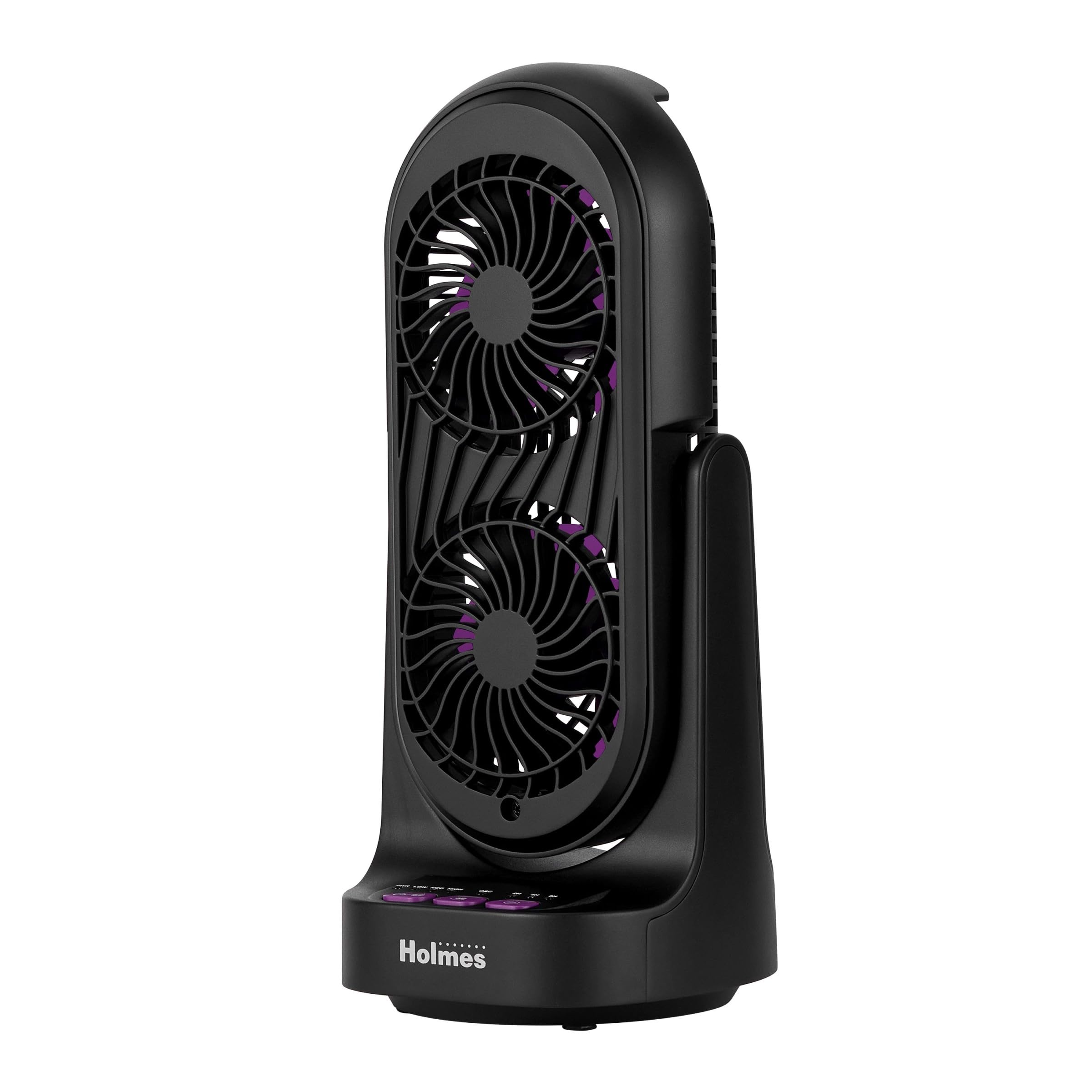
Figi 1: Devan ak bò view of the Holmes DuoBreeze Desk Fan, highlighting its compact dimensions of 13.4 inches in height and 5.9 inches in width/depth.
Videyo 1: Pwodui ofisyèl la finiview demonstrating the Holmes DuoBreeze Dual Purple Blade 13-inch Desk Fan's features, including dual blade design for maximum airflow, 45-degree adjustable head tilt, 60-degree automatic oscillation, 3 speed settings, 2/4/8 hour timer, and removable grill for easy cleaning.
Enfòmasyon sou Sekirite
Lè w ap itilize aparèy elektrik, yo ta dwe toujou swiv prekosyon sekirite debaz yo pou diminye risk pou dife, chòk elektrik ak blesi moun, tankou sa ki annapre yo:
- Li tout enstriksyon anvan ou itilize fanatik sa a.
- Sèvi ak vantilatè sa a sèlman jan sa dekri nan manyèl sa a. Lòt itilizasyon ki pa rekòmande ka lakòz dife, chòk elektrik, oswa blesi moun.
- Pou pwoteje tèt ou kont chòk elektrik, pa mete vantilatè a nan fenèt, pa plonje aparèy la, ploge a oswa kòd la nan dlo, epi pa flite likid.
- Sipèvizyon sere se nesesè lè nenpòt aparèy itilize pa oswa toupre timoun yo.
- Deploge nan priz lè w pa itilize, lè w ap deplase fanatik soti nan yon kote nan yon lòt, epi anvan w netwaye.
- Pa opere nenpòt aparèy ki gen yon kòd oswa ploge ki domaje, oswa apre aparèy la fonksyone byen oswa apre yo te tonbe oswa domaje nan nenpòt fason.
- Pa kite kòd pandye sou kwen tab oswa kontwa, oswa manyen sifas cho.
- Pa opere an prezans eksplozif ak/oswa lafimen ki ka pran dife.
- Pa mete fanatik oswa nenpòt pati tou pre yon flanm dife louvri, pou kwit manje oswa lòt aparèy chofaj.
- Do not operate fan with a damaged guard or any rotating part.
- Evite kontak ak pati k ap deplase.
- Pou dekonekte, priz ploge epi rale soti nan priz miray la. Pa janm tire sou kòd.
- Toujou itilize sou yon sifas ki sèk ak nivo.
Kontni pake
- Holmes DuoBreeze Dual Purple Blade 13-inch Desk Fan (Model: 32510555)
- Manyèl itilizatè
- Fil elektrik (tache)
Enstalasyon
The Holmes DuoBreeze Desk Fan requires minimal assembly. Follow these steps to prepare your fan for use:
- Retire vantilatè a nan anbalaj li avèk prekosyon.
- Mete fanatik la sou yon sifas ki estab ak nivo.
- Ensure the power cord is easily accessible to a standard electrical outlet.
- Before plugging in, ensure the fan is in the desired position and the tilt head is adjusted as needed.
Enstriksyon Operasyon
Familiarize yourself with the control panel located on the base of the fan:
- Bouton pouvwa (PWR): Peze pou limen oswa etenn vantilatè a.
- Speed Buttons (BA, MED, HIGH): Press to cycle through the three fan speed settings: Low, Medium, and High.
- Bouton Osilasyon (OSC): Press to activate or deactivate the 60-degree automatic oscillation feature.
- Timer Buttons (2H, 4H, 8H): Press to set the fan to automatically turn off after 2, 4, or 8 hours. Multiple presses will cycle through the available timer options.
Ajisteman enklinezon: The fan head can be manually tilted up to 45 degrees to direct airflow precisely where needed. Gently push or pull the fan head to adjust its angle.
Antretyen
Regular cleaning helps maintain the fan's performance and air quality.
- Anvan Netwayaj: Always unplug the fan from the electrical outlet.
- Netwaye eksteryè a: Sèvi ak yon mou, damp twal pou siye sifas ekstèn vantilatè a. Pa sèvi ak pwodui netwayaj abrazif oswa solvan.
- Cleaning the Blades and Interior (Clean Breeze Technology):
- The front grill is removable for easy access to the blades and interior. Refer to the product diagram for grill removal instructions (typically involves unscrewing or unlatching clips).
- Carefully wipe the fan blades and interior surfaces with a soft, dry cloth or a slightly damp twal.
- Ensure all parts are completely dry before reattaching the front grill and plugging the fan back in.
- Depo: When not in use, store the fan in a cool, dry place, preferably in its original packaging to protect it from dust.
Depanaj
Si vantilatè w la pa ap fonksyone byen, konsilte gid depanaj sa a:
| Pwoblèm | Kòz posib | Solisyon |
|---|---|---|
| Vantilatè a pa limen. | Pa gen ekipman pou pouvwa. | Ensure the fan is securely plugged into a working electrical outlet. Check the circuit breaker. |
| Sikilasyon lè a fèb oswa pa genyen. | Lam vantilatè yo sal oswa bouche. | Unplug the fan and clean the blades and grill as described in the Maintenance section. Ensure no objects are blocking the air intake or output. |
| Vantilatè a fè yon bri etranj. | Loose parts or debris inside. | Unplug the fan and inspect for any loose components or foreign objects. Clean thoroughly. If noise persists, contact customer support. |
| Osilasyon an pa fonksyone. | Oscillation feature is not activated. | Press the OSC button to activate oscillation. Ensure the fan is on a flat surface. |
Espesifikasyon
| Spesifikasyon | Detay |
|---|---|
| Mak | HOLMES |
| Non modèl | Holmes 13" DuoBreeze CleanBreeze Desk Fan with Purple Blades |
| Nimewo Modèl Atik | 32510555 |
| Koulè | Nwa / Koulè wouj violèt |
| Dimansyon pwodwi | 5.9"D x 5.9"W x 13.42"H |
| Pwa atik | 2.2 liv |
| Sous pouvwa | Fil elektrik |
| Voltage | 120.0 V |
| Kantite Nivo Pouvwa | 3 |
| Karakteristik espesyal | Adjustable Tilt, Oscillating |
| Nivo bri | 50 Desibèl |
| Kapasite Flow Air | 900 pye kib pou chak minit |
| Metòd kontwòl | Pouse bouton |
| Itilizasyon Andedan kay la / Deyò | Andedan kay la |
| Asanble obligatwa | Wi |
| Espesifikasyon Met | ETL |
Garanti ak sipò
This Holmes DuoBreeze Dual Purple Blade 13-inch Desk Fan is backed by a 1-ane garanti limiteGaranti sa a kouvri domaj nan materyèl oswa nan fabrikasyon anba itilizasyon nòmal.
For warranty claims, technical support, or general inquiries, please contact Holmes customer service. Keep your purchase receipt as proof of purchase for warranty validation.
Kontak Sèvis Kliyan: Please refer to the contact information provided on the product packaging or the official Holmes websit la pou jwenn dènye enfòmasyon sou sipò a.