Entwodiksyon
The B22 Micro-Cut Document Shredder is designed for secure and efficient shredding in office environments. Featuring P-5 security level micro-cut technology, it ensures sensitive documents and credit cards are destroyed to high standards. This shredder is suitable for 1-5 users, offering continuous operation, anti-jamming technology, and quiet performance. Its compact design integrates well into any office space, providing a reliable tool for protecting sensitive information.
Enstriksyon Sekirite Enpòtan
Please read these instructions carefully before using the shredder. Failure to follow these instructions may result in injury or damage to the shredder.
- Kenbe men, cheve ak rad lach lwen fant antre papye a.
- Kenbe timoun ak bèt kay lwen shredder la.
- Do not insert more sheets than specified (9 sheets maximum).
- Do not shred metal objects, large paper clips, or adhesive labels.
- Unplug the shredder when not in use or before moving/cleaning.
- Pa sèvi ak dechikteur a si kòd elektrik la domaje.
- Empty the waste bin regularly to prevent jams.
Ki sa ki nan bwat la
Lè w ap ouvri pake a, tanpri verifye si tout konpozan yo la:
- HSM Securio B22 Micro-Cut Document Shredder Unit
- Integrated Waste Bin with a 8.7-gallon capacity
- Kòd pouvwa
- Manyèl Itilizatè (dokiman sa a)
Enstalasyon
Debalaj ak plasman
Carefully remove the shredder from its packaging. Place the shredder on a flat, stable surface near a power outlet. Ensure there is adequate space around the unit for ventilation and easy access to the waste bin.
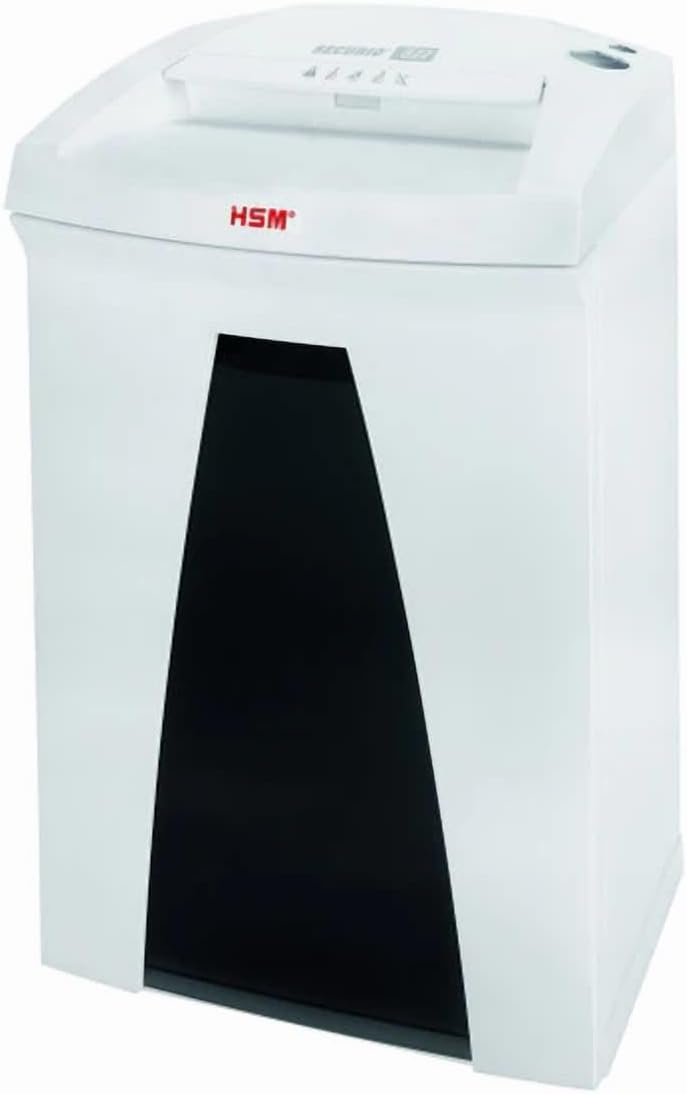
Image: The HSM Securio B22 Micro-Cut Document Shredder, showing its compact design and waste bin access.
Installing the Waste Bin
Ensure the integrated 8.7-gallon waste bin is correctly seated within the shredder unit. The shredder will not operate if the bin is not properly inserted.
Koneksyon pouvwa
Plug the power cord into the shredder's power inlet, then plug the other end into a standard electrical outlet (120 V / 60 Hz). The shredder is now ready for operation.
Enstriksyon Operasyon
Limen / Off
Locate the power switch, typically on the top or back of the shredder. Set it to the "ON" position to activate the shredder. To turn off, set the switch to "OFF". For extended periods of non-use, unplug the shredder from the wall outlet.
Dechiktaj Dokiman
Insert paper, staples, or paper clips into the paper entry slot. The shredder will automatically start shredding. Do not exceed the maximum sheet capacity of 9 sheets per pass to prevent jams. For credit cards, insert them one at a time into the designated slot (if separate) or the main paper entry slot.
Operasyon kontinyèl
This shredder is designed for continuous operation, allowing for extended shredding sessions without overheating. However, it is always good practice to monitor the shredder's performance and empty the bin when full.
Anti-Jamming Technology
The shredder is equipped with anti-jamming technology. If a paper jam occurs, the shredder may automatically reverse to clear the jam. If it does not clear automatically, switch the shredder to reverse mode (if available) or turn it off, unplug it, and carefully remove the jammed paper.
Operasyon trankil
The B22 Micro-Cut Shredder operates quietly, minimizing disruption in office environments. This feature allows for comfortable use even during busy work hours.
Antretyen
Vide bin fatra a
Regularly check and empty the 8.7-gallon waste bin to prevent overfilling and potential paper jams. The shredder may stop operating when the bin is full.
Netwayaj
Unplug the shredder before cleaning. Use a soft, dry cloth to wipe down the exterior. Do not use abrasive cleaners or solvents. Periodically clean the paper entry area to remove any paper dust or debris.
Oiling the Shredder Blades (Recommended)
To maintain optimal performance and extend the life of your shredder, it is recommended to oil the cutting blades regularly, especially after emptying the waste bin or after heavy use. Use a shredder-specific oil. Apply a thin line of oil across the paper entry slot, then run a few sheets of paper through the shredder to distribute the oil.
Depanaj
| Pwoblèm | Kòz posib | Solisyon |
|---|---|---|
| Dechikteur a pa limen. | Not plugged in; power switch off; waste bin not properly inserted; overheating. | Ensure power cord is securely plugged in. Turn power switch to "ON". Re-insert waste bin correctly. Allow shredder to cool down for 30 minutes if it has been used continuously. |
| Konfiti papye. | Too many sheets inserted; paper not inserted straight; bin is full. | Reduce the number of sheets. Insert paper straight. Empty the waste bin. Use the reverse function to clear the jam. If necessary, unplug and carefully remove paper. |
| Shredder is noisy. | Blades need oiling; foreign object in blades. | Oil the shredder blades as per maintenance instructions. Unplug the shredder and carefully inspect the blades for any foreign objects. |
| Dechikteur a sispann pandan l ap travay. | Waste bin full; overheating; safety sensor triggered. | Empty the waste bin. Allow the shredder to cool down. Check if the bin is properly seated and if any safety sensors are obstructed. |
Espesifikasyon
| Karakteristik | Detay |
|---|---|
| Dimansyon pwodwi | 12.2 x 14.76 x 23.62 pous |
| Pwa atik | 35 liv |
| ASIN | B0DT4MSDMF |
| Nimewo Modèl Atik | Securio B22 Micro-Cut |
| Dat Premye Disponib | 15 janvye 2025 |
| Manifakti | HSM |
| Peyi orijin | Almay |
| Koupe Kalite | Mikwo Koupe |
| Mak | Jenerik |
| Kapasite | 8.7 Gallons (Bin) |
| Karakteristik espesyal | Operasyon trankil |
| Kapasite Estanda Fèy | 9 dra |
| Nivo Sekirite | P-5 (DIN 66399: E-4 | F-2 | P-5 | T-5) |
| Gwosè Shred | 1/16 x 5/8 pous |
| Shreddable Materials | Paper, staples, paper clips, credit cards |
| Run Tan | Kontinyèl |
| Vitès | 17.7 pye/min |
| Lajè gòj | 9.45 pous |
| Konsomasyon pouvwa | 440 Watts |
| Voltage / Frekans | 120V / 60Hz |
Enfòmasyon sou Garanti
This 1832 Model B22 Micro-Cut Document Shredder comes with a standard manufacturer's warranty against defects in materials and workmanship. Please refer to the warranty card included with your product for specific terms, conditions, and duration. Keep your purchase receipt as proof of purchase for warranty claims.
Sipò pou Kliyan
For technical assistance, troubleshooting, or warranty inquiries, please contact the manufacturer's customer support. Refer to the contact information provided on the product packaging or the manufacturer's official website. When contacting support, please have your model number (Securio B22 Micro-Cut) and ASIN (B0DT4MSDMF) ready.
Pou plis enfòmasyon, ou ka vizite paj pwodwi sou Amazon.


