
whall EV691
Whall EV691 Cordless Stick Vacuum Cleaner User Manual
Model: EV691 | Brand: Whall
1. Enstriksyon Sekirite Enpòtan
Please read all instructions carefully before using the Whall EV691 Cordless Stick Vacuum Cleaner. Keep this manual for future reference.
- Pa sèvi ak aparèy la deyò oswa sou sifas ki mouye.
- Pa kite timoun yo sèvi ak aspiratè a. Li nesesè pou siveye l byen lè w ap itilize l toupre timoun.
- Pa ranmase materyèl ki ka pran dife oswa ki ka pran dife (likid brikè, gazolin, kewozèn, elatriye) oswa itilize li nan zòn kote yo ka prezan.
- Pa ranmase anyen k ap boule oswa fimen, tankou sigarèt, alimèt, oswa sann cho.
- Pa itilize san gode pousyè tè ak/oswa filtè an plas.
- Turn off the appliance before connecting or disconnecting the motorized brush, extension wand, or other accessories.
- Sèvi ak li sèlman jan sa dekri nan manyèl sa a. Sèvi ak sèlman akseswa rekòmande pa manifakti a.
2. Pwodwi souview
Familiarize yourself with the components included with your Whall EV691 Cordless Stick Vacuum Cleaner.

Figi 2.1: All components of the Whall EV691 Cordless Stick Vacuum Cleaner as packaged in the box. This includes the main motor unit, battery, extension wand, floor brush, various nozzles, and filters.
Lis konpozan:
- Inite Motè Prensipal la ak Gode Pousyè a
- Pak batri rechargeable
- Adjustable Extension Wand
- Bwòs planche motè ak limyè LED
- Long Flat Nozzle (Crevice Tool)
- 2-in-1 Soft Brush
- Mi Mount Charger
- Filtè HEPA adisyonèl
- Manyèl itilizatè
3. Asanblaj ak Enstalasyon
Swiv etap sa yo pou rasanble aspiratè ou a anvan premye itilizasyon an.
3.1 Assembling the Main Unit and Attachments
- Tache batri a: Slide the rechargeable battery pack into the designated slot on the main motor unit until it clicks securely into place.
- Konekte baton ekstansyon an: Insert the adjustable extension wand into the main motor unit until it locks.
- Mete bwòs planche a: Connect the motorized floor brush to the other end of the extension wand, ensuring it clicks into place.
- Adjust Wand Length: Press the release button on the extension wand to adjust its length for comfortable use.
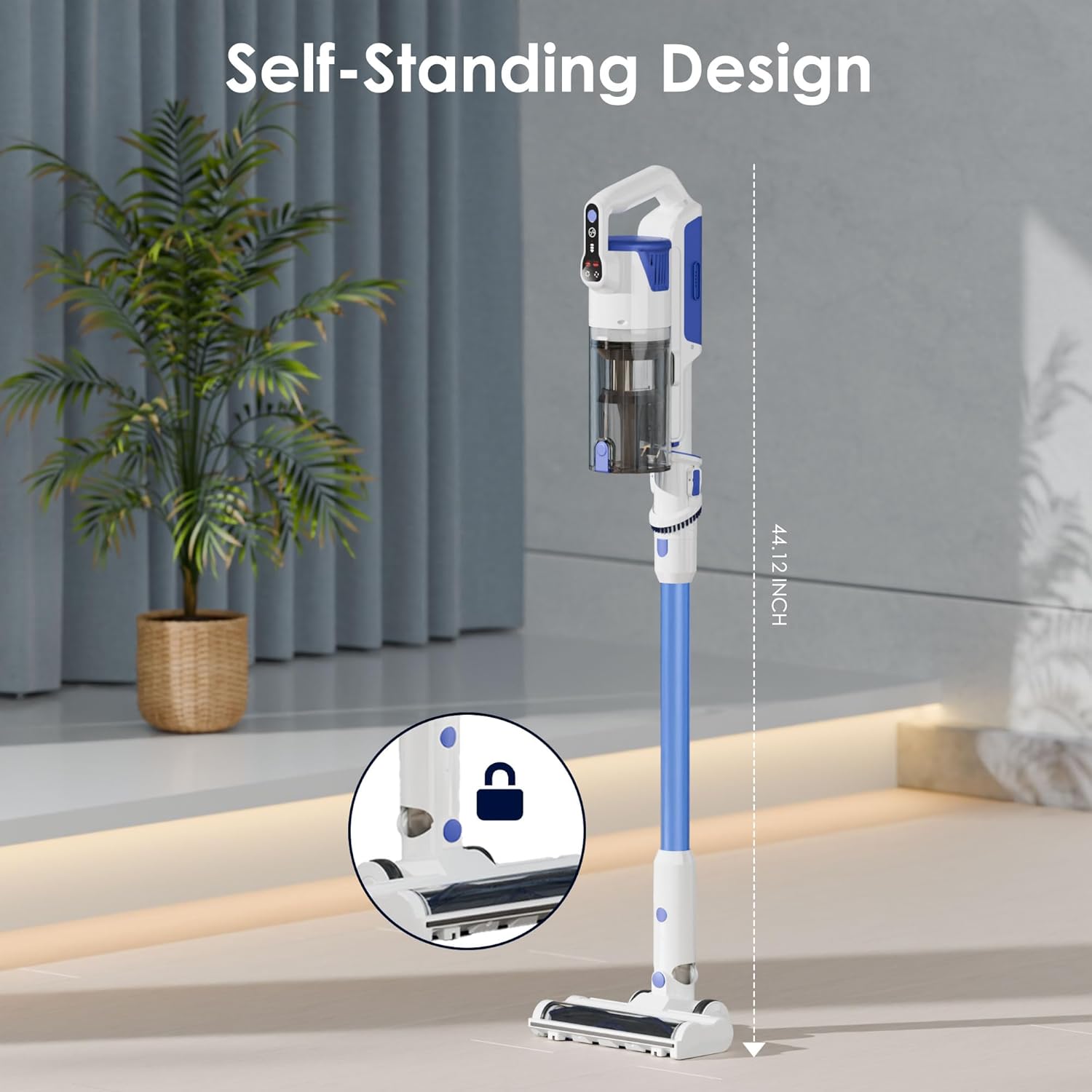
Figi 3.1: The Whall EV691 vacuum cleaner assembled in its self-standing position, demonstrating the connection points for the main unit, extension wand, and floor brush.
3.2 Premye chaj
Before first use, fully charge the battery. Refer to the Charging section for detailed instructions.
3.3 Assembly Demonstration Video
Videyo 3.1: A demonstration of the assembly process for the Whall Cordless Vacuum Cleaner, including attaching the main unit, extension wand, and floor brush, and showcasing its various cleaning capabilities and filter maintenance.
4. Operasyon
Learn how to effectively use your Whall EV691 Cordless Stick Vacuum Cleaner for various cleaning tasks.
4.1 Limen/Etenn ak Mòd Aspirasyon
- Pouvwa sou: Press the power button on the main unit to turn on the vacuum.
- Chanje Mòd Aspirasyon an: Use the mode selection button to cycle through the three available suction modes: Standard, Medium, and MAX. The LED display will indicate the current mode.
- Pouvwa Off: Peze bouton pouvwa a ankò pou etenn aspiratè a.

Figi 4.1: The intelligent LED display screen provides real-time information on air duct blockage, battery level, ground brush status, HEPA filter presence, and the selected suction mode.
4.2 Using the Motorized Floor Brush
The motorized floor brush is designed for efficient cleaning on various floor types, including carpets and hard floors.

Figi 4.2: The powerful 88,000 RPM brushless motor provides strong 45KPA suction for effective cleaning on various surfaces.

Figi 4.3: The upgraded V-shaped roller brush design is engineered to prevent hair tangling while efficiently removing dust and debris.

Figi 4.4: The flexible floor brush features LED lights to illuminate dust and debris in dark areas, and offers 90° up/down and 180° left/right maneuverability.
4.3 Using Handheld Mode and Attachments
Detach the extension wand and floor brush to use the main unit as a handheld vacuum. Attach the appropriate nozzle for specific cleaning needs.
- Long Flat Nozzle (Crevice Tool): Ideal for cleaning tight spaces, corners, and crevices in furniture or vehicles.
- 2-in-1 Soft Brush: Suitable for delicate surfaces, upholstery, keyboards, and curtains.

Figi 4.5: The lightweight and multifunctional design allows for quick conversion to a handheld vacuum, perfect for cleaning sofas, car interiors, keyboards, and hard-to-reach gaps.
5. Chaje
Ensure your vacuum is always ready for use by following proper charging procedures.
5.1 Dire Batri a
The large-capacity battery provides:
- Up to 55 minutes of runtime in Standard mode.
- Up to 16 minutes of runtime in MAX mode for deep cleaning.

Figi 5.1: The vacuum is equipped with a powerful 6*2500mAh battery, offering up to 45 minutes of continuous runtime.
5.2 Charging Methods and Time
Batri a pran apeprè 4-5 èdtan pou chaje konplètman.
Three charging methods are available:
- Chaje dirèk: Plug the charger directly into the battery pack.
- Charging on Main Unit: Plug the charger into the main unit with the battery installed.
- Chaje sou miray: Install the wall mount charger and hang the vacuum for convenient charging and storage.

Figi 5.2: The vacuum offers versatile charging and storage options, including charging the battery directly, charging the main unit, or using the wall mount for integrated charging and storage.
6. Antretyen
Antretyen regilye asire pèfòmans optimal epi pwolonje lavi aspiratè ou a.
6.1 Vide gode pousyè a
The dust cup features a one-touch empty design for easy disposal of debris.
- Locate the dust cup release button on the main unit.
- Press the button to open the bottom flap of the dust cup and empty contents into a trash bin.
6.2 Netwayaj Sistèm Filtraj la
The vacuum features a 4-layer high-efficiency filtration system, including a stainless steel filter and a HEPA filter. These filters are washable.

Figi 6.1: The 4-layer high-efficiency filtration system, consisting of a dust cup, single cone filtration, stainless steel filter, and HEPA filter, captures fine dust and prevents secondary air pollution.
- Remove Dust Cup: Detach the dust cup from the main unit.
- Demonte filtè yo: Carefully remove the HEPA filter and the stainless steel filter from the dust cup.
- Lave filtè yo: Rinse the filters under running water until clean. Do not use harsh detergents.
- Sèch lè: Allow all filter components to air dry completely for at least 24 hours before reassembling. Ensure they are completely dry to prevent mold and maintain suction power.
- Remonte: Once dry, reassemble the filters and dust cup, then attach them back to the main unit.

Figi 6.2: Step-by-step guide for one-touch emptying of the dust cup, disassembling the HEPA filter, cleaning the filter and dust cup, and air drying the components.
6.3 Filter Cleaning Demonstration Video
Videyo 6.1: This video demonstrates the process of cleaning the washable filters of the Whall Cordless Vacuum Cleaner, ensuring proper maintenance for sustained performance.
NAN. Depanaj
If you encounter any issues with your Whall EV691, refer to the following common problems and solutions.
| Pwoblèm | Kòz posib | Solisyon |
|---|---|---|
| Pa gen kouran / Pa limen | Battery not charged; Battery not properly installed. | Charge the battery fully; Ensure battery is securely clicked into place. |
| Pouvwa aspirasyon redwi | Dust cup full; Filters clogged; Air duct blockage. | Empty dust cup; Clean or replace filters; Check for and clear any blockages in the air duct. Refer to LED display for 'Air duct blockage reminder'. |
| Motorized Brush Not Spinning | Brush roll tangled with hair/debris; Brush roll stuck. | Turn off vacuum and remove any obstructions from the brush roll. Refer to LED display for 'Ground brush stuck reminder'. |
| Batri pa chaje | Charger not properly connected; Faulty charger/battery. | Ensure charger is securely plugged into both the battery/unit and the power outlet; Contact customer support if issue persists. Refer to LED display for 'Battery reminder'. |
| HEPA Filter Missing Reminder | HEPA filter not installed or incorrectly installed. | Ensure the HEPA filter is correctly inserted into the dust cup. |
8. Espesifikasyon
Key technical specifications for the Whall EV691 Cordless Stick Vacuum Cleaner.
| Karakteristik | Spesifikasyon |
|---|---|
| Mak | whall |
| Non modèl | EV691 |
| Sous pouvwa | Batri Powered |
| Wattage | 280 wat |
| Voltage | 110 Volts |
| Maksimòm aspirasyon | 25KPA (Upgraded) |
| Kantite Nivo Pouvwa | 3 |
| Kalite filtre | Filtè HEPA |
| Pousyè Cup kapasite | 500 mililit |
| Kalite batri | Lityòm-Ion |
| Runtime | Jiska 55 minit (Mòd estanda) |
| Tan chaj batri | 4-5 èdtan |
| Dimansyon atik (L x W x H) | 9.84"L x 7.48"L x 45.28"H |
| Koulè | Ble |
| Karakteristik espesyal | Cordless, Lightweight, Multifunctional, LED Display, Self-Standing |
| Itilizasyon Rekòmande | Car, Carpet, Hard Floor |
9. Garanti ak sipò
Your Whall EV691 Cordless Stick Vacuum Cleaner comes with a manufacturer's warranty. For specific warranty details, please refer to the warranty card included in your product packaging or visit the official Whall websit.
For technical support, troubleshooting assistance, or to inquire about replacement parts, please contact Whall Customer Service. Contact information can typically be found on the product packaging, the official Whall websit entènèt la, oubyen atravè revandè ou a.
Ask a question about this manual
Ask about setup, troubleshooting, compatibility, parts, safety, or missing instructions. Manuals+ will review the question and use this page’s manual context to help answer it.