
1. Entwodiksyon
This manual provides essential information for the proper installation, operation, and maintenance of the LiftMaster K41-0219-000 Postal Lock Switch. This component is designed as a replacement kit for use with various LiftMaster Smart Video Intercom Medium and Large Access Control Systems, specifically models CAPXM, CAPXLV, and CAPXLV2. It enables postal service personnel to access the property via a dedicated lock mechanism integrated into the access control system.
Please read this manual thoroughly before proceeding with installation or use to ensure safe and correct functionality.
2. Enfòmasyon sou Sekirite
AVÈTISMAN: Improper installation or use of this product can result in serious injury or damage to property. Always adhere to the following safety guidelines:
- Enstalasyon pwofesyonèl rekòmande: Installation of this postal lock switch should only be performed by qualified personnel or a certified LiftMaster technician.
- Dekonekte pouvwa: Always disconnect power to the access control system before performing any installation, maintenance, or repair procedures.
- Refer to System Manual: This postal lock switch is a component of a larger access control system. Always refer to the primary installation and safety manuals for your specific LiftMaster CAPXM, CAPXLV, or CAPXLV2 system for comprehensive instructions and warnings.
- Sekirite elektrik: Ensure all wiring is performed according to local electrical codes and manufacturer specifications.
- Kenbe klè: During operation, keep hands and other objects clear of moving parts within the access control system.
3. Pake kontni
Verifye ke tout atik ki nan lis anba a yo prezan nan pakè ou a:
- LiftMaster K41-0219-000 Postal Lock Switch (1 unit)
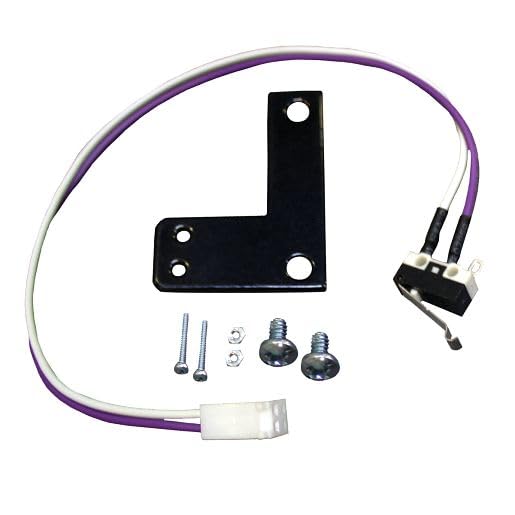
Image 1: LiftMaster K41-0219-000 Postal Lock Switch. This image shows the compact design of the postal lock switch, typically a small, rectangular electronic component with connection points.
4. Enstalasyon ak Enstalasyon
The K41-0219-000 Postal Lock Switch is a replacement component for specific LiftMaster access control systems. Installation involves integrating this switch into the existing system's wiring and mounting points.
- Tcheke konpatibilite: Before installation, confirm that your access control system is one of the compatible models: CAPXM, CAPXLV, or CAPXLV2. Refer to your system's documentation for verification.
- Dekoneksyon pouvwa: Ensure that all power to the LiftMaster access control system is completely disconnected at the circuit breaker or main power source before beginning any work.
- Consult System Manual: Refer to the detailed installation manual for your specific LiftMaster CAPXM, CAPXLV, or CAPXLV2 access control system. This manual will provide precise instructions for locating the existing postal lock switch (if replacing) and the correct wiring and mounting procedures for the K41-0219-000 replacement.
- Fil elektrik: Carefully follow the wiring diagrams provided in your main system's installation manual. Ensure all connections are secure and correctly polarized.
- Montaj: Secure the postal lock switch in its designated location within the access control system enclosure using appropriate fasteners.
- Power Restoration & Testing: Once installation is complete and all connections are verified, restore power to the system. Test the functionality of the postal lock switch according to the procedures outlined in your main system manual to ensure proper operation.
Nòt: This component is designed for integration into complex access control systems. If you are unsure about any step, contact a qualified technician.
5. Operasyon
The LiftMaster K41-0219-000 Postal Lock Switch functions as an integral part of your LiftMaster CAPXM, CAPXLV, or CAPXLV2 access control system. Its primary purpose is to provide a secure, key-operated entry point for authorized postal service personnel.
- When a postal service key is inserted into the corresponding lock cylinder (not included with this switch, but part of the overall system) and turned, the postal lock switch sends a signal to the access control system.
- This signal instructs the system to temporarily unlock the gate or door, allowing postal personnel to enter the property.
- The system typically re-locks automatically after a preset delay or once the gate/door closes, ensuring continued security.
The operation is entirely dependent on the configuration and programming of the main access control unit. Refer to your CAPXM, CAPXLV, or CAPXLV2 system's user manual for specific operational details and programming options related to the postal lock function.
6. Antretyen
The LiftMaster K41-0219-000 Postal Lock Switch is designed for durability and requires minimal maintenance. However, periodic inspection and cleaning can help ensure its longevity and reliable operation.
- Enspeksyon vizyèl: Periodically inspect the switch and its connections for any signs of wear, corrosion, or damage. Ensure all wiring is intact and secure.
- Netwayaj: If necessary, gently clean the exterior of the switch with a soft, dry cloth. Avoid using harsh chemicals, abrasives, or excessive moisture, as these can damage the electronic components.
- Pwoteksyon anviwònman: Ensure the access control system enclosure remains sealed and protected from moisture, dust, and extreme temperatures, which can affect the switch's performance.
If any damage is observed or if the switch is not functioning correctly, refer to the troubleshooting section or contact LiftMaster support.
NAN. Depanaj
If the postal lock function of your access control system is not operating as expected, consider the following troubleshooting steps:
- Pouvwa sistèm: Verify that the main LiftMaster access control system (CAPXM, CAPXLV, or CAPXLV2) has power and is operating correctly.
- Operasyon kle: Ensure the postal service key is fully inserted and turned correctly in the lock cylinder. Test with a known working key if possible.
- Koneksyon fil elektrik: With power disconnected, visually inspect all wiring connections to the K41-0219-000 switch. Ensure they are tight and correctly connected according to the system's wiring diagram.
- Domaj Fizik: Check the switch for any visible signs of physical damage, such as cracks, bent pins, or corrosion.
- Dyagnostik sistèm: Consult the diagnostic features or error codes of your main CAPXM, CAPXLV, or CAPXLV2 system. These may provide specific information regarding the postal lock input.
If the issue persists after performing these checks, it may indicate a fault with the postal lock switch itself, the lock cylinder, or the main access control unit. In such cases, it is recommended to contact LiftMaster technical support or a qualified service technician.
8. Espesifikasyon
| Nimewo Modèl: | K41-0219-000 |
| Kalite pwodwi: | Postal Lock Switch Replacement Kit |
| Konpatibilite: | LiftMaster CAPXM, CAPXLV, CAPXLV2 Access Control Entry Systems |
| Manifakti: | LiftMaster |
| Pwa atik: | 8 ons (apeprè 0.23 kg) |
| Dimansyon pwodwi: | 1 x 1 x 1 pous (apeprè 2.54 x 2.54 x 2.54 cm) |
| Eleman ki enkli: | Postal Lock Switch |
9. Garanti & Sipò
Enfòmasyon sou garanti:
This LiftMaster K41-0219-000 Postal Lock Switch is covered by LiftMaster's standard manufacturer's warranty. For specific details regarding warranty duration, coverage, and terms, please refer to the warranty documentation included with your original LiftMaster access control system or visit the official LiftMaster websit la. Kenbe prèv acha ou pou reklamasyon garanti.
Sipò teknik:
Should you require technical assistance, have questions about installation, or need to report a malfunction, please contact LiftMaster Customer Support. Have your product model number (K41-0219-000) and your main access control system model (CAPXM, CAPXLV, or CAPXLV2) readily available when contacting support.
LiftMaster Ofisyèl Websit: www.liftmaster.com
Please note that warranty and support policies are subject to change by the manufacturer.


