
Solenco 204
Solenco 204 Air Purifier User Manual
Modèl: 204
Entwodiksyon
Thank you for choosing the Solenco 204 Air Purifier. This device is designed to significantly improve your indoor air quality by removing various airborne pollutants. Featuring an advanced multi-filtration system, UV light sterilization, and smart controls, the Solenco 204 provides clean, fresh air for spaces up to 30m².
Please read this manual thoroughly before operating the appliance and retain it for future reference.
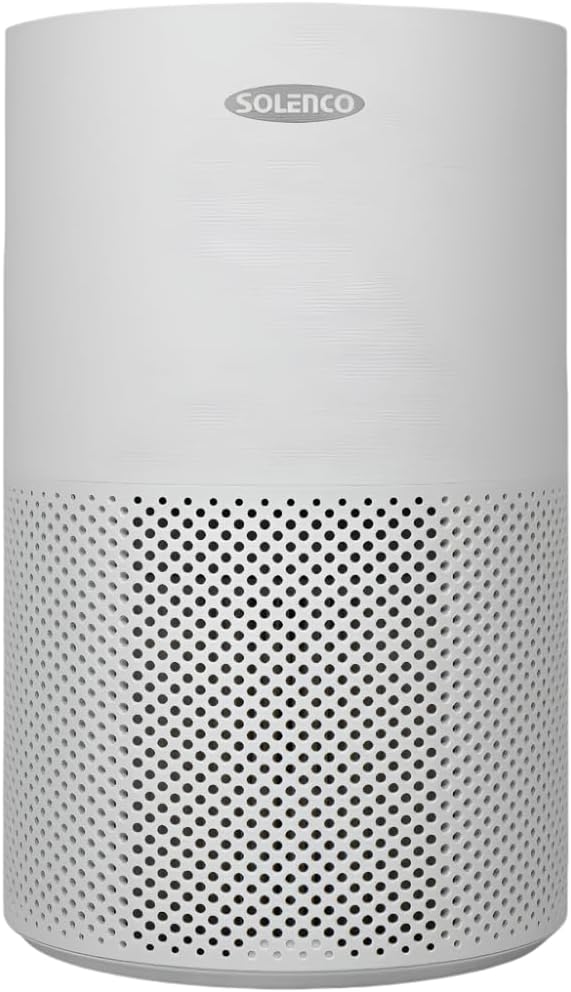
Figure 1: Solenco 204 Air Purifier
Pwodwi konpozan
The Solenco 204 Air Purifier consists of the following main components:
- Inite Prensipal: Li loje vantilatè a, motè a, ak panèl kontwòl la.
- Multi-Layer Filter: Combines a pre-filter, H13 Medical Grade HEPA filter, antiviral filter, and activated carbon filter.
- UV-C Lamp: Entèn lamp pou esterilizasyon.
- Kòd pouvwa: Pou konekte ak yon priz elektrik.

Figure 2: Advanced Filtration System - Equipped with a pre-filter, H13 Medical Grade HEPA filter, activated carbon filter, and an antiviral filter to capture dust, pollen, smoke, odours, VOC's and airborne viruses.
Gid Enstalasyon
- Debake: Retire pirifikatè lè a nan anbalaj li avèk prekosyon. Kenbe tout materyèl anbalaj yo pou depo oswa transpò pita.
- Enstalasyon Filter: Before first use, ensure the multi-layer filter is correctly installed and any protective plastic wrapping is removed. Refer to the filter compartment instructions for specific steps.
- Plasman: Place the air purifier on a firm, level surface. Ensure there is at least 20 cm of clear space around all sides for optimal airflow. The unit is suitable for rooms up to 30m².
- Koneksyon pouvwa: Branche kòd kouran an nan yon priz elektrik estanda. Aparèy la ap antre nan mòd veille.
Gid Operasyon
Kontwòl Panel
The Solenco 204 features an intuitive touch panel for easy control:

Figure 3: Smart Control - Features a touch panel with easy-to-use controls, including a timer, speed settings, UV light, and sleep mode. WiFi Enabled: Connect and control the air purifier remotely through the Smart Life app.
- Bouton pouvwa: Peze vire inite a ON / OFF.
- Vitès fanatik: Adjust fan speed (Low, Medium, High).
- Mòd oto: Ajiste vitès vantilatè a otomatikman selon kalite lè a detekte.
- Limyè UV: Activate or deactivate the UV-C sterilization lamp.
- Mòd dòmi: Reduces fan speed and dims lights for quiet operation (as low as 26dB).
- Revèy: Set the operating duration (e.g., 2, 4, 8 hours).

Figure 4: Auto Mode - Automatically adjusts the fan speed based on the air quality detected by the built-in sensor.

Figure 5: UV-C Light Technology - Destroys harmful microorganisms such as bacteria, viruses, and mould spores.

Figure 6: Quiet Operation - Operates at a noise level as low as 26dB in sleep mode, ensuring a peaceful environment.
WiFi Connectivity (Smart Life App)
The Solenco 204 can be controlled remotely via the Smart Life app. Download the app from your smartphone's app store and follow the in-app instructions to pair your device. This allows for remote control, scheduling, and monitoring of air quality.
Antretyen ak Swen
Ranplasman filtè
The multi-layer filter has a limited lifespan and requires regular replacement to maintain optimal performance. The filter indicator light on the control panel will illuminate when a replacement is needed (typically every 6-12 months, depending on usage and air quality).
- Fèmen epi deploge purifikateur lè a.
- Locate the filter compartment (usually at the bottom or back of the unit).
- Retire ansyen filtè a epi jete l byen.
- Unpack the new filter and insert it into the compartment, ensuring correct orientation.
- Fèmen konpatiman filtè a.
- Plug in and turn on the unit. Reset the filter indicator by pressing and holding the filter reset button (refer to control panel diagram for exact location) for 3-5 seconds.
Netwaye inite a
- Siye deyò aparèy la avèk yon twal mou epi sèk.
- Pa sèvi ak pwodui netwayaj abrazif oswa solvang.
- Periodically vacuum the air intake and outlet vents to remove dust buildup.
Depanaj
| Pwoblèm | Kòz posib | Solisyon |
|---|---|---|
| Inite pa limen | Pa gen ekipman pou kouran; Pa peze bouton pouvwa a | Check power cord connection; Ensure outlet is functional; Press power button firmly. |
| Flux lè fèb | Filter clogged; Air inlets/outlets blocked | Ranplase filtè a; Retire tout obstak. |
| Bri etranj | Foreign object inside; Unit not on a level surface | Turn off and inspect for objects; Place on a stable, flat surface. |
| Filter indicator remains on after replacement | Reyajisteman filtè a pa fèt | Press and hold the filter reset button for 3-5 seconds. |
| Pa ka konekte nan fil | Incorrect WiFi password; Router issues; App issues | Verify WiFi password; Restart router; Reinstall Smart Life app. |
Espesifikasyon teknik
| Karakteristik | Spesifikasyon |
|---|---|
| Modèl | Solenco 204 |
| Mak | Solenco |
| Koulè | Gri |
| Pouvwa / Wattage | 40 wat |
| Nivo bri | 26 dB (minimòm) |
| Pwa atik | 3.53 kg |
| Dimansyon pwodwi (D x W x H) | 22.6D x 22.6W x 36H santimèt |
| Metòd kontwòl | Aplikasyon, Panèl taktil |
| Kalite filtre | H13 HEPA, Activated Carbon, Antiviral |
| Kouvèti zòn etaj | Jiska 30 mèt kare |

Figure 7: Coverage Area - Effectively purifies the air in rooms up to 30m² at 4 air changes per hour.
Garanti ak sipò pou kliyan
For warranty information and customer support, please refer to the documentation provided at the time of purchase or visit the official Solenco website. You may also contact the seller, Solenco SA, for assistance.
Community Rhino Conservation Initiative: A portion of every Solenco air purifier purchase contributes to the Community Rhino Conservation Initiative (CRCI). Learn more about this initiative and meet the rhinos by scanning the QR code or visiting the link below:

Figure 8: Solenco's contribution to the Community Rhino Conservation Initiative.
Ask a question about this manual
Ask about setup, troubleshooting, compatibility, parts, safety, or missing instructions. Manuals+ will review the question and use this page’s manual context to help answer it.