
1. Entwodiksyon
This manual provides essential information for the proper use and maintenance of your BNCF Bpad 10 Android 14 Tablet. Please read it thoroughly before operating your device to ensure optimal performance and longevity. The Bpad 10 is designed for a seamless user experience, powered by a Snapdragon 685 processor and running Android 14.
2. Pake kontni
Verifye ke tout atik ki nan lis anba a yo prezan nan anbalaj pwodwi ou a:
- BNCF Bpad 10 Tablet
- Manyèl itilizatè
- Charging Adapter (5V/2A)
- Type-C Cable (5V/2A)
- PIN pou ejektè kat SIM

Figure 2.1: Package Contents and Tablet Components Overview
3. Pwodwi souview
The BNCF Bpad 10 features a sleek design with strategically placed components for ease of use.

Figure 3.1: BNCF Bpad 10 Tablet Front and Rear View
3.1 Konpozan fizik yo
- Plas MicroSD: Pou depo ki ka elaji.
- Kalite-C Port: Pou chaje ak transfè done.
- Bouton Volim: Ajiste volim odyo a.
- Bouton pouvwa: Turn the device on/off or lock/unlock the screen.
- Oratè: Dual stereo speakers for audio output.
- Mikwofòn: Pou opinyon vwa.
- Kamera dèyè: Main camera for photos and videos.
- Kamera devan: Pou apèl videyo ak selfie.
4. Enstalasyon
4.1 Premye chaj
Before first use, fully charge your BNCF Bpad 10 tablet using the provided Type-C cable and charging adapter. Connect the Type-C cable to the tablet's charging port and the adapter to a power outlet. The charging indicator will show the charging status.
4.2 Limen/Etenyen
- Pou limen: Press and hold the Power Button until the BNCF logo appears on the screen.
- Pou etenn: Press and hold the Power Button until the power options menu appears, then select 'Power Off'.
- Pou rekòmanse: Press and hold the Power Button until the power options menu appears, then select 'Restart'.
4.3 Inisyal Konfigirasyon
Upon first power-on, the tablet will guide you through the initial setup process. This includes selecting your language, connecting to a Wi-Fi network, setting up your Google account, and configuring security options like facial recognition.
5. Operasyon Enstriksyon
5.1 Karakteristik Android 14
Your Bpad 10 runs on Android 14, offering enhanced multitasking, security, and user-friendly features:
- Rekonesans vizaj: Securely unlock your device using your face.
- Split-Screen: Use two applications simultaneously by dividing the screen.
- Smart Projection: Cast your tablet's screen to compatible external displays.
- Three-Finger Screenshot: Pran imaj ekran rapidman lè w glise anba ak twa dwèt.
- Kontwòl paran yo: Manage and monitor device usage for children.
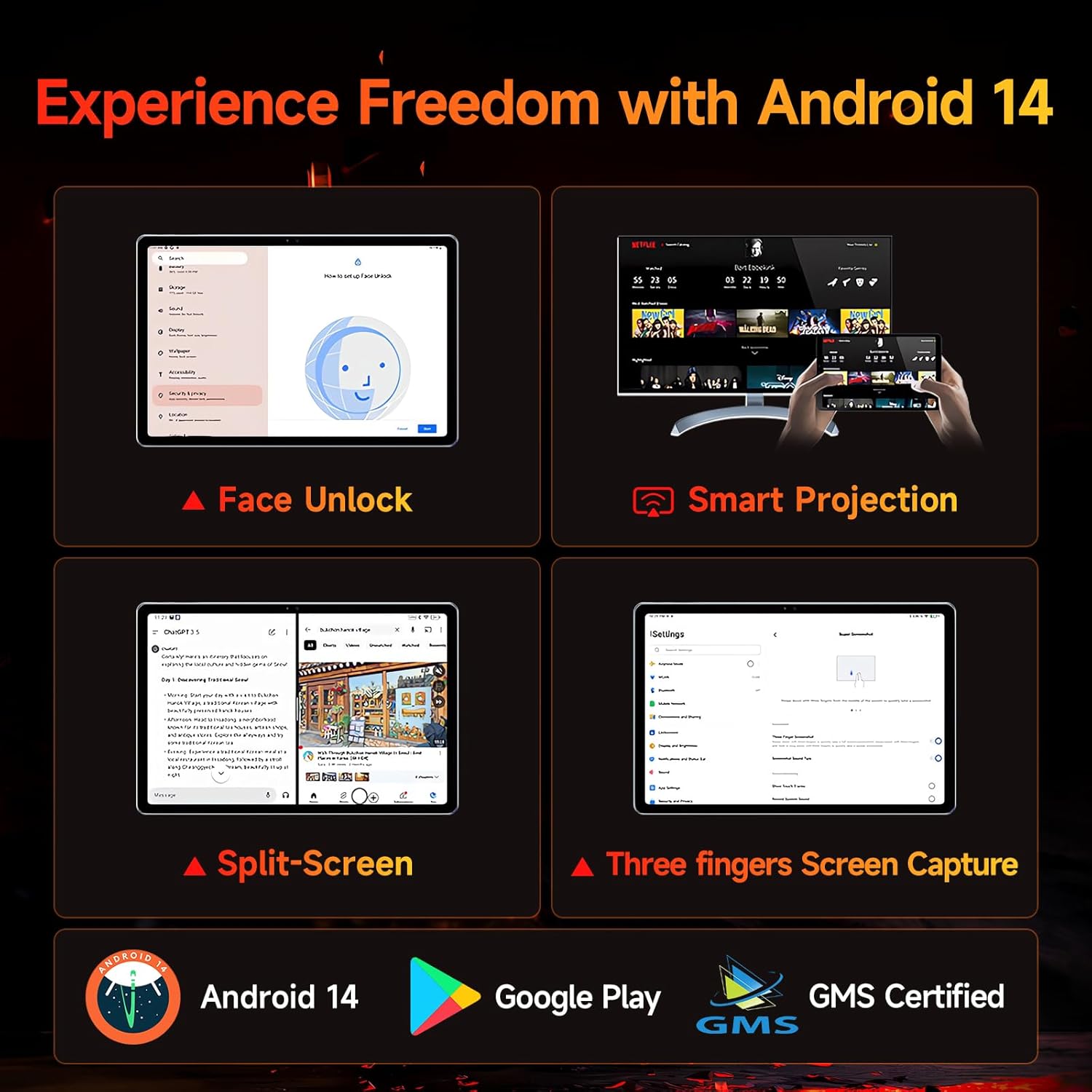
Figure 5.1: Android 14 User Interface and Features
5.2 Pèfòmans
The Bpad 10 is equipped with a 6nm Snapdragon 685 processor (2.8GHz) and Adreno 610 GPU, ensuring efficient performance for various tasks. A 6-Axis Gyro Sensor enhances gaming and video recording stability.

Figure 5.2: Snapdragon 685 Processor Details
5.3 Ekspozisyon ak Odyo
Experience clear visuals and immersive sound with the Bpad 10:
- Ekspozisyon: 10.1-inch FHD IPS screen with 1920x1200 resolution and a 60Hz refresh rate. It features 400 Nits brightness and Incell technology for improved touch accuracy.
- Widevine L1: Supports HD streaming on platforms like Netflix and Prime Video.
- Odyo: Dual stereo speakers provide a cinematic audio experience.

Figure 5.3: Display and Widevine L1 Capabilities
5.4 Kamera
The tablet is equipped with 5MP front and 5MP rear cameras, suitable for capturing photos, 4K videos, and conducting HD video calls.
5.5 Koneksyon
Stay connected with the following features:
- Wi-Fi: Supports 2.4G/5G dual-band Wi-Fi for stable internet access.
- Bluetooth 5.0: Pou konekte akseswa san fil.
- GPS: Pou sèvis navigasyon ak lokalizasyon.
- Hall Sensor: Enables smart on/off functionality with compatible covers.
5.6 Storage and Battery
The Bpad 10 offers ample storage and long-lasting power:
- RAM: 12GB (4GB physical + 8GB virtual) for smooth multitasking.
- ROM: 128GB UFS storage, expandable up to 1TB via MicroSD card.
- Batri: 6500mAh battery supporting 18W PD fast charging for extended use.

Figure 5.4: Storage and Battery Specifications
6. Antretyen
To ensure the longevity and optimal performance of your BNCF Bpad 10 tablet, follow these maintenance guidelines:
- Netwayaj: Sèvi ak yon twal mou ki pa gen pousyè pou netwaye ekran an ak kò a. Evite materyèl abrazif oswa pwodui chimik ki agresif.
- Tanperati: Sèvi ak tablèt la nan limit tanperati rekòmande yo. Evite chalè oswa frèt ekstrèm.
- Ekspozisyon dlo: Keep the tablet away from water and high humidity. It is not waterproof.
- Depo: Store the tablet in a dry, cool place when not in use.
- Mizajou lojisyèl: Tcheke epi enstale mizajou sistèm yo regilyèman pou asire amelyorasyon sekirite ak pèfòmans.
NAN. Depanaj
If you encounter issues with your BNCF Bpad 10, refer to the following common troubleshooting steps:
| Pwoblèm | Solisyon posib |
|---|---|
| Tablèt la pa limen | Asire w batri a chaje. Konekte plato a epi tann kèk minit anvan ou eseye limen l ankò. Si aparèy la pa reponn, fòse l rekòmanse lè w kenbe bouton pouvwa a pandan 10-15 segonn. |
| Pèfòmans dousman | Close unnecessary background applications. Clear cache for frequently used apps. Restart the tablet. Ensure sufficient storage space is available. |
| Pwoblèm koneksyon Wi-Fi | Rekòmanse routeur Wi-Fi ou a. Bliye rezo a sou tablèt ou a epi rekonekte li. Asire w ke tablèt la nan zòn siyal Wi-Fi a. |
| Ekran pa reponn | Restart the tablet. Ensure the screen is clean and free from moisture or debris. |
| Batri vide byen vit | Reduce screen brightness. Close background apps. Disable unused features like Bluetooth or GPS. Check for apps consuming excessive power in battery settings. |
8. Espesifikasyon
Key technical specifications for the BNCF Bpad 10 tablet:
| Karakteristik | Spesifikasyon |
|---|---|
| Gwosè ekran | 10.1 pous |
| Rezolisyon ekran | 1920 x 1200 piksèl (FHD) |
| Sistèm operasyon | Android 14 |
| Processeur | Qualcomm Snapdragon 685 (2.8GHz) |
| RAM | 12GB (4GB + 8GB Virtual) |
| Gwosè memwa flash | 128 GB UFS (Expandable to 1TB) |
| Kamera | 5MP devan, 5MP dèyè |
| Kapasite batri | 6500mAh |
| Chaje | Chaje rapid 18W PD |
| Kalite san fil | 802.11b/g (2.4G/5G WiFi), Bluetooth 5.0 |
| Pwa atik | 1.07 liv (apeprè 485g) |
| Dimansyon pwodwi | 7.9 x 4.9 x 0.3 pous (apeprè 20.1 x 12.4 x 0.76 cm) |
| Koulè | Gri |
9. Garanti ak sipò
BNCF is committed to providing quality products and customer satisfaction.
9.1 Règleman Garanti
BNCF offers a one-year warranty for its products. For tablets purchased from the BNCF Official Flagship Store, customers benefit from a 12-month free repair warranty and lifetime technical support.
9.2 Sipò pou Kliyan
If you encounter any issues or have inquiries regarding your BNCF Bpad 10 tablet, please contact BNCF customer service. You can expect a response within 24 hours. They can assist with troubleshooting, returns, or exchange services.
- Kontakte: Please refer to the contact information provided on the BNCF official websit entènèt la oswa platfòm acha ou a.
- FAQ:
- Are you specialized in tablets? Yes, BNCF is dedicated to designing and manufacturing innovative tablets, prioritizing quality, performance, and user experience.
- What is the RMA policy for this tablet? We offer a one-year warranty. You can expect a response from us within 24 hours for any issues or inquiries.
- If my products have issues, what should I do? Please leave us a message, and we will use our expertise to solve the problem for you, or provide a return or exchange service.