1. Entwodiksyon
Thank you for choosing the Generic GTS-1191 Wireless HD Sound Speaker. This portable speaker is designed to deliver clear, high-definition audio with versatile playback options, including Bluetooth, USB, Micro SD card, and FM radio. Its compact design and dynamic LED lighting make it suitable for various environments. This manual provides essential information for setting up, operating, and maintaining your speaker to ensure optimal performance.
2. Enfòmasyon sou Sekirite
- Pa ekspoze oratè a nan dlo, imidite, oswa tanperati ekstrèm.
- Evite jete oswa soumèt oratè a nan gwo enpak.
- Pa eseye demonte, repare, oswa modifye oratè a tèt ou. Kontakte pèsonèl sèvis kalifye.
- Kenbe oratè a lwen sous chalè ak limyè solèy dirèk.
- Sèvi sèlman ak kab chaje ki vini ak li a oswa yon kab ekivalan sètifye.
- Jete pwodwi a ak batri li yon fason responsab dapre règleman lokal yo.
3. Pake kontni
Tanpri tcheke pake a pou atik sa yo:
- GTS-1191 Wireless HD Sound Speaker
- Chaje kab
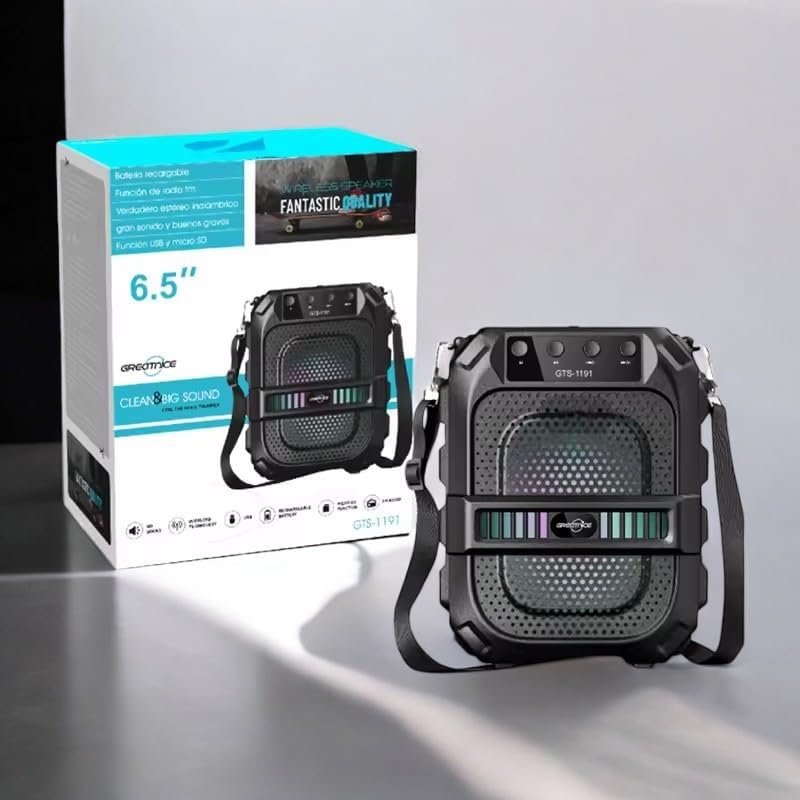
Image: The GTS-1191 speaker shown alongside its retail packaging, highlighting the included shoulder strap for portability.
4. Pwodwi souview
Familyarize w avèk kontwòl ak pò oratè a:
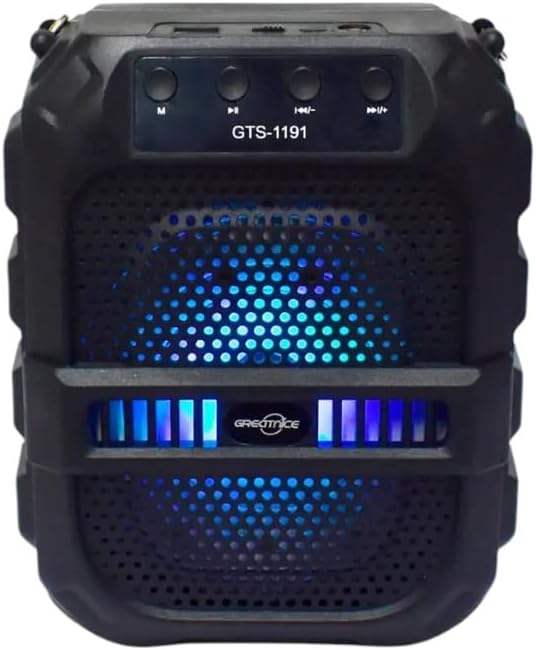
Imaj: Devan view of the GTS-1191 speaker, displaying the control panel at the top, the speaker grille, and active blue LED lighting.
Panèl Kontwòl (Anlè)
- M (Mòd) bouton: Press to switch between Bluetooth, USB, Micro SD, and FM radio modes.
- Bouton pou bese volim / mizik anvan an: Short press for previous track (in music modes), long press to decrease volume.
- Bouton jwe/poz: Press to play or pause audio. In FM mode, long press to auto-scan and save stations.
- Bouton Pwochen Mizik / Ogmante Volim: Short press for next track (in music modes), long press to increase volume.
Ports (Top/Rear)
- Pò USB: Pou lekti sou yon kle USB.
- Mikwo SD kat plas: Pou lekti kat Micro SD.
- Pò chaje: Pou konekte kab chaje a.
5. Enstalasyon
5.1 Chaje Oratè a
- Connect the small end of the charging cable to the charging port on the speaker.
- Connect the large end of the charging cable to a USB power adapter (not included) or a computer's USB port.
- Limyè endikatè chaje a ap limen, anjeneral an wouj, pandan y ap chaje.
- Once fully charged, the indicator light may change color or turn off. A full charge provides up to 12 hours of playtime.
5.2 Power On/Off
- To power on, locate the power switch (usually on the back or side) and slide it to the 'ON' position. You will hear an audible prompt.
- Pou etenn li, glise switch pouvwa a nan pozisyon 'OFF'.
6. Operasyon Enstriksyon
6.1 Bluetooth Pairing
- Ensure the speaker is powered on and in Bluetooth mode. If not, press the 'M' (Mode) button until you hear a Bluetooth pairing prompt. The LED lights may flash to indicate pairing mode.
- Sou aparèy mobil ou a (telefòn entelijan, tablèt, elatriye), aktive Bluetooth epi chèche aparèy ki disponib yo.
- Select 'GTS-1191' from the list of devices.
- Yon fwa yo konekte, ou pral tande yon son konfimasyon, epi limyè LED yo ka chanje modèl yo.
- Kounye a ou kapab jwe odyo soti nan aparèy ou an atravè oratè a.
6.2 Lekti USB
- Mete yon kle USB ki gen odyo MP3 ladan l files nan pò USB a.
- Press the 'M' (Mode) button to switch to USB mode. The speaker will automatically begin playing audio files soti nan kondwi a USB.
- Use the 'Previous Track' and 'Next Track' buttons to navigate through songs.
6.3 Lekti Kat Mikwo SD
- Insert a Micro SD card containing MP3 audio files into the Micro SD card slot.
- Press the 'M' (Mode) button to switch to Micro SD card mode. The speaker will automatically begin playing audio files soti nan kat la.
- Use the 'Previous Track' and 'Next Track' buttons to navigate through songs.
6.4 FM Radyo
- Peze bouton 'M' (Mòd) la pou chanje nan mòd radyo FM.
- Long press the 'Play/Pause' button to initiate an automatic scan for FM stations. The speaker will scan and save available stations.
- Once scanning is complete, use the 'Previous Track' and 'Next Track' buttons to switch between saved FM stations.
6.5 Kontwòl Volim
- To increase volume, long press the 'Next Track / Volume Up' button.
- To decrease volume, long press the 'Previous Track / Volume Down' button.
6.6 Dynamic LED Light Display
The GTS-1191 speaker features dynamic LED lights that enhance the listening experience. These lights typically activate automatically when the speaker is powered on and may change patterns based on the audio playback. There is no specific control button for the LED lights; they operate as an integrated visual feature.

Image: The GTS-1191 speaker positioned next to its retail box, showcasing its active red LED light display.
7. Antretyen
- Netwayaj: Sèvi ak yon twal mou epi sèk pou netwaye deyò oratè a. Pa sèvi ak pwodui netwayaj abrazif oswa solvan.
- Depo: Lè w pa itilize oratè a pou yon bon bout tan, sere l nan yon kote ki fre epi sèk, lwen limyè solèy dirèk ak tanperati ekstrèm.
- Swen batri: Pou pwolonje lavi batri a, evite dechaje oratè a nèt souvan. Chaje l regilyèman, menm si w pa itilize l tout tan.
NAN. Depanaj
| Pwoblèm | Kòz posib | Solisyon |
|---|---|---|
| Oratè pa limen. | Batri ap vide. | Charge the speaker for at least 2-3 hours. |
| Pa gen son ki soti nan oratè a. | Volume is too low or muted. Device not paired. Incorrect mode. | Increase volume. Ensure Bluetooth device is paired. Switch to correct mode (Bluetooth, USB, SD, FM). |
| Bluetooth appariement echwe. | Oratè a pa nan mòd koneksyon. Aparèy la twò lwen. Entèferans. | Ensure speaker is in Bluetooth mode and discoverable. Move device closer. Turn off other Bluetooth devices. |
| Lektur sou kat USB/Micro SD a pa fonksyone. | Pa kòrèk file format. Drive/card not inserted correctly. | Asire w files are MP3 format. Reinsert USB drive/Micro SD card. Press 'M' to select correct mode. |
9. Espesifikasyon
| Karakteristik | Detay |
|---|---|
| Non modèl | GTS-1191 |
| Kalite Oratè | Portable oratè |
| Koneksyon | Bluetooth, USB, Micro SD, FM Radio |
| Koulè | Nwa |
| Lavi batri | Jiska 12 èdtan (tan lekti kontinyèl) |
| Dimansyon pwodwi | 10D x 8W x 20H santimèt |
| Dimansyon pake | 23.6 x 19.2 x 12.4 cm |
| Pwa pake | 920 g |
| Konpozan ki enkli | Oratè, Kab chaje |
10. Garanti ak sipò
The Generic GTS-1191 Wireless HD Sound Speaker comes with a manufacturer's warranty of 6 mwa from the date of purchase. This warranty covers manufacturing defects under normal use. It does not cover damage caused by misuse, accidents, unauthorized modifications, or normal wear and tear.
For warranty claims or technical support, please contact your retailer or the point of purchase with your proof of purchase.


