
Entwodiksyon
This manual provides essential information for the proper setup, operation, and maintenance of your My Arcade Sonic The Hedgehog Joystick Player. Please read this manual thoroughly before using the product to ensure a safe and enjoyable gaming experience.
Pwodwi souview
The My Arcade Sonic The Hedgehog Joystick Player is a portable retro gaming console featuring classic SEGA titles. It offers an authentic arcade experience with a joystick and dedicated buttons.
Karakteristik kle:
- Officially licensed SEGA game console.
- High-resolution 3.5-inch full-color display.
- Gen ladann Detonasyon Lerison an epi Sonic the Hedgehog 2.
- 3.5mm headphone jack for private audio.
- Bati-an oratè ak kontwòl volim.
- Klate ekran reglabl.
- Powered by 4 AA batteries (not included) or USB-C cable (not included).
Eleman:
- Gaming Console Unit
- Joystick
- Action Buttons (A, B, C)
- Bouton Kay
- Credit/Start Button
- Kontwòl Volim (+/-)
- Kontwòl klète
- Jack kas ekoutè 3.5mm
- USB-C Power Input (5V IN)
- Konpatiman pil (li bezwen 4 pil AA)

The My Arcade Sonic The Hedgehog Joystick Player, a portable retro gaming console.
Enstalasyon
Powering the Console:
- Enstalasyon batri: Locate the battery compartment on the back of the console. Insert 4 AA batteries (not included), ensuring correct polarity.
- USB-C Power (Optional): Alternatively, connect a USB-C cable (not included) to the 5V IN port on the back of the console to power it.
Premye itilizasyon:
- Peel off the protective screen sticker before use.
- Turn on the console using the power switch located on the back.

Dèyè view of the console, highlighting the battery compartment, USB-C port, and headphone jack.
Enstriksyon Operasyon
Game Selection and Start:
- Once powered on, use the joystick to navigate and select your desired game (Detonasyon Lerison an or Sonic the Hedgehog 2) from the main menu.
- Peze a START/CREDIT button to add virtual coins and begin the game.
- To skip the Sonic demo mode, press the START/CREDIT bouton.
Kontwòl:
- Joysticks: Controls character movement.
- Action Buttons (A, B, C): Perform in-game actions such as jumping or attacking.
- Kontwòl Volim (+/-): Adjust the sound level of the built-in speaker using the buttons on the back of the console.
- Klate ekran an: Adjust the screen brightness using the dedicated button on the back.
- Kas ekoutè Jack: For private listening, connect 3.5mm headphones to the headphone jack on the back.
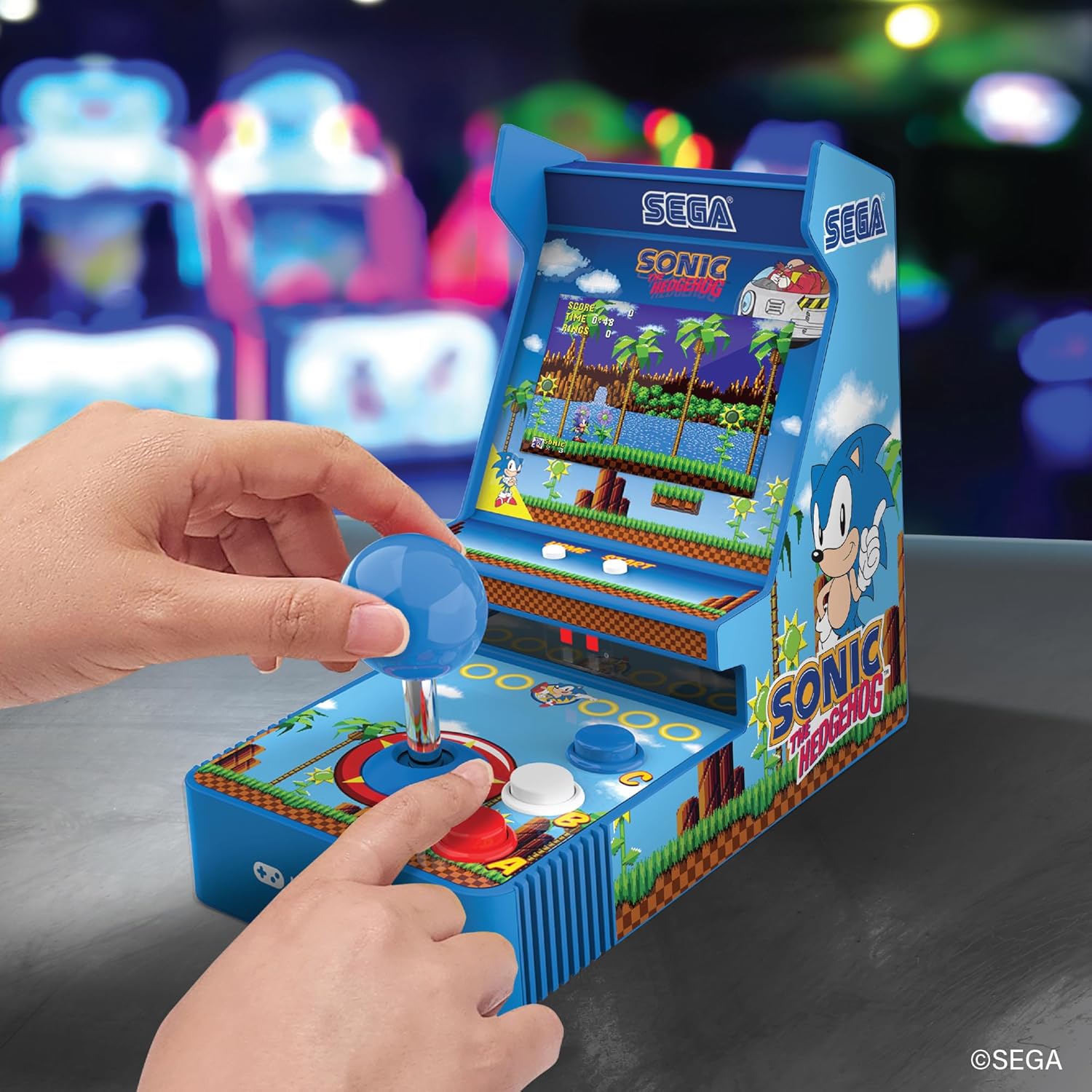
Devan view of the console, showing the joystick, action buttons, and screen during gameplay.
Official video demonstrating the My Arcade Sonic Arcade Game in action, showcasing gameplay and features.
Antretyen
To ensure the longevity of your My Arcade Sonic The Hedgehog Joystick Player, follow these simple maintenance guidelines:
- Keep the console clean by wiping it with a soft, dry cloth. Avoid using abrasive cleaners or solvents.
- Sere konsole a nan yon kote ki fre epi sèk, lwen limyè solèy dirèk ak tanperati ekstrèm.
- If not in use for an extended period, remove the AA batteries to prevent leakage.
Depanaj
If you encounter any issues with your My Arcade Sonic The Hedgehog Joystick Player, refer to the following common solutions:
- Konsòl la pa limen: Ensure that fresh AA batteries are correctly installed or that the USB-C cable is securely connected to a power source.
- Game does not start from demo mode: Peze a START/CREDIT button to exit demo mode and begin gameplay.
- Pa gen son: Check the volume control buttons on the back of the console. If headphones are connected, ensure they are fully plugged in and functioning correctly.
- Ekran an fèb: Adjust the screen brightness using the dedicated button on the back of the console.
If problems persist, please contact My Arcade customer support for further assistance.
Espesifikasyon
| Karakteristik | Detay |
|---|---|
| Dimansyon pwodwi | 4"L x 6.8"L x 7.6"H |
| Kalite kontwolè | Joystick |
| Pwa atik | 0.63 kilogram (1.39 liv) |
| Gwosè ekran | 3.5 pous |
| Sous pouvwa | 4 AA batteries (not included) or USB Type C (not included) |
| Entèfas Materyèl | USB Kalite C |
| Kalite ekspozisyon | LCD |
| Materyèl | Plastik |
| Kapasite Depo memwa | 4 MB |
| Nimewo Modèl | DGUNL-7157 |
| UPC | 845620071579 |
Enfòmasyon sou Sekirite
- Pa apwopriye pou timoun ki poko gen 3 zan akòz ti pati.
- Toujou sipèvize timoun piti pandan w ap itilize.
- Do not expose the console to water or excessive moisture.
- Avoid dropping or subjecting the console to strong impacts.
- Use only recommended battery types and ensure correct installation.
Garanti ak sipò
For warranty information or technical support, please refer to the official My Arcade websit la oubyen kontakte depatman sèvis kliyan yo. Kenbe resi acha w la kòm prèv acha.