
Entwodiksyon
Thank you for choosing the BACKWIN B800-T USB-C Wired Headphones. This manual provides detailed instructions for the proper use, setup, and maintenance of your new headphones. Please read this manual thoroughly before using the product to ensure optimal performance and longevity.
Kontni pake
Asire w tout atik yo prezan nan pakè a:
- BACKWIN B800-T USB-C Wired Headphones
- Ear Cushions (various sizes: large, medium, small)

Image: The BACKWIN B800-T USB-C Wired Headphones, showing the earbuds, inline control, and USB-C connector. Also included are additional ear cushions.
Pwodwi souview
Karakteristik kle
- Four-Unit Driver Design: Each earbud features a dynamic bass unit and a high-definition decoding iron coil unit for powerful subwoofer sound and clear high-pitched audio.
- Integrated DAC Chip: Equipped with a 24-bit/96Khz DAC decoding chip for high-fidelity audio.
- Konpatibilite inivèsèl USB-C: Designed for devices with a Type-C interface, especially those without a 3.5mm audio jack.
- Inline Control with Microphone: Features volume control and a high-definition microphone for convenient call management and music playback.
- Anilasyon Bri Pasif: The earbud design and included silicone ear caps provide passive noise isolation.
- Konstriksyon dirab: Metal back shell of the headphones is CNC machined for precise workmanship.
Eleman

Image: An exploded diagram illustrating the internal components of the earbud, including the dynamic coil, composite vibration film, sound processor with physical noise reduction, and the iron ring. This combination delivers rich bass, full midrange, and clear treble.
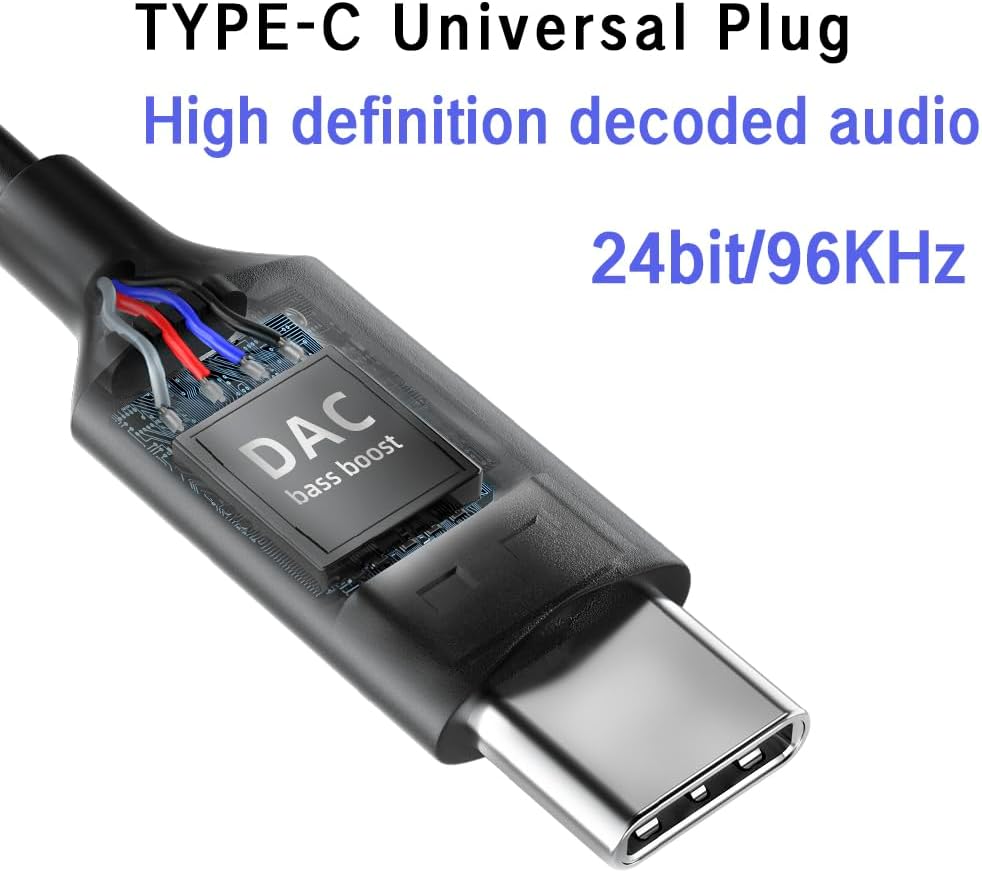
Imaj: Yon gwo plan view of the USB-C plug, highlighting the integrated DAC (Digital-to-Analog Converter) chip, which supports 24-bit/96KHz high-definition audio decoding.

Imaj: Yon imaj detaye view of the earbud's metal back shell, showcasing the CNC precision machining and overall craftsmanship.
Enstalasyon
1. Selecting Ear Cushions
The headphones come with large, medium, and small soundproof silicone ear caps. Choose the size that provides the most comfortable and secure fit for your ears. A proper fit is crucial for optimal sound quality and passive noise cancellation.
2. Konekte ak aparèy ou an
- Locate the USB-C port on your compatible device (e.g., smartphone, tablet, laptop).
- Insert the USB-C plug of the headphones firmly into the device's USB-C port.
- Your device should automatically recognize the headphones. No additional drivers are typically required.
Nòt: These headphones are designed for devices with a Type-C interface, especially those without a 3.5mm audio jack. Compatibility may vary with some devices; ensure your device supports audio output via its USB-C port.

Image: A person wearing the BACKWIN B800-T USB-C Wired Headphones, demonstrating proper ear placement and fit.
Enstriksyon Operasyon
Inline Remote Control Functions
The inline remote control allows you to manage audio playback and calls without needing to access your device directly.

Image: A diagram detailing the functions of the inline remote control, including volume up, volume down, microphone, and multi-function button for calls and music playback.
- Bouton pou monte volim (+): Peze pou ogmante volim odyo a.
- Bouton Diminye Volim (-): Peze pou diminye volim odyo a.
- Multi-function Button (Center Button):
- For Calls:
- Yon klik: Reponn yon apèl k ap antre oubyen fini yon apèl aktif.
- Long Press: Rejte yon apèl fèk ap rantre.
- Pou Mizik:
- Yon klik: Play or Pause music.
- Klike de fwa: Ale nan pwochen track la.
- Klike twa fwa: Retounen nan tras anvan an.
- For Calls:
- Mikwofòn: The built-in microphone allows for hands-free communication during calls.
Antretyen
- Netwayaj: Siye ekoutè yo ak kab la dousman avèk yon twal mou epi sèk. Pa sèvi ak pwodui chimik ki agresif oswa materyèl abrazif.
- Kousen zòrèy: Retire epi netwaye kousen zòrèy silikon yo regilyèman avèk savon dou ak dlo. Asire w ke yo byen sèk anvan ou mete yo ankò.
- Depo: Store the headphones in a clean, dry place when not in use. Avoid extreme temperatures and direct sunlight.
- Swen kab: Evite pliye byen file oswa rale kab la twòp pou anpeche li domaje.
- Ekspozisyon dlo: Kas ekoutè sa yo pa enpèmeyab. Evite ekspoze yo a dlo oswa imidite twòp.
Depanaj
| Pwoblèm | Kòz posib | Solisyon |
|---|---|---|
| Pa gen son oswa volim ki ba |
|
|
| Mikwofòn pa mache |
|
|
| Distòsyon son oswa bon jan kalite pòv |
|
|
Espesifikasyon
| Non modèl | B800-T |
| Mak | BACKWIN |
| Koneksyon Teknoloji | Branche |
| Ekoutè Jack | Kalite-C (USB-C) |
| Kalite chofè odyo | Hybrid Driver (Dynamic bass unit + high-definition decoding iron coil unit) |
| Repons Frekans | Up to 96 KHz (24bit/96Khz Decoding chip) |
| Sansiblite | 96 dB |
| Enpedans | 32 Ohms |
| Kontwòl bri | Anilasyon bri pasif |
| Kalite kontwòl | Volume Control, Push Button (for calls/music) |
| Materyèl | Metal (earbud back shell) |
| Pwa atik | 3.17 ons |
| Konpozan ki enkli | Kousen zòrèy |
Garanti ak sipò
For warranty information or technical support, please refer to the documentation provided with your purchase or contact BACKWIN customer service through the retailer where the product was purchased. Keep your proof of purchase for warranty claims.
Pou plis asistans, ou ka vizite BACKWIN Store on Amazon.