
Entwodiksyon
Thank you for choosing the Ensenior 52 Inch Smart Ceiling Fan with Light. This manual provides detailed instructions for the safe installation, operation, and maintenance of your new ceiling fan. Please read this manual thoroughly before installation and keep it for future reference.
Videyo: Finiview of the Ensenior 52 Inch Smart Ceiling Fan with Light, showcasing its features and design in a living space.
Enstalasyon ak Enstalasyon
This ceiling fan is designed for easy installation. Follow the steps below carefully. Professional installation is recommended if you are unsure about any part of the process.
Konsiderasyon Pre-Enstalasyon
- The fan includes 6-inch and 10-inch downrods to accommodate various ceiling heights.
- It supports angled mounts for sloped ceilings up to 10 degrees.
- Ensure the mounting location can support the fan's weight (approximately 12.97 pounds).
Etap enstalasyon yo
- Install the Hanger Bracket: Securely attach the hanger bracket to your ceiling's electrical box. Ensure it is firmly mounted to a structural beam.
- Assemble Fan Components: Attach the downrod to the motor housing. Feed the wires through the downrod.
- Enstale lam vantilatè yo: Secure each of the five fan blades to the motor housing using the provided screws. The blades are reversible, offering a choice between a dark wood grain and a solid black finish.
- Enstale limyè ki ap dirije a: Connect the LED light module to the fan's wiring and secure it to the bottom of the motor housing.
- Konekte vantilatè a: Connect the fan's electrical wires to your household wiring according to local electrical codes. Ensure all connections are secure.
- Pandye aparèy la: Carefully lift the fan assembly and hang it onto the installed hanger bracket. Secure the canopy to cover the wiring.

Image: Step-by-step visual guide for installing the Ensenior 52 Inch Smart Ceiling Fan.
Video: Detailed installation guide for the Ensenior 52 Inch Smart Ceiling Fan.

Image: Downrod options and sloped ceiling compatibility for installation.

Image: Reversible fan blades, allowing choice between dark wood grain and black finishes.
Enstriksyon Operasyon
Your Ensenior Smart Ceiling Fan offers multiple convenient control methods to enhance your comfort.
Metòd kontwòl
- Kontwòl Remote: Use the included remote for direct control over fan speeds, light settings, and timer functions.
- Kontwòl Smart App: Connect the fan to the Smartlife/Tuya app (2.4GHz Wi-Fi required) for comprehensive control from your smartphone or tablet.
- Kontwòl vwa: Integrate with Alexa or Google Assistant for hands-free operation. Simply say, "Alexa, turn on the fan."

Image: Three ways to control your smart ceiling fan: App, Alexa, and Remote.
Video: Demonstrates the various control options for the Ensenior Ceiling Fan, including remote, app, and voice commands.
Fonksyon Fanatik
- 6-Speed Reversible DC Motor: Adjust airflow with six fan speeds. The reversible motor allows for downdraft (cooling in summer) and updraft (circulating warm air in winter) modes.
- Operasyon trankil: The DC motor operates at less than 35dB, ensuring a quiet environment.

Image: Fan speed settings and reversible motor function for year-round comfort.
Karakteristik ekleraj
- Tanperati koulè reglabl: Choose from 3000K (warm white), 4000K (natural white), and 6000K (clear white) to set the desired ambiance.
- Dimmable Klate: Adjust the light brightness from 1% to 100% (2500 lumens) to suit your needs.
- Fonksyon memwa limyè: The fan remembers your last light setting when turned off and on.
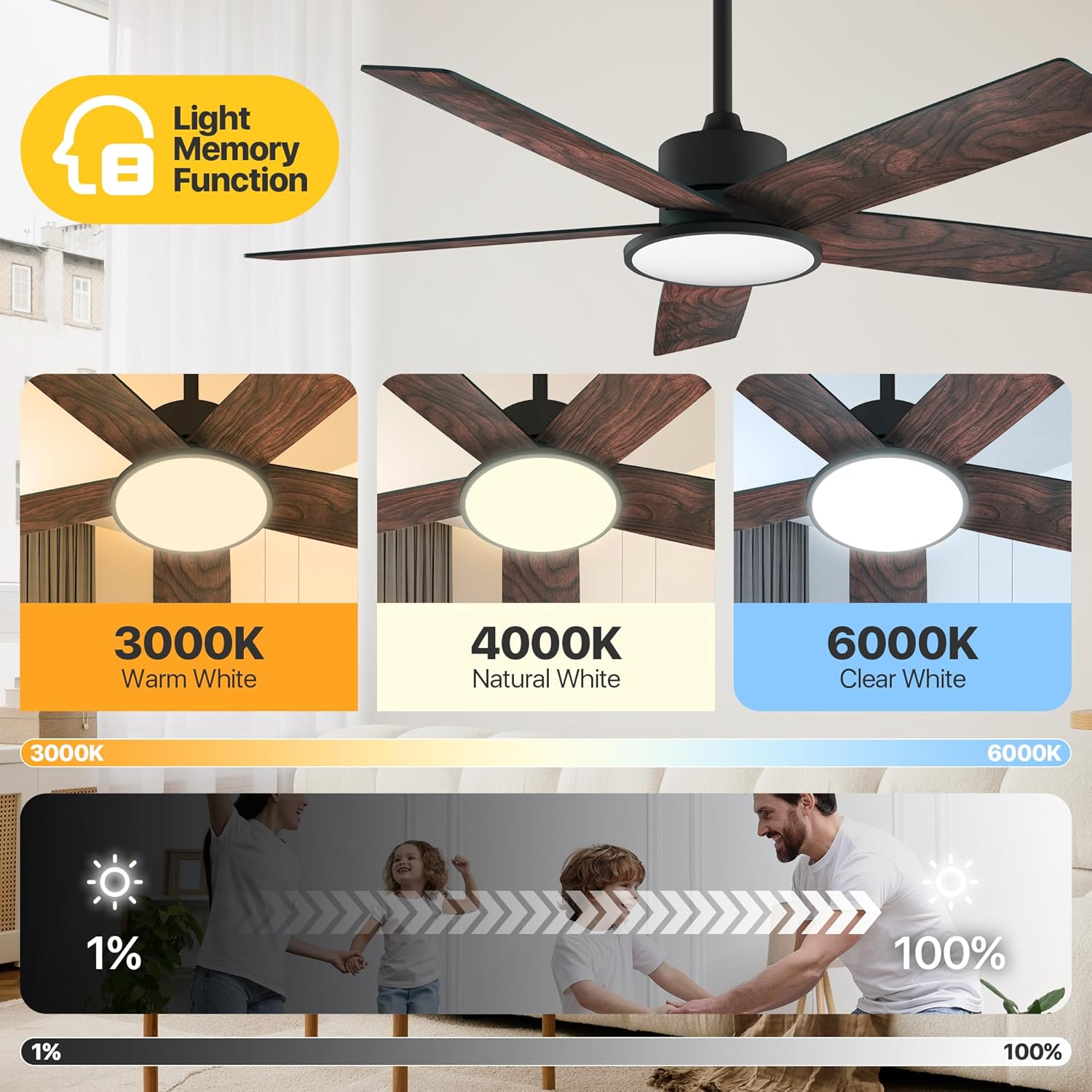
Image: Adjustable color temperatures and dimmable brightness for the integrated LED light.
Anviwònman revèy
Utilize the timer function via the remote or app to schedule fan and light operation, promoting energy efficiency and convenience.

Image: App interface for setting the fan's timer and illustrating quiet operation.
Antretyen
Antretyen regilye asire pèfòmans optimal ak lonjevite fanatik plafon ou a.
- Netwayaj: Detanzantan, retire pousyè sou lam vantilatè yo ak lojman motè a avèk yon twal mou.amp twal. Evite sèvi ak pwodui netwayaj abrazif ki ka domaje fini an.
- Sere lam: Tcheke vis lam yo chak ane pou asire yo byen sere. Lam ki lach ka fè yo tranble epi fè bri.
- Sous limyè: The integrated LED light module is designed for long-term use and typically does not require replacement.
Depanaj
If you encounter issues with your fan, refer to the following common solutions:
| Pwoblèm | Kòz posib | Solisyon |
|---|---|---|
| Fanatik pa kòmanse | No power supply; Loose wiring; Remote/App not paired. | Check circuit breaker; Verify all wire connections; Re-pair remote/app. |
| Fanatik tranble | Vis lam ki lach; Lam dezekilibwe; Sipò montaj ki lach. | Tighten all blade screws; Use balancing kit (if included); Ensure mounting bracket is secure. |
| Limyè pa travay | Loose light wiring; Faulty LED module. | Check light connections; Contact customer support if LED module is faulty. |
| Remote pa travay | Pil mouri; Telekòmand lan pa konekte. | Replace batteries; Re-pair the remote with the fan. |
Si pwoblèm nan pèsiste apre ou fin eseye solisyon sa yo, tanpri kontakte sèvis kliyan.
Espesifikasyon
Detailed technical specifications for the Ensenior 52 Inch Smart Ceiling Fan.
| Karakteristik | Detay |
|---|---|
| Mak | Granmoun |
| Non modèl | Fanatik plafon ak limyè |
| Nimewo Modèl Atik | ZF2-52-5Y-SM |
| Gwosè | 52 pous |
| Dimansyon pwodwi | 51.97"D x 51.97"W x 17.99"H |
| Pwa atik | 12.97 liv |
| Kantite lam | 5 |
| Kalite motè | DC |
| Kantite Nivo Pouvwa | 6 |
| Kapasite Flow Air | 5500 pye kib pou chak minit |
| Nivo bri | 35 Desibèl |
| Wattage | 33 wat |
| Metòd kontwòl | Aplikasyon, Remote, Vwa |
| Karakteristik espesyal | App Operable, LED Light, Quiet Reversible DC Motor, Remote Controlled, Timer |
| Limyè Koulè Tanperati | 3000K-6000K Dimmable LED |
| Konpozan ki enkli | Twous limyè |
| Itilizasyon Andedan kay la / Deyò | Andedan kay la |
| Kalite aliye | Mòn plafon |
| Sous pouvwa | AC/DC |
| UPC | 769044681834 |

Image: Product dimensions and recommended room size for the 52-inch fan.

Image: Benefits of the high-efficiency DC motor, including energy savings and quiet operation.
Garanti ak sipò
The Ensenior 52 Inch Smart Ceiling Fan is backed by a 3-ane garanti. For any questions, technical assistance, or warranty claims, please contact our professional customer support team. Refer to your purchase documentation for specific contact details.