
Pwodwi souview
The GPD Win 4 2025 Handheld Gaming PC is a powerful portable gaming console designed for high-performance gaming on the go. Featuring the latest AMD Ryzen AI 9 HX 370 processor and Radeon 890M graphics, it delivers desktop-level performance in a compact form factor. With a 6-inch 1080P display and a unique OcuLink slide-up backlit keyboard, it offers a versatile and immersive gaming experience.
Karakteristik kle
- Unmatched CPU Performance: Equipped with an AMD Ryzen AI 9 HX 370 CPU, featuring 16 cores and 24 threads, reaching turbo speeds of up to 5.1GHz for ultra-smooth gaming and efficient multitasking.
- Superior Graphics Power: Features an AMD Radeon 890M GPU with 16 Compute Units and a max frequency of 2900MHz, capable of running demanding AAA games at high settings.
- Extensive Memory Options: Offers 32GB LPDDR5X RAM at 7500 MT/s for seamless multitasking and quick loading.
- Kapasite Depo Ekspansif: Includes 2TB M.2 NVMe 2280 SSD storage for lightning-fast boot-up and ample space for games and applications.
- Compact, Portable Design: Weighs just 598g with dimensions of 8.6 x 3.6 x 1.1 inches, featuring a full QWERTY keyboard, ALPS OEM dual 3D joysticks, Wi-Fi 6E, Bluetooth 5.3, and USB4.

Image: GPD Win 4 2025 Handheld Gaming PC with its slide-up keyboard and integrated game controls.
Kòmanse
Premye chaj
Before first use, fully charge your GPD Win 4 2025 using the provided USB-C charger. Connect the charger to the USB-C port located at the bottom of the device. The charging indicator light will show the charging status.
Limen
Press and hold the power button located on the top edge of the device until the screen illuminates. The device will boot into Windows 11 Home.
Koneksyon debaz
Once powered on, follow the on-screen prompts to set up Windows 11. Connect to your Wi-Fi network via the settings menu. Bluetooth 5.3 is available for connecting wireless peripherals.

Image: The top edge of the GPD Win 4 2025, highlighting the power button, volume controls, USB-C, and OcuLink ports.
Opere Aparèy la
Ekspozisyon
The GPD Win 4 2025 features a 6-inch H-IPS touchscreen display with a resolution of 1920 x 1080 pixels (Full HD) and 368 PPI. It supports both 40Hz and 60Hz refresh rates, protected by Gorilla Glass 5. The display slides up to reveal the physical keyboard.

Imaj: Yon gwo plan view of the GPD Win 4 2025's vibrant 6-inch touchscreen display.
Keyboard and Gamepad
The device integrates a full QWERTY keyboard that slides out from beneath the screen. It features ALPS OEM dual 3D joysticks, a D-Pad, game buttons (A, B, X, Y), and an optical finger mouse for precise control. The keyboard has a white backlight for use in low-light conditions.

Image: A detailed diagram illustrating the various controls and ports on the GPD Win 4 2025.

Image: User's hands demonstrating the use of the slide-up keyboard for in-game chat or text input.
Pò ak Koneksyon
- USB-C (USB4): Pou chaje ak transfè done.
- OcuLink (SFF-8612): Dedicated port for external GPU connections.
- MicroSD Kat plas: Pou depo ki ka elaji.
- Jack ekoutè 3.5mm: Pou pwodiksyon odyo.
- Wi-Fi 6E & Bluetooth 5.3: Pou koneksyon san fil.

Imaj: Bò kote view of the GPD Win 4 2025, showing the MicroSD card slot and the switch to toggle between mouse and controller modes.
External GPU Support (OcuLink)
The integrated OcuLink port allows for connection to external GPU (eGPU) docking stations, such as the GPD G1. This significantly boosts graphics performance, enabling higher frame rates and resolutions for demanding games when docked.
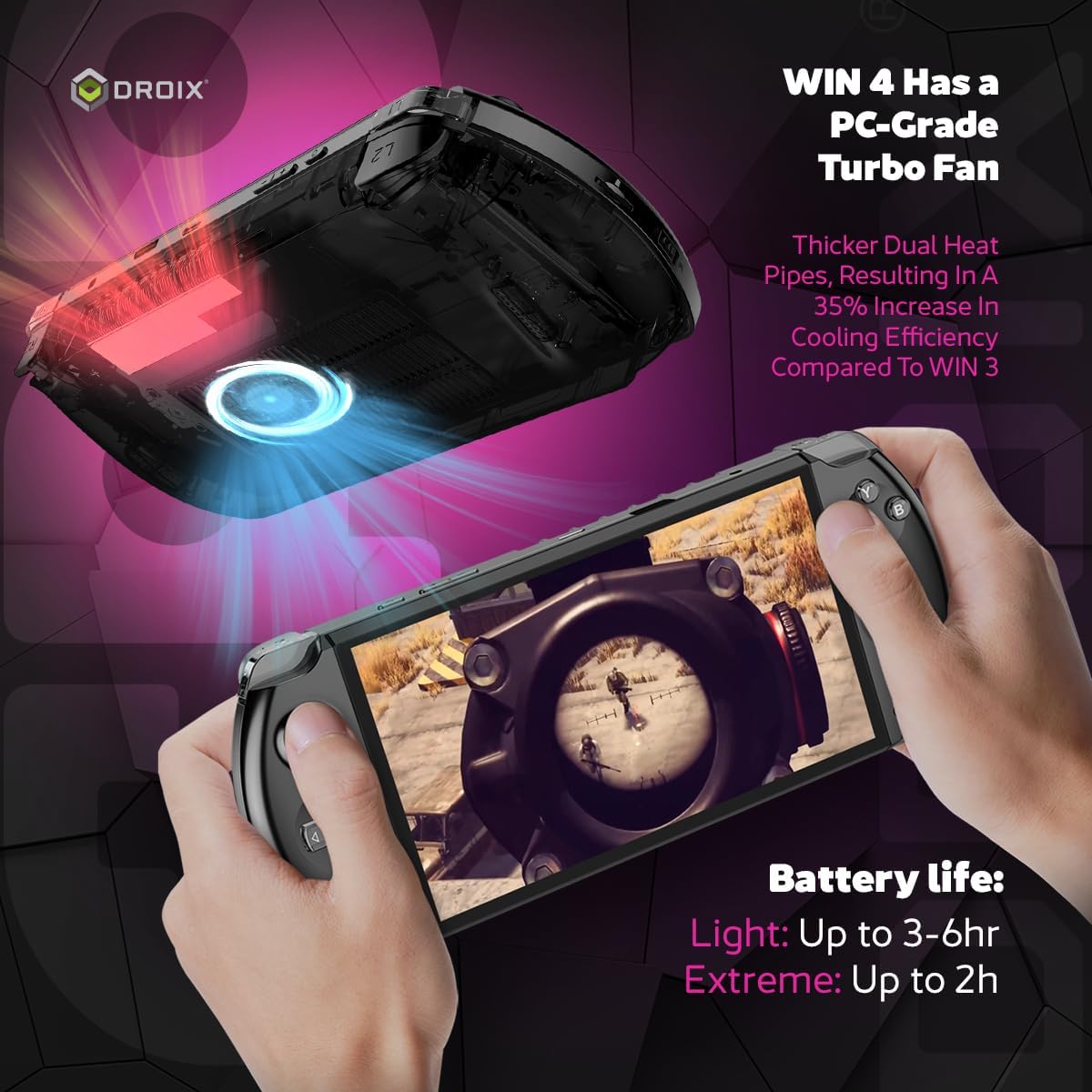
Image: The GPD Win 4 2025 connected to an external GPD G1 eGPU and an external monitor, demonstrating its expandability.
Pèfòmans
Processeur ak grafik
The GPD Win 4 2025 is powered by the AMD Ryzen AI 9 HX 370 processor, featuring 16 cores and 24 threads with a turbo frequency of up to 5.1GHz. Graphics are handled by the integrated AMD Radeon 890M GPU, which has 16 Compute Units and a max frequency of 2900MHz.
Memwa ak Depo
It comes with 32GB of LPDDR5X RAM operating at 7500 MT/s, ensuring smooth multitasking and application performance. For storage, it includes a 2TB M.2 NVMe 2280 SSD, providing fast load times and ample space for your game library.
Lavi batri
The device is equipped with a 45.62Wh Lithium Polymer battery. Average usage can provide 3-6 hours of playtime, depending on the demand of the applications and games. Under full load at 28W TDP, the battery life is approximately 57 minutes.
Video: An official review of the GPD WIN 4 2025, showcasing its features and performance in various games and applications.
Antretyen
To ensure the longevity and optimal performance of your GPD Win 4 2025, regular maintenance is recommended.
Swen Aparèy
- Kenbe aparèy la pwòp pa siye li ak yon twal mou, sèk.
- Evite ekspoze aparèy la nan tanperati ekstrèm oswa limyè solèy la dirèk.
- Protect the screen from scratches by using a screen protector or a protective case when not in use.
Sistèm refwadisman
The GPD Win 4 2025 features a PC-grade turbo fan with thicker dual heat pipes, resulting in a 35% increase in cooling efficiency compared to previous models. Ensure the air inlets and outlets are not obstructed to maintain proper airflow and prevent overheating.
Depanaj
If you encounter any issues with your GPD Win 4 2025, refer to the common troubleshooting steps below.
- Aparèy pa soumen: Ensure the device is fully charged. If it still doesn't power on, try holding the power button for 10-15 seconds for a hard reset.
- Pwoblèm ekspozisyon: If the screen flickers or shows abnormalities, try adjusting the refresh rate in Windows display settings.
- Pwoblèm koneksyon: For Wi-Fi or Bluetooth issues, try restarting the device and your router. Ensure drivers are up to date.
- Surchof: Check that the air vents are clear of obstructions. Reduce the TDP settings in the system's power options if prolonged high-performance usage causes excessive heat.
Espesifikasyon teknik detaye
| Spesifikasyon | Valè |
|---|---|
| Kanpe gwosè ekspozisyon ekran | 6 pous |
| Rezolisyon ekran | 1926 x 1080 piksèl |
| Rezolisyon ekran maksimòm | 1080p Full HD piksèl |
| Processeur | 3.3 GHz AMD Ryzen AI 9 HX 370 |
| RAM | 32 GB LPDDR5X |
| Koprosesè grafik | AMD Radeon 890M |
| Gwosè memwa flash | 2 TB |
| Kalite san fil | 802.11ax (Wi-Fi 6E) |
| Dire lavi batri mwayèn (an èdtan) | 6 èdtan |
| Sistèm operasyon | Windows 11 Kay |
| Pwa atik | 1.32 liv |
| Dimansyon pwodwi | 8.66 x 1.1 x 3.62 pous |
| Koulè | 2025 - Raven Black |
Garanti ak sipò
Warranty information for this product is not available in the provided data. Please refer to the product packaging or the manufacturer's official websit la pou wè tèm ak kondisyon garanti detaye yo.
Customer support contact information is not available in the provided data. Please refer to the product packaging or the manufacturer's official websit pou opsyon sipò.