
1. Entwodiksyon
This user manual provides comprehensive instructions for the Callsky 10-inch Wi-Fi Tablet, Model Ctab 10. Please read this manual carefully before using your device to ensure proper operation and to maximize its features. Keep this manual for future reference.
2. Pwodwi souview
2.1 Kontni pake a
Lè w ap ouvri pake a, verifye si tout bagay ki nan lis anba a la:
- Callsky Ctab 10 Tablet
- USB Kalite-C Chaje Kab
- Adaptè pouvwa
- Manyèl Itilizatè (Japonè)

Image: Package contents including the tablet, charging cable, power adapter, and user manual.
2.2 Konpozan Aparèy
Familiarize yourself with the physical layout and ports of your tablet:
- Kamera devan: 5MP pou apèl videyo ak selfie.
- Kamera dèyè: 8MP with autofocus for high-resolution photos.
- Bouton pouvwa: Located on the side for turning the device on/off and screen lock.
- Bouton Volim: Ajiste nivo odyo yo.
- USB Kalite-C Port: Pou chaje ak transfè done.
- Jack ekoutè 3.5mm: Pou pwodiksyon odyo.
- Doub Oratè: Pou yon eksperyans odyo amelyore.
- MicroSD Kat plas: For storage expansion up to 2TB.

Imaj: Plis paseview of tablet features including face recognition, wireless projection, and physical dimensions.
2.3 Karakteristik kle
- Konsepsyon ki lejè: Ultra-thin at 8.7mm and weighing 425g for easy portability.
- Android 14 OS: Enhanced privacy, personalized settings, and improved user experience.
- Pèfòmans segondè: 1.8GHz Allwinner A523 Octa-core processor and Mali-G57 GPU for smooth multitasking, gaming, and HD video.
- Memwa ak Depo: 3GB RAM + 9GB virtual memory, 128GB internal storage, expandable up to 2TB via MicroSD.
- Ekspozisyon vivan: 10.1-inch 1280x800 Incell IPS display with eye protection mode and Widevine L1 support for high-quality streaming.
- Koneksyon: Wi-Fi 6 and Bluetooth 5.4 for stable and high-speed connections.
- Karakteristik avanse: Wireless projection, face recognition, and split-screen functionality.
- Batri ki dire lontan: Batri 6000mAh pou itilizasyon pwolonje.

Image: Visual summary of the tablet's core specifications and features.
3. Enstalasyon
3.1 Premye Limen ak Paramèt Debaz yo
- Press and hold the Power button until the Callsky logo appears.
- Follow the on-screen prompts to select your language (e.g., English).
- Connect to a Wi-Fi network. Select your network from the list and enter the password if required.
- Review and accept the Google Services terms.
- Set up a screen lock (PIN, pattern, or password) for security. You can skip this step and set it up later.
- Complete the remaining setup steps as guided by the Android 14 interface.
3.2 Mete yon Kat MicroSD
Pou ogmante espas depo tablèt ou a:
- Jwenn fant kat MicroSD a sou bò tablèt la.
- Gently insert the MicroSD card into the slot until it clicks into place. Ensure the card is oriented correctly.
- Tablèt la ap detekte nouvo depo a. Yo ka mande w pou fòma kat la pou l ka itilize l pi byen ak aparèy la.
4. Operasyon Enstriksyon
4.1 Navigasyon debaz
- Jès manyen: Tape pou chwazi, glise pou defile, pense pou agrandi.
- Ekran Kay: Jwenn aksè a aplikasyon, widjèt, ak notifikasyon.
- Notifikasyon: Glise desann soti nan tèt ekran an pou view notifikasyon ak paramèt rapid.
4.2 Jesyon Memwa ak Depo
The tablet comes with 3GB of physical RAM and 9GB of virtual memory, totaling 12GB, along with 128GB of internal storage. You can expand storage up to 2TB using a MicroSD card.
- Pou verifye depo a: Ale nan Anviwònman > Depo.
- To manage apps: Go to Anviwònman > Aplikasyon.

Image: Details on memory and storage, including RAM, internal storage, and MicroSD expansion.
4.3 Ekspozisyon ak Eksperyans Vizyèl
The 10.1-inch 1280x800 Incell IPS display provides clear and vibrant visuals. It supports Widevine L1 for high-definition streaming from platforms like Netflix and YouTube.
- Mòd Pwoteksyon Je: Activate this mode in settings to reduce blue light and eye strain during prolonged use.
- Fann ekran: Use two applications simultaneously for enhanced productivity.

Image: Tablet demonstrating Widevine L1 support for streaming services.
4.4 Koneksyon
The tablet supports Wi-Fi 6 and Bluetooth 5.4 for reliable and fast wireless connections.
- Wi-Fi: Connect to 2.4G or 5G networks. Go to Anviwònman > Rezo ak entènèt > Wi-Fi pou jere koneksyon yo.
- Bluetooth: Pair with wireless devices like headphones or keyboards. Go to Anviwònman > Aparèy konekte > Bluetooth.
- Pwojeksyon san fil: Share your screen with compatible displays. Access this feature from the quick settings panel.
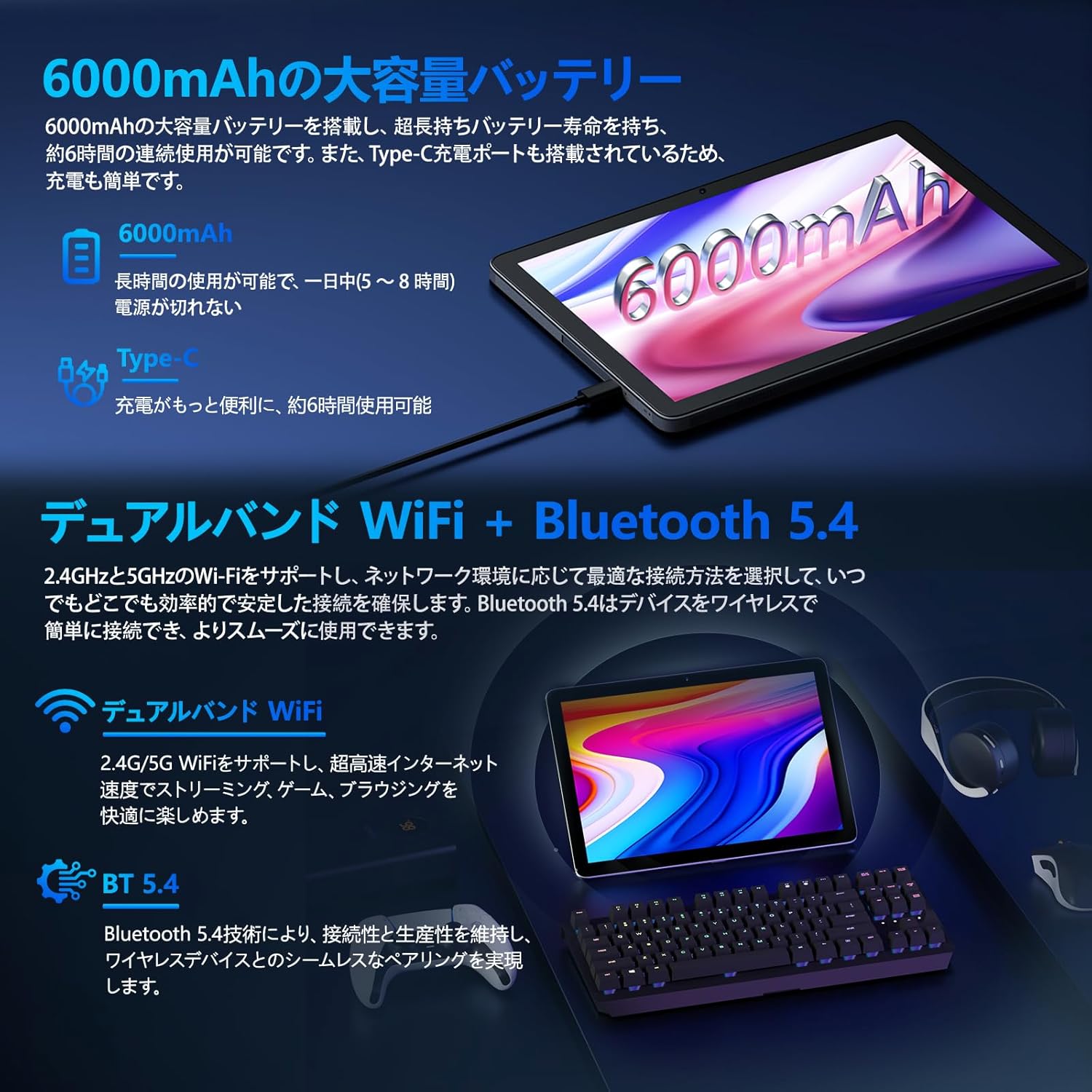
Image: Tablet highlighting battery capacity, Type-C charging, Wi-Fi, and Bluetooth features.
4.5 Kamera
The tablet features a 5MP front camera and an 8MP rear camera with autofocus, suitable for video calls and capturing photos.
- Open the Camera app to take photos or record videos.
- Rekonesans figi: Use the front camera for quick and secure unlocking. Set this up in Anviwònman > Sekirite ak vi prive > Deblokaj figi.

Image: Illustration of the tablet's front and rear cameras and their resolutions.
4.6 Kids Mode (Parental Controls)
The tablet includes a dedicated Kids Mode and parental control features to ensure a safe and controlled environment for children.
- Access Kids Mode to provide curated content and limit screen time.
- Parents can manage app usage and content access through parental control settings.
4.7 Detèktè
The tablet is equipped with various sensors for enhanced functionality:
- GPS: Pou sèvis lokalizasyon ak navigasyon.
- Geomagnetic Sensor: Functions as a compass.
- Capteur pwoksimite: Prevents unintended screen operations.
- Capteur limyè anbyen: Automatically adjusts screen brightness.
- Jiroskop: For tilt operations and AR applications.
- Akseleromètr: Detects tilt, shock, and movement.
5. Antretyen
5.1 Swen Batri
The 6000mAh battery provides long usage times. To prolong battery life:
- Evite tanperati ekstrèm.
- Pa kite batri a dechaje nèt souvan.
- Sèvi ak chargeur ak kab ki vini ak yo a.
- Optimize itilizasyon batri a nan Anviwònman> Batri.

Image: Tablet connected to a Type-C charger, highlighting the 6000mAh battery.
5.2 Netwayaj
Sèvi ak yon twal mou ki pa gen pousyè pou netwaye ekran an ak kò tablèt la. Evite itilize pwodui chimik ki agresif oswa materyèl abrazif.
NAN. Depanaj
If you encounter issues with your tablet, refer to the following common problems and solutions:
| Pwoblèm | Kòz posib / Solisyon |
|---|---|
| Tablèt la pa limen | Asire w batri a chaje. Konekte chajè a epi tann kèk minit anvan ou eseye limen l ankò. |
| Ekran an pa reponn | Restart the tablet by holding the power button. If unresponsive, force restart by holding the power button for a longer duration (e.g., 10-15 seconds). |
| Pwoblèm koneksyon Wi-Fi | Check if Wi-Fi is enabled in settings. Restart your router. Forget the network and reconnect. |
| Device overheating / unexpected shutdowns | Close background applications. Avoid using the tablet in direct sunlight or hot environments. If the issue persists, contact customer support. |
| Aplikasyon yo ap plante oswa bloke | Clear the app's cache (Settings > Apps > [App Name] > Storage & cache > Clear cache). Update the app. Reinstall the app. |
| Pèfòmans dousman | Fèmen aplikasyon ki pa nesesè nan background nan. Vide kach la ak aplikasyon tanporè yo files. Ensure sufficient storage space. |
Si pwoblèm nan pèsiste apre ou fin eseye solisyon sa yo, tanpri kontakte sèvis kliyan Callsky.
7. Espesifikasyon
| Karakteristik | Detay |
|---|---|
| Mak | Callsky |
| Non modèl | Ctab 10 |
| Sistèm operasyon | Android 14 |
| Gwosè ekran | 10.1 pous |
| Rezolisyon ekspozisyon | 1280x800 pixels (Incell IPS) |
| CPU | Allwinner A523 Octa-core (1.8 GHz) |
| GPU | Mali-G57 (Integrated) |
| RAM | 3GB Physical + 9GB Virtual (Total 12GB) |
| Depo Entèn | 128 GB |
| Depo dilatabl | Jiska 2TB atravè kat MicroSD |
| Kamera dèyè | 8 MP |
| Kamera devan | 5 MP |
| Wi-Fi | Wi-Fi 6 (802.11ac, 802.11b, 802.11g, 802.11n) |
| Bluetooth | Bluetooth 5.4 |
| Kapasite batri | 6000mAh (22.8 Watt-hours, 1 Lithium Polymer cell) |
| Port chaje | Kalite-C |
| Dimansyon | 32.4 x 20.3 x 3.4 cm |
| Pwa | 425 g |
| Sètifikasyon | GMS Certified, PSE Certified |
8. Garanti ak sipò
The Callsky Ctab 10 tablet comes with a 2-ane garanti. This warranty covers manufacturing defects and ensures long-term reliability.
8.1 Sipò pou Kliyan
If you encounter any issues or have questions regarding your Callsky tablet, please contact our customer support team. We are committed to providing prompt assistance.
- Metòd Kontak: Refer to your purchase platform (e.g., Amazon) for specific contact details. Typically, you can find seller contact information through your order history.
- Tan repons: We aim to respond to inquiries within 24 hours on weekdays and within 48-72 hours on weekends or holidays.
Please have your product model (Ctab 10) and purchase details ready when contacting support.