
1. Pwodwi souview
The MOVE SPEED 145W Laptop Power Bank is a high-capacity portable charging solution designed for a wide range of electronic devices, including laptops, smartphones, and tablets. Featuring PD 3.1 fast charging technology and a 25,000mAh capacity, it ensures your devices remain powered during travel, work, or outdoor activities. The integrated digital display provides real-time charging insights, enhancing user convenience.
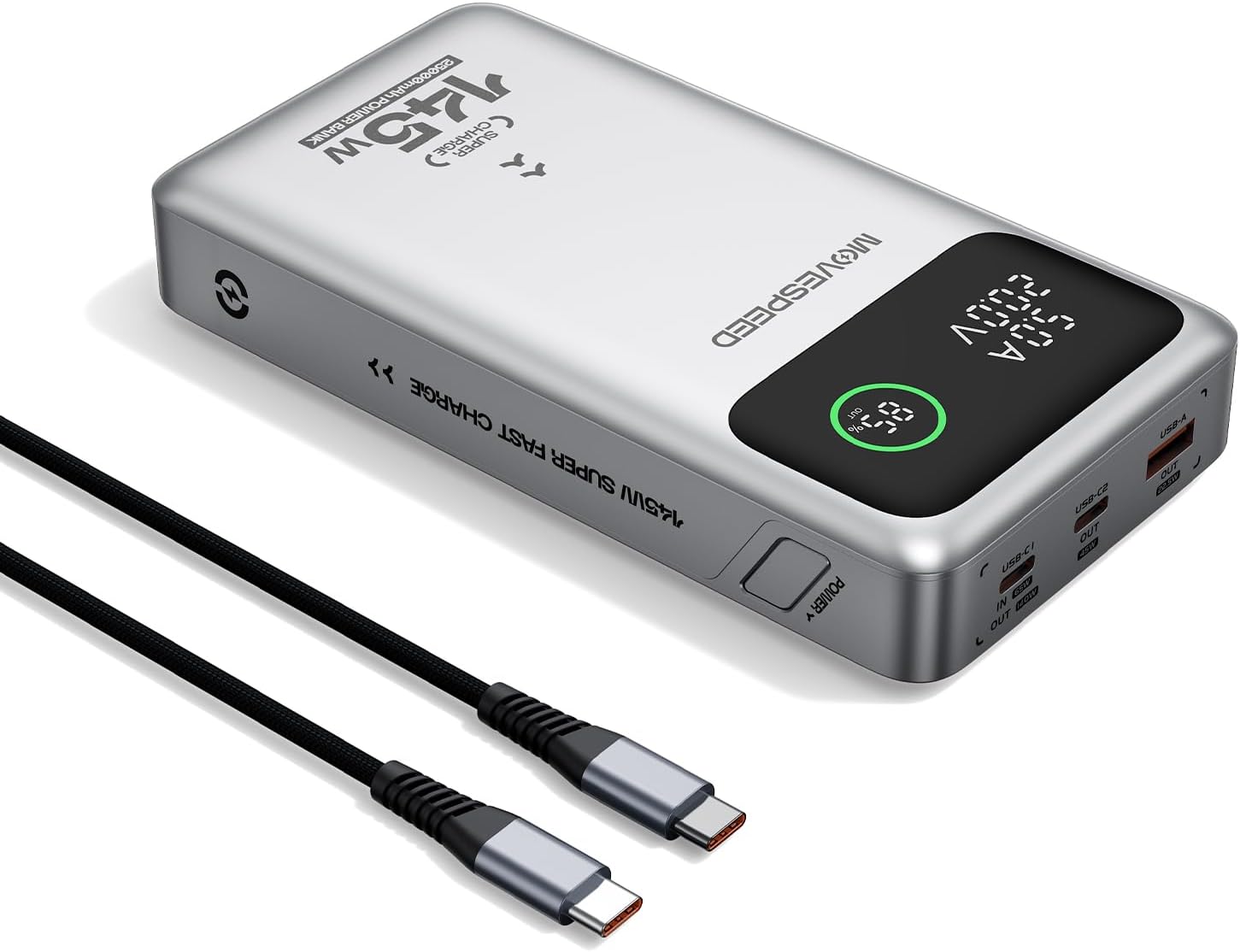
Figure 1.1: MOVE SPEED 145W Laptop Power Bank and 240W Type-C Cable.
2. Enfòmasyon sou Sekirite
Prekosyon Sekirite Enpòtan:
- Pa ekspoze bank pouvwa a nan tanperati ekstrèm, limyè solèy dirèk, oswa dife.
- Evite lage l, demonte l, oswa eseye repare aparèy la tèt ou.
- Kenbe lwen dlo ak imidite ki wo.
- Asire w ke sistèm nan byen vantile pandan w ap itilize l epi pandan w ap chaje l.
- This power bank is flight-approved (25000mAh/92.5Wh) and meets FAA and TSA carry-on regulations.
- The device incorporates 9-layer protection against overcharging, overheating, and short circuits.

Figure 2.1: The power bank is designed to be air-travel friendly.

Figure 2.2: Built-in NTC Temperature Sensor and comprehensive protection features.
3. Pake kontni
Verifye ke tout atik yo prezan nan pakè a:
- MOVE SPEED 145W Laptop Power Bank x 1
- 240W 3.28Ft Type-C Cable x 1
- Manyèl itilizatè x 1

Figi 3.1: Atik ki enkli nan pake pwodwi a.
4. Pwodwi Features
- 140W Ultra-Fast Single-Port Charging: Supports PD 3.1, capable of charging a 16-inch MacBook Pro to 56% in approximately 30 minutes.
- 65W Ultra-Fast Recharging: Fully recharges the power bank in about 2 hours using a compatible high-wattage plato.
- Gwo kapasite 25,000mAh: Provides multiple charges for various devices (e.g., 4 full charges for iPhone 16, 3 for Galaxy S24, 2 for iPad 11).
- Triple-Port Output:
- USB-C1 (IN/OUT): Up to 140W output, 65W input.
- USB-C2 (OUT): Up to 45W output.
- USB-A (OUT): Up to 22.5W output.

Figure 4.1: Single port output capabilities.

Figure 4.2: Two-port simultaneous output capabilities.

Figure 4.3: Three-port simultaneous output capabilities.
- Smart Dynamic Charging: Optimizes power distribution up to 145W combined output when multiple USB-C ports are active.
- Ekspozisyon ki ap dirije entelijan: Shows precise battery percentage, charging status (INPUT/OUTPUT), and real-time voltage ak aktyèl pou chak pò aktif.
- Chaje pasaj: Allows simultaneous charging of devices while the power bank itself is being recharged.

Figure 4.4: Key features of the MOVE SPEED 145W Power Bank.

Figure 4.5: Fast charging capability for laptops.

Figure 4.6: Extended power supply for multiple devices.

Figure 4.7: Simultaneous charging of up to three devices.

Figure 4.8: Rapid recharging of the power bank.

Figure 4.9: The smart LED display provides comprehensive charging information.

Figure 4.10: Pass-through charging capability for convenience.
5. Enstalasyon
Before first use, it is recommended to fully charge the power bank.
- Connect the included 240W Type-C cable to the USB-C1 port (IN/OUT) on the power bank.
- Connect the other end of the cable to a compatible USB-C wall charger (65W or higher recommended for optimal charging speed).
- The digital display will show "IN" and the battery percentage ogmanteasing, indicating that the power bank is charging.
- Yon fwa ekran an montre 100%, bank pouvwa a konplètman chaje epi li pare pou itilize.
6. Operasyon Enstriksyon
6.1 Aparèy Chaje
Pou chaje aparèy elektwonik ou yo:
- Connect your device's charging cable to the appropriate output port on the power bank (USB-C1, USB-C2, or USB-A).
- Konekte lòt bout kab la sou aparèy ou an.
- The digital display will show "OUT" and the real-time voltage and current, indicating that your device is charging.
- The power bank will automatically detect the connected device and deliver the optimal charging speed.
Video 6.1: Demonstration of the MOVE SPEED power bank charging a laptop. This video highlights the product's ability to provide power to larger devices.
Videyo 6.2: Finiview of the MOVE SPEED laptop power bank's features and usage. This video provides a general demonstration of the product.
Video 6.3: Demonstration of the MOVESPEED portable laptop charger and its 145W power bank capabilities. This video showcases the power bank in action with various devices.
6.2 Rechaje Bank Ekstèn lan
Pou rechaje bank pouvwa a:
- Connect the included 240W Type-C cable to the USB-C1 port (IN/OUT) on the power bank.
- Connect the other end of the cable to a power source, such as a wall adapter or a computer's USB-C port.
- The digital display will indicate "IN" and the charging progress.
Note: For optimal recharging speed, use a power adapter that supports 65W Power Delivery (PD) or higher.
7. Espesifikasyon
| Karakteristik | Detay |
|---|---|
| Nimewo Modèl | YSPB-M25pro-US |
| Kapasite batri | 25,000mAh / 92.5Wh |
| Antre USB-C1 | 65W Max |
| USB-C1 Sòti | 140W Maksimòm (PD 3.1) |
| USB-C2 Sòti | 45W Max |
| USB-A Sòti | 22.5W Max |
| Sòti total | 145W Max (Dynamic Distribution) |
| Dimansyon | 8.19 x 4.49 x 1.56 pous |
| Pwa | 1.41 liv |
| Enkli kab | 240W 3.28Ft Type-C Cable |
| Karakteristik sekirite | 9-layer protection (overcharging, overheating, short circuits, etc.), UN38.3 certified |
| Flight Approved | Yes (under 100Wh limit) |
8. Antretyen
- Netwaye bank ekstèn lan avèk yon twal mou epi sèk. Pa sèvi ak pwodui chimik ki agresif oswa materyèl abrazif.
- Sere bank pouvwa a nan yon kote ki fre epi sèk, lwen limyè solèy dirèk ak tanperati ekstrèm.
- If storing for an extended period, recharge the power bank every 3-6 months to maintain battery health.
- Evite ekspoze pò yo nan pousyè oswa debri.
NAN. Depanaj
Pwoblèm komen ak solisyon:
- Batri pouvwa a pa chaje:
- Ensure the charging cable is securely connected to both the power bank (USB-C1 port) and the power adapter.
- Verify that the wall adapter is functioning correctly and provides sufficient power (65W recommended).
- Eseye yon lòt kab chaje oswa adaptè kouran.
- Aparèy la pa chaje ak bank pouvwa a:
- Tcheke si bank pouvwa a gen ase chaj.
- Asire w ke kab chaje a byen konekte ak bank pouvwa a ak aparèy ou an.
- Eseye yon lòt pò pwodiksyon sou bank pouvwa a.
- Verify that your device's charging cable is not damaged.
- Chaje dousman:
- Ensure you are using the included 240W Type-C cable or another high-quality cable that supports fast charging.
- For recharging the power bank, use a 65W or higher PD-compatible wall adapter.
- When charging multiple devices, the total output power is dynamically distributed, which may result in slower charging for individual devices compared to single-port charging.
- Ekspozisyon dijital la pa fonksyone:
- Asire w ke bank pouvwa a byen chaje.
- Si pwoblèm nan kontinye, kontakte sipò kliyan.
10. Garanti ak sipò
MOVE SPEED offers a 36-month protection plan for this product. If you encounter any issues or have questions regarding your MOVE SPEED 145W Laptop Power Bank, please contact our customer support team for assistance.
For further support, visit the official MOVE SPEED store on Amazon: MOVE SPEED Store