
1. Entwodiksyon
This manual provides essential instructions for the setup, operation, and maintenance of your TMY Projector. Please read this manual thoroughly before using the product to ensure proper functionality and to maximize your vieweksperyans nan. Kenbe manyèl sa a pou referans nan lavni.
2. Pwodwi souview
2.1 Kontni pake a
Verifye ke tout atik yo prezan nan pakè a:
- TMY Projector Unit
- Kontwòl Remote
- HDMI kab
- Kòd pouvwa
- Kat Garanti
2.2 Karakteristik kle
- Netflix Ofisyèlman Lisansye: Access streaming services directly without external devices.
- 1080P Resolution: Bay imaj klè ak detaye.
- Electric Focus & Auto Keystone: Automatic image adjustment for optimal clarity and shape.
- Sipò ki ka vire 270°: Flexible projection angles, including ceiling projection.
- Upgraded WiFi 6 Connectivity: Ensures stable and fast wireless streaming.
- Dual-Mode Bluetooth 5.2: Connects to external speakers or functions as a standalone Bluetooth speaker.
- Opsyon Koneksyon miltip: HDMI, USB, Phone/PC mirroring.
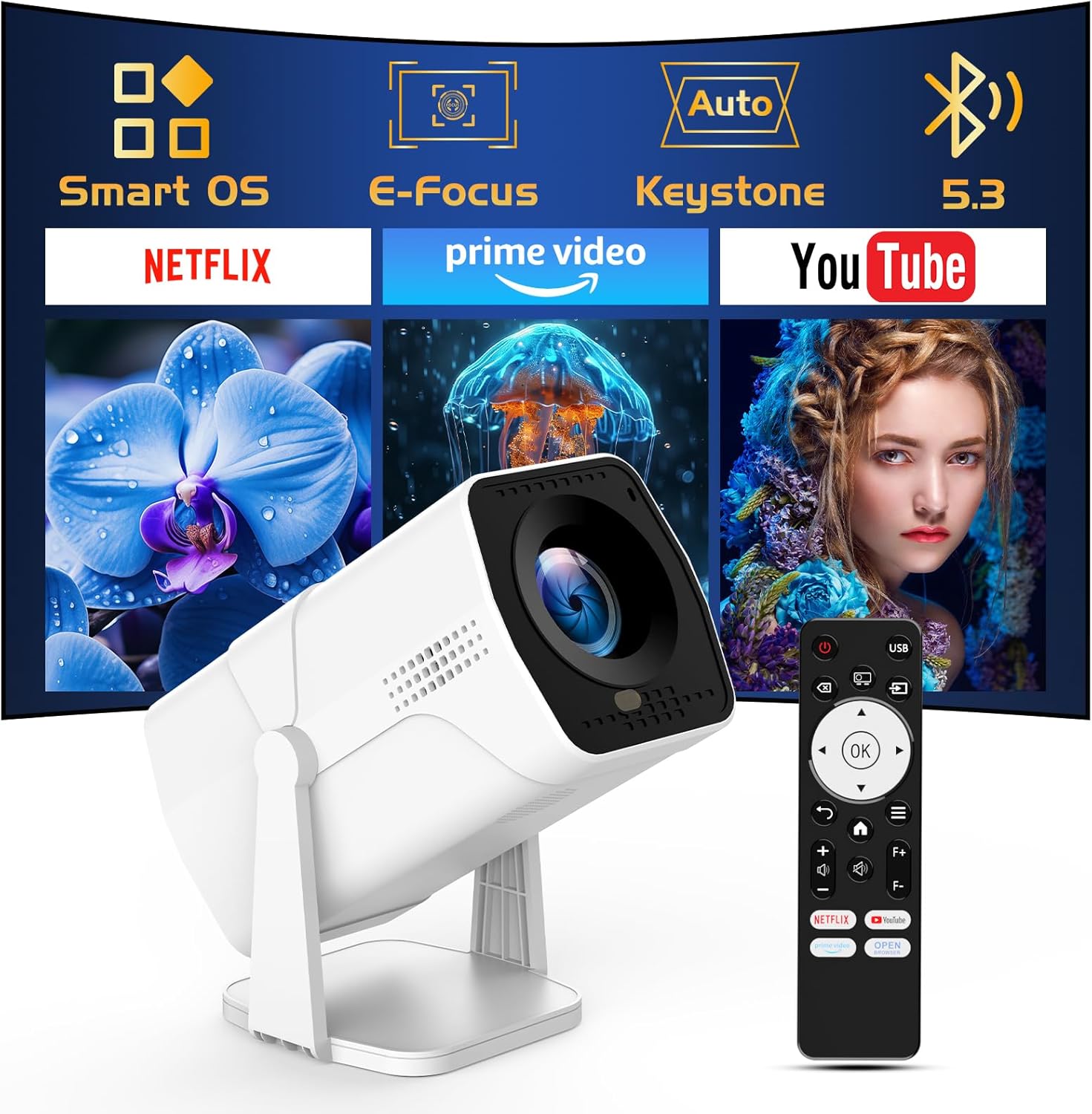
Image: The TMY Projector unit, its remote control, and a projected screen displaying logos for Smart OS, E-Focus, Auto Keystone, Bluetooth 5.3, Netflix, Prime Video, and YouTube.
3. Enstalasyon
3.1 Plasman
Position the projector on a stable, flat surface. The 270° rotatable stand allows for versatile placement, including projecting onto walls or ceilings. Ensure adequate ventilation around the projector.

Image: A TMY Projector positioned on a bedside table, projecting an image onto the ceiling, demonstrating its 270° rotatable stand for multi-angle viewing.
3.2 Koneksyon pouvwa
- Konekte kòd kouran an nan pò antre kouran pwojektè a.
- Branche lòt bout kòd kouran an nan yon priz elektrik estanda.
3.3 Premye Limen ak Ajisteman Fokus
- Peze bouton pouvwa a sou pwojektè a oswa kontwòl remote la pou limen aparèy la.
- Karakteristik pwojektè a Konsantre elektrik epi Auto Keystone correction. The image will automatically adjust for clarity and a rectangular shape within approximately 2 seconds.
- If further adjustment is needed, use the remote control to fine-tune the focus.

Image: A TMY Projector projecting a vibrant image onto a screen, with an overlay illustrating the 'FOCUS' function and icons for Auto Keystone and 50%-100% Zoom.
3.4 Koneksyon Rezo (WiFi)
The projector supports WiFi 6 for a fast and stable internet connection.
- Ale nan meni 'Paramèt' la avèk kontwòl remote la.
- Chwazi 'Rezo' oswa 'Paramèt WiFi'.
- Chwazi rezo WiFi ou vle a nan lis la epi antre modpas la.
- Konfime koneksyon an.

Image: A TMY Projector wirelessly connected to a tablet, smartphone, and laptop, illustrating its WiFi 6 connectivity for faster streaming with no lagging.
3.5 Bluetooth Koneksyon
The projector features Dual-Mode Bluetooth 5.2 for audio connectivity.
- Projector Mode (Output): To connect to external Bluetooth speakers or soundbars: Navigate to 'Bluetooth Settings', enable Bluetooth, and pair with your audio device.
- Speaker Mode (Input): To use the projector's built-in speakers as a standalone Bluetooth speaker: Select 'Speaker Mode' in the Bluetooth settings. Your phone or other device can then connect to the projector to play audio.

Image: A TMY Projector illustrating its two-way Bluetooth 5.2 functionality, showing connections to a soundbar (Projector Mode) and a smartphone (Speaker Mode).
4. Operasyon
4.1 Navigating the Smart OS
The projector runs on a smart TV operating system. Use the provided remote control to navigate menus, select applications, and control playback.

Image: The TMY Projector unit with a projected screen showing a grid of built-in smart OS applications, including Netflix, YouTube, Prime Video, TikTok, and others.
4.2 Aksè nan aplikasyon entegre yo
The projector comes with pre-installed and officially licensed applications such as Netflix, Prime Video, and YouTube. Access these directly from the home screen or through the 'App Store' for additional content.

Image: A TMY Projector projecting a screen filled with content from officially licensed apps like Netflix, Prime Video, and YouTube, with the remote control in the foreground.
4.3 Konekte Aparèy Ekstèn yo
The projector offers multiple ports for connecting external devices:
- HDMI: Connect TV sticks, TV boxes, PCs/Laptops, or gaming consoles (e.g., PS).
- USB: Jwe medya files directly from USB drives or connect other USB accessories.
- Phone/PC Mirroring: Wirelessly mirror content from your smartphone or PC (refer to the on-screen instructions for specific mirroring protocols).
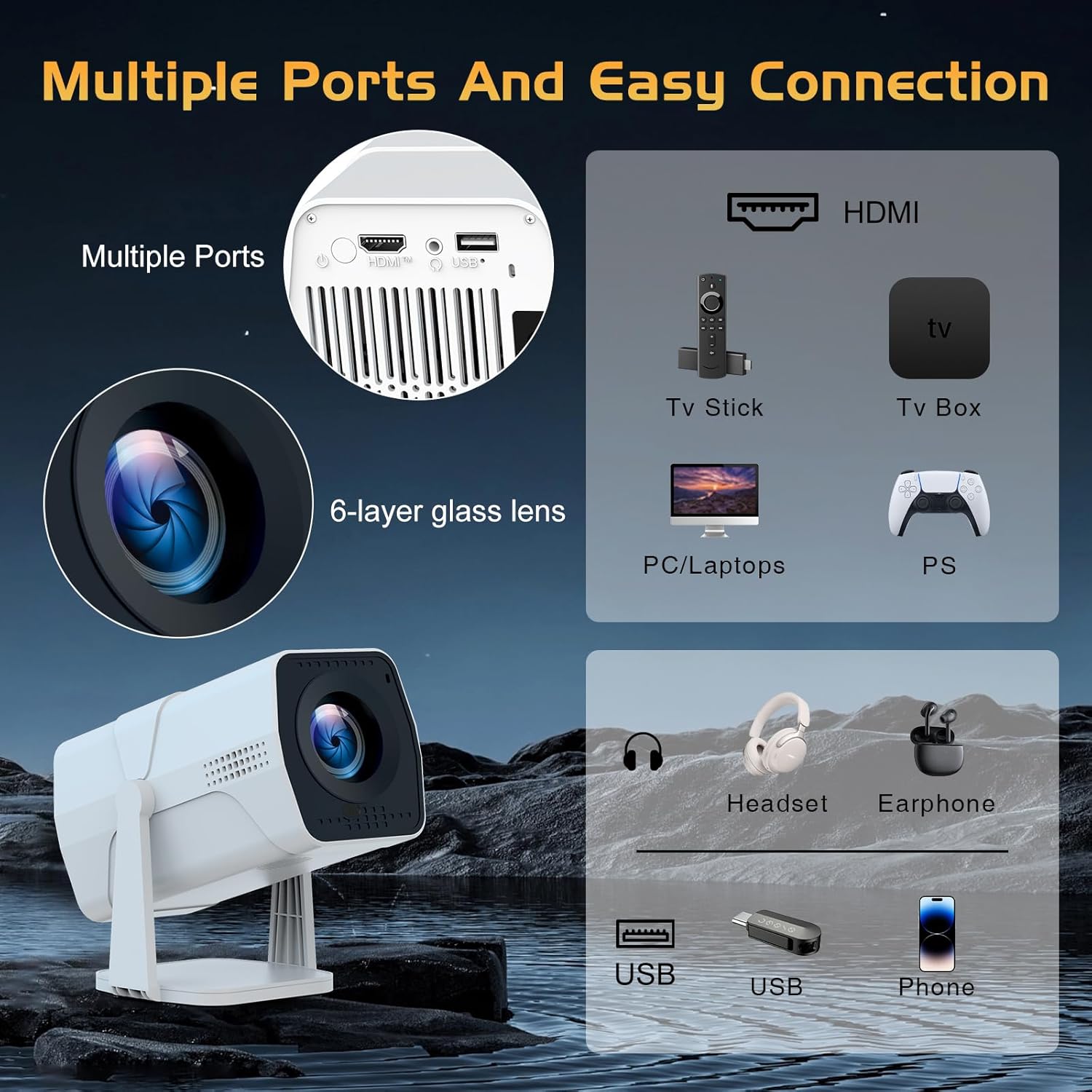
Image: A detailed diagram showing the multiple ports on the TMY Projector (HDMI, USB) and various connection possibilities, including TV sticks, PCs, gaming consoles, headsets, and phones.
4.4 Screen Zoom Function
The projector includes a 50%-100% zoom function, allowing you to adjust the screen size without moving the projector. This feature can be accessed via the remote control or settings menu.
5. Antretyen
To ensure the longevity and optimal performance of your TMY Projector, follow these maintenance guidelines:
- Netwaye lantiy la: Sèvi ak yon twal mou ki pa gen pousyè, espesyalman fèt pou lantiy optik. Evite materyèl abrazif oswa pwodui chimik ki agresif.
- Netwaye eksteryè a: Siye deyò pwojektè a avèk yon twal mou epi sèk. Pa sèvi ak pwodui netwayaj likid dirèkteman sou aparèy la.
- Vantilasyon: Asire w ke ouvèti vantilasyon yo pa bloke pou anpeche surchof.
- Depo: When not in use for extended periods, store the projector in a cool, dry place, away from direct sunlight and dust.
NAN. Depanaj
If you encounter issues with your TMY Projector, refer to the following common problems and solutions:
- Pa gen pouvwa:
- Ensure the power cord is securely connected to both the projector and a working electrical outlet.
- Tcheke si priz kouran an fonksyonèl.
- No Image / Blurry Image:
- Verify the projector is powered on and the lens cap is removed.
- Allow the automatic focus and keystone correction to complete. If still blurry, manually adjust focus using the remote.
- Ensure the projection surface is suitable and the projector is within the recommended distance.
- If using an external source (HDMI), ensure the correct input source is selected.
- Pa gen son:
- Tcheke nivo volim nan pwojektè a ak nenpòt aparèy odyo ekstèn ki konekte.
- If using Bluetooth speakers, ensure they are properly paired and connected.
- If using internal speakers, ensure external Bluetooth output is not selected.
- Kontwòl Remote pa reponn:
- Ensure the batteries are correctly inserted and not depleted.
- Dirije telekòmand lan dirèkteman nan direksyon reseptè IR pwojektè a.
- Pwoblèm koneksyon WiFi:
- Ensure your WiFi network is active and within range.
- Verifye modpas WiFi a de fwa.
- Rekòmanse pwojektè a ak routeur WiFi ou a.
- If the connection times out, try moving the projector closer to the router or reducing interference.
7. Espesifikasyon
| Karakteristik | Spesifikasyon |
|---|---|
| Mak | TMY |
| Modèl | B0DRFF5KMF |
| Pwa atik | 2.79 liv |
| Dimansyon pwodwi | 5.35 x 4.84 x 7.09 pous |
| Koulè | Blan |
| Karakteristik espesyal | Speakers, Electric Focus, Auto Keystone, 270° Rotatable Stand |
| Koneksyon Teknoloji | HDMI, USB, WiFi 6, Bluetooth 5.2 |
| Rezolisyon ekspozisyon | 1920 x 1080 (1080P Full HD) |
| Itilizasyon Rekòmande | Andedan kay la |

Image: A visual comparison showing the TMY Projector's 1080P Full HD image quality, emphasizing that it is recommended for use in dark environments for optimal viewing, contrasted with daytime or light-on conditions.
8. Garanti ak sipò
TMY is committed to providing excellent customer service and product support.
- Garanti: Pwodwi sa a vini ak yon garanti 3 ane.
- Règleman retounen: Enjoy a 30-day return period.
- Sipò teknik: Lifetime after-sale service and technical support are available.
- Tan repons: Expect a quick reply within 24 hours for support inquiries.
Pou plis asistans, tanpri vizite sit ofisyèl la TMY Store on Amazon or contact customer support through the provided channels in your warranty card.