
Bietrun DX-GAC2000W
Bietrun 2000W Pure Sine Wave Inverter User Manual
Model: DX-GAC2000W
1. Entwodiksyon
This manual provides essential information for the safe and efficient operation of your Bietrun 2000W Pure Sine Wave Inverter. Please read it thoroughly before installation and use, and retain it for future reference.
Kontni pake
Verifye ke tout atik yo prezan nan pakè a:
- 1 x Bietrun 2000W Pure Sine Wave Inverter
- 2 x 10AWG 3-foot Battery Cables (Red and Black)
- 1 x Ground Cable
- 1 x kontwòl remote
- 4 x Fusibles
- 1 x Ti kle
- Montaj Vis

Image 1.1: The Bietrun 2000W Pure Sine Wave Inverter with its remote control, battery cables, ground cable, fuses, and wrench.
2. Enstriksyon Sekirite
Observe the following safety precautions to prevent injury and damage to the inverter or connected devices:
- Pa louvri envèstisè c laasing. Pa gen okenn pyès itilizatè a ka repare anndan an.
- Ensure proper ventilation around the inverter. Do not block cooling vents.
- Keep the inverter away from water, moisture, flammable materials, and direct sunlight.
- Konekte envèstisè a sèlman ak yon sous kouran 12V DC. Konekte ak lòt vòltajtages ka koze domaj.
- Ensure correct polarity when connecting battery cables (Red to Positive, Black to Negative). Reverse polarity will cause damage.
- Always connect the ground cable to a proper earth ground.
- Do not exceed the inverter's rated continuous power output (2000W) or peak surge power (4000W).
- Dekonekte envèstisè a nan batri a anvan ou fè nenpòt antretyen oswa netwayaj.
Karakteristik Pwoteksyon Entegre
The inverter includes multiple protection mechanisms:
- Pwoteksyon Surcharge
- Low Voltage Pwoteksyon
- Pwoteksyon GFCI
- Overvoltage Pwoteksyon
- Pwoteksyon Sur Tanperati
- Pwoteksyon Kout Awondisman
- Pwoteksyon Ranvèse Koneksyon
- Pwoteksyon sou aktyèl

Image 2.1: Visual representation of the inverter's comprehensive safety protection system.
3. Pwodwi Features
The Bietrun 2000W Pure Sine Wave Inverter is designed for reliable power conversion with advanced features:
- Pi bon kalite pwodiksyon vag sinis: Provides high-quality AC power (THD < 3%) suitable for sensitive electronics, ensuring stable operation and minimizing damage risk.
- Segondè efikasite: Conversion efficiency exceeding 90% reduces energy loss.
- Pouvwa kontinyèl: Delivers 2000W continuous power with a 4000W peak surge capacity.
- Sòti versatile: Features 4 AC outlets, 1 AC wiring terminal, 2 USB ports (5V/2.1A), and 1 Type-C port (5V/2.1A).
- Ekspozisyon HD ki ap dirije: Provides real-time status updates including input/output voltage, charging status, battery status, current power, and fault codes.
- Kontwòl Remote: Allows for convenient power management from a distance.
- Operasyon trankil: High-efficiency cooling system with a low-noise fan maintains optimal operating temperature.
- Konsepsyon kontra ak dirab: Encased in rugged Aluminum Alloy, with dimensions of 19 x 10 x 7 inches and a weight of 12.5 lbs.

Image 3.1: Key features of the Bietrun 2000W Pure Sine Wave Inverter.
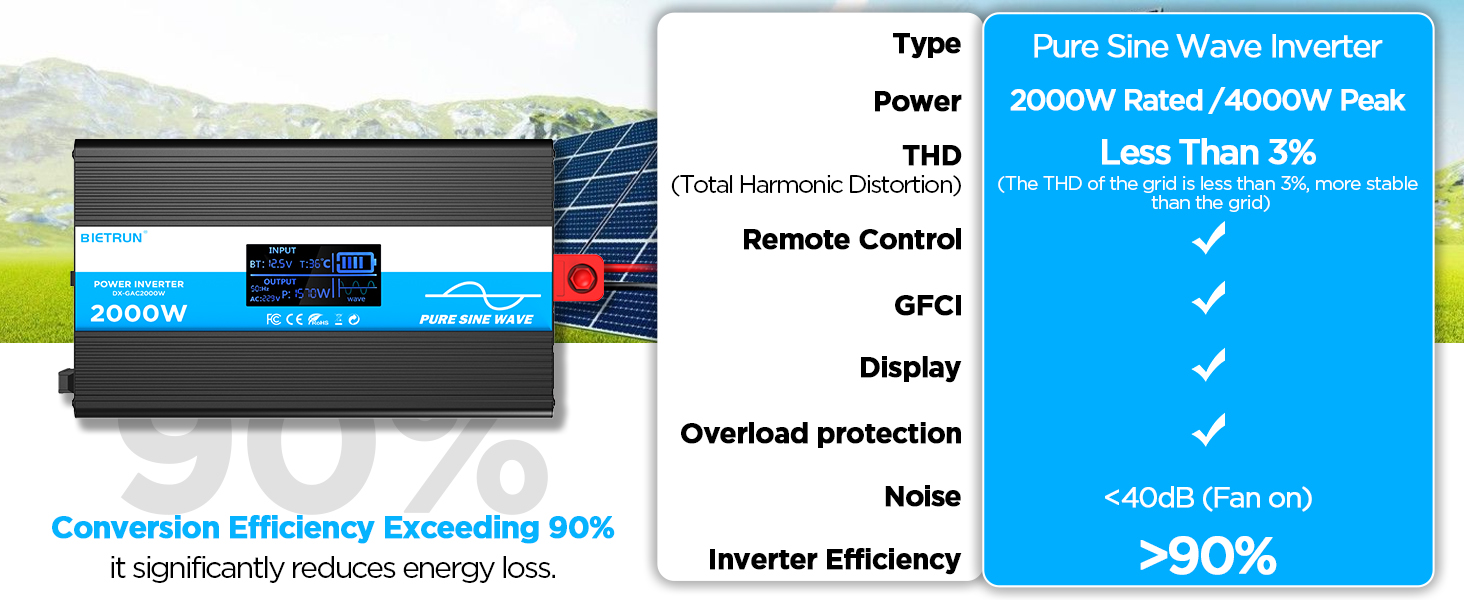
Image 3.2: Illustrates the stable, grid-like output of a pure sine wave inverter compared to unstable power from other types.
4. Enstalasyon ak Enstalasyon
Kote ak Montaj
Choose a dry, well-ventilated location away from direct sunlight, heat sources, and flammable materials. The inverter can be wall-mounted using the provided screws.
Konpatibilite batri
The inverter is compatible with various 12V battery types, including LiFePO4, LI, SLD, GEL, FLD, and AGM batteries.

Image 4.1: The inverter supports multiple 12V battery chemistries.
Etap Koneksyon
- Prepare kab: Use the provided 10AWG 3-foot cables. Ensure all connections are secure.
- Konekte kab tè a: Attach the green/yellow ground cable to the inverter's ground terminal and to a reliable earth ground point.
- Konekte kab batri yo:
- Konekte a wouj battery cable to the inverter's pozitif (+) tèminal.
- Konekte a nwa battery cable to the inverter's negatif (-) tèminal.
- Konekte lòt bout la wouj cable to the battery's pozitif (+) tèminal.
- Konekte lòt bout la nwa cable to the battery's negatif (-) tèminal.
Enpòtan: Ensure correct polarity. A spark may occur during the final connection, which is normal due to capacitor charging.
- Koneksyon an sekirite: Double-check all connections for tightness to prevent loose contacts and overheating.
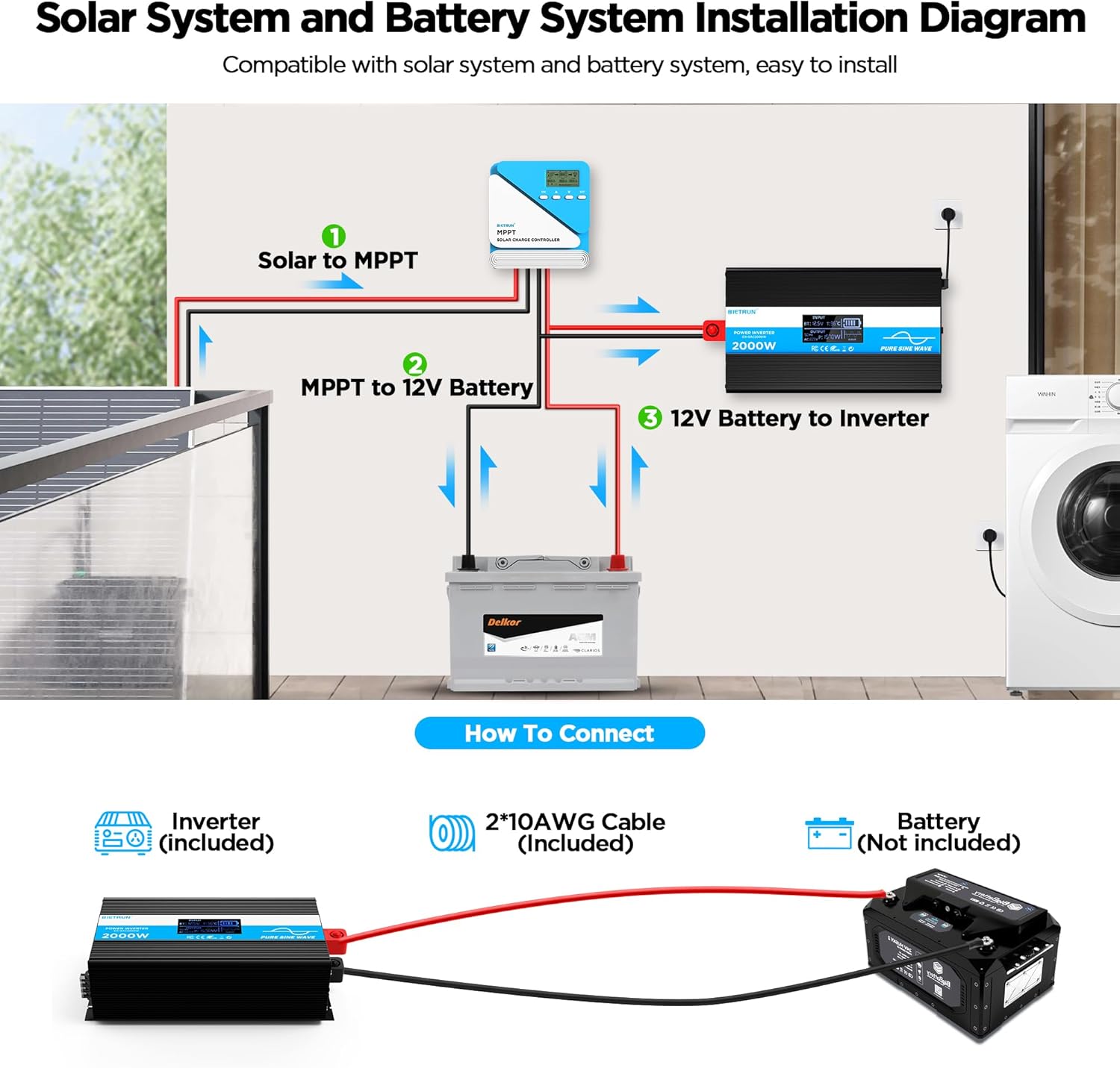
Image 4.2: Basic wiring diagram for connecting the inverter to a 12V battery.
Inverter Interface Overview

Image 4.3: Front panel layout with output interfaces and controls.

Image 4.4: Rear panel layout with battery input terminals and cooling fans.
5. Operasyon
Limen / Off
- Operasyon manyèl: Flip the ON/OFF switch on the inverter to the 'ON' position to power on. Flip to 'OFF' to power off.
- Operasyon Remote Control: Ensure the inverter's 'REMOTE' switch is in the 'ON' position. Use the ON/OFF buttons on the remote control to operate the inverter.
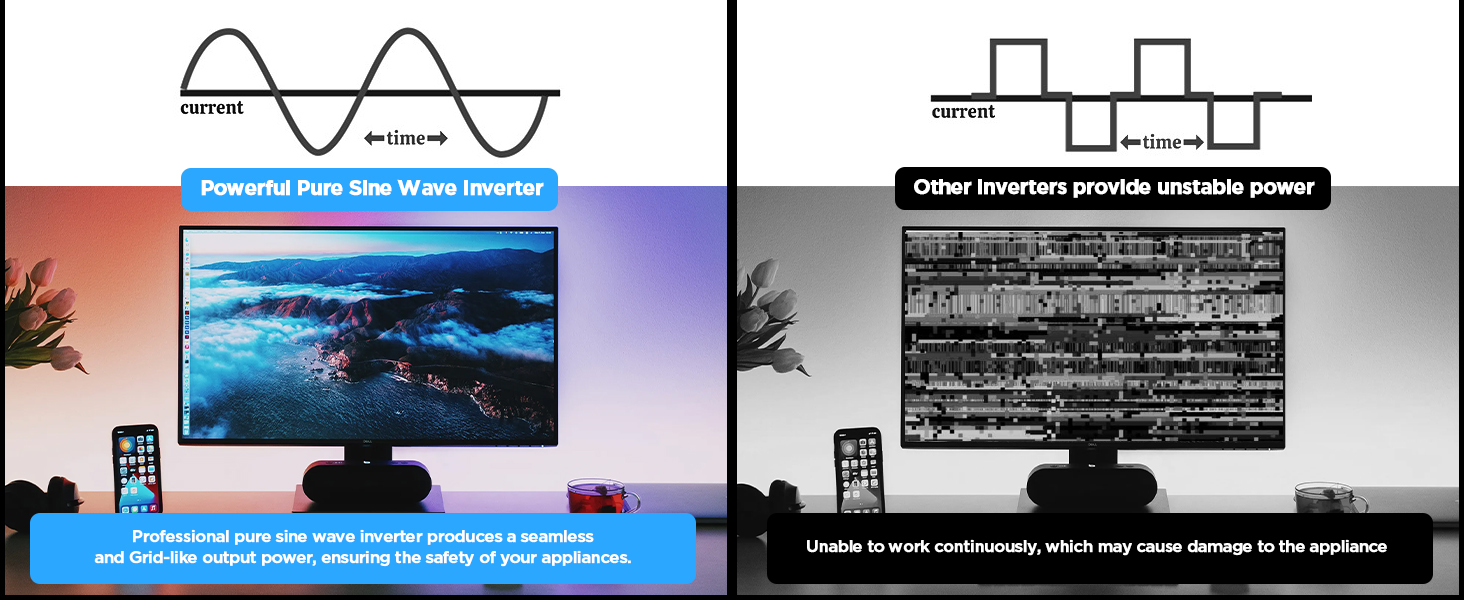
Image 5.1: The remote control allows for convenient operation.
Konekte Aparèy
Once the inverter is powered on, plug your AC devices into the AC outlets or connect to the AC wiring terminal. USB devices can be connected to the USB or Type-C ports.
Ensure the total power consumption of all connected devices does not exceed 2000W continuously.
6. HD Display Information
The integrated HD display provides real-time operational data and fault indications:
- Antre: Montre vol batritage (BT) and internal temperature (T).
- Sòti: Shows output frequency (Hz), AC voltage (AC), and current power consumption (P).
- Estati batri: Visual indicator of battery charge level.
- Form: Indicates pure sine wave output.
- Kòd fay: Numeric codes appear for specific issues, aiding in troubleshooting.

Image 6.1: The HD display provides comprehensive status updates and fault codes.
Deskripsyon Kòd Fay
- 2: Low Voltage Avètisman
- 3: Overvoltage Pwoteksyon
- 4: Low Voltage Pwoteksyon
- 5: Avètisman Surcharge
- 6: Pwoteksyon Surcharge
- 7: Pwoteksyon Sur Tanperati
- 8: Pwoteksyon Kout Awondisman Pwodiksyon
NAN. Depanaj
If the inverter is not functioning correctly, refer to the display for fault codes and consult the table below:
| Pwoblèm | Kòz posib | Solisyon |
|---|---|---|
| Envèstisè a pa limen | Koneksyon batri ki lach, volim batri ki batage, faulty fuse. | Check battery cable connections. Recharge or replace battery. Check and replace fuses if blown. |
| No AC output (Fault Code 8) | Sòti kous kout. | Disconnect all AC loads. Check for short circuits in connected devices or wiring. Reconnect one by one. |
| Overload warning/protection (Fault Code 5/6) | Chaj konekte a depase kapasite envèstisè a. | Reduce the total power of connected devices. Disconnect high-power appliances. |
| Low voltage warning/protection (Fault Code 2/4) | Batri voltage twò ba. | Recharge the battery. Check battery health. |
| Overvoltage protection (Fault Code 3) | Antre voltage twò wo. | Verify batri voltage is within the 12V range. Disconnect from charging source if overcharging. |
| Overtemperature protection (Fault Code 7) | Envèstisè a ap chofe twòp. | Ensure adequate ventilation. Reduce load. Allow inverter to cool down. Clean fan vents if obstructed. |
If the fault persists after attempting the solutions, contact customer support.
8. Espesifikasyon
| Karakteristik | Spesifikasyon |
|---|---|
| Nimewo Modèl | DX-GAC2000W |
| Pouvwa kontinyèl | 2000W |
| Pik pouvwa vag | 4000W |
| Antre Voltage | DC 12V |
| Sòti Voltage | AC 110V-120V |
| Sòti Ond | Vag sinis pi |
| Distòsyon amonik total (THD) | <3% |
| Konvèsyon Efikasite | > 90% |
| AC plòg | 4 |
| Pò USB | 2 (5V/2.1A) |
| Kalite-C Port | 1 (5V/2.1A) |
| Dimansyon (L x W x H) | 19 x 10 x 7 pous |
| Pwa atik | 11.13 liv |
| Sistèm refwadisman | Doub fanatik refwadisman |
9. Antretyen
Antretyen regilye asire pèfòmans optimal ak lonjevite envèstisè ou a:
- Netwayaj: Netwaye deyò envèstisè a detanzantan avèk yon twal sèk epi mou. Asire w ke ouvèti refwadisman yo pa gen pousyè ak debri. Pa sèvi ak pwodui netwayaj likid.
- Tcheke Koneksyon: Regularly inspect battery cable connections for tightness and corrosion. Clean any corrosion with a wire brush and baking soda solution.
- Vantilasyon: Ensure the inverter always has adequate airflow. Do not operate in enclosed spaces without ventilation.
- Ranplasman Fuse: If a fuse blows, replace it only with a fuse of the same type and rating as specified in the package contents.
10. Garanti ak sipò
For warranty information or technical support, please refer to the contact details provided with your purchase or visit the official Bietrun websit la. Kenbe resi acha ou kòm prèv acha.
Ask a question about this manual
Ask about setup, troubleshooting, compatibility, parts, safety, or missing instructions. Manuals+ will review the question and use this page’s manual context to help answer it.