
1. Entwodiksyon
The INIA X3B002 3-in-1 Skin Tightening Device is designed to enhance your skincare routine with its multi-mode functionality. This device combines advanced technologies to help improve skin appearance, promote natural facial contours, and enhance the absorption of skincare products. It is suitable for use on the face and neck.
Karakteristik kle yo enkli:
- 3-in-1 Multi-Mode Design: Features LIFT, TIGHTEN, and INFUSE modes with adjustable intensity.
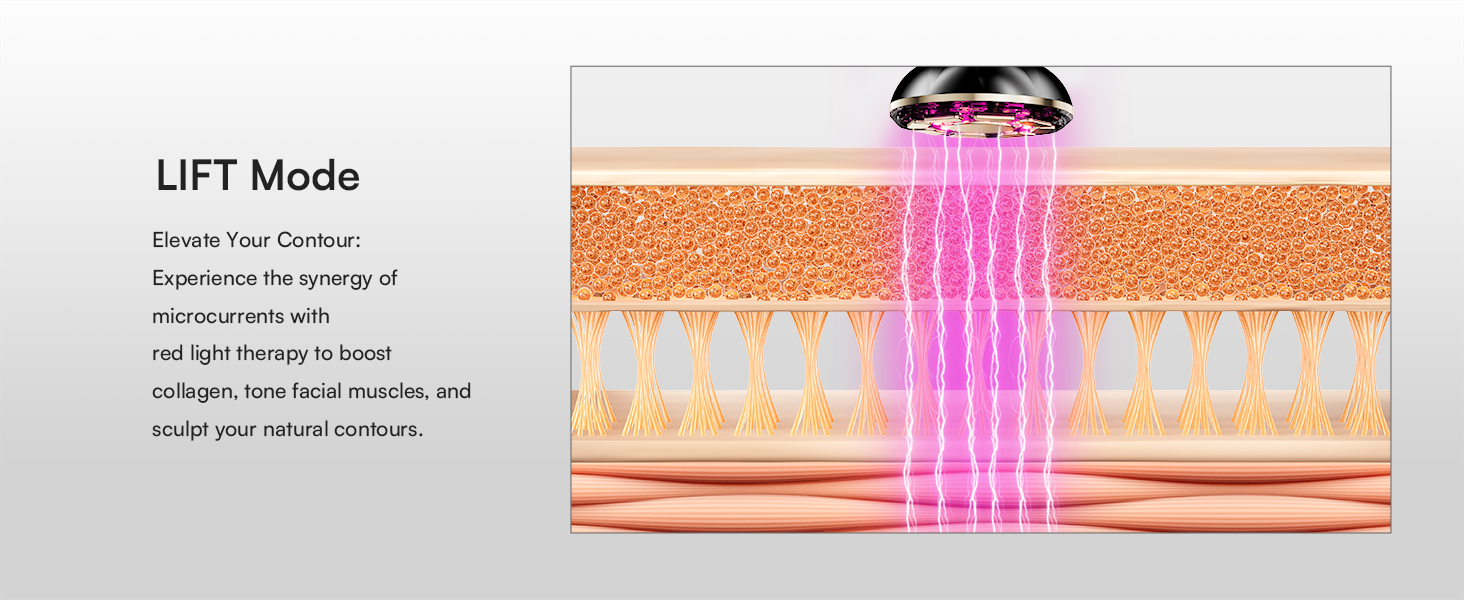
- LIFT Mode: Utilizes microcurrents and red light therapy to help reshape and tone facial muscles, promoting natural contours.
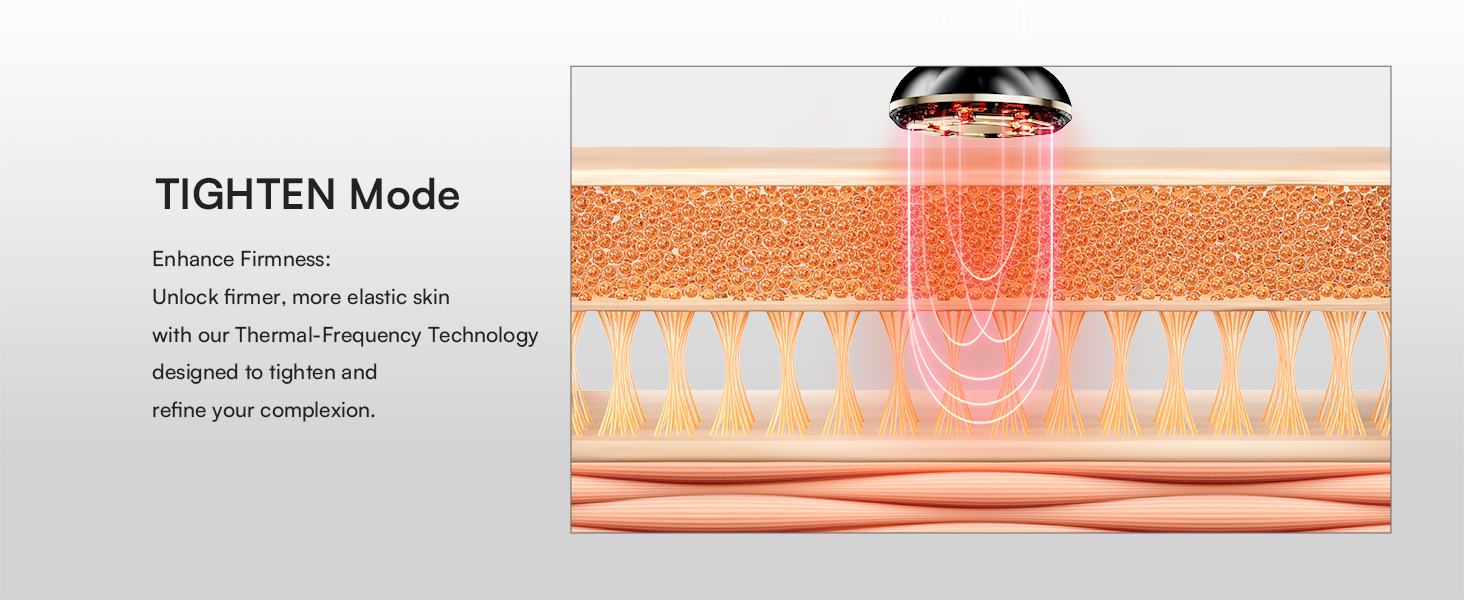
- TIGHTEN Mode: Employs red light technology and thermal-frequency technology to help reduce the appearance of fine lines and improve skin firmness and elasticity.
- INFUSE Mode: Incorporates negative ion technology to enhance the absorption and effectiveness of your skincare products.
- Konsepsyon ergonomique: Features a flexible 3D head for consistent application across various facial contours.
2. Prekosyon sekirite
Please read all instructions carefully before using the INIA X3B002 device. Keep this manual for future reference.
- Pa sèvi ak aparèy la sou po ki fann, ki irite, oswa ki enfekte.
- Evite kontak dirèk ak je.
- Konsilte yon doktè anvan ou itilize li si ou gen nenpòt pwoblèm medikal, si ou ansent, oswa si ou gen enplant elektwonik.
- Kenbe soti nan atenn timoun yo.
- Do not immerse the device in water. Clean with a damp cloth as instructed.
- Use only with the recommended conductive gel or essence to ensure proper function and avoid skin irritation.
- Sispann itilizasyon an si ou santi nenpòt malèz oswa reyaksyon negatif.
3. Pwodwi konpozan
Your INIA X3B002 package includes:
- INIA X3B002 3-in-1 Skin Tightening Device
- Hydrating Conductive Gel (300g)
- Kab chaje (USB-C)
- Manyèl itilizatè

4. Aparèy souview
The INIA X3B002 features an intuitive design for ease of use. It includes a multi-functional head with 9 advanced zinc-alloy electrodes and a flexible 3D head for optimal skin contact.
Modes and Indicators:
- LIFT Mode: Indicated by purple light. Focuses on contouring and muscle toning.
- TIGHTEN Mode: Indicated by red light. Targets skin firmness and elasticity.
- INFUSE Mode: Indicated by blue light. Enhances product absorption.
- Nivo entansite: Three adjustable intensity levels for each mode, indicated by LED lights.
5. Pou kòmanse (Enstalasyon)
Before your first use, ensure the device is fully charged. A full charge typically takes 2-3 hours.
Etap Preparasyon:
- Netwaye po: Thoroughly clean and dry your face and hands. Ensure your skin is free from any makeup, dirt, or other products.
- Apply Conductive Gel: Squeeze a sufficient amount of INIA Hydrating Conductive Gel onto your palm. Apply the gel evenly to the area of your face or neck you intend to treat. The gel is essential for optimal conductivity and comfort during treatment.

6. Operasyon Enstriksyon
The INIA X3B002 device offers three distinct modes to target different skincare needs. Press and hold the Power/Mode button for 1 second to switch on the device and select your desired treatment mode.
6.1. LIFT Mode (Purple Light)
This mode helps to elevate tired-looking skin and promote the appearance of natural facial contours through microcurrents and red light therapy.
- Dire: 10-minute smart partition (4 minutes for left cheek, 4 minutes for right cheek, 2 minutes for forehead).
- Aplikasyon: Gently glide the device upwards along your jawline, cheekbones, and forehead. Follow the natural contours of your face.

6.2. TIGHTEN Mode (Red Light)
This mode employs red light technology and thermal-frequency technology to help reduce the appearance of fine lines and wrinkles, promoting a smoother and firmer complexion.
- Dire: 10-minute smart partition (4 minutes for left cheek, 4 minutes for right cheek, 2 minutes for forehead).
- Aplikasyon: Move the device in small, circular motions or short, upward strokes over areas with fine lines and areas needing firmness.

6.3. INFUSE Mode (Blue Light)
Features negative ion technology to help enhance the absorption of your favorite serums and moisturizers, maximizing their effectiveness.
- Dire: 4-minute symmetrical treatment (2 minutes on each cheek).
- Aplikasyon: After applying your essence or serum, gently glide the device over the treated areas to aid absorption.
6.4. Skincare Routine Suggestion
It is recommended to dynamically adjust the frequency of use according to your skin condition (2-5 times/week). The total duration of a single treatment should not exceed 15 minutes (including preparation time).
A suggested weekly routine:
| Jounen | Recommended Mode(s) |
|---|---|
| Lendi | LIFT + INFUSE |
| Madi | TIGHTEN + INFUSE |
| Mèkredi | LIFT + INFUSE |
| Jedi | TIGHTEN + INFUSE |
| Vandredi | LIFT + INFUSE |
| Samdi | TIGHTEN + INFUSE |
| Dimanch | Jou repo |
Note: It is advised not to use LIFT and TIGHTEN modes on the same day to prevent dry skin.
Videyo pwodwi ofisyèl la:
Video: Official INIA FLARE demonstration, showcasing the device and its use with the 300g gel.
7. Antretyen ak Swen
Proper cleaning and storage will ensure the longevity and effectiveness of your INIA X3B002 device.
- Apre chak itilizasyon: Thoroughly clean the electrode head with a soft, damp cloth or a wet paper towel after turning off the device.
- Siye: Asire w ke aparèy la sèk nèt anvan ou sere l.
- Depo: Sere aparèy la nan yon kote ki fre, sèk, lwen limyè solèy la dirèk ak imidite.
- Evite pwodwi chimik piman bouk: Do not use alcohol, abrasive cleaners, or harsh chemicals to clean the device, as this may damage its surface or internal components.
NAN. Depanaj
If you encounter any issues with your INIA X3B002 device, please refer to the following common solutions:
- Aparèy pa limen: Ensure the device is fully charged. Press and hold the Power/Mode button for at least 1 second.
- No sensation during use: Ensure sufficient conductive gel is applied to the skin. Increase the intensity level if needed.
- Iritasyon po: Discontinue use immediately. Ensure you are using the recommended conductive gel and that your skin is clean before treatment. Consult a dermatologist if irritation persists.
- Limyè yo pa mache: Check if the device is powered on and fully charged. If the issue persists, contact customer support.
9. Espesifikasyon
| Karakteristik | Detay |
|---|---|
| Nimewo Modèl | X3B002 |
| Mak | INIA |
| Dimansyon pake | 10.28 x 7.4 x 3.43 pous |
| Pwa atik | 2.23 liv |
| Koulè | Nwa |
| Materyèl | Plastik |
| Style | Modern, Sleek, Luxury |
| Benefis pwodwi | Skin Care (Lifting, Tightening, Infusion) |
10. Garanti ak sipò
The INIA X3B002 device comes with a manufacturer's warranty. For detailed warranty information, please refer to the product packaging or contact INIA customer support.
For any questions, technical support, or service inquiries, please visit the official INIA website or contact our customer service team. Keep your purchase receipt as proof of purchase for warranty claims.