
1. Entwodiksyon
Welcome to the user manual for your new XIAOMI Redmi Note 14 Pro+ 5G Smartphone. This guide provides essential information on setting up, operating, and maintaining your device. Please read it carefully to ensure optimal performance and longevity of your smartphone.
2. Pake kontni
Verifye ke pake ou a gen atik sa yo:
- Telefòn entelijan XIAOMI Redmi Note 14 Pro+ 5G
- USB kab
- Gid demaraj rapid (ka varye selon rejyon an)
- Zouti pou retire kat SIM lan (ka varye selon rejyon an)
Note: A charger is not included in the package. Please use a compatible 120W HyperCharge adapter for optimal charging.
3. Aparèy souview
Familiarize yourself with the physical components of your Redmi Note 14 Pro+ 5G.
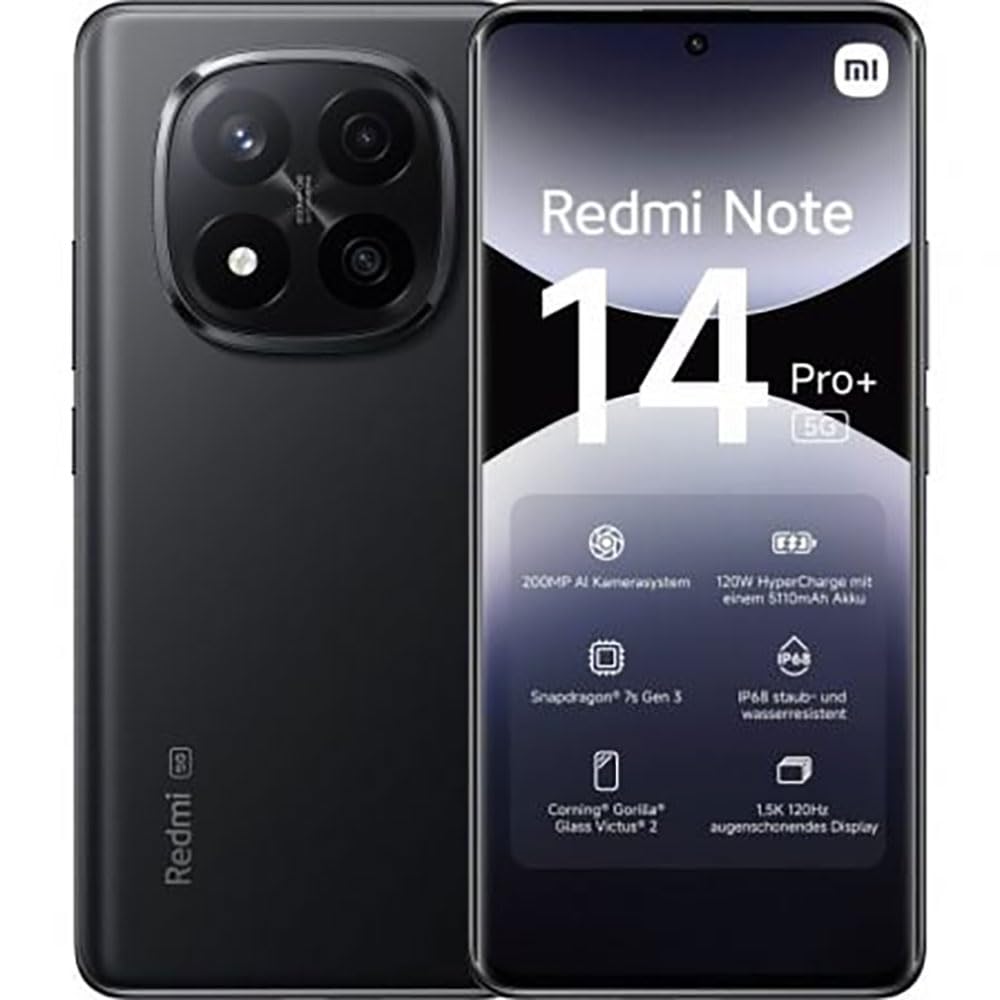
The image displays the front and back of the XIAOMI Redmi Note 14 Pro+ 5G smartphone. The front shows the display with 'Redmi Note 14 Pro+ 5G', '200 Megapixels', and '256 GB' text. The back features a prominent camera module with multiple lenses and the 'Redmi 5G' branding.
Konpozan kle:
- Ekspozisyon Devan: 6.67-inch 1.5K 120Hz AMOLED display with Corning Gorilla Glass Victus 2.
- Modil Kamera Dèyè: Houses the 200MP Pro-Grade AI Camera system.
- Bouton pouvwa: Located on the side, used to power on/off and wake/sleep the device.
- Bouton Volim: Sitiye sou bò a, yo itilize li pou ajiste volim medya ak apèl.
- USB Kalite-C Port: Pou chaje ak transfè done.
- Fant kat SIM: Supports Dual SIM Nano SIM cards.
- Oratè: Stereo speakers for audio output.
4. Enstalasyon
4.1. Mete kat SIM la
- Jwenn plato kat SIM lan sou bò aparèy ou an.
- Mete zouti pou ejecte kat SIM lan nan ti twou ki akote plato a epi peze byen fèm jiskaske plato a soti.
- Place your Nano SIM card(s) into the tray with the gold contacts facing down. Ensure proper orientation.
- Dousman pouse plato a tounen nan fant lan jiskaske li fè yon klik.
4.2. Limen Aparèy Ou a
Peze epi kenbe la Bouton pouvwa on the side of the phone until the XIAOMI logo appears on the screen. Follow the on-screen instructions to complete the initial setup, including connecting to Wi-Fi, setting up your Google account, and configuring security features like fingerprint recognition.
4.3. Premye Chaj
It is recommended to fully charge your device before first use. Connect the USB Type-C cable to the phone and a compatible 120W HyperCharge adapter (not included) to a power outlet.
5. Itilizasyon telefòn entelijan ou an
5.1. Navigasyon debaz
- Ekran manyen: Tape pou chwazi, glise pou defile, pense pou agrandi.
- Ekran Kay: Sant santral ou pou aplikasyon ak widjèt yo.
- Panèl Notifikasyon: Glise anba soti anwo ekran an pou jwenn aksè a notifikasyon yo ak paramèt rapid yo.
- Tiwa aplikasyon: Swipe up from the bottom of the screen (or tap the app drawer icon) to view tout aplikasyon enstale.
5.2. Limen/Etenn epi rekòmanse
- Pou Pouvwa Off: Press and hold the Power Button until the power menu appears, then select "Power off."
- Pou Rekòmanse: Press and hold the Power Button until the power menu appears, then select "Restart."
5.3. Karakteristik sekirite
Your device supports various security options:
- Rekonesans anprent: Anrejistre anprent dwèt ou yo pou debloke rapidman e an sekirite.
- Debloke figi: Sèvi ak figi ou pou debloke aparèy la.
- Kòd PIN/Modèl/Modpas: Standard security methods.
Jwenn aksè nan paramèt sa yo atravè Anviwònman > Sekirite ak vi prive.
6. Karakteristik Kamera
The Redmi Note 14 Pro+ 5G features a powerful 200MP Pro-Grade AI Camera system designed to enhance your photography experience.
- Kamera prensipal 200MP: Capture highly detailed images with optical image stabilization (OIS).
- Multiple Camera Modes: Includes automatic, scene, portrait, and manual modes for versatile shooting.
- Dual LED Flash: Provides enhanced lighting in low-light conditions.
- Kamera devan: A 20MP front sensor for high-quality selfies and video calls.
- Anrejistreman videyo: Supports up to 8K video capture at 120 fps.
7. Karakteristik IA
Leverage the integrated AI functionalities for a smarter user experience:
- IA Efase Pwofesyonèl: Intelligently remove unwanted objects or people from your photos.
- Ekspansyon Imaj IA: Expand the boundaries of your images using AI.
- Nòt IA: Smart note-taking capabilities.
- Sous-titre IA yo: Generate subtitles for videos or audio in real-time.
- Anrejistrè IA: Enhanced voice recording with AI features.
- Entèprèt IA: Tradiksyon lang an tan reyèl.
- Jemini: Integrated AI assistant.
- Antoure pou fè rechèch ak Google: Chèche enfòmasyon rapidman lè w antoure objè yo sou ekran ou an.
8. Chaje
Your Redmi Note 14 Pro+ 5G supports 120W HyperCharge technology for rapid charging.
- Kapasite batri: 5110mAh Lithium-polymer battery.
- Chaje: Use the provided USB Type-C cable with a compatible 120W power adapter (sold separately) for optimal charging speeds.
- Lavi batri: Expect up to 20 hours of talk time. Actual battery life may vary based on usage.
Always use certified charging accessories to prevent damage to your device.
9. Antretyen
9.1. Rezistans kont dlo ak pousyè
Aparèy la gen yon Evalyasyon IP68 for dust and water resistance. This means it is protected against dust ingress and can withstand immersion in water up to 1.5 meters for 30 minutes. However, this resistance is not permanent and may decrease over time with normal wear. Avoid exposing the device to hot water, saltwater, or other liquids.
9.2. Netwaye Aparèy Ou a
- Sèvi ak yon twal mou ki pa gen pousyè pou netwaye ekran an ak kò a.
- Evite itilize pwodui netwayaj abrazif, solvan, oswa espre ayewosòl.
- If the device gets wet, wipe it thoroughly with a clean, dry cloth before charging or using ports.
9.3. Mizajou lojisyèl
Tcheke epi enstale mizajou lojisyèl regilyèman pou asire aparèy ou an gen dènye karakteristik yo, patch sekirite yo, ak amelyorasyon pèfòmans yo. Ale nan Anviwònman > Konsènan telefòn > Vèsyon MIUI pou tcheke pou mizajou.
NAN. Depanaj
Si ou rankontre pwoblèm ak aparèy ou an, eseye solisyon komen sa yo:
- Aparèy pa limen: Asire w batri a chaje. Konekte l nan yon plato pou omwen 15 minit, epi eseye limen l.
- Aplikasyon yo ap plante oswa bloke: Fèmen aplikasyon ki gen pwoblèm nan epi relouvri li. Si pwoblèm nan pèsiste, rekòmanse telefòn ou.
- Pòv koneksyon rezo: Check your SIM card is correctly inserted. Try toggling Airplane Mode on and off. If the issue persists, contact your network provider.
- Batri a vide byen vit: Diminye klète ekran an, fèmen aplikasyon ou pa itilize yo, epi dezaktive fonksyon ki pa nesesè tankou GPS oswa Bluetooth lè w pa ap itilize yo.
- Ekran an pa reponn: Force restart your device by holding the Power Button for approximately 10-15 seconds.
Pou pwoblèm ki pi konplèks, al gade sipò ofisyèl XIAOMI a. websit oswa kontakte sèvis kliyan.
11. Espesifikasyon
| Karakteristik | Spesifikasyon |
|---|---|
| Mak | XIAOMI |
| Non modèl | Redmi Note 14 Pro + 5G |
| Sistèm operasyon | Android 14 |
| Modèl CPU | Snapdragon 7 Gen 3 |
| RAM | 8 GB |
| Kapasite Depo | 256 GB |
| Gwosè ekran | 6.67 pous |
| Rezolisyon ekspozisyon | 2712 x 1220 piksèl |
| Rafrechisman pousantaj | 120 Hz |
| Rezolisyon kamera dèyè | 200 Megapixels (with OIS) |
| Rezolisyon kamera devan | 20 megapiksèl |
| Kapasite batri | 5110 mAh |
| Teknoloji chaje | 120W Ipèchaj |
| Rezistans dlo | IP68 |
| Teknoloji selilè | 5G |
| Kalite kat SIM | Nano SIM (Doub SIM) |
| Koneksyon | USB Kalite-C |
12. Garanti ak sipò
12.1. Garanti manifakti a
Your XIAOMI Redmi Note 14 Pro+ 5G Smartphone comes with a Garanti manifakti 2 zanGaranti sa a kouvri domaj nan materyèl ak nan fabrikasyon anba itilizasyon nòmal. Tanpri konsève prèv acha ou pou reklamasyon garanti.
The warranty does not cover damage caused by accidents, misuse, unauthorized modifications, or normal wear and tear.
12.2. Sipò pou Kliyan
For technical assistance, warranty claims, or further information, please visit the official XIAOMI support website or contact their customer service department. Contact details can typically be found on the XIAOMI websit la oubyen nan kat garanti ki vini ak pwodwi a.