
1. Entwodiksyon
This manual provides essential information for the installation, operation, and maintenance of your Amazon Renewed C9300L-24T-4X-A Catalyst 9300L Network Switch. This device is a high-performance, fixed-configuration switch designed for enterprise access layer deployments, offering 24 Gigabit Ethernet ports and 4x 10 Gigabit Ethernet uplinks with Network Advantage karakteristik.
Please read this manual thoroughly before attempting to install or operate the switch to ensure proper functionality and safety.
2. Enfòmasyon sou Sekirite
Obsève prekosyon sekirite sa yo pou evite blesi ak domaj nan ekipman an:
- Sous pouvwa: Connect the switch only to the type of power source indicated on the marking label. Ensure the power cord is properly grounded.
- Vantilasyon: Pa bloke ouvèti vantilasyon yo. Asire w ke gen ase sikilasyon lè toutotou aparèy la pou anpeche li chofe twòp.
- Anviwònman: Operate the switch in a clean, dry environment within the specified temperature and humidity ranges. Avoid exposure to moisture, dust, and direct sunlight.
- Manyen: Handle the switch with care. Avoid dropping or subjecting it to strong impacts.
- Sèvis: Pa eseye fè sèvis pwodui sa a tèt ou. Refere tout sèvis yo bay pèsonèl sèvis kalifye.
3. Pake kontni
Verifye ke tout atik yo prezan nan pakè a:
- 1x C9300L-24T-4X-A Catalyst 9300L Network Switch
- 1x konsole kab
- 1x pouvwa kòd
- 1x Rack Ears (for rack mounting)
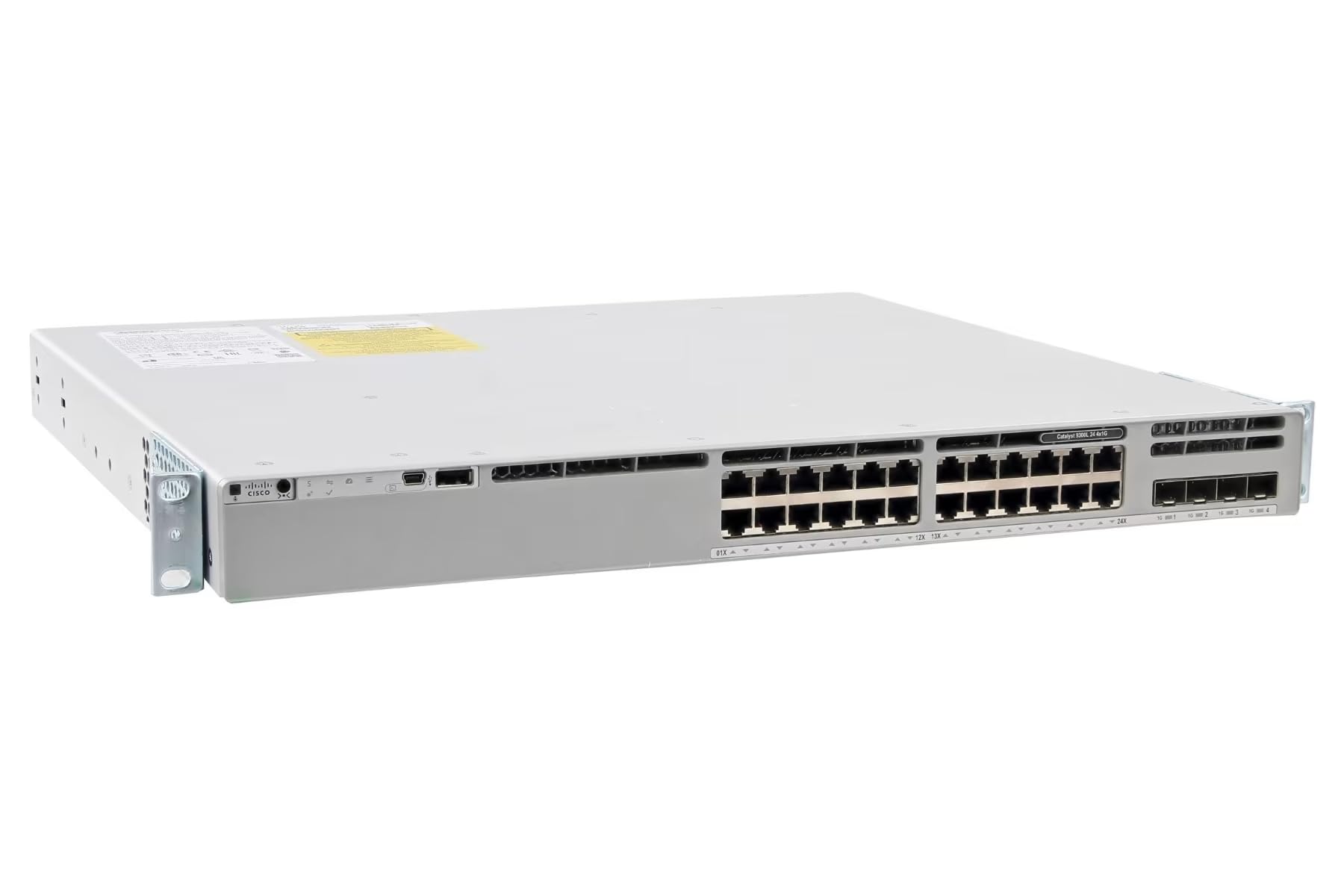
Figi 1: Devan view of the C9300L-24T-4X-A Catalyst 9300L Network Switch, showing the 24 Gigabit Ethernet ports and 4x 10 Gigabit Ethernet uplink ports.
4. Enstalasyon
4.1 Enstalasyon Fizik
- Montaj etajè: Attach the included rack ears to the sides of the switch using the provided screws. Secure the switch into a standard 19-inch equipment rack. Ensure sufficient space for airflow around the front, sides, and rear of the unit.
- Plasman: If not rack-mounting, place the switch on a stable, flat surface away from direct heat sources, moisture, and strong electromagnetic fields.
- Koneksyon kab:
- Câbles rezo: Connect Ethernet cables from your network devices (computers, servers, access points) to the 1 Gigabit Ethernet ports (RJ-45) on the front panel.
- Uplink Cables: Connect appropriate SFP/SFP+ transceivers and fiber optic cables (or DAC cables) to the 10 Gigabit Ethernet uplink ports for connection to your core network or other switches.
- Console Cable: For initial configuration or direct management, connect the console cable (RJ-45 to DB-9 or USB) from your management workstation to the console port on the switch.
4.2 Limen
- Connect the provided power cord to the power inlet on the rear of the switch.
- Ploge lòt pwent fil kouran an nan yon priz elektrik ki chita.
- The switch will automatically power on. Observe the system LED indicators for boot-up status. The system LED should turn green once the boot process is complete.
4.3 Inisyal Konfigirasyon
For initial configuration, connect to the switch via the console port using a terminal emulation program (e.g., PuTTY, Tera Term) with the following settings:
- Pousantaj Baud: 9600
- Done Bits: 8
- Parite: Okenn
- One Stop Bits: 1
- Kontwòl koule: Okenn
Follow the on-screen prompts to set up basic network parameters such as IP address, subnet mask, default gateway, and administrative credentials. Refer to the official Cisco documentation for detailed configuration guides for Cisco IOS XE.
5. Opere
5.1 Koneksyon Rezo Debaz
Once configured, the switch will forward traffic between connected devices. Verify connectivity by checking the link/activity LEDs on each port. A solid green LED typically indicates a successful link, while a blinking LED indicates data activity.
5.2 Itilizasyon Pò
- 1 Gigabit Ethernet pò: Use these 24 ports for connecting end-user devices, IP phones, wireless access points, and other network peripherals requiring 1 Gbps connectivity.
- 10 Gigabit Ethernet Uplink Ports: The 4x 10G uplink ports are designed for high-bandwidth connections to distribution layer switches, servers, or other network infrastructure components. Ensure compatible SFP/SFP+ transceivers are used.
5.3 Network Advantage Karakteristik
The Network Advantage license enables advanced features such as:
- Advanced routing protocols (e.g., OSPF, EIGRP, BGP)
- Enhanced security features (e.g., TrustSec, MACsec)
- Advanced Quality of Service (QoS) capabilities
- Programmability and automation features
Detailed configuration of these features requires knowledge of Cisco IOS XE and is beyond the scope of this basic manual. Refer to Cisco's official documentation for comprehensive guides.
6. Antretyen
6.1 Netwayaj
Periodically clean the exterior of the switch with a soft, dry, lint-free cloth. Do not use liquid or aerosol cleaners directly on the device. Ensure ventilation openings are free from dust and debris to maintain proper cooling.
6.2 Mizajou Firmware
Regularly check for and apply firmware updates to ensure optimal performance, security, and access to new features. Firmware updates typically involve downloading the new image from the manufacturer's support website and installing it via the command-line interface (CLI) or a network management system. Always back up your configuration before performing a firmware update.
6.3 Konsiderasyon Anviwònman
Maintain the operating environment within the specified temperature and humidity ranges to prolong the life of the device. Avoid extreme temperatures, high humidity, and rapid temperature changes.
NAN. Depanaj
Seksyon sa a bay solisyon pou pwoblèm komen ou ka rankontre.
7.1 Endikatè ki ap dirije
| dirije | Estati | Deskripsyon |
|---|---|---|
| Sistèm ki ap dirije | Vèt (solid) | Sistèm ap fonksyone nòmalman. |
| Sistèm ki ap dirije | Amber (solid) | System fault or error. |
| Port Status LED | Vèt (solid) | Lyen etabli. |
| Port Status LED | Vèt (kliyote) | Activity on port. |
| Port Status LED | Off | No link or port disabled. |
7.2 Pwoblèm komen
- Pa gen pouvwa:
- Asire w ke kòd kouran an byen konekte ak tou de switch la ak priz kouran an.
- Verifye priz kouran an fonksyonèl.
- Pa gen lyen sou pò a:
- Check the Ethernet cable for damage and ensure it is properly seated at both ends.
- Verifye ke aparèy ki konekte a limen epi li fonksyone byen.
- Ensure the port is not administratively shut down in the switch configuration.
- Pwoblèm koneksyon rezo:
- Verify IP addressing and subnet mask configurations on the switch and connected devices.
- Check routing tables if devices are on different subnets.
- Ensure no VLAN misconfigurations are present.
7.3 Reset faktori
Performing a factory reset will erase all configurations and restore the switch to its default settings. This procedure should only be performed as a last resort and requires console access. Refer to Cisco's official documentation for the specific steps to perform a factory reset on a Catalyst 9300L series switch.
8. Espesifikasyon
| Karakteristik | Deskripsyon |
|---|---|
| Modèl | C9300L-24T-4X-A |
| Pò | 24 x 1 Gigabit Ethernet (RJ-45), 4 x 10 Gigabit Ethernet Uplinks (SFP/SFP+) |
| Lisans | Rezo Advantage |
| Manifakti | Cisco (Original Equipment Manufacturer) |
| Brand (Renewed) | Amazon renouvle |
| ASIN | B0DQYCMCT4 |
| UPC | 703670828300 |
| Konpozan ki enkli | 1x Console Cable, 1x Power Cord, 1x Rack Ears |
9. Garanti ak sipò
9.1 Enfòmasyon sou Garanti
This product is an Amazon Renewed device. Amazon Renewed products are backed by the Amazon Renewed Guarantee. If your renewed product does not work as expected, you are eligible for a replacement or refund within 90 days of receipt. Please refer to the Amazon Renewed Guarantee terms and conditions for full details.
9.2 Sipò teknik
For technical assistance, troubleshooting, or warranty claims related to this Amazon Renewed product, please contact the seller, Refurb Rack, directly through your Amazon order history. Alternatively, you can contact Amazon Renewed customer support for assistance with the Amazon Renewed Guarantee.
For advanced configuration and detailed technical documentation, please refer to the official Cisco documentation for the Catalyst 9300L series switches.