
1. Entwodiksyon
This manual provides detailed instructions for the installation, operation, and maintenance of your XTRONS 12.3-inch Android Car Stereo, specifically designed for BMW X1 F48 models (from 2018) equipped with the NBT EVO System. Please read this manual thoroughly before installation and use to ensure proper functionality and safety.
2. Enfòmasyon sou Sekirite
- Always ensure the vehicle is parked safely before operating the car stereo's advanced features.
- Do not attempt to install or repair the unit if you are not qualified. Improper installation can lead to damage or injury.
- Evite ekspozisyon pwolonje nan limyè solèy dirèk oswa tanperati ekstrèm.
- Keep the screen clean using a soft, dry cloth. Do not use abrasive cleaners.
- Asire w tout fil elektrik yo byen konekte pou evite kous kout oswa danje elektrik.
3. Pake kontni
Verifye ke tout atik ki nan lis anba a yo enkli nan pakè ou a:
- 1 x Main Unit (12.3-inch Display)
- 1 x Fil elektrik ISO
- 1 x kab RCA
- 1 x Audio kab
- 1 x USB kab
- 1 x GPS antèn
- 1 x 4G antèn
- 1 x Mini Oratè
- 1 x Sipò Plastik
- 1 x Pensèt
- 1 x manyèl itilizatè
- 1 x Enstriksyon Enstalasyon

Imaj: Plis paseview of the package contents and the wiring harness connections for the XTRONS car stereo.
4. Gid Enstalasyon
Professional installation is highly recommended. Refer to the included 'Installation Instruction' for detailed, step-by-step procedures specific to your BMW X1 F48. Below are general considerations:
- Preparasyon: Dekonekte batri machin nan anvan ou kòmanse nenpòt travay elektrik.
- Retire: Carefully remove the original head unit and trim pieces from your dashboard.
- Fil elektrik: Connect the provided ISO wiring harness to the vehicle's existing harness. Ensure all connections (power, ground, speakers, accessories) are secure.
- Antèn: Install the GPS and 4G antennas in locations with clear signal reception, typically on the dashboard or under the windshield.
- Koneksyon opsyonèl: Connect any optional accessories such as a backup camera, DVR, or TPMS as per their respective manuals.
- Montaj: Secure the new XTRONS unit into the dashboard opening using the provided plastic bracket and screws.
- Tès: Reconnect the battery and power on the unit to test all functions before reassembling the dashboard.
5. Sistèm konpatibilite
This XTRONS car stereo is designed for BMW X1 F48 models from 2018 onwards that are equipped with the NBT EVO System. It is crucial to verify your vehicle's system type before installation to ensure full compatibility. The unit retains the original iDrive system control, allowing access to all original functions and navigation within both the original system and the Android system.

Imaj: Visual guide illustrating compatible BMW X1 F48 models with NBT EVO system and important notes on functionality after installation.
6. Karakteristik prensipal yo ak operasyon an
6.1. 12.3-inch IPS Touch Screen
The unit features a 12.3-inch IPS touch screen with a 1920x720 resolution, offering wide viewing angles and clear visuals. The fully-laminated, anti-glare design enhances visibility and user interaction.

Imaj: Displaying the 12.3-inch screen in a BMW X1 F48 dashboard, highlighting G+G Touch Screen, IPS Technology, and 1920x720 pixels.

Imaj: Illustrating the benefits of the fully-laminated, ultra-slim, and anti-glare screen compared to standard displays.
6.2. Qualcomm Snapdragon 680 Processor & Android 14
Powered by a Qualcomm Snapdragon 680 Octa-core processor (Kyro 265 CPU, up to 2.4GHz) and running Android 14, the unit provides enhanced performance and energy efficiency. It includes 8GB LPDDR4 RAM and 128GB Solid State ROM for smooth operation and ample storage for applications.

Imaj: Detaye view of the Qualcomm Snapdragon 680 chip and its specifications, including Octa Core, 2.4GHz speed, and 6nm process technology.
6.3. CarPlay san fil ak Android Auto
Enjoy seamless smartphone integration with built-in wireless Apple CarPlay and wireless/wired Android Auto. This allows you to access navigation, music, calls, and voice assistants (Siri/Google Assistant) directly from the head unit's screen.
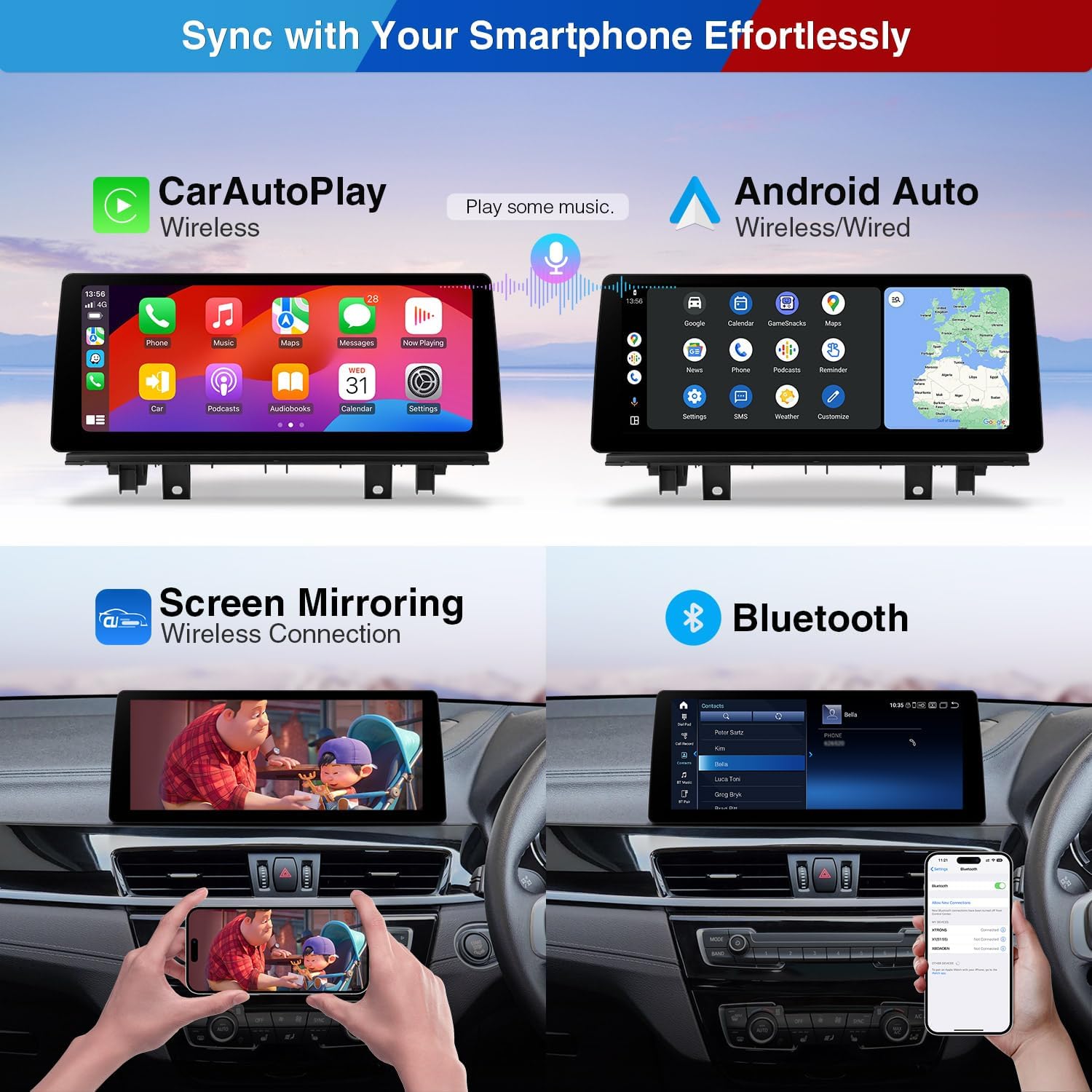
Imaj: Demonstrating the Wireless CarPlay and Wireless/Wired Android Auto interfaces, along with wireless screen mirroring functionality.
6.4. Retained Original Functions
The XTRONS unit integrates with your vehicle's existing systems, retaining the functionality of the original iDrive controller, original radio and CD player, original speaker system, and steering wheel controls. It also supports original cameras.

Imaj: Visual representation of retained original functions including the original system display, iDrive control, speaker system, radio/CD, original camera compatibility, and steering wheel control.
6.5. Entèfas itilizatè (UI)
The unit features a new XTRONS series UI with a Day/Night switch mode and six classic UI sets, designed for BMW enthusiasts. It allows for customization of the launcher and quick access to various functions.

Imaj: Screenshots of the XTRONS UI, showcasing quick access bar, music sources, day/night mode, navigation apps, and six classic UI sets.
6.6. Koneksyon
- Built-in 4G: Supports 99% of worldwide carriers via a Micro SIM card slot for constant internet access.
- Dual Wi-Fi Band: Connects to 2.4GHz or 5GHz Wi-Fi networks for faster and more flexible internet access.
- Bluetooth 5.1: Provides stable connections and high-quality transmission for hands-free calls and music streaming.
- GPS entegre: Integrated GPS module for accurate navigation.
7. Antretyen
- Netwayaj ekran: Sèvi ak yon twal mou ki pa gen pousyè pou siye ekran an dousman. Pou tach ki difisil pou retire, siye l yon ti kras.ampSiye twal la avèk dlo oswa yon pwodui netwayaj ki an sekirite pou ekran. Evite pwodui chimik ki agresif.
- Mizajou lojisyèl: Periodically check for software updates from the XTRONS website or through the unit's settings to ensure optimal performance and access to new features.
- Swen Jeneral: Avoid placing heavy objects on the unit or exposing it to excessive moisture.
NAN. Depanaj
Si ou rankontre pwoblèm, gade pwoblèm ak solisyon komen sa yo:
| Pwoblèm | Kòz posib | Solisyon |
|---|---|---|
| Aparèy pa limen | Incorrect wiring, blown fuse, vehicle battery low. | Check power connections, inspect vehicle fuses, ensure battery is charged. |
| Pa gen son | Speaker wiring incorrect, volume muted, audio source not selected. | Verify speaker connections, check volume settings, select correct audio input. |
| Siyal GPS fèb/pèdi | GPS antenna improperly installed or obstructed. | Asire w ke antèn GPS la gen yon vizyon klè. view of the sky, check connection. |
| Manyen ekran pa reponn | Software glitch, screen calibration issue. | Restart the unit. If issue persists, perform a factory reset (data will be lost). |
| CarPlay/Android Auto pa konekte | Bluetooth/Wi-Fi issues, phone compatibility, incorrect settings. | Ensure Bluetooth/Wi-Fi is enabled on both devices, check phone compatibility, restart phone and unit. |
For further assistance, please contact XTRONS customer support.
9. Espesifikasyon
| Karakteristik | Spesifikasyon |
|---|---|
| Mak | XTRONS |
| Kalite Sèvis Machin | Car (BMW X1 F48 from 2018 with NBT EVO System) |
| Gwosè ekran | 12.3 pous |
| Rezolisyon ekspozisyon | 1920x720 |
| Processeur | Qualcomm Snapdragon 680 Octa-core (Kyro 265 CPU, up to 2.4GHz) |
| Sistèm operasyon | Android 14 |
| RAM | 8GB LPDDR4 |
| ROM | 128GB Solid State |
| Koneksyon Teknoloji | Bluetooth 5.1, USB, Dual Wi-Fi (2.4GHz/5GHz), Built-in 4G (Micro SIM) |
| Karakteristik espesyal | Touchscreen, Wireless CarPlay, Wireless/Wired Android Auto, GPS Navigation, Multi-task Display (PIP), Retains iDrive/Original Functions |
| Aparèy konpatib | Smartphone, iPhone |
10. Garanti ak sipò
The XTRONS 12.3-inch Android Car Stereo comes with a 1-ane garanti manifaktiGaranti sa a kouvri domaj nan materyèl ak nan fabrikasyon anba itilizasyon nòmal. Tanpri konsève prèv acha ou pou reklamasyon garanti.
For technical support, troubleshooting assistance, or warranty inquiries, please contact XTRONS customer service through their official website or the retailer where the product was purchased. You may also find additional resources and FAQs on the XTRONS support page.