
Entwodiksyon
Thank you for choosing the Walfront Smart Thermostat TRV Valve. This device is designed to provide intelligent temperature control for your home, offering convenience through app and voice control, multiple operating modes, and programmable schedules. Please read this manual carefully before installation and operation to ensure proper use and optimal performance.
Enfòmasyon sou Sekirite
- Asire ke ekipman pou pouvwa a dekonekte anvan enstalasyon oswa antretyen.
- Aparèy sa a fèt pou itilize andedan kay la sèlman.
- Pa ekspoze aparèy la nan dlo oswa imidite twòp.
- Kenbe soti nan atenn timoun yo.
- Sèvi ak sèlman kalite pil espesifye a (2 pil AA).
Kontni pake
Verifye ke tout atik yo prezan nan pakè a:
- 1 x Thermostatic Valve
- 10 x Installation Accessories
- 1 x vis
- 1 x nwa
- 1 x Manyèl Itilizatè (dokiman sa a)
Nòt: A Zigbee hub is required for smart functionality and app control. The Zigbee hub is not included and must be purchased separately.
Pwodwi souview
The Walfront Smart Thermostat TRV Valve features an integrated display and control knob for easy interaction. Below is a diagram illustrating the key components and display indicators:

Imaj: Devan view of the Walfront Smart Thermostat TRV Valve, highlighting its display and various indicators for modes, settings, and battery status.
- Ekspozisyon Tanperati: Shows the current or set temperature.
- Endikatè pou fèmen timoun yo: Appears when the child lock function is active.
- Endikatè nivo batri: Displays the remaining battery power.
- Flèch monte ak desann: Used for adjusting temperature or navigating settings.
- Manual Mode Indicator: Shows when the thermostat is in manual control.
- Programming Mode Indicator: Indicates an active programmed schedule.
- Holiday Mode Indicator: Activates during holiday settings.
- Comfort Mode Indicator: Engaged for comfort temperature settings.
- ECO Mode Indicator: Shows when energy-saving mode is active.
- Energy Saving Mode Indicator: Indicates energy-saving operation.
Espesifikasyon
| Karakteristik | Spesifikasyon |
|---|---|
| Kalite atik | Valv tèrmostatik |
| Materyèl | ABS, PC |
| Pwovizyon pou pouvwa | 3V, 2 x AA Batteries (not included) |
| Maksimòm konjesyon serebral | Apeprè 5.5mm / 0.22 pous |
| Presizyon | ± 0.5℃ |
| Mete Range Tanperati | 5 a 45 ℃ |
| Montre Range Tanperati | 0 a 70 ℃ |
| Tanperati Fonksyònman | 0 a 45 ℃ |
| Operasyon Imidite | 5 a 95% RH (ki pa kondanse) |
| Tanperati Depo | -5 a 45 ℃ |
| Erè distribisyon | 1% |
| Nivo | IP20 |
| Bouton | Bouton wotasyon |
| Konpatibilite App | Tuya, Smart Life App |

Imaj: Detailed dimensions of the Walfront Smart Thermostat TRV Valve.
Motor Characteristics:
- Ultra quiet: Motor sound less than 25 decibels.
- Ultra large stroke: The motor stroke is 5.5mm / 0.22in.
- Extra large diameter: The motor rod diameter is 8mm / 0.31in.
- Ekonomize pouvwa: The standby power consumption of the motor is very small.
Enstalasyon
1. Enstalasyon batri
- Gently twist and remove the top cover of the thermostatic valve.
- Insert two AA batteries (not included) into the battery compartment, ensuring correct polarity (+/-).
- Replace the top cover, twisting it until it clicks securely into place.
2. Enstalasyon Fizik
The Walfront Smart Thermostat TRV Valve is designed for easy installation on various radiator valves. Use the provided installation accessories to match your specific valve type.
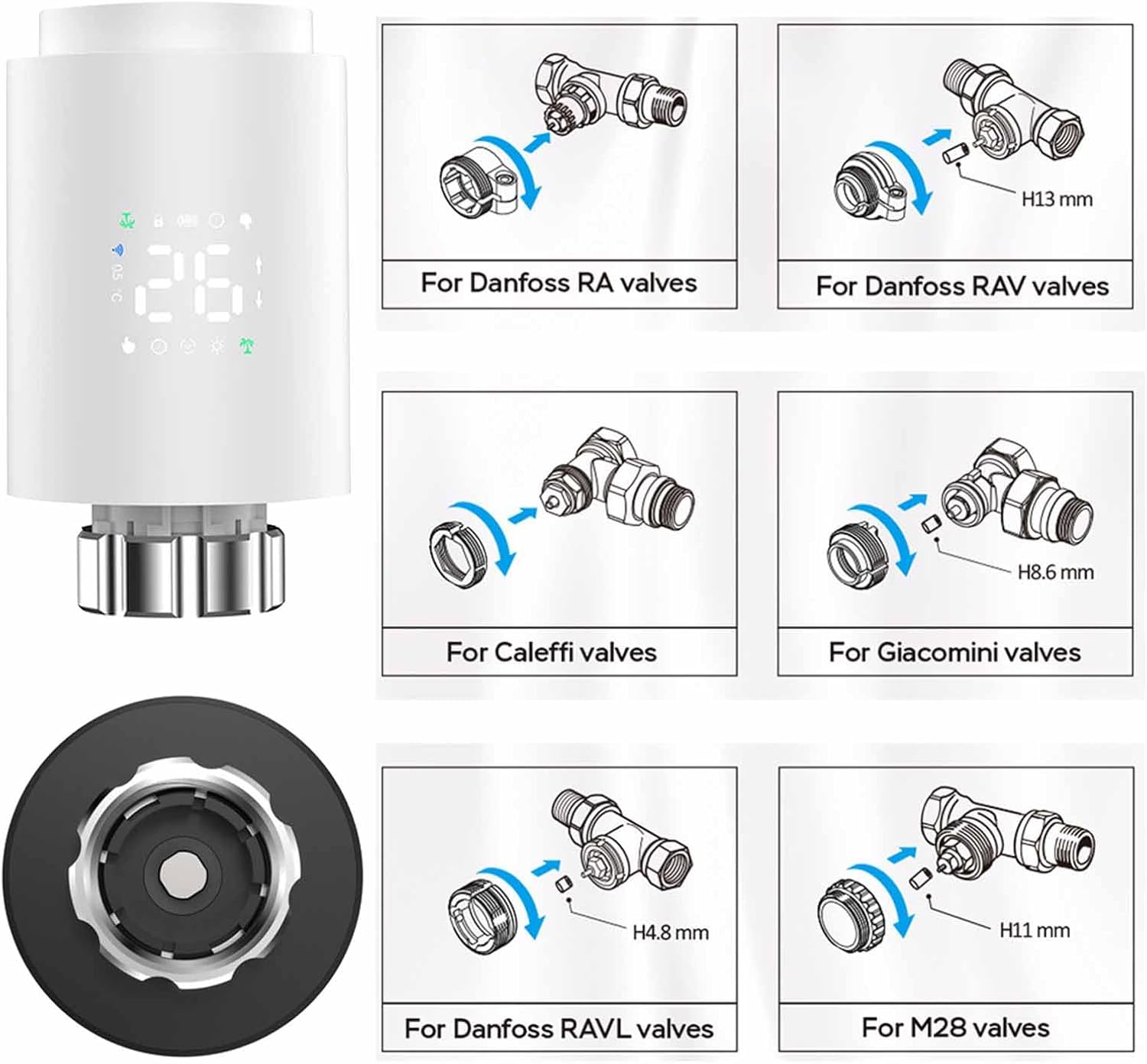
Imaj: Installation guide for various radiator valve types, including adapters for Danfoss, Caleffi, Giacomini, and M28 valves.
- Identify your existing radiator valve type.
- Select the appropriate adapter from the installation accessories.
- Attach the adapter to your radiator valve as shown in the diagrams.
- Screw the Walfront Smart Thermostat TRV Valve onto the adapter until it is firmly secured.
3. App Installation and Pairing (Requires Zigbee Hub)
To utilize the smart features of your thermostat, you need to connect it to a Zigbee hub via the Tuya or Smart Life app.

Imaj: Visual representation of the Zigbee pairing process between the thermostat, a Zigbee gateway, and the mobile app.
- Telechaje la Tuya Smart or Lavi entelijan aplikasyon an nan magazen aplikasyon telefòn entelijan ou an (iOS oswa Android).
- Enskri oswa konekte nan kont ou.
- Ensure your Zigbee hub is powered on and connected to your home Wi-Fi network.
- In the app, tap 'Add Device' or the '+' icon.
- Select 'Gateway' or 'Zigbee Gateway' and follow the on-screen instructions to add your Zigbee hub.
- Once the Zigbee hub is added, select it and then choose 'Add sub-device'.
- Follow the app's instructions to put the TRV valve into pairing mode (usually by pressing and holding a button on the device until an indicator flashes).
- The app will detect and add the TRV valve. You can then rename the device for easy identification.
Enstriksyon Operasyon
1. Basic Operation (Manual Control)
- Ajiste Tanperati: Rotate the knob on the thermostat to increase or decrease the desired temperature. The new set temperature will be displayed.
- Mòd manyèl: The thermostat will maintain the set temperature until changed manually or a programmed schedule takes over.
2. Kontwòl App
Once paired with the Tuya or Smart Life app, you can control your thermostat remotely.

Imaj: Mobile app interface demonstrating temperature control and device status.
- Open the Tuya Smart or Smart Life app and select your TRV valve.
- Ou kapab view the current room temperature and adjust the set temperature directly from the app.
- Access various operating modes and programming options through the app interface.
3. Operasyon Modes
The thermostat offers several modes to suit your needs:

Imaj: App screenshots showing mode selection, weekly programming, and general settings.
- Mòd manyèl: Kenbe yon tanperati konstan ke itilizatè a fikse.
- Mòd otomatik: Swiv orè pwograme chak semèn nan.
- Mòd konfò: Sets the temperature to a predefined comfortable level.
- Mòd ECO (Ekonomize Enèji): Sets the temperature to an energy-efficient level.
- Mòd vakans: Maintains a lower, energy-saving temperature for extended periods when you are away.
- Vent Open Mode (Window Check): Automatically detects open windows/vents and temporarily suspends heating to save energy.
4. Weekly Programmable Schedules
Create personalized heating schedules for maximum convenience and energy efficiency.
- The thermostat supports 5+2 (weekdays/weekend), 6+1 (weekdays/Saturday/Sunday), or 7-day programming options.
- You can set up to six time slots per day, each with its own desired temperature.
- Access and configure schedules through the Tuya or Smart Life app under the 'Weekly Program' section.
5. Timoun Lock
Activate the child lock feature via the app settings to prevent unauthorized changes to the thermostat settings.
6. Kontwòl vwa
The thermostat supports voice control through compatible smart home assistants (e.g., Amazon Alexa, Google Assistant) when integrated with the Tuya/Smart Life app. Refer to your smart assistant's instructions for connecting Tuya/Smart Life devices.
7. Pataje Aparèy
You can share control of the thermostat with family members through the Tuya or Smart Life app.

Imaj: Illustration of sharing device control with multiple family members via the app.
- In the app, navigate to the device settings for your TRV valve.
- Look for the 'Share Device' option.
- Follow the prompts to invite family members to control the device. They will need their own Tuya/Smart Life accounts.
Antretyen
- Ranplasman batri: When the battery indicator shows low power, replace the two AA batteries promptly to ensure continuous operation.
- Netwayaj: Siye aparèy la avèk yon twal mou epi sèk. Pa sèvi ak pwodui netwayaj abrazif oswa solvan.
- Depo: If storing the device for an extended period, remove the batteries.
Depanaj
- Aparèy pa soumen: Tcheke enstalasyon pil yo epi asire w pil yo fre.
- Cannot connect to app: Ensure a Zigbee hub is present and properly connected to your Wi-Fi. Confirm the thermostat is in pairing mode. Check Wi-Fi signal strength.
- Temperature not adjusting: Verify the device is not in child lock mode. Check if the valve is physically obstructed.
- Lekti tanperati ki pa egzak: Asire w ke tèmosta a pa ekspoze a limyè solèy dirèk oswa kouran lè, sa ki ka afekte lekti yo.
- Aplikasyon an montre aparèy la offline: Check the Zigbee hub's connection to the internet and ensure the thermostat is within range of the hub.
Garanti ak sipò
For warranty information and technical support, please refer to the documentation provided at the point of purchase or contact Walfront customer service. Keep your purchase receipt as proof of purchase.
Dispozisyon
This product contains electronic components and batteries. Do not dispose of it with general household waste. Please follow local regulations for the proper disposal of electronic waste and batteries to protect the environment.