
Entwodiksyon
This manual provides detailed instructions for the safe and efficient operation of your Phomemo M836-B Portable Thermal Printer. The M836-B is an inkless, wireless thermal printer designed for portability and convenience, supporting various paper sizes including US Letter and A4. Please read this manual thoroughly before using the printer to ensure optimal performance and longevity.
Pwodwi souview
Karakteristik kle
- Enpresyon tèmik san lank: Utilizes thermal technology, eliminating the need for ink cartridges or ribbons.
- Koneksyon Wireless: Supports Bluetooth for seamless connection with iOS and Android devices.
- Koneksyon USB: Compatible with Windows, macOS, ChromeOS, and Linux via USB Type-C.
- Segondè rezolisyon: Offers a print resolution of 300 DPI for clear text and graphics.
- Konsepsyon pòtab: Compact and lightweight, ideal for travel and on-the-go printing.
- Multi-Size Paper Support: Accommodates various thermal paper sizes, including US Letter (8.5'' x 11'') and A4.
- Sòti monokrom: Prints in black and white.

Image: The Phomemo M836-B printer demonstrating its inkless thermal printing capability, highlighting no mess from ink.

Imaj: Yon plis paseview of the Phomemo M836-B's key features, including wireless connectivity, inkless operation, 2600mAh battery capacity, and 300 DPI resolution.
Kontni pake
Verifye ke tout atik yo prezan nan pakè a:
- Phomemo M836-B Portable Thermal Printer
- Thermal Paper (as specified in the box)
- USB Kalite-C kab
- Manyèl Itilizatè (dokiman sa a)
Gid Enstalasyon
1. Chaje aparèy pou enprime a
- Konekte kab USB Kalite-C ki vini ak li a nan pò chaje enprimant lan.
- Konekte lòt bout kab USB a nan yon adaptè kouran USB konpatib (pa enkli) oubyen nan yon pò USB òdinatè.
- The indicator light will show charging status. Charge the printer fully before first use.
2. Chaje Papye
The Phomemo M836-B supports both thermal paper rolls and sheet-fed thermal paper.
- Louvri kouvèti lòj papye a.
- For roll paper: Insert the thermal paper roll into the designated slot, ensuring the printing side faces upwards. Gently pull a small length of paper out.
- For sheet-fed paper: Insert the thermal paper sheet into the input slot, ensuring it is straight and aligned.
- Fèmen kouvèti konpatiman papye a byen fèm.

Image: Illustration of how to load different types of thermal paper (roll and sheet) into the Phomemo M836-B printer, showing the paper selection mechanism.
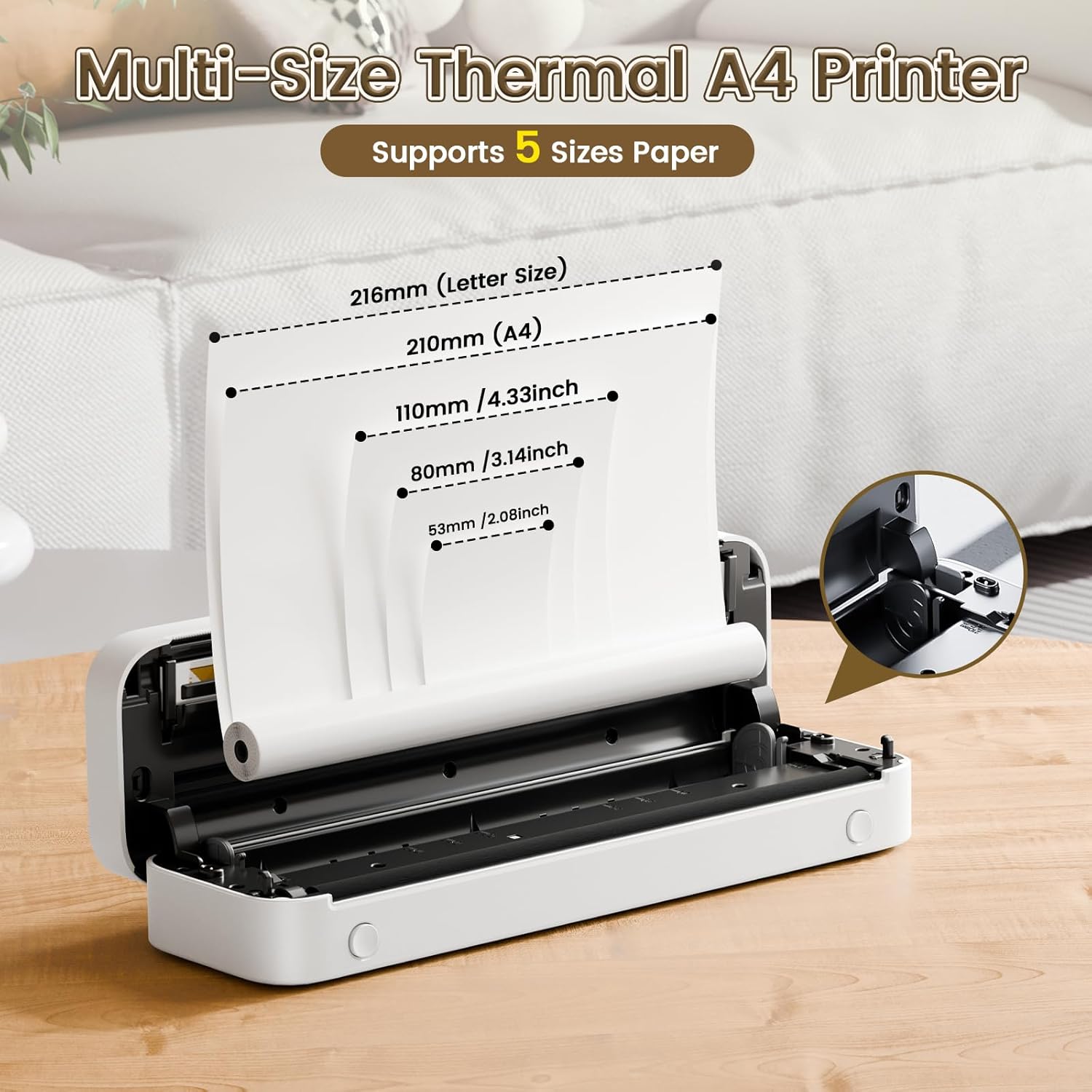
Image: The Phomemo M836-B printer demonstrating support for multiple paper sizes, including US Letter (216mm) and A4 (210mm).
3. Konekte ak Aparèy yo
The printer supports both Bluetooth and USB connections.
Bluetooth Connection (for iOS/Android)
- Download the official Phomemo app from your device's app store.
- Turn on the printer by pressing and holding the power button.
- Pèmèt Bluetooth sou aparèy mobil ou.
- Open the Phomemo app, search for the printer (M836-B), and pair with it.
- Swiv nenpòt envit ki sou ekran pou konplete pwosesis kouple a.
USB Connection (for Windows/macOS/ChromeOS/Linux)
- Asire w enprimant lan limen.
- Connect the printer to your computer using the provided USB Type-C cable.
- Visit the official Phomemo websit (www.phomemo.com) to download and install the appropriate drivers for your operating system.
- Once drivers are installed, the printer should be recognized by your computer.

Image: Diagram illustrating the two types of connections supported by the Phomemo M836-B: Bluetooth for Android, iOS, and iPad, and USB for Windows, macOS, ChromeOS, and Linux.
Enstriksyon Operasyon
Enprime soti nan Aparèy Mobil
- Ensure your printer is charged, loaded with paper, and connected via Bluetooth to your mobile device.
- Louvri aplikasyon Phomemo a.
- Select the document or image you wish to print from within the app.
- Adjust print settings (e.g., paper size, density) as needed.
- Tap the print button to initiate printing.
Printing from Computers
- Ensure your printer is charged, loaded with paper, and connected via USB to your computer with drivers installed.
- Louvri dokiman an oswa file you wish to print on your computer.
- Go to "File" > "Print" (or use the shortcut Ctrl+P/Cmd+P).
- Select the Phomemo M836-B from the list of available printers.
- Adjust print preferences (e.g., paper size, orientation) as required.
- Klike sou "Enprime".
Paper Handling Tips
- Always use high-quality thermal paper for best results.
- Ensure the paper is loaded correctly with the printable side facing the print head.
- Avoid exposing thermal paper to direct sunlight or high temperatures, as this can degrade print quality over time.
- Manually tear off printed documents carefully after printing, as the printer does not have an automatic cutter.
Antretyen
Netwaye aparèy pou enprime a
- Etenn enprimant lan epi dekonekte li nan sous kouran an.
- Sèvi ak yon ti moso twal mou, ki san pèl dampened with isopropyl alcohol to gently wipe the print head. Allow it to dry completely before use.
- Clean the exterior of the printer with a soft, dry cloth. Do not use abrasive cleaners or solvents.
Depo
- Sere enprimant lan nan yon kote ki fre epi sèk, lwen limyè solèy dirèk ak tanperati ekstrèm.
- If storing for an extended period, ensure the printer is fully charged to maintain battery health.
- Keep thermal paper in its original packaging in a dark, cool place to prevent premature fading.
Depanaj
If you encounter issues with your Phomemo M836-B printer, refer to the following common problems and solutions:
Printer Not Turning On
- Tcheke batri: Ensure the printer is sufficiently charged. Connect it to a power source and try again.
- Bouton pouvwa: Press and hold the power button for a few seconds to ensure it's properly activated.
Connectivity Issues (Bluetooth/USB)
- Bluetooth:
- Ensure Bluetooth is enabled on your device and the printer is within range.
- Unpair and re-pair the printer in your device's Bluetooth settings.
- Rekòmanse tou de enprimant lan ak aparèy mobil ou a.
- USB:
- Verifye ke kab USB a byen konekte ak enprimant lan ak òdinatè a.
- Ensure the correct printer drivers are installed on your computer. Reinstall if necessary.
- Eseye yon pò USB diferan oswa yon kab.
Poor Print Quality (Blurry, Faded, Streaks)
- Netwaye tèt enprime a: Follow the cleaning instructions in the Maintenance section.
- Paper Quality/Type: Ensure you are using high-quality thermal paper and that it is loaded correctly.
- Enprime Dansite: Adjust print density settings in the Phomemo app or printer driver.
- Depo Papye: Thermal paper exposed to heat or light can degrade. Try a fresh roll of paper.
Papye Jams
- Turn Off Printer: Immediately turn off the printer.
- Retire papye: Gently pull out any jammed paper. Do not force it, as this can damage the printer.
- Rechaje: Ensure paper is loaded correctly and not wrinkled or bent before restarting.
Espesifikasyon teknik
| Karakteristik | Spesifikasyon |
|---|---|
| Mak | Phomemo |
| Non modèl | M836-B |
| Koneksyon Teknoloji | Bluetooth, USB Kalite C |
| Teknoloji Enpresyon | Tèmik |
| Sòti enprimant | Monokrom |
| Rezolisyon Maksimòm Enpresyon | 300 DPI |
| Vitès Enpresyon Maksimòm (Monochrome) | 1.5 paj pa minit |
| Aparèy konpatib | Android Devices, Mac, Windows, iPhone, iPad |
| Gwosè Maksimòm Medya | 8.5 x 11 inch (US Letter) |
| Sipò gwosè papye | Lèt Etazini, A4 |
| Printing Media Type | Papye tèmik |
| Pwa atik | 1.53 Liv (apeprè 694g) |
| Dimansyon pwodwi (D x W x H) | 7.8P x 26.4W x 4.5H santimèt |
| Metòd kontwòl | App |
| Peyi orijin | Lachin |
Garanti ak sipò
Specific warranty details for the Phomemo M836-B Portable Thermal Printer are not provided within this document. For information regarding warranty coverage, technical support, or service, please refer to the warranty card included with your product or contact Phomemo customer service directly through their official websit la oswa enfòmasyon kontak ki nan anbalaj pwodwi ou a.
Official Phomemo Websit: www.phomemo.com