
1. Entwodiksyon
Thank you for choosing the QDVOPHZA 10K 20MP Outdoor Wireless WiFi Security Camera. This advanced surveillance system is designed to provide comprehensive security monitoring with its ultra-high definition resolution, 10x optical zoom, automatic tracking, and multi-screen viewing capabilities. This manual will guide you through the installation, operation, and maintenance of your new security camera to ensure optimal performance and longevity.
2. Enfòmasyon sou Sekirite
- Asire ekipman pou pouvwa a voltage matches the camera's requirements (DC 12V). Incorrect voltage ka domaje aparèy la.
- Pa ekspoze kamera a nan tanperati ekstrèm, imidite, oswa anviwònman koroziv.
- Avoid direct exposure to sunlight for extended periods, as this may affect image quality and device lifespan.
- Install the camera in a secure location where it cannot be easily tampered ak.
- Keep the camera away from strong electromagnetic fields.
- Dekonekte kouran an anvan ou fè nenpòt antretyen oswa netwayaj.
- Sèlman sèvi ak akseswa espesifye pa manifakti a.
3. Pake kontni
Tanpri verifye sa ki nan pake a lè w ap debale l. Si gen nenpòt atik ki manke oswa ki domaje, kontakte machann ou an.
- QDVOPHZA 10K 20MP Outdoor Wireless WiFi Security Camera
- Adaptè pouvwa (DC 12V)
- Mounting Twous Plimen
- Manyèl itilizatè
4. Pwodwi souview
Familiarize yourself with the components of your QDVOPHZA security camera.

Figi 4.1: Devan view of the QDVOPHZA 10K 20MP Outdoor Wireless WiFi Security Camera, showing the main PTZ camera, two side fixed cameras, and antennas.

Figi 4.2: Diagram illustrating the four-screen camera system, with the main PTZ camera providing a zoomable view and three fixed lenses covering additional areas.
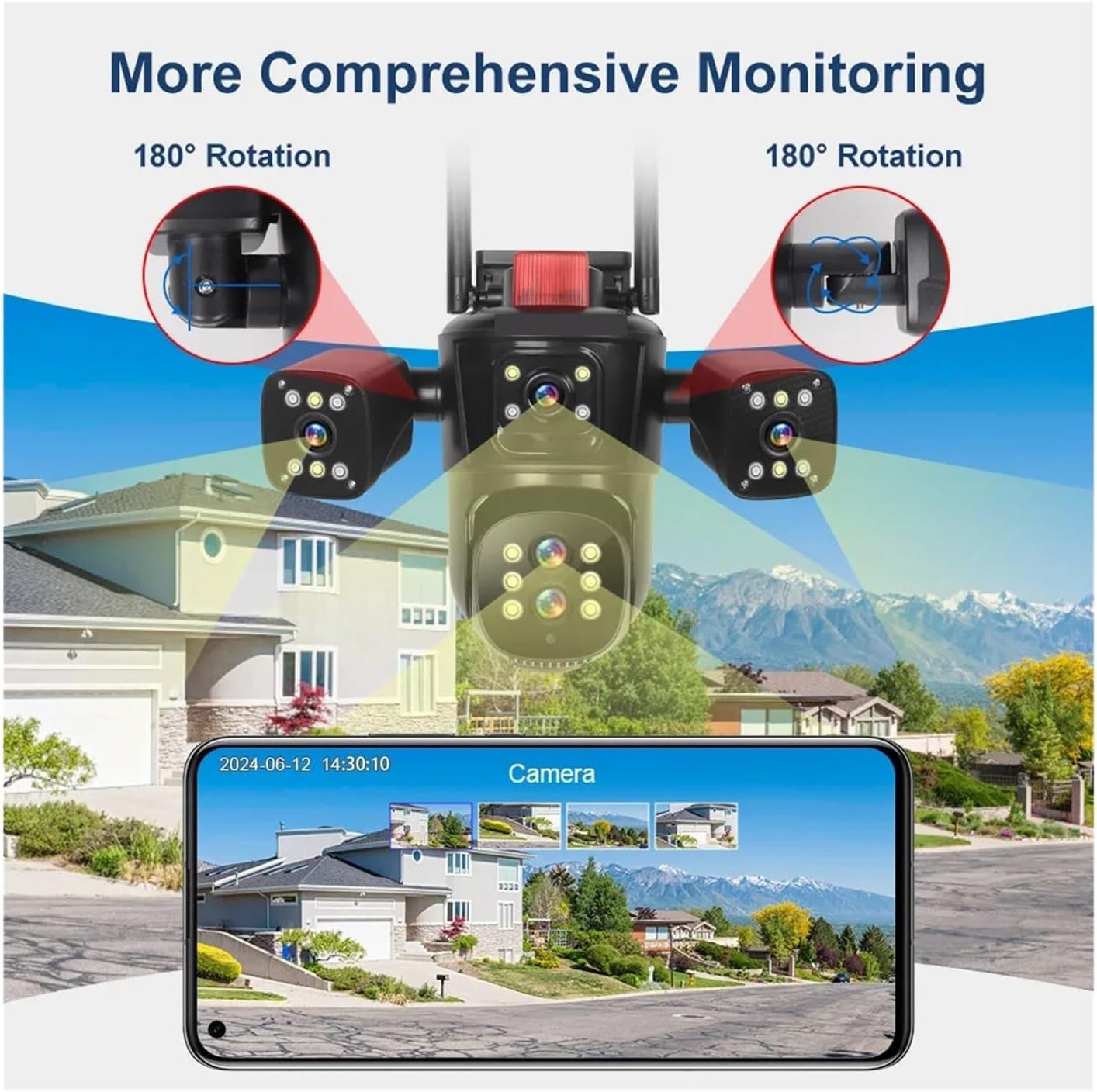
Figi 4.3: Visual representation of the camera's comprehensive monitoring capabilities, including 180-degree rotation for the side cameras and a smartphone interface displaying multiple camera feeds.
5. Enstalasyon
5.1 Enstalasyon
- Chwazi yon kote: Chwazi yon kote deyò ki bay sa ou vle a viewing angle and is within range of your Wi-Fi network or near an Ethernet port. The camera is IP66 waterproof, suitable for various weather conditions.
- Montaj: Use the provided screw kit to securely mount the camera to a wall or ceiling. Ensure the mounting surface is strong enough to support the camera's weight.
- Ajiste ang: Loosen the adjustment screws (if applicable) to position the camera for optimal coverage. The main PTZ camera offers horizontal 0-360 degrees and vertical 0-90 degrees movement. The side cameras can rotate 180 degrees for broader coverage.
5.2 Koneksyon pouvwa
Connect the provided DC 12V power adapter to the camera's power input port and then plug it into a power outlet. The camera will power on and initiate its self-test sequence.
5.3 Rezo Koneksyon
The camera supports both 2.4G WiFi and RJ45 network port access.
- Wireless (WiFi): Download the recommended mobile application (refer to the packaging or quick start guide for app name). Follow the in-app instructions to add the camera and connect it to your 2.4GHz Wi-Fi network.
- Filaire (Etènèt): Connect an Ethernet cable from your router to the camera's RJ45 port. The camera should automatically connect to the network. Then, use the mobile app to discover and add the camera.
6. Operasyon Enstriksyon
6.1 Mobile Application Usage
After successfully connecting your camera to the network, open the mobile application to access its features.
- Viv View: The app will display the live feeds from all four camera lenses simultaneously, providing a comprehensive overview nan zòn siveye ou a.
- Kontwòl PTZ: Use the on-screen controls to pan (rotate horizontally) and tilt (rotate vertically) the main camera.
- Zoom optik: Utilize the 10x optical zoom feature to magnify distant objects without losing image clarity.
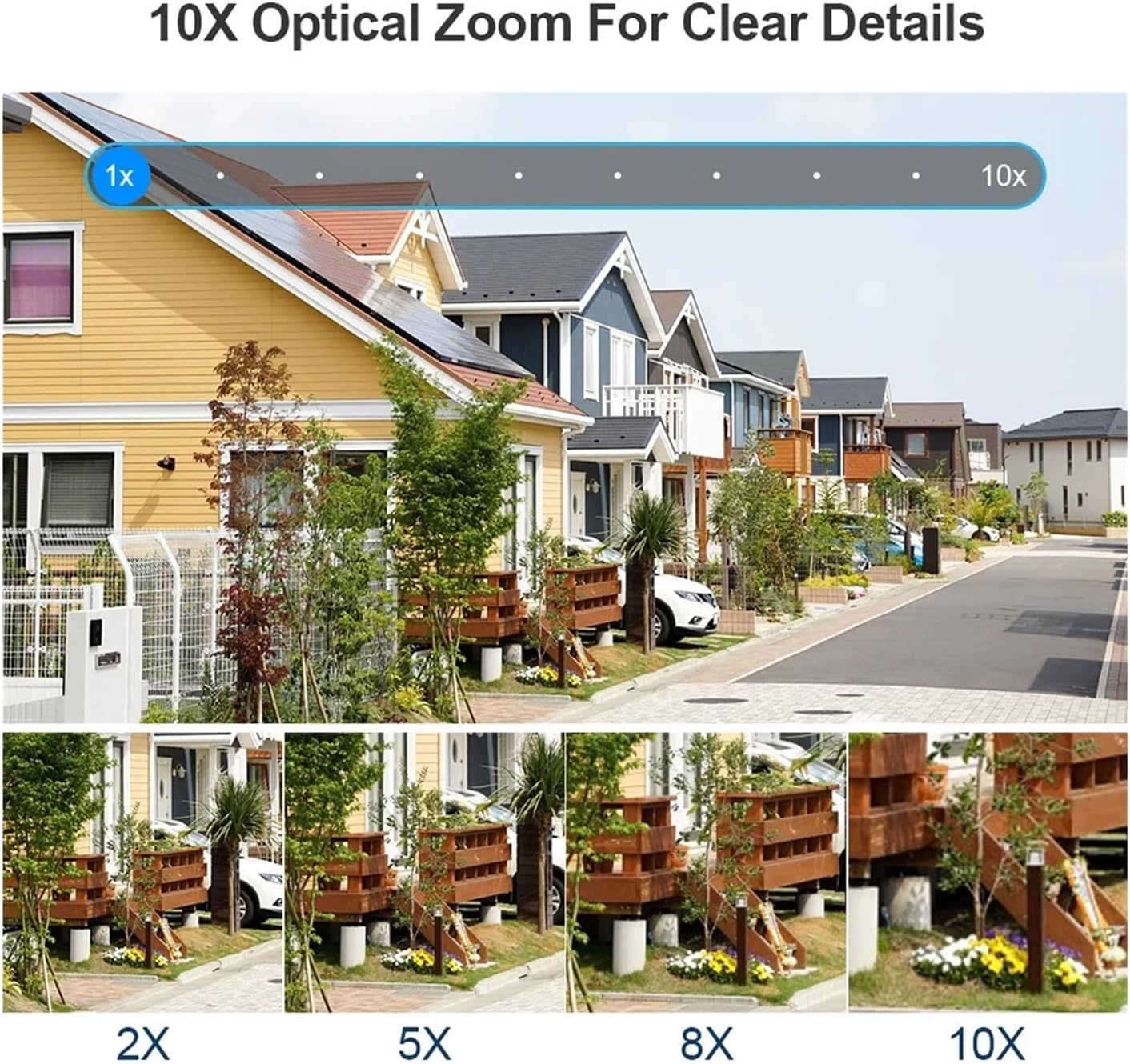
Figi 6.1: Demonstration of the 10x optical zoom capability, showing progressive magnification from 1x to 10x while maintaining image clarity.

Figi 6.2: Visual comparison highlighting the difference in detail captured by the 10x zoom camera versus a fixed focus camera, demonstrating the advantage of optical zoom.
6.2 Deteksyon Mouvman ak Suivi Otomatik
The camera features intelligent motion detection and automatic tracking.
- Deteksyon Mouvman: The camera can detect movement within its field of view and send instant alerts to your mobile device.
- Suivi oto: When a moving target is detected, the camera will automatically adjust its pan/tilt to keep the target centered in the frame, ensuring continuous monitoring of suspicious activity.

Figi 6.3: Illustration of the human detection and automatic tracking feature, showing the camera following a person and a mobile phone displaying an alarm notification.
6.3 Anrejistreman ak Depo
The camera supports multiple storage options for video recordings.
- Depo kat TF: Insert a TF (microSD) card (up to 128GB, not included) into the designated slot for local storage of recordings. The camera supports video synchronous recording and playback.
- Depo nwaj: Subscribe to the cloud storage service via the mobile app to securely save your video data online. This ensures your recordings are safe even if the camera is damaged or stolen.
6.4 Two-Way Audio and Night Vision
- De-fason Audio: The built-in microphone and speaker allow for two-way communication, enabling you to listen in and speak through the camera via the app.
- Vizyon lannwit koulè: The camera is equipped with advanced night vision technology, providing clear, full-color video even in low-light conditions.
7. Antretyen
- Netwayaj: Netwaye lantiy kamera a regilyèman avèk yon twal mou epi sèk pou asire yon bon jan kalite imaj. Pa sèvi ak pwodui chimik ki agresif oswa materyèl abrazif.
- Mizajou mikrolojisyèl: Check the mobile application periodically for available firmware updates. Keeping your camera's firmware up-to-date ensures optimal performance, security, and access to new features.
- Sik pouvwa: If the camera experiences issues, try power cycling it by disconnecting and reconnecting the power adapter.
NAN. Depanaj
| Pwoblèm | Kòz posib | Solisyon |
|---|---|---|
| Kamera pa limen | Pa gen kouran, adaptè ki defektye, koneksyon ki lach | Tcheke priz kouran an, asire w adaptè a byen konekte, eseye yon lòt priz. |
| Pa kapab konekte ak Wi-Fi | Modpas Wi-Fi ki pa kòrèk, kamera a twò lwen routeur la, rezo 5GHz chwazi a | Verify Wi-Fi password, move camera closer to router, ensure you are connecting to a 2.4GHz network. |
| Pòv bon jan kalite imaj | Dirty lens, low network bandwidth, insufficient lighting | Clean the camera lens, ensure stable internet connection, check lighting conditions. |
| Auto tracking not working | Feature disabled in app, obstruction in view, slow movement | Enable auto tracking in the app settings, ensure clear line of sight, ensure movement is detectable. |
| Pa gen odyo oswa move kalite odyo | Microphone/speaker blocked, app volume low, network issues | Ensure microphone/speaker are clear, adjust app volume, check network stability. |
9. Espesifikasyon
| Mak | QDVOPHZA |
| Nimewo Modèl | w0u5903wei |
| Segondè Definisyon | 20 Megapixels (10K resolution, 5 lenses x 4MP each) |
| Koneksyon | WIFI (2.4G), RJ45 Ethernet Port |
| Depo | TF Card (Up to 128GB), Cloud Storage |
| Evalyasyon IP | IP66 (Enpèmeyab / Rezistan a move tan) |
| Ranje Mouvman (Pan) | 0°-360° |
| Ranje Mouvman (Enklinasyon) | 0°-90° |
| Zoom optik | 10x |
| Sòti odyo | Odyo de fason |
| Karakteristik espesyal | Color Night Vision, Motion Detection, Auto Tracking, Four Screens |
| Pwovizyon pou pouvwa | DC 12V |
| Pwa atik | 50 gram |
10. Garanti ak sipò
Pwodui sa a vini ak yon garanti manifakti estanda. Tanpri gade kat garanti ki enkli nan pake ou a oswa kontakte revandè ou a pou tèm ak kondisyon espesifik garanti a.
For technical support, troubleshooting assistance, or any questions regarding your QDVOPHZA security camera, please contact the customer support team through the contact information provided on the product packaging or the official brand websit.