
SHARP KN-HW16H-B
SHARP Healsio Hot Cook KN-HW16H-B 1.6L Automatic Cooking Pot User Manual
Model: KN-HW16H-B
1. Entwodiksyon
Mèsi pou acha aasing the SHARP Healsio Hot Cook KN-HW16H-B Automatic Cooking Pot. This appliance is designed to simplify your cooking process by offering automatic, waterless cooking and various convenient features. Please read this manual thoroughly before use to ensure safe and optimal operation.
For more information and recipes, please visit the official SHARP website or consult the recipe book included with your product.

Image: The SHARP Healsio Hot Cook KN-HW16H-B Automatic Cooking Pot, black color.
2. Prekosyon sekirite
Toujou swiv prekosyon sekirite debaz yo lè w ap itilize aparèy elektrik pou diminye risk dife, chòk elektrik, ak/oswa blesi pou moun.
- Pa plonje inite prensipal la nan dlo oswa lòt likid.
- Asire w ke kòd kouran an byen branche nan yon priz ki gen tè.
- Kenbe soti nan atenn timoun yo.
- Do not operate if the appliance or power cord is damaged.
- Toujou debranche aparèy la lè li pa itilize epi anvan w netwaye.
3. Konpozan pwodwi ak dimansyon
Familiarize yourself with the parts of your Healsio Hot Cook.
- Main Unit
- Inner Pot
- Kouvèti
- Stirring Unit
- Kòd pouvwa

Image: The SHARP Healsio Hot Cook KN-HW16H-B with dimensions indicated. Height: 24.0cm, Width: 33.0cm, Depth: 28.2cm.
4. Enstalasyon
- Debake: Carefully remove all packaging materials and accessories. Retain packaging for future transport if needed.
- Netwayaj inisyal: Before first use, wash the inner pot, lid, and stirring unit with warm soapy water. Rinse thoroughly and dry. Wipe the exterior of the main unit with a damp twal.
- Plasman: Place the appliance on a stable, flat, heat-resistant surface, away from direct sunlight and heat sources. Ensure adequate ventilation around the unit.
- Koneksyon pouvwa: Connect the power cord to the appliance and then to a suitable electrical outlet.
5. Operasyon Enstriksyon
5.1 Basic Automatic Cooking
The Healsio Hot Cook simplifies cooking by automatically adjusting heat and stirring. Simply add ingredients and seasonings, select a menu, and start cooking.
- Place ingredients and seasonings into the inner pot.
- Fèmen kouvèti a byen.
- Select the desired cooking menu from the control panel.
- Press the Start button. The appliance will automatically cook the dish.

Image: The SHARP Healsio Hot Cook demonstrating automatic waterless cooking, with various dishes prepared.
5.2 Automatic Stirring Function
The built-in stirring unit ensures even cooking and prevents food from sticking. It stirs ingredients during heating, allowing flavors to penetrate thoroughly and resulting in a consistent, delicious finish.
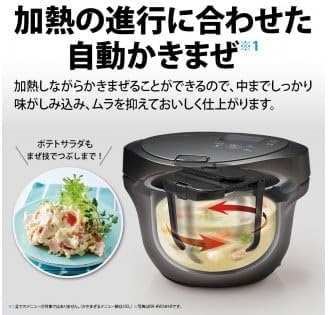
Image: Diagram showing the automatic stirring mechanism inside the SHARP Healsio Hot Cook, illustrating how it mixes ingredients.
5.3 Triple Sensor Technology
The appliance utilizes three sensors (temperature, steam, and load) to precisely monitor the cooking environment and the state of the ingredients. This allows for fine-tuned automatic heat adjustment, ensuring optimal cooking results.
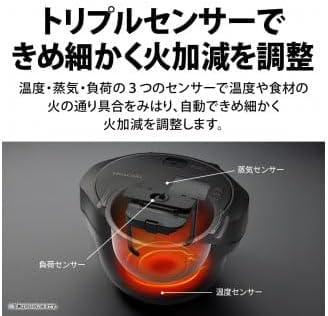
Image: Diagram illustrating the location of the three sensors (temperature, steam, and load) within the SHARP Healsio Hot Cook.
5.4 Reservation Cooking
The reservation cooking function allows you to set a delayed start time, so your meal is ready when you need it. This feature can be set for up to 15 hours, considering food hygiene.
- Prepare engredyan yo epi mete yo nan chodyè anndan an.
- Select a menu that supports reservation cooking.
- Set the desired finish time using the control panel.
- Press the Start button. The appliance will begin cooking at the appropriate time to finish at your set time.
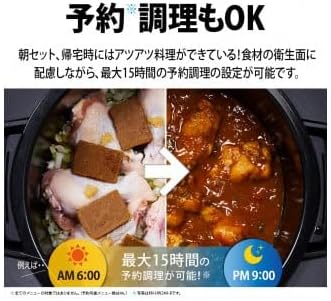
Imaj: Egzample of reservation cooking on the SHARP Healsio Hot Cook, showing ingredients placed in the pot at 6:00 AM for a meal ready by 9:00 PM.
6. Antretyen ak netwayaj
Netwayaj regilye asire lonjevite ak fonksyònman ijyenik aparèy ou an.
- Anvan Netwayaj: Toujou debranche aparèy la epi kite l refwadi nèt anvan w netwaye.
- Inner Pot and Stirring Unit: These parts are removable and can be washed with warm soapy water or placed in a dishwasher (refer to specific instructions for dishwasher compatibility).
- Kouvèti: The lid can be detached and washed with warm soapy water. Ensure all food residues are removed.
- Eksteryè Inite Prensipal la: Siye eksteryè a ak yon mou, damp twal. Pa sèvi ak pwodui netwayaj abrazif oswa plonje inite prensipal la nan dlo.
- Easy-Clean Coat: The bottom heating plate of the main unit features an easy-clean coating, making it simple to wipe away spills and dirt with a damp twal.

Image: A hand wiping the interior base of the SHARP Healsio Hot Cook, demonstrating the easy-clean coating.
NAN. Depanaj
If you encounter issues with your Healsio Hot Cook, please refer to the following common problems and solutions:
| Pwoblèm | Kòz posib | Solisyon |
|---|---|---|
| Aparèy la pa limen. | Kòd kouran an pa byen konekte. | Check if the power cord is securely plugged into both the appliance and the outlet. |
| Manje pa kwit menm jan. | Ingredients not properly distributed or stirring unit not installed correctly. | Ensure ingredients are spread evenly. Verify the stirring unit is correctly attached. |
| Mesaj erè parèt. | Kondisyon erè espesifik. | Refer to the detailed error code list in the full product manual or contact customer support. |
Si pwoblèm nan pèsiste apre ou fin eseye solisyon sa yo, tanpri kontakte sèvis kliyan SHARP.
8. Espesifikasyon
| Mak | SHARP |
| Nimewo Modèl | KN-HW16H-B |
| Kapasite | 1.6 lit |
| Koulè | Nwa |
| Dimansyon pwodwi (D x W x H) | 30.5 cm x 33.4 cm x 39.5 cm |
| Konpozan ki enkli | Kòd pouvwa |
| Kalite pwodwi | Pou kwit manje machin |
9. Garanti ak sipò
This product comes with a manufacturer's warranty. Please refer to the warranty card included with your purchase for details on coverage and duration. For technical support, service, or inquiries, please contact SHARP customer service through their official websit la oswa enfòmasyon kontak yo bay nan dokimantasyon pwodwi ou a.
SHARP Official Websit: https://jp.sharp/hotcook/
Ask a question about this manual
Ask about setup, troubleshooting, compatibility, parts, safety, or missing instructions. Manuals+ will review the question and use this page’s manual context to help answer it.