
OKD RPCETD-LRO
OKD 60-inch Executive Desk Instruction Manual
Model: RPCETD-LRO | Brand: OKD
Enfòmasyon enpòtan sou sekirite
This product is a heavy object. Always use caution when moving or assembling. Ensure proper assembly for stability. Always follow the included instructions for safe use.
The item will be delivered in 1-3 packages and may not arrive on the same day. Please ensure all packages are received before beginning assembly.
Pwodwi souview
The OKD 60-inch Executive Desk is designed for home office use, combining a farmhouse aesthetic with practical features. It offers a spacious work surface, integrated charging capabilities, and various storage options.
Karakteristik kle:
- Timeless Farmhouse Design: Crafted with a vintage-inspired farmhouse look, featuring a distressed finish and thoughtful detailing.
- Convenient Built-In Charging Station: Includes two USB ports and two AC outlets for device charging.
- Ampdepo: Features a large file drawer for letter-size documents, three utility drawers for supplies, and a cabinet with an adjustable shelf. A dedicated compartment accommodates a vertical CPU tower.
- Ergonomic Pull-Out Keyboard Tray: Designed for comfortable typing posture, reducing wrist and shoulder strain.
- Expansive 60" Work Surface: Bay ample space for dual monitors, paperwork, and other essentials.

Figi 1: Dimansyon pwodwi a. This image illustrates the overall dimensions of the OKD 60-inch Executive Desk: 60 inches wide, 22 inches deep, and 30 inches high. It also shows the dimensions of the various drawers and the estimated weight of the desk at 200 lbs. The desk is delivered in two packages.

Figure 2: Desk in Use. Yon devan view of the OKD 60-inch Executive Desk in a home office environment, showcasing its spacious surface and farmhouse design.
Enstalasyon ak Asanble
Assembly of the OKD Executive Desk is required. It is recommended that two people assemble the desk due to its weight and size.
Zouti obligatwa (pa enkli):
- Fè egzèsis
- Tournvis
Please refer to the detailed assembly instructions provided in the packaging for step-by-step guidance. Ensure all parts are present before beginning assembly.
Video 1: OKD Vintage Rustic Office Collection. This video showcases the various pieces within the OKD Vintage Rustic Office Collection, including the executive desk, highlighting its design and features.
Enstriksyon Operasyon
Estasyon chaje entegre:
The desk includes a built-in charging station located on the desktop. It features two standard AC outlets and two USB ports. To use, simply plug your devices into the available ports. Ensure the desk is connected to a power source.

Figure 3: Charging Station. Yon tèt anba view of the desk surface, highlighting the integrated charging station with two AC outlets and two USB ports, and the spacious work area.
Plato klavye:
The center drawer features a pull-out and flip-down front, converting it into an ergonomic keyboard tray. Gently pull the drawer front forward and then flip it down to access the tray.
Tiwa Depo ak Kabinè:
- File Tiwa: Located on the right side, this large drawer is designed to hold letter-size documents.
- Utility Drawers: Three smaller drawers are available for general office supplies.
- Adjustable Cabinet: The cabinet on the left side contains an adjustable shelf, allowing customization for storing books, office supplies, or a vertical CPU tower.
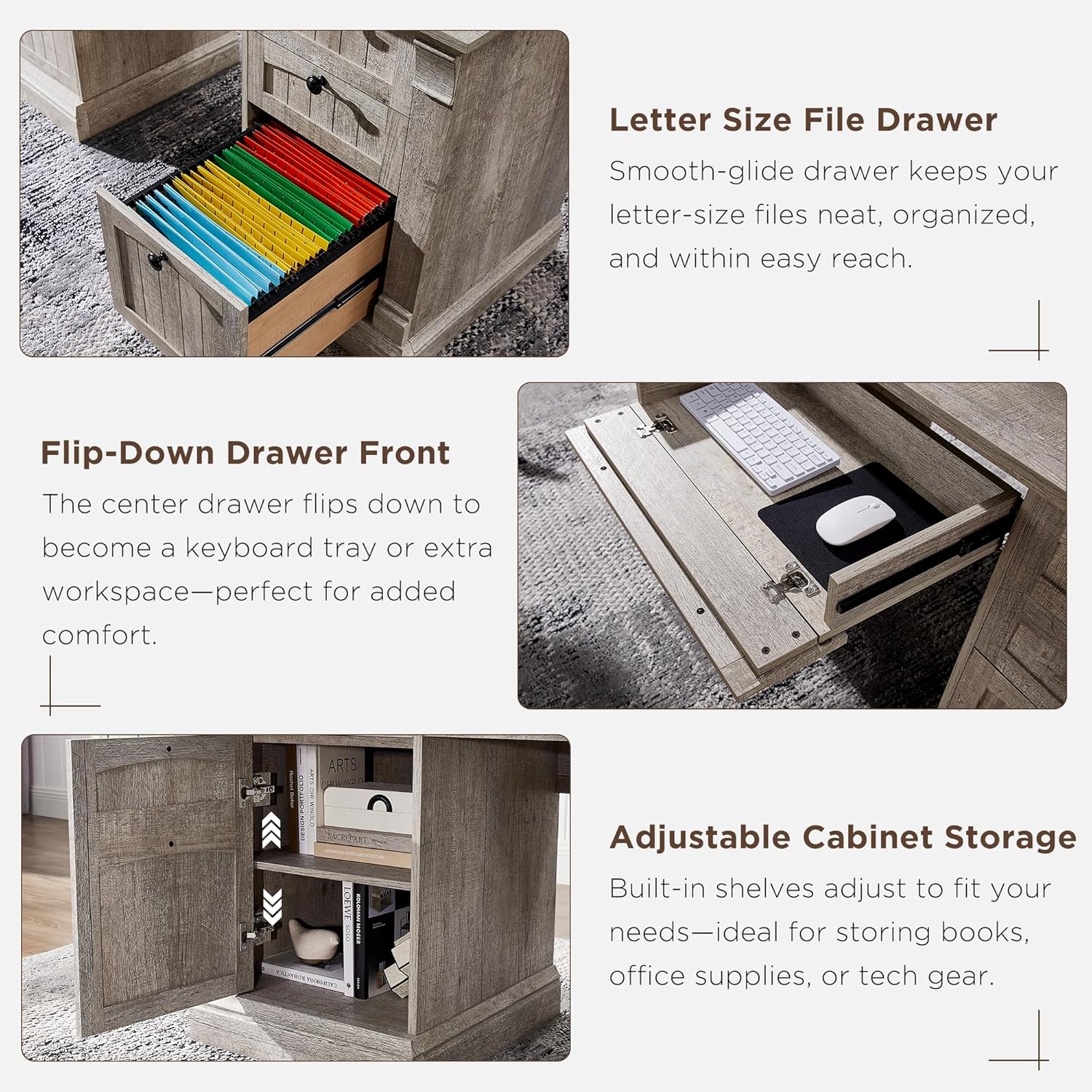
Figure 4: Storage Features. This composite image shows detailed views of the desk's storage solutions: a smooth-glide letter-size file drawer, the flip-down drawer front for the keyboard tray, and the adjustable shelf within the cabinet.

Figure 5: Open Storage. A view of the desk with all drawers and the cabinet door open, illustrating the internal storage capacity and layout.
Antretyen ak Swen
To maintain the appearance and longevity of your OKD Executive Desk, wipe surfaces with a dry cloth. Avoid using harsh chemicals or abrasive cleaners, which may damage the distressed finish.
Depanaj
Tiwa yo pa glise fasilman:
- Tcheke pou nenpòt obstak nan glisad tiwa yo.
- Ensure the drawer glides are properly aligned and secured.
- Verify that the desk is assembled correctly and is level on the floor.
Estasyon chaje a pa fonksyone:
- Confirm the desk's power cord is securely plugged into a functional wall outlet.
- Check if the power strip within the charging station is switched on (if applicable).
- Test with different devices and cables to rule out device-specific issues.
Desk instability:
- Ensure all assembly hardware is tightened securely.
- Verify the desk is placed on a flat, level surface.
- If adjustable feet are present, adjust them to eliminate wobbling.
Espesifikasyon
| Karakteristik | Detay |
|---|---|
| Mak | OKD |
| Nimewo Modèl | RPCETD-LRO |
| Dimansyon pwodwi (D x W x H) | 22"D x 60"W x 30"H |
| Pwa atik | 142 liv |
| Rekòmandasyon pwa maksimòm | 350 liv |
| Koulè | Light Rustic Oak |
| Materyèl | Enjenieri bwa |
| Fini Kalite | Detrès |
| Kantite tiwa | 5 (1 file, 3 utility, 1 keyboard tray) |
| Kantite kabinèt yo | 1 (with adjustable shelf) |
| Karakteristik espesyal | Built-In USB Outlet, Keyboard Tray Included |
| Asanble obligatwa | Wi (2 moun rekòmande) |
| Enstriksyon Swen Pwodwi | Siye ak twal sèk |
Enfòmasyon sou Garanti
This OKD Executive Desk comes with a limited warranty. For specific details regarding coverage, duration, and claims process, please refer to the warranty documentation included with your product packaging or contact OKD customer support.
Sipò pou Kliyan
Should you have any questions, require assistance with assembly, or need to report missing/damaged parts, please contact OKD customer support.
For the most up-to-date contact information, please visit the official OKD website or refer to your product packaging.
Ask a question about this manual
Ask about setup, troubleshooting, compatibility, parts, safety, or missing instructions. Manuals+ will review the question and use this page’s manual context to help answer it.