
Entwodiksyon
Thank you for choosing the King Lucky B900 Hybrid Active Noise Cancelling Headphones. This manual provides essential information for setting up, operating, maintaining, and troubleshooting your new headphones. Please read it thoroughly to ensure optimal performance and longevity of your device.
Enstalasyon
1. Unboxing
Retire tout konpozan yo nan anbalaj la avèk prekosyon. Asire w ke tout atik ki nan lis anba a yo la:
- King Lucky B900 Over-Ear Headphones
- High-fidelity audio cable (3.5mm)
- Kalite-C chaje kab
- Manyèl itilizatè

Image: King Lucky B900 headphones displayed with their included accessories: a 3.5mm audio cable, a Type-C charging cable, and the user manual.
2. Chaje kas ekoutè yo
Before first use, fully charge your headphones. Connect the provided Type-C charging cable to the charging port on the headphones and the other end to a USB power source. A full charge takes approximately 2 hours.
Image: The King Lucky B900 headphones are shown with a glowing charging icon, symbolizing their extended battery life.
Video: A demonstration of the King Lucky B900 headphones, highlighting their long battery life and charging capabilities.
3. Pè Bluetooth
Pou konekte kas ekoutè ou yo ak yon aparèy:
- Asire w ke kas ekoutè yo chaje epi etenn.
- Press and hold the power button for a few seconds until the indicator light flashes, indicating pairing mode.
- On your device (smartphone, tablet, laptop), enable Bluetooth and search for "B900".
- Select "B900" from the list of available devices to connect. The indicator light will turn solid when successfully paired.
4. Mete kas ekoutè yo
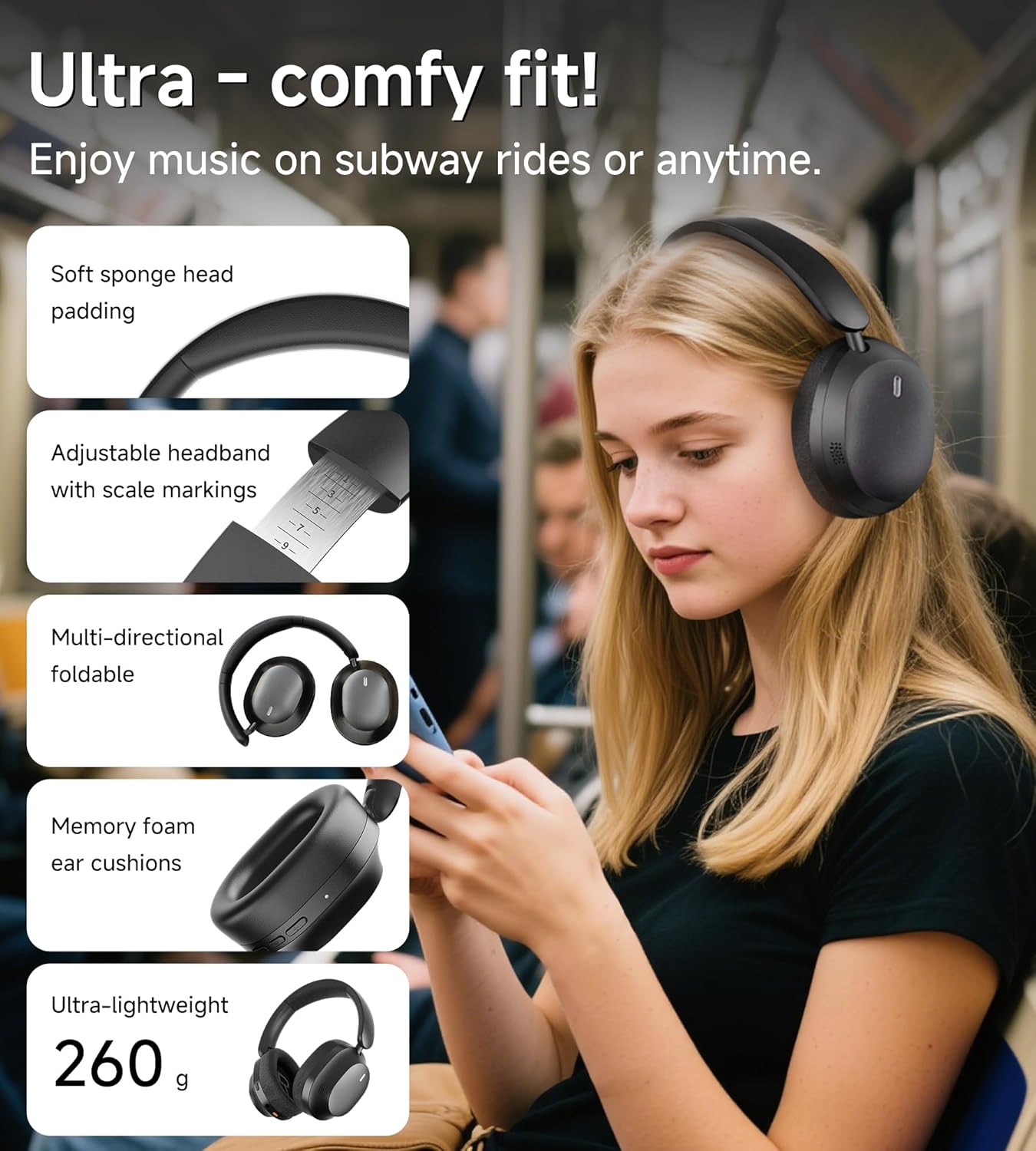
Adjust the headband for a comfortable and secure fit. The ear cushions are designed to create an acoustic seal for optimal sound and noise cancellation.

Image: A person is shown wearing the King Lucky B900 headphones, illustrating their comfortable and ergonomic design for extended use.
Enstriksyon Operasyon
1. Kontwòl souview
The headphones feature intuitive buttons for easy control of audio playback, calls, and noise cancellation modes.
Imaj: Yon imaj detaye view of the King Lucky B900 headphone's right earcup, highlighting the power, volume up/down, and ANC control buttons.
2. Anilasyon Bri Aktif (ANC) ak Mòd Transparans
The B900 headphones utilize hybrid ANC technology to reduce ambient noise. Press the dedicated ANC button to cycle through modes:
- ANC sou: Blocks out up to 90% of external noise, ideal for travel or noisy environments.
- Mòd transparans: Allows ambient sounds to pass through, enabling awareness of your surroundings without removing headphones.
- ANC Off: Standard audio mode.

Image: A graph demonstrating the noise cancellation capabilities of the King Lucky B900 headphones, showing significant reduction in airplane and car noise compared to other products.
Video: A short demonstration showcasing the noise-canceling performance of the King Lucky B900 over-ear headphones.
3. Koneksyon plizyè aparèy
The headphones support Bluetooth multi-point connection, allowing you to connect to two devices simultaneously. This enables seamless switching between audio sources, such as a laptop for work and a smartphone for calls, without re-pairing.

Image: An illustration depicting the King Lucky B900 headphones connected to both a laptop and a smartphone, demonstrating its multi-device connectivity feature.
4. Kalite Son
Equipped with 40mm dynamic drivers, the B900 headphones deliver Hi-Res Audio with deep bass, clear mids, and crisp highs, providing an immersive listening experience for music, movies, and gaming.
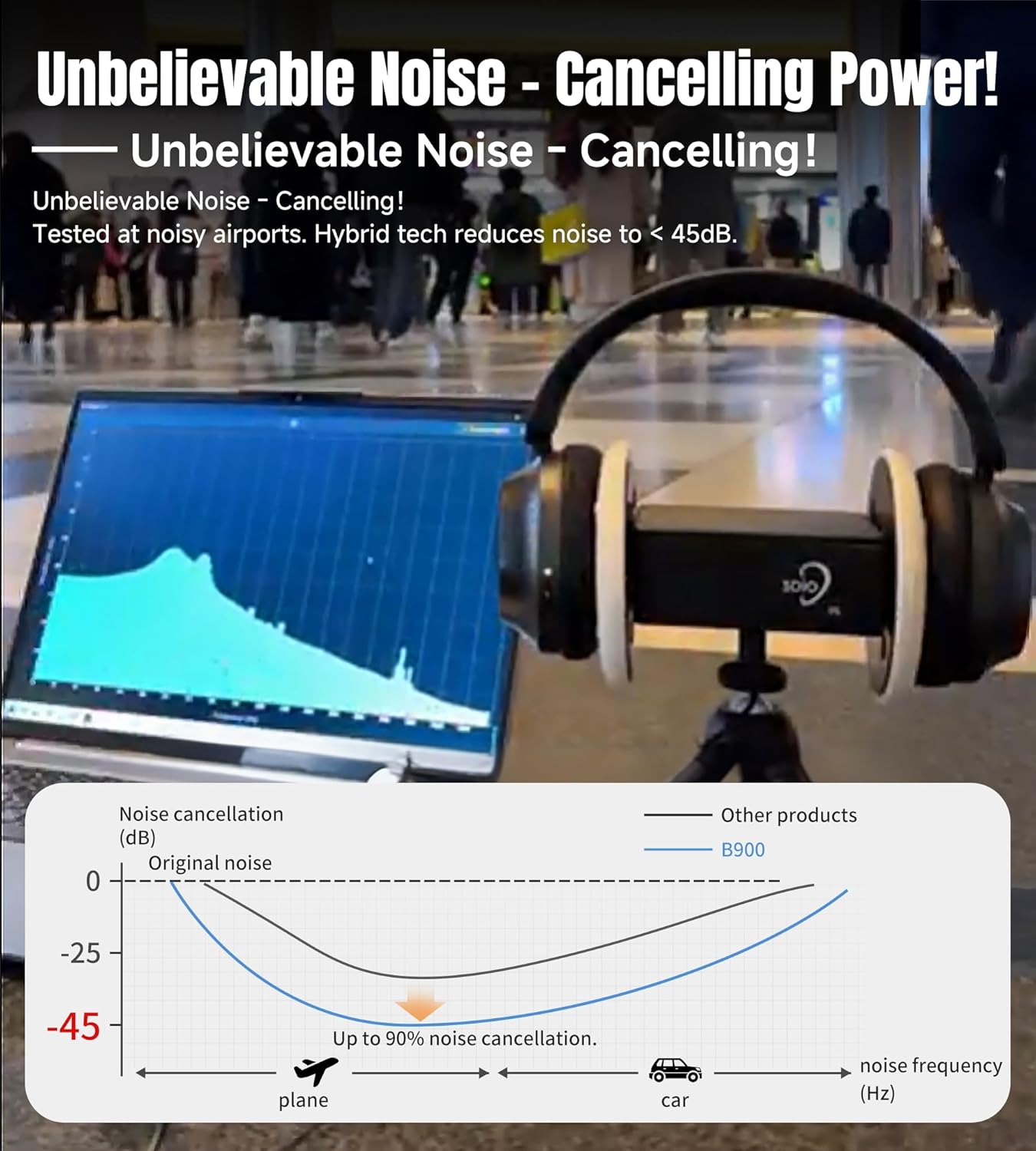
Image: The King Lucky B900 headphones in their black finish, highlighting their overall design and comfortable over-ear fit.
Antretyen
1. Netwayaj
Regularly clean the ear cushions and headband with a soft, dry cloth. Avoid using harsh chemicals or abrasive materials, as these can damage the finish. For deeper cleaning, a slightly damp cloth can be used, ensuring no moisture enters the speaker grilles or charging ports.
2. Depo
Lè w pa ap itilize kas ekoutè yo, sere yo nan yon kote ki fre epi sèk, lwen limyè solèy dirèk ak tanperati ekstrèm. Desen pliyab la pèmèt ou sere yo yon fason konpak, sa pwoteje yo kont domaj.

Image: The King Lucky B900 headphones are shown in a folded configuration, illustrating their portability and ease of storage.
Depanaj
- Pa gen pouvwa: Asire w ke kas ekoutè yo byen chaje. Konekte yo nan yon sous kouran epi tcheke endikatè chaj la.
- Pa ka konekte: Make sure the headphones are in pairing mode (flashing indicator light). Ensure Bluetooth is enabled on your device and it is within range (typically 10 meters). Try restarting both the headphones and your device.
- Pa gen son: Check the volume levels on both the headphones and your connected device. Ensure the headphones are correctly paired. If using the audio cable, ensure it is securely connected to both the headphones and the audio source.
- ANC pa fonksyone byen: Ensure the ear cushions form a good seal around your ears. Check that ANC mode is activated.
Espesifikasyon
| Non modèl | B900 |
| Mak | Wa Chans |
| Koneksyon Teknoloji | San fil (Bluetooth 5.4) |
| Kontwòl bri | Anile ibrid aktif bri |
| Kalite chofè odyo | Chofè dinamik (40mm) |
| Lavi batri | Up to 30 hours (24 hours with ANC on) |
| Tan pou chaje | 2 èdtan |
| Pwa atik | 0.56 kilogram (1.23 liv) |
| Materyèl | Leather, Metal, Plastic, Rubber |
| Koulè | Nwa |
Garanti ak sipò
King Lucky products come with a standard manufacturer's warranty. For detailed warranty information, product support, or service inquiries, please refer to the contact information provided in the packaging or visit the official King Lucky websit.
Sipò sou entènèt: Visit the King Lucky Store on Amazon