
1. Entwodiksyon
This manual provides detailed instructions for the proper use, setup, and maintenance of your Pard NV009-850nm Digital Night Vision Monocular. Please read this manual thoroughly before operating the device to ensure optimal performance and longevity. This device is designed for wildlife observation, hunting, and general outdoor viewing in various light conditions.

Image 1.1: The Pard NV009-850nm Digital Night Vision Monocular. This image displays the compact and ergonomic design of the monocular, highlighting its main body, objective lens, and eyepiece.
2. Pwodwi souview
2.1 Kontni pake a
Upon unboxing, verify that all items listed below are present:
- Pard NV009-850nm Digital Night Vision Monocular
- Ka Pwoteksyon Pote
- USB Chaje Kab
- Wrist Strap / Neck Strap
- Manyèl Itilizatè (dokiman sa a)

Image 2.1: Contents of the Pard NV009-850nm package. This image shows the monocular, its carrying case, charging cable, straps, and the user manual, all neatly arranged.
2.2 Karakteristik kle
- Daytime and Nighttime Operation: Seamless transition between full-color daytime viewing and monochrome night vision mode.
- Imaj segondè rezolisyon: Features a 1920x1080 FHD CMOS image sensor and a 1024x768 OLED display for clear, detailed visuals.
- Adjustable IR Illuminator: Integrated 850nm IR illuminator with three intensity levels, providing effective illumination up to 200 meters.
- Photo and Video Recording: Capture 2608x1944 resolution photos and 1920x1080 Full HD videos directly to a Micro SD card.
- Zoom optik ak dijital: Offers 4.7x optical magnification and 1.5x-3.0x digital zoom for precise target observation.
- Koneksyon Wi-Fi: Connects to smart mobile devices via the "PardVision" app for remote viewing and data transfer.
- Mòd Imaj-an-Imaj (PIP): Provides a magnified inset view of the central area for enhanced detail without losing the wider field of view.
- Konsepsyon dirab: IP67 waterproof rating ensures reliability in various outdoor conditions.

Image 2.2: Comparison of day and night vision modes. This image illustrates the monocular's capability to provide full-color images during the day and clear monochrome images at night, featuring a fox in both scenarios.

Image 2.3: Nighttime viewing range illustration. This graphic demonstrates the monocular's effective viewing distance of up to 200 meters (656 feet) in low-light conditions, showing a wild boar as an example target.

Image 2.4: Enhanced image quality demonstration. This image compares a blurred, lower-quality image with a sharp, enhanced image, illustrating the effectiveness of the PARD Visual Light Enhancement Algorithm (VLEA) and OLED display.
3. Enstalasyon
3.1 Enstalasyon batri
- Locate the battery compartment cover, typically on the underside or side of the monocular.
- Open the cover by twisting or sliding it according to the indicator.
- Insert a fully charged 18650 type battery (not included) with the correct polarity (+/-) as indicated inside the compartment.
- Byen fèmen kouvèti lòj batri a.
3.2 Mete Kat Mikwo SD
The device supports Micro SD cards for storing photos and videos.
- Jwenn fant kat Micro SD a, ki anjeneral pwoteje pa yon kouvèti kawoutchou.
- Mete kat Micro SD a dousman nan fant lan jiskaske li klike pou l antre nan plas li. Asire w kat la byen oryante.
- Close the rubber cover to protect the slot from dust and moisture.
3.3 Premye Limen ak Ajisteman Fokus
- Peze epi kenbe bouton pouvwa a pou limen aparèy la.
- Adjust the diopter ring on the eyepiece until the on-screen display (OSD) text appears sharp and clear to your eye.
- Rotate the objective lens focus ring to bring the observed image into sharp focus.
4. Operasyon Enstriksyon
4.1 Power On/Off
- Pouvwa sou: Peze epi kenbe bouton Power la pou apeprè 3 segonn.
- Pouvwa Off: Press and hold the Power button for approximately 3 seconds until the device shuts down.
4.2 Mode Selection (Day/Night)
The NV009-850nm automatically adjusts to ambient light, but you can manually switch modes:
- Nan prensipal la viewing interface, short press the Mode button to toggle between Day (color) and Night (monochrome) vision modes.
4.3 IR Illuminator Adjustment
The integrated IR illuminator enhances visibility in complete darkness.
- Activate the IR illuminator by pressing its dedicated button (if available) or through the menu.
- Short press the IR button to cycle through the three intensity levels (Low, Medium, High) or to turn it off.

Image 4.1: IR Illuminator functionality. This graphic illustrates the 200m adjustable beam IR illuminator with its three intensity levels, showing how it illuminates a target in darkness.
4.4 Operasyon Zoom
- Use the designated zoom buttons (often '+' and '-') to adjust the digital magnification. The optical magnification is fixed at 4.7x.
4.5 Kaptire Foto ak Videyo
- Foto: In viewing mode, short press the Photo button to capture an image.
- Videyo: Short press the Video button to start recording. Press again to stop recording.

Image 4.2: Video recording and playback function. This image shows the monocular's ability to capture and play back high-definition video, with a simulated screen displaying a recorded scene of a fox.
4.6 Lektur
- Enter the Playback menu via the main menu.
- Navigate through your recorded photos and videos using the directional buttons.
- Select an item to view it on the OLED display.
4.7 Wi-Fi Connectivity (PardVision App)
- Download the "PardVision" app from your device's app store (Apple App Store or Google Play Store).
- On the monocular, enable Wi-Fi through the system settings. The device will broadcast a Wi-Fi network.
- Connect your smartphone or tablet to the monocular's Wi-Fi network.
- Open the PardVision app to view a live feed, control settings, and transfer files.
4.8 Mòd Imaj-an-Imaj (PIP)
- Activate PIP mode through the quick menu or system settings.
- A magnified window will appear on the main display, showing a zoomed-in view of the central area.
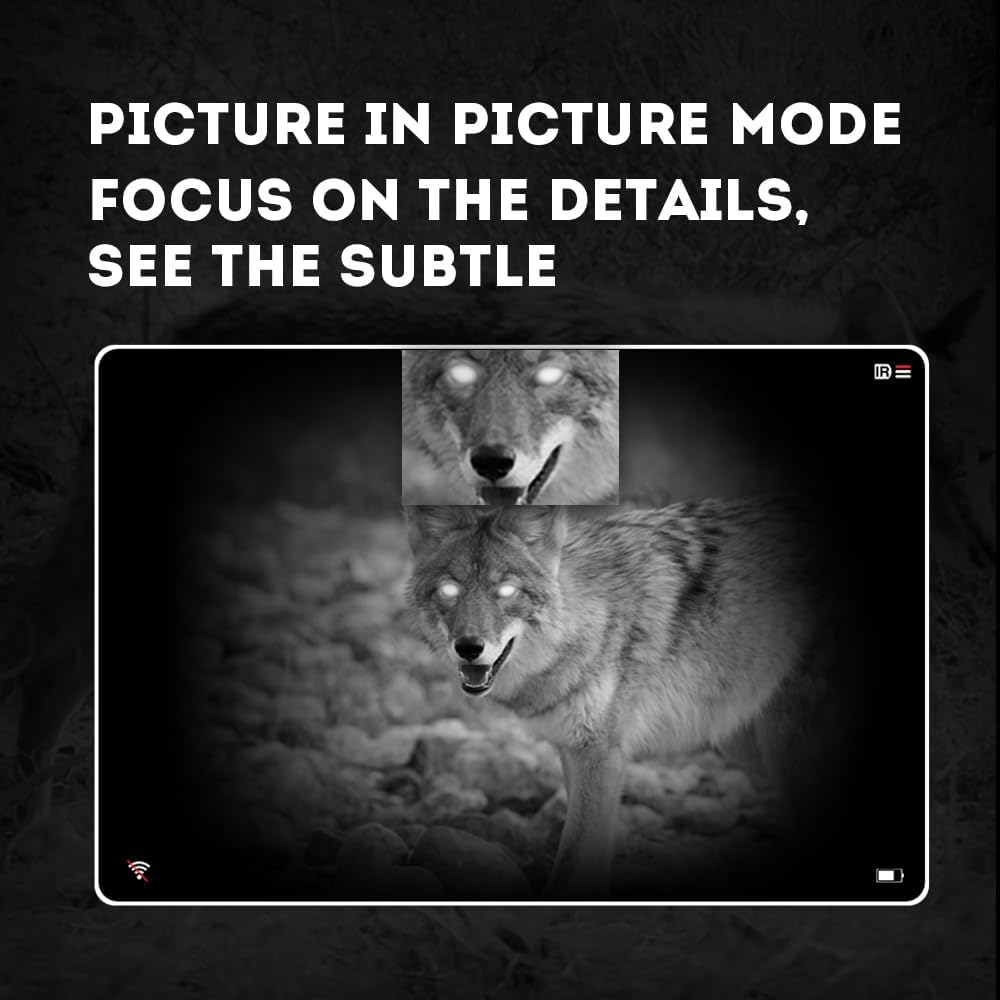
Image 4.3: Picture-in-Picture (PIP) mode. This image demonstrates how PIP mode allows users to focus on specific details within the main view, showing a magnified inset of a coyote's face.
5. Antretyen
5.1 Netwaye Aparèy la
- Lantiy: Use a soft, lint-free cloth specifically designed for optical lenses. For stubborn smudges, use a small amount of lens cleaning solution. Avoid abrasive materials.
- Kò: Siye kò monokilè a ak yon twal mou.amp twal. Pa sèvi ak pwodwi chimik piman bouk oswa solvang.
5.2 Swen Batri
- Always use high-quality, rechargeable 18650 batteries.
- Retire batri a si aparèy la pa pral itilize pou yon peryòd pwolonje.
- Sere pil yo nan yon kote ki fre, sèk.
5.3 Depo
- Store the monocular in its protective carrying case when not in use.
- Kenbe aparèy la nan yon anviwònman sèk, lwen limyè solèy dirèk ak tanperati ekstrèm.
NAN. Depanaj
If you encounter issues with your Pard NV009-850nm, refer to the following common problems and solutions:
| Pwoblèm | Kòz posib | Solisyon |
|---|---|---|
| Aparèy pa limen | Low or depleted battery; Incorrect battery installation | Charge or replace the battery; Reinstall battery with correct polarity. |
| Imaj la twoub | Improper focus adjustment; Dirty lens | Adjust the diopter and objective lens focus rings; Clean the lenses. |
| No image in night mode | IR illuminator is off or set too low | Turn on the IR illuminator and adjust its intensity. |
| Pwoblèm koneksyon Wi-Fi | Wi-Fi not enabled on device; Incorrect app settings | Ensure Wi-Fi is enabled on the monocular; Check app permissions and settings. |
| Pa ka anrejistre foto/videyo | No Micro SD card; SD card full or corrupted | Insert a Micro SD card; Delete old fileoubyen fòma kat la (fè yon backup done enpòtan yo an premye). |
If the problem persists after attempting these solutions, please contact Pard customer support.
7. Espesifikasyon
| Karakteristik | Detay |
|---|---|
| Mak | Pard |
| Non modèl | PARD Night Vision Monocular |
| Nimewo Modèl | NV009-850nm |
| Koulè | Nwa |
| Dimansyon pwodwi (LxWxH) | 7.16" x 2.24" x 2.79" (18.19 santimèt x 5.69 santimèt x 7.09 santimèt) |
| Pwa atik | 340 gram |
| Materyèl | Aliminyòm |
| Dyamèt lantiy objektif | 25 Milimèt |
| Sekou je | 25 Milimèt |
| Kapasite vizyon lannwit | Wi |
| IR Illuminator Wavelength | 850nm (with 940nm option available in other variants) |
| CMOS Sensor Resolution | 1920x1080 piksèl |
| Ekspozisyon ekran | 1024x768 OLED |
| Agrandisman Optical | 4.7x |
| Zoom dijital | 1.5x-3.0x |
| Rezolisyon foto | 2608x1944 piksèl |
| Rezolisyon videyo | 1920x1080 piksèl |
| Evalyasyon ki enpèmeyab | IP67 |
| Aparèy konpatib | Camera (for recording) |
| Kalite aliye | Rail Mount (if applicable for accessories) |
8. Garanti ak sipò
8.1 Enfòmasyon sou Garanti
The Pard NV009-850nm Digital Night Vision Monocular comes with a 1-ane garanti apati dat acha a. Garanti sa a kouvri domaj fabrikasyon ak fonksyònman ki pa kòrèk nan itilizasyon nòmal. Li pa kouvri domaj ki koze pa move itilizasyon, aksidan, modifikasyon san otorizasyon, oswa antretyen ki pa kòrèk.
Tanpri kenbe prèv ou achte pou reklamasyon garanti.
8.2 Sipò pou Kliyan
For technical assistance, warranty claims, or any questions regarding your device, please contact Pard customer support through the official Pard website or your retailer. When contacting support, please have your model number (NV009-850nm) and purchase date available.