
1. Entwodiksyon
This manual provides detailed instructions for the installation, operation, and maintenance of your QDVOPHZA 4K 8MP HD Tuya Smart Life POE NVR CCTV System. This system offers high-definition video surveillance with advanced features for comprehensive security monitoring.
2. Pake kontni
Tanpri verifye ke tout atik ki nan lis anba a yo enkli nan pakè ou a. Si gen nenpòt atik ki manke oswa ki domaje, kontakte sèvis kliyan.
- 1 X 8CH 4K TUYA POE NVR Network Video Recorder
- 8 X HD POE IP 8.0MP cameras (for 8XCAM variant)
- 1 X Power Supply for NVR
- 1 X USB Mouse for NVR
- Hard Disk (Optional, depending on purchase)
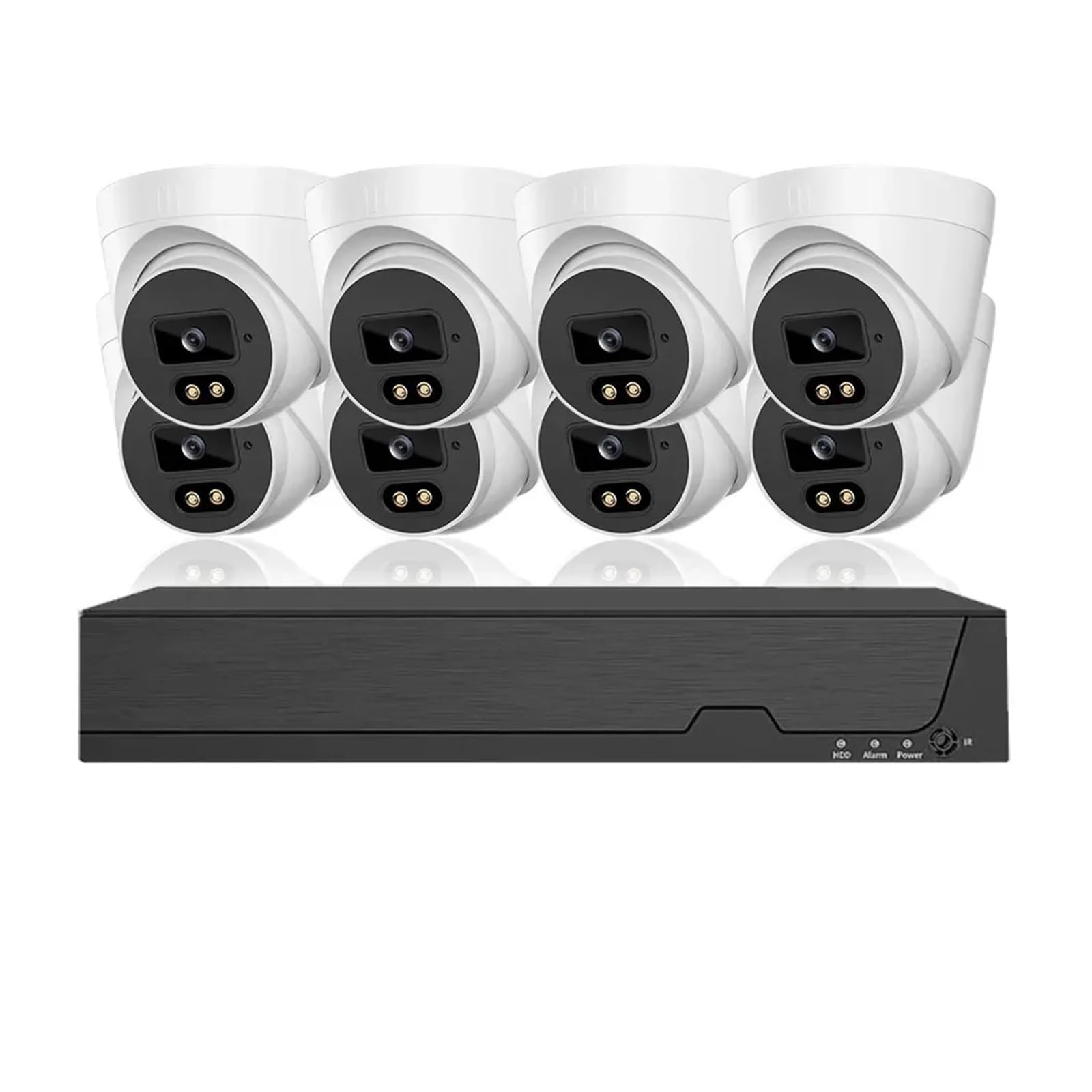
Figi 2.1: Plis paseview of the QDVOPHZA 4K 8MP HD Tuya Smart Life POE NVR CCTV System components.
3. Pwodwi souview
3.1 Karakteristik kle
- Rezolisyon 4K 8MP: Equipped with 8 million pixel HD cameras, supporting 4K resolution recording for detailed video.
- Tuya Smart Life Integration: Built-in platform for linkage with smart home devices and remote viewing via mobile app.
- Power Over Ethernet (POE): Single network cable for both data transmission and power, simplifying installation.
- Vizyon lannwit avanse: Provides clear surveillance in low-light or dark conditions.
- 8-Channel Audio Recording: Simultaneous video and audio recording for comprehensive monitoring.
- Konpresyon videyo H.265: Efficient compression for reduced storage and bandwidth usage.
- Human Detection & Smart Playback: Intelligent features for enhanced monitoring and review.
- Kamera ki enpèmeyab IP66: Durable metal cameras suitable for indoor and outdoor use.
- Motion Detection & Email Alerts: Configurable motion detection with instant email notifications.
- Aksè Remote: Access your system from anywhere, anytime.
4. Enstriksyon Enstalasyon
4.1 Dyagram Koneksyon Sistèm
The QDVOPHZA POE NVR system utilizes Power Over Ethernet (POE) technology, simplifying the wiring process. Follow the diagram below for proper connection.
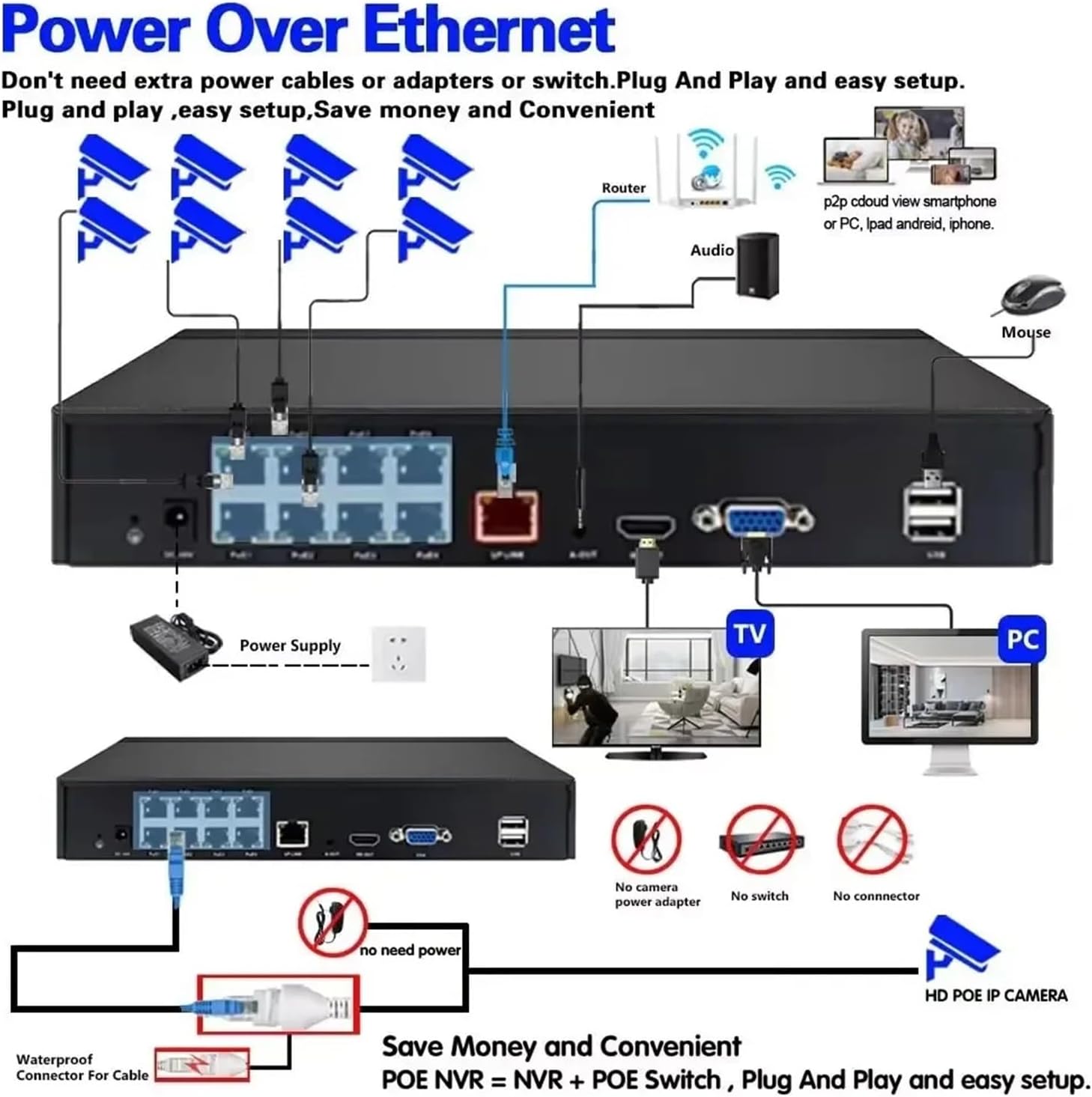
Figure 4.1: POE NVR System Connection Diagram. Connect cameras to NVR POE ports, NVR to router, and NVR to a monitor and mouse.
4.2 Etap Inisyal Enstalasyon yo
- Konekte Kamera yo: Connect each POE IP camera to the POE ports on the NVR using Ethernet cables. The cameras will receive power and data through these cables.
- Konekte NVR a ak rezo a: Connect the NVR's LAN port to your router using an Ethernet cable for internet access and remote viewkapasite yo.
- Konekte Ekspozisyon: Connect a monitor or TV to the NVR's HDMI or VGA output port.
- Konekte sourit: Plug the included USB mouse into a USB port on the NVR for navigation.
- Pouvwa sou: Connect the NVR to the power supply and plug it into an electrical outlet. The system will power on.
- Premye konfigirasyon: Follow the on-screen prompts to complete the initial setup, including setting up a password, network settings, and hard disk initialization (if applicable).
- Enstalasyon aplikasyon mobil: Download the Tuya Smart Life app on your smartphone. Register an account and add your NVR system by scanning the QR code displayed on the NVR's monitor or by manual input.
5. Operasyon Enstriksyon
5.1 Viv View ak Lektur
- Viv View: After successful setup, the NVR will display live feeds from all connected cameras on the monitor.
- Lektur: Use the NVR interface or the mobile app to access recorded footage. The system supports smart playback to easily find events.
5.2 Motion Detection and Email Alerts
Configure motion detection zones and sensitivity to trigger recordings and send email alerts when activity is detected.

Figure 5.1: Motion Detection and Email Alarm configuration. Define detection areas and set up email notifications.
5.3 Vizyon lannwit
The cameras are equipped with advanced night vision technology, automatically switching to infrared mode in low light conditions to provide clear black and white images.

Figi 5.2: Egzample of Day and Night Vision capabilities.
5.4 Audio Anrejistreman
The 8MP cameras include built-in microphones for audio recording, providing a more comprehensive surveillance record.

Figure 5.3: Audio recording feature with built-in microphone.
Konpresyon Videyo 5.5 H.265
The system utilizes H.265 video compression, which significantly reduces file sizes and bandwidth requirements compared to older H.264 compression, without compromising video quality.
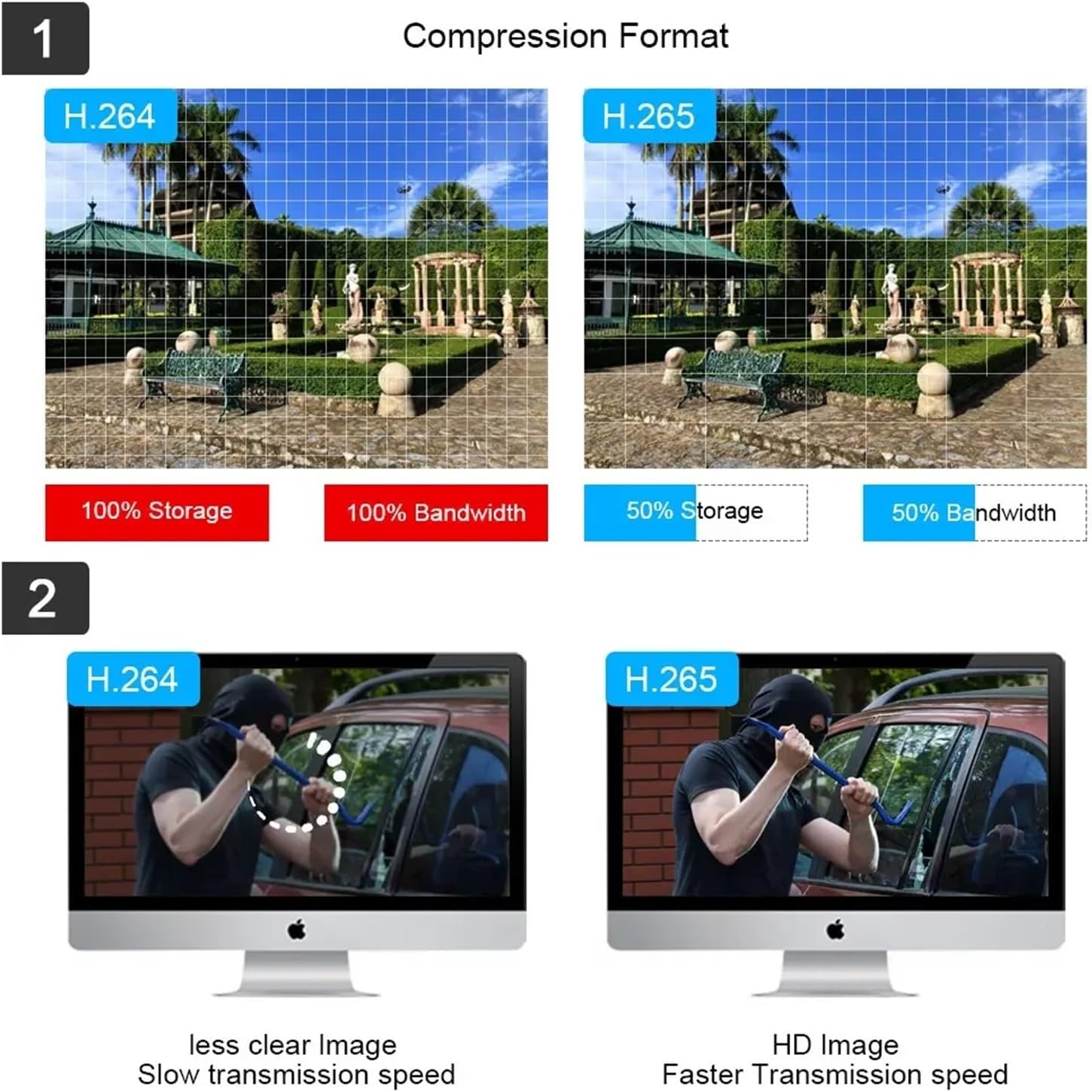
Figure 5.4: H.265 compression benefits over H.264.
6. Antretyen
- Netwayaj regilye: Netwaye lantiy kamera yo detanzantan avèk yon savon mou,amp twal pou asire yon bon jan kalite imaj klè.
- Mizajou mikrolojisyèl: Tcheke manifakti a website or the Tuya Smart Life app for available firmware updates to ensure optimal performance and security.
- Jesyon Disk Di: If using a local hard drive, ensure it has sufficient space. Configure overwrite settings if continuous recording is desired.
- Enspeksyon kab: Regularly inspect all cables for wear or damage, especially outdoor cables, to prevent connection issues.
- Pwovizyon pou pouvwa: Ensure the NVR's power supply is stable and free from interruptions.
NAN. Depanaj
| Pwoblèm | Kòz posib | Solisyon |
|---|---|---|
| Pa gen okenn videyo ki parèt sou monitè a. | Loose cable connection, NVR not powered, incorrect input source on monitor. | Check HDMI/VGA cable connections. Ensure NVR is powered on. Select correct input source on monitor. |
| Kamera yo pa montre videyo. | POE cable issue, camera not powered, camera fault. | Verify POE cable connections. Ensure NVR POE ports are active. Try connecting camera to a different POE port. |
| Cannot access system remotely via app. | NVR not connected to internet, incorrect network settings, app configuration issue. | Ensure NVR is connected to router. Check NVR network settings. Re-add NVR to Tuya Smart Life app. |
| Deteksyon mouvman pa travay. | Motion detection disabled, sensitivity too low, incorrect zone setup. | Enable motion detection in NVR settings. Adjust sensitivity. Redraw detection zones. |
| Move kalite vizyon lannwit. | Dirty camera lens, IR illuminators blocked, insufficient ambient IR light. | Clean camera lens. Ensure no obstructions are blocking the camera's view or IR LEDs. |
8. Espesifikasyon
- Mak: QDVOPHZA
- Nimewo Modèl: w0u5903wei
- ASIN: B0DN67H5KB
- Rezolisyon kamera: 8MP (4K)
- Konpresyon videyo: H.265
- NVR Channels: 8-Channel POE
- Koneksyon: Pouvwa sou Ethernet (POE)
- Karakteristik: Tuya Smart Life Integration, Human Detection, Smart Playback, Night Vision, Audio Record, Motion Detection, Email Alerts, Remote Access
- Materyèl kamera: Metal
- Evalyasyon ki enpèmeyab: IP66
- Pwa atik: 1.76 ounces (for the current variant)
- Dimansyon pake: 0.39 x 0.39 x 0.39 inches (for the current variant)
9. Garanti ak sipò
For warranty information and technical support, please refer to the documentation provided with your purchase or contact the manufacturer directly. Contact details are typically available on the product packaging or the manufacturer's official websit.